App Store rejection reasons design can prevent: 10 fixes before you submit
App Store rejection reasons I design around: account deletion, Sign in with Apple, permission prompts, in-app purchase, privacy labels and demo accounts.

Most App Store rejection reasons have little to do with code. They're gaps a reviewer finds in minutes: no demo account, a dead privacy link, no way to delete an account, a vague camera prompt. On Apple's App Review page, Apple says over 40% of unresolved issues fall under guideline 2.1, App Completeness. Google Play's Developer Policy Center covers the same ground.
Nearly all of these are design decisions, so I settle them in Figma before the first build goes to review, as part of my mobile app design services. Below are the ten checks I run on every app, with section numbers exactly as Apple's App Review Guidelines (last updated 8 June 2026) publish them, and the matching Google Play policy.
It's for founders and product leads about to submit a first app, or reading a rejection right now. Nobody can promise approval, but I can remove the design reasons for a no.
The app store rejection reasons I check, at a glance
The 2025 App Store Transparency Report counts 9,100,620 submissions reviewed and 2,093,244 rejected, about 23% by my arithmetic. And 387,087 were approved after a rejection, so most problems are fixable; the cost is the extra round.
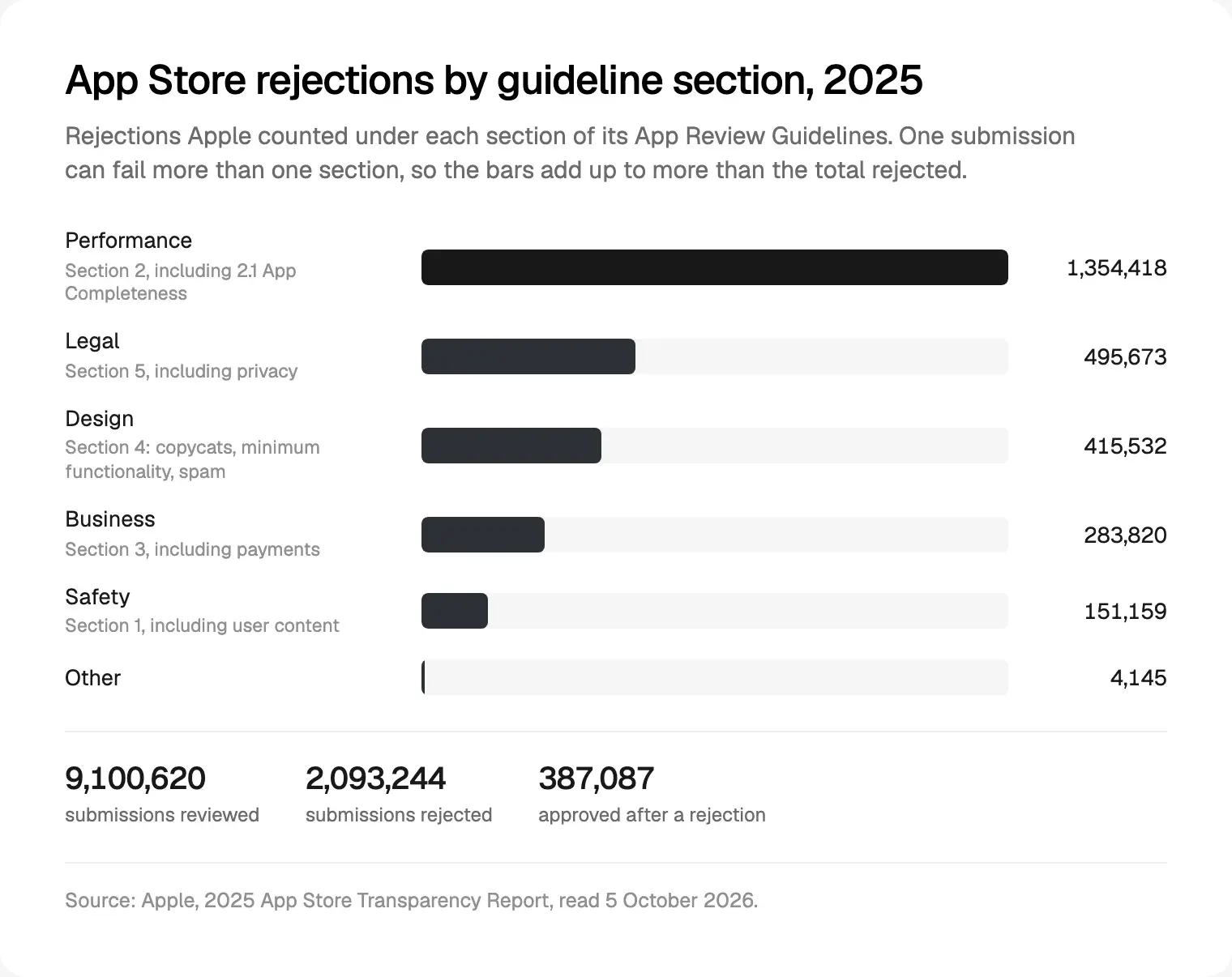
Performance is section 2, where completeness lives. Apple's review page says 90% of submissions are reviewed in under 24 hours on average, so review is quick; the loop of rejection, fix and resubmit is what moves launch dates.
| Check | Apple rule | Google Play rule | What I design |
|---|---|---|---|
| Account deletion | 5.1.1(v) | Account deletion requirements | A Delete account row and a web page |
| Private login | 4.8 | None | Sign in with Apple, same size |
| Permissions | 5.1.1(ii) to (iv) | Prominent disclosure | In-context screen, written purpose string |
| Digital purchases | 3.1.1, 3.1.3 | Payments | The right checkout |
| Privacy labels | 2.3, 5.1.1(i) | Data safety | A data map with every SDK |
| Demo account | 2.1(a) | Sign-in details | A seeded reviewer account |
| Placeholders, links | 2.1 | Broken functionality | Final copy, live links |
| Minimum functionality | 4.2 | Limited functionality | Features a website can't offer |
| User content | 1.2 | User Generated Content | Report, block, terms |
| Regulated apps | 5.1.1(ix) | Organisation account | The licensed company submits |
Account deletion inside the app
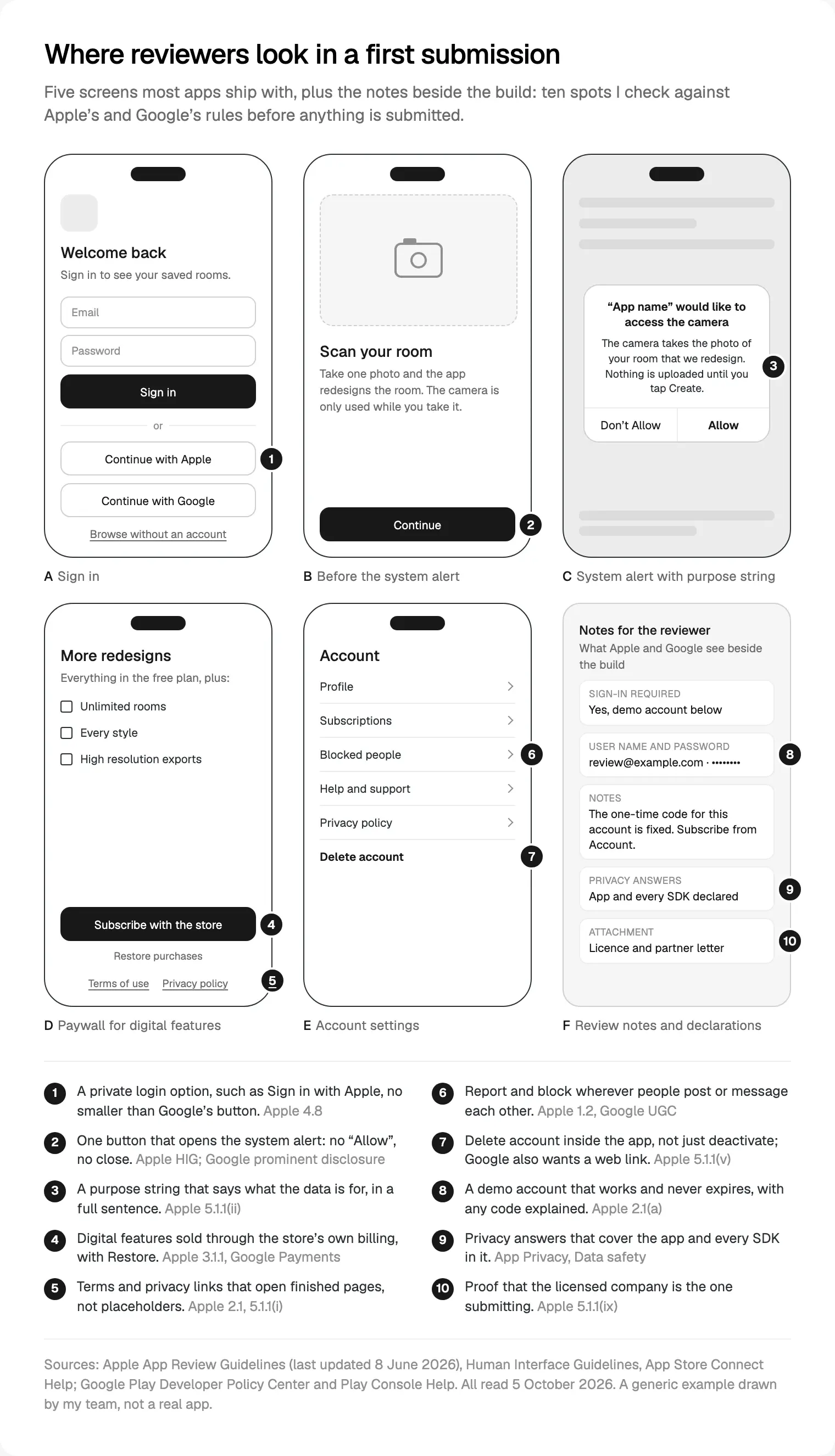
Guideline 5.1.1(v): if your app supports account creation, it must offer account deletion within the app. Apple's account deletion guidance, in force since 30 June 2022, adds the detail. Make it easy to find, usually in account settings. Delete the whole record and its personal data; deactivation alone is not enough. If deletion finishes on a website, link straight to that page.
A password or code to confirm is fine; making deletion needlessly hard fails. Guest accounts need deletion too, shared photos and reviews go with the account, and a slow manual process is acceptable if you say how long. Only regulated apps under 5.1.1(ix) may route people through customer service.
Google's account deletion requirements ask for an in-app path and a web link where people can request deletion, declared in the Data safety form. Data kept for security, fraud prevention or regulation may stay.
How I draw it: Delete account is the last row in Account settings. The next screen says what goes, what must stay and why, and that subscriptions keep billing until cancelled; then a confirmation, and a "request received" state with a date. Apple's guidance on managing accounts asks for the same experience in the app and on the web, so I design both as one flow.
Sign in with Apple when you also offer Google or Facebook login
Guideline 4.8 applies when a social login, such as Google Sign-In or Facebook Login, sets up the user's main account. You must then also offer an equivalent login that limits data to name and email, lets people keep their email private, and doesn't track them for advertising without consent.
The guideline doesn't name Sign in with Apple; it's simply the option I know meets all three. No extra login is needed if the app uses only your own accounts, a school or company account, or a government electronic ID.
That exemption matters for Gulf apps. If people sign in only with a national ID, as in my guides to UAE PASS sign-in screens and the Nafath login flow for Saudi apps, I read 4.8 as not applying. Once a Google button sits beside it, I treat the rule as back.
Apple's Sign in with Apple design guidance says the button should be no smaller than other sign-in buttons and visible without scrolling, so every login button gets the same size and weight. Where an app has no significant account features, 5.1.1(v) lets people in without a login, so I add "Browse without an account". Google Play has no rule like 4.8.
Permission prompts and purpose strings
In my experience, permission wording is the copy most often left to the last day. Guideline 5.1.1(ii) asks for purpose strings that describe your use of the data clearly and completely. 5.1.1(iii) asks for only what the feature needs, and 5.1.1(iv) forbids pressure and suggests an alternative when people refuse, such as typing an address instead of sharing a location.
Apple's Human Interface Guidelines on privacy set the craft rules:
- Ask when someone uses the feature, not at launch, unless the app can't work without it.
- Write the purpose string as one short, complete, active sentence.
- A screen before the system alert gets one button that opens the alert, titled "Continue" or "Next", never "Allow", and no close option.
- Never show a picture of the alert, offer a reward or point at its buttons; Apple says these designs get rejected.
Android differs. Its guide to runtime permissions also says ask in context, but always let people cancel an explanation screen. Google Play's User Data policy requires a prominent in-app disclosure, immediately before the prompt, when data use might surprise people, such as background location; tapping away is not consent.
So I design the explanation screen twice, one button on iOS and two on Android, and write each purpose string in Figma beside its screen, part of how I design apps for both stores.
In-app purchase rules for digital goods
Guideline 3.1.1: if people pay to open up features or content in the app, such as subscriptions or premium content, use in-app purchase, with a way to restore purchases.
Not everything goes through Apple. Under 3.1.3(e), physical goods and services used outside the app must use other methods, such as Apple Pay or card entry. Under 3.1.3(d), real-time one-to-one services, with tutoring and medical consultations among Apple's examples, may pay outside it. On the United States storefront, 3.1.1(a) allows buttons and links to other ways to buy. Google Play's Payments policy draws a similar line:
| What people pay for | Apple App Store | Google Play |
|---|---|---|
| Features, subscriptions, AI credits used in the app | In-app purchase, 3.1.1 | Google Play billing |
| Physical goods, rides, food delivery | Not in-app purchase, 3.1.3(e) | Play billing must not be used |
| A live one-to-one session, such as a doctor's consultation | Other methods allowed, 3.1.3(d) | Not named; I'd confirm with Google |
| Money sent between people, bills | Not named in the guidelines | Play billing must not be used |
| A link to pay on your website | US storefront yes; elsewhere by entitlement | Only in eligible countries, by programme |
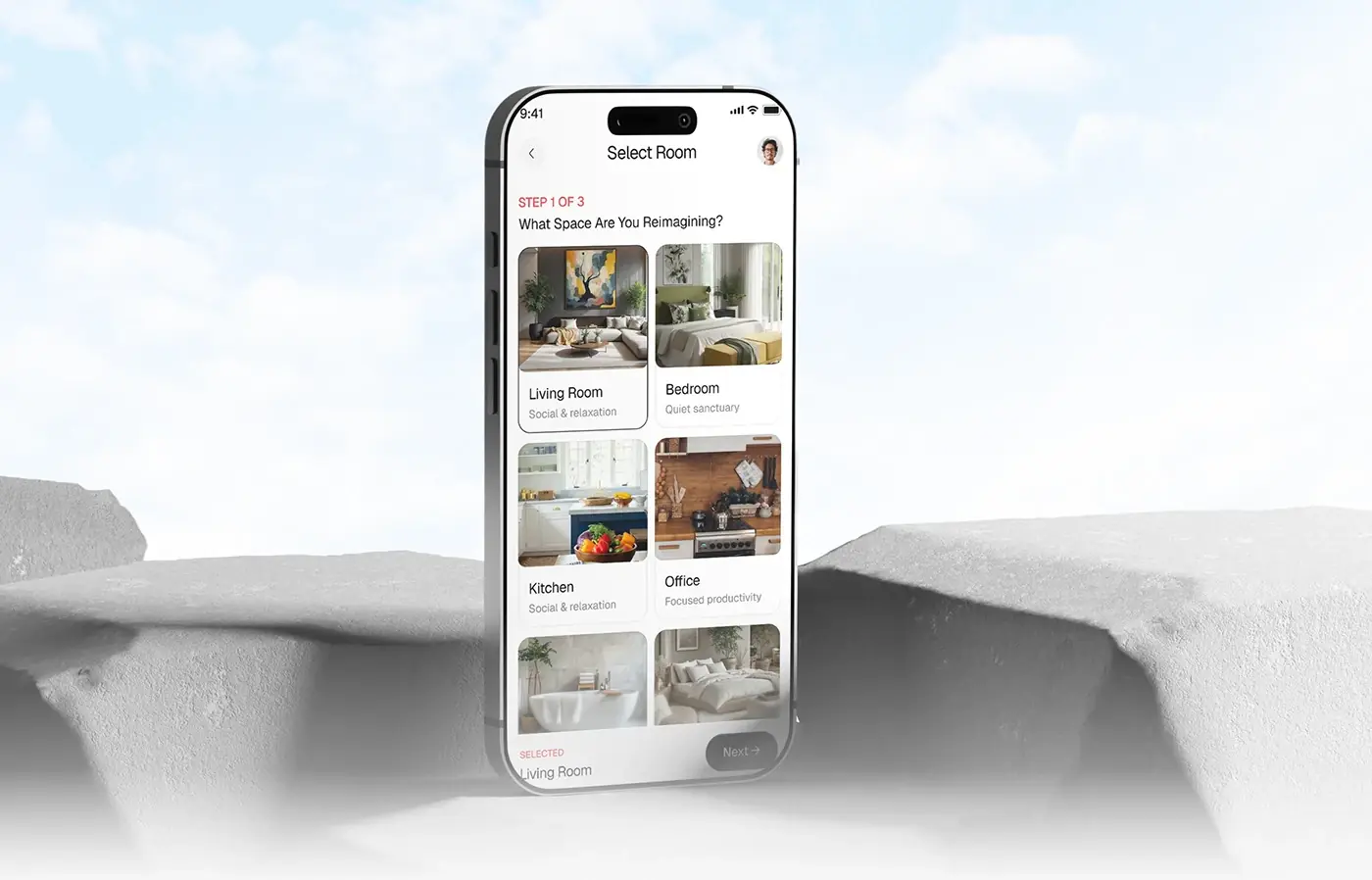
My first question about any paywall: what are people paying for, and where do they use it? More AI room designs are digital; a sofa bought in the same app is physical. I draw the paywall around the store's own purchase sheet, with "Restore purchases" and working terms and privacy links under the button. None of this depends on your stack; if you're still choosing, see Flutter or React Native for Arabic apps.
Privacy labels and Google Play's Data safety form
Apple's app privacy details ask you to declare every data type that you or your third-party partners collect, including analytics tools, ad networks and other SDKs. Guideline 2.3 asks that metadata, privacy information included, matches the app, and 5.1.1(i) requires a privacy policy link in App Store Connect and inside the app.
Google's Data safety form is required for apps on closed, open or production tracks; only internal testing is exempt. Even an app that collects nothing must complete it and link a privacy policy, and data your SDKs send counts as yours.
The design side is a data map: for each screen that collects something, what, why, and which SDK touches it. AI features hide surprises; guideline 5.1.2(i) says sharing personal data with third-party AI needs explicit permission. One map feeds both stores' answers and the privacy policy.
Demo accounts and review notes
Guideline 2.1(a) asks for demo account details, with your back end switched on, whenever the app has a login; a built-in demo mode needs Apple's approval first. The App Store Connect reference says the demo account must not expire, and the Notes field holds up to 4,000 bytes. Under 2.3.1(a), new features must be described specifically; generic notes are rejected.
Google's guide to preparing your app for review asks for everything a reviewer needs to get past a login, including one-time passwords. Another gate surprises founders: under the testing requirements for new personal accounts, accounts created after 13 November 2023 must run a closed test with at least 12 testers, opted in for 14 days in a row, before production. Plan that fortnight.
What I prepare for the review notes:
- A demo account seeded with realistic data, so the reviewer sees orders or bookings, not empty states.
- A fixed one-time code for that account only.
- Where each paid feature lives, and the taps to the purchase.
- Each permission, the screen that asks for it, and why.
- For regulated apps, the licence and the attached documents.
- A named contact who answers during the review window.
Placeholder content, broken links and minimum functionality
Guideline 2.1(a) asks for placeholder text, empty websites and temporary content to be removed. Apple's review page lists broken links among common issues, and every app needs a working support link with current contact details and a privacy policy link. In the store listing, 2.3.3 wants screenshots of the app in use, not a splash or login screen.
Before handoff I run a lorem sweep: search Figma and the strings for lorem, TODO and test, and open every link from a fresh install.
Minimum functionality is the harder conversation. Guideline 4.2 asks for more than a repackaged website, and 4.2.2 rules out apps that are mainly marketing, web clippings or collections of links. Google's functionality policy rejects text-only or PDF apps and apps that crash or don't load. If your app is your website in a frame, I'll say so in the intro call, and we look for what a phone does better: offline use, the camera, location.
User-generated content: filter, report and block
Guideline 1.2 covers apps where people post or talk to each other: a way to filter objectionable material, report it with timely responses, block abusive users, and published contact details. Google Play's User Generated Content policy adds that people accept the terms before first posting, and one-to-one messaging needs blocking.
In practice: Report and Block on every post, profile and thread, a terms step before the first post, and a moderation queue in the admin panel.
Health and finance apps: submitted by the licensed company
Guideline 5.1.1(ix) says apps in highly regulated fields, naming banking and financial services, healthcare, gambling, legal cannabis, air travel and crypto exchanges, should be submitted by the legal entity providing the service, not an individual developer. Apple's review page lists this as a common issue; partnership documents go in the Attachment section.
Google's guide to developer account types asks for an organisation account for financial products, health apps, VPN apps and government apps, and that needs a D-U-N-S number.
So for a fintech or health app, I ask in the intro call whose developer account it ships from. Open the company's Apple and Google accounts in week one, not launch week.
Where I would start
Run these checks at wireframe stage, not after the first rejection: sign-in and account settings first, then permissions, the paywall, the data map, and the review notes in the last sprint. Each fix costs a few frames early, or a resubmission late. To budget the design work itself, see what app design costs in 2026.
If you'd like a second pair of eyes before you submit, that's part of my mobile app design work: a free 30 minute intro call, then a written scope and one fixed quote, with weekly Figma sprints. More on how I work.
Frequently asked questions
What is the most common reason apps get rejected by the App Store?
Incomplete apps. Apple says over 40% of unresolved issues relate to guideline 2.1, App Completeness: crashes, placeholder content, broken links and missing review information such as a demo account. In Apple's 2025 Transparency Report, the Performance section, which contains 2.1, accounted for 1,354,418 rejections, far more than any other section.
Do I need Sign in with Apple if my app uses Google login?
Usually, yes. Guideline 4.8 says that if a social login sets up the main account, you must also offer an equivalent option that limits data to name and email, lets people hide their email and doesn't track them for ads. Sign in with Apple meets that. Apps using only their own accounts, work or school accounts, or a government electronic ID are exempt.
Does my app need a delete account button?
If people can create an account in your app, yes. Apple's guideline 5.1.1(v) requires account deletion inside the app, and deactivation alone is not enough. Google Play requires an in-app path plus a web link for deletion requests. You may ask people to confirm with a password or code.
Can I use Stripe instead of Apple in-app purchase?
For physical goods and services used outside the app, such as deliveries or rides, yes: Apple's 3.1.3(e) requires a method other than in-app purchase. For digital features and subscriptions used inside the app, guideline 3.1.1 requires in-app purchase. On the United States storefront, apps may also link to other ways to buy.
Why was my app rejected for a permission request?
Usually the purpose string is vague, the request comes before the feature that needs it, or a screen before the alert pushes people to accept. Guideline 5.1.1(ii) asks for purpose strings that clearly and completely describe how the data is used. Apple's design guidance asks for one complete sentence, and a single "Continue" button on any screen before the alert.
Can an individual developer publish a banking or health app?
Not on the App Store in most cases. Guideline 5.1.1(ix) says apps in regulated fields such as banking, healthcare and crypto exchanges should be submitted by the legal entity that provides the service. Google Play asks financial and health apps to use an organisation developer account, which needs a D-U-N-S number. Open the company's accounts early.
Sources and method
I read every source on 5 October 2026; Apple's guideline numbers come from the version updated 8 June 2026. Google Play policies have no section numbers, so I name them. The 23% rate is my own division. Apple breaks rejections down by section, not by guideline, and I found no comparable breakdown from Google.
- Apple, App Review Guidelines, last updated 8 June 2026, read 5 October 2026: developer.apple.com
- Apple, App Review overview and common issues, read 5 October 2026: developer.apple.com
- Apple, 2025 App Store Transparency Report, read 5 October 2026: apple.com
- Apple, Offering account deletion in your app, read 5 October 2026: developer.apple.com
- Apple, Human Interface Guidelines, Managing accounts, read 5 October 2026: developer.apple.com
- Apple, Human Interface Guidelines, Sign in with Apple, read 5 October 2026: developer.apple.com
- Apple, Human Interface Guidelines, Privacy, read 5 October 2026: developer.apple.com
- Apple, App privacy details on the App Store, read 5 October 2026: developer.apple.com
- Apple, App Store Connect Help, platform version information, read 5 October 2026: developer.apple.com
- Google, Google Play Developer Policy Center, read 5 October 2026: play.google
- Google, account deletion requirements, read 5 October 2026: support.google.com
- Google, User Data policy, read 5 October 2026: support.google.com
- Google, Data safety section, read 5 October 2026: support.google.com
- Google, Payments policy, read 5 October 2026: support.google.com
- Google, User Generated Content policy, read 5 October 2026: support.google.com
- Google, functionality, content and user experience policy, read 5 October 2026: support.google.com
- Google, prepare your app for review, read 5 October 2026: support.google.com
- Google, testing requirements for new personal developer accounts, read 5 October 2026: support.google.com
- Google, choose a developer account type, read 5 October 2026: support.google.com
- Android Developers, request runtime permissions, read 5 October 2026: developer.android.com