Saudi checkout UX: designing payment with mada, Apple Pay, STC Pay and Tamara
Saudi checkout UX for apps and web: method order, mada and Apple Pay rules, STC Pay, where Tamara and Tabby go, Arabic amounts and declines.

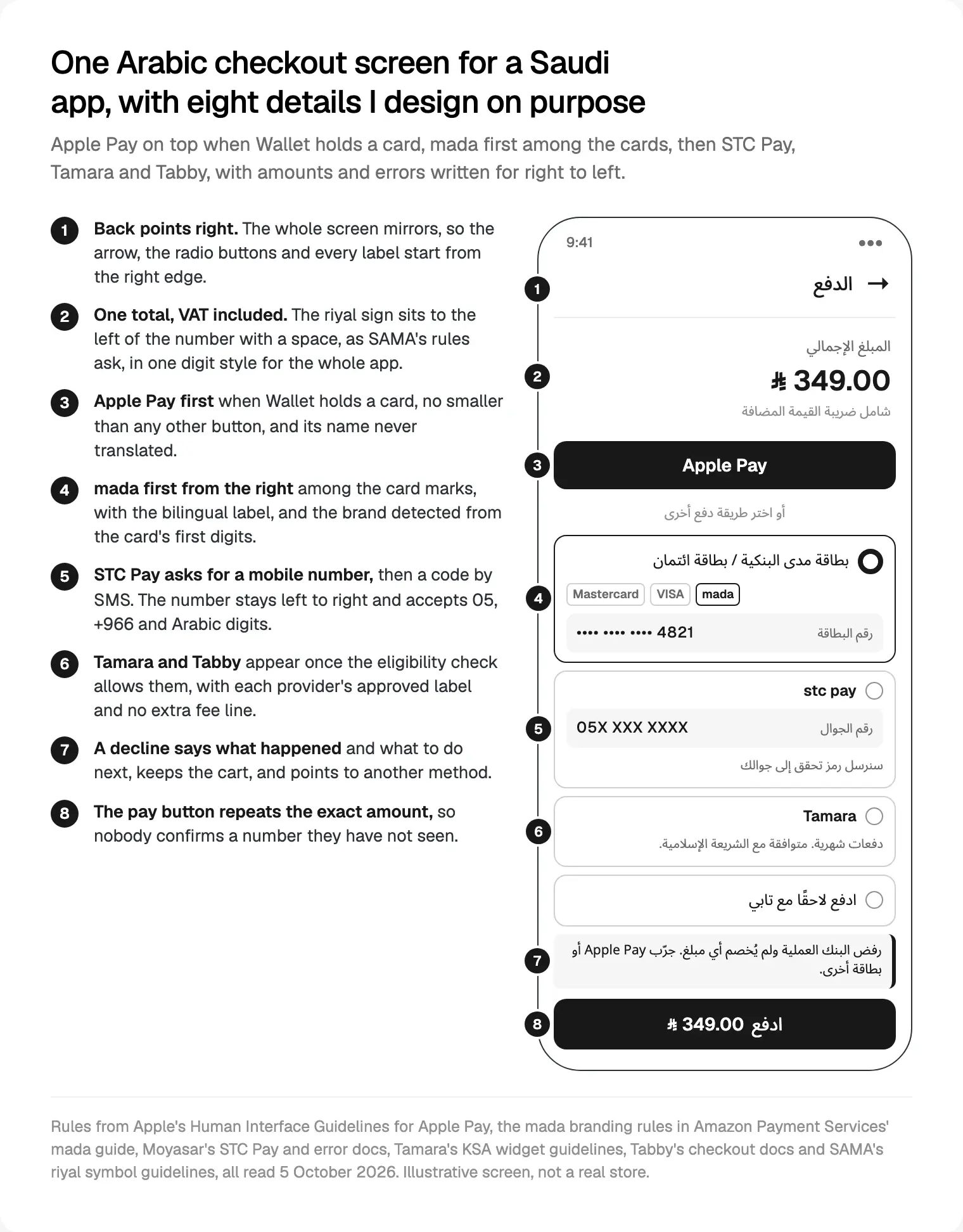
Good Saudi checkout UX comes down to order and recovery. On a phone with a card in Wallet, Apple Pay goes first. Below it sits one card option with the mada mark first from the right, then STC Pay, then Tamara and Tabby, each shown only when the customer can use it. Every amount carries the riyal sign in one digit style, and every failure ends with a next step.
It's the checkout I draw in my mobile app design and development in Riyadh projects, and little of it is taste. The rules come from Apple, mada's branding, SAMA's rules for buy now, pay later (BNPL) companies, and Tamara's and Tabby's guidelines. The pages I found explain the integration but show no screen, so I start from the screen.
It's for founders and product leads building a Saudi app with a web twin. I'm a designer, not a lawyer, so confirm details with your gateway and BNPL providers.
Which payment methods show first, and why
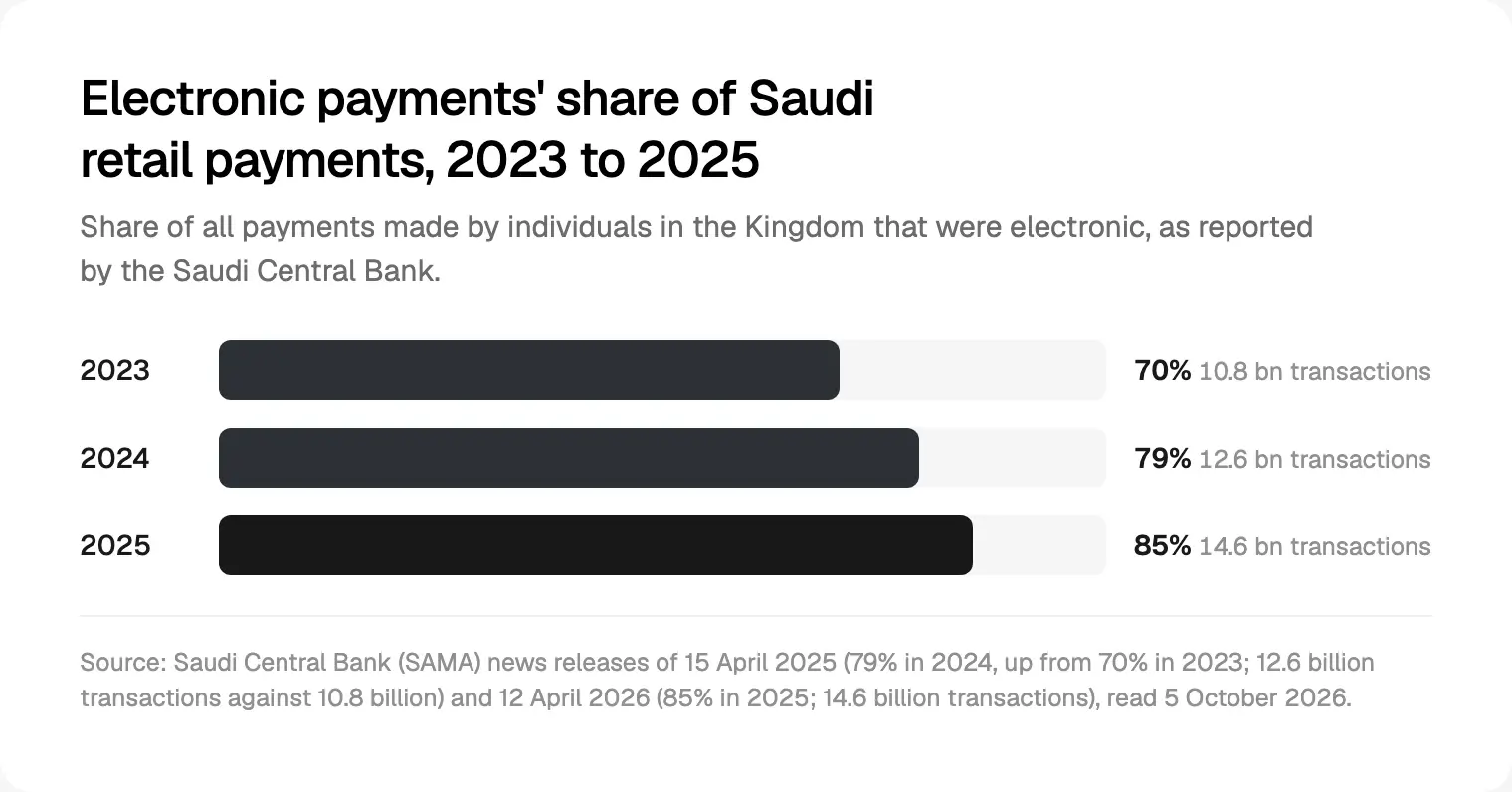
I order a Saudi checkout by what the customer can use now and which rule decides its place. The Saudi Central Bank (SAMA) said in its April 2026 release on retail payments that electronic payments made up 85% of retail payments in 2025, up from 79% in 2024, and credited growth in mada. Its release a year earlier put 2023 at 70%.
My starting order, before the client's data changes it:
| Position | Method | Why it sits there | Rule behind it |
|---|---|---|---|
| 1 | Apple Pay on iPhone, Google Pay on Android | One tap, nothing to type | Apple: primary when Wallet holds a card |
| 2 | Card: mada, Visa, Mastercard | Domestic debit runs on mada | mada mark first, checked by your gateway |
| 3 | STC Pay | A wallet with its own SMS step | Your gateway's STC Pay support |
| 4 | Tamara, Tabby | Instalments, only when eligible | Provider checks, SAMA's BNPL rules |
Apple's rule and the mada rule don't clash: Apple Pay is a button, and the mada rule orders the brand marks inside the card option. On Android, Google Pay takes the top slot; SAMA's mada page lists mada cards in Apple Pay, Google Pay and Samsung Pay.
The mada rules your gateway will check
SAMA's mada page describes mada as a national payment system it owns, launched in 1990, with e-commerce run through 3D Secure. Apple's note on complying with regional regulations gives the reason it leads: Saudi Arabia requires all domestic debit transactions to use mada.
The branding rules reach you through your provider. Amazon Payment Services' mada guide calls them "a legal requirement in KSA enforced by SAMA" and lists what the screen needs:
- mada first: first from the right on an Arabic checkout, first from the left on an English one.
- A bilingual label: "mada bank card / Credit card" and "بطاقة مدى البنكية/ بطاقة ائتمان".
- Brand detection: read the first six digits (the BIN) and show the mada mark as people type.
- No shortcuts: mada allows no separate authorisation and no skipping 3D Secure.
- No quiet changes: altering the branding after sign-off needs approval again.
That changes the product. Checkout.com's mada documentation says mada transactions must be captured in full, so a grocery app can't hold an estimate and settle less later. My checkouts charge the confirmed total, refund any difference after substitutions, and say so before people pay.
Apple Pay with mada cards: what Apple asks of the screen
Apple's PassKit mada network has existed since iOS 12.1.1, and its regional note warns that without it some Saudi cards may fail when the country code is SA. Confirm mada in Apple Pay with your gateway first. Then Apple's Human Interface Guidelines for Apple Pay, updated on 8 June 2026, shape the screen:
- Primary when available. If your app checks for an active card in Wallet, Apple Pay must be the primary, not necessarily the only, option wherever you check.
- Never smaller. No smaller than other payment buttons, no scrolling to find it, never hidden or greyed out.
- Stacked in Arabic. Side by side, Apple puts the button right of Add to Cart; in a mirrored layout I stack them, Apple Pay above, as Apple also allows.
- The name stays English. Apple Pay is never translated; the system button localises itself.
- No extra spinners, and accounts afterwards. The sheet shows its own progress, and registration belongs on the confirmation page.
Apple's App Review Guidelines add two rules. Physical goods and services must be paid outside in-app purchase, with Apple Pay or card entry (3.1.3(e)), and Apple Pay apps must show all material purchase information before the sale (4.9). That's why my pay button repeats the full amount.
STC Pay checkout: a phone number and a code
Arab News reported that SAMA approved STC Pay's move to STC Bank in April 2024 and its full launch in January 2025; STC Bank's eCommerce page also sells card acceptance. The wallet usually reaches your checkout through a gateway. Moyasar's STC Pay guide shows the flow: a mobile number starting with 05, a one-time code by SMS, then a payment that comes back paid or failed.
I design it as steps inside the checkout:
- Mobile number: prefilled from the account, left to right inside the Arabic screen, forgiving about format.
- The code: one field with the phone's one-time code autofill, a resend link that shows when it's active, and a way to change the number.
- The result: success, or a message naming the problem, such as a wrong or expired code.
Where Tamara and Tabby go on the product page, cart and checkout
BNPL messaging starts on the product page. Tamara's KSA widget guidelines, updated on 6 April 2026, cover plans of up to 12 payments. The product widget sits directly below the price, never below the fold. It shows the monthly amount, the four-payment option, the Sharia-compliance line, a "More options" link and the logo, in 14px text on mobile with a 28px logo. The amount is rounded: SAR 2,500 over 12 payments shows as SAR 208 a month, and it recalculates when the cart changes.
Tabby's on-site messaging docs put its promo near the price or next to Add to cart, below the cart total, and its checkout card under the Tabby option once selected. Snippets must fit a 320px screen.
| Page | Tamara | Tabby |
|---|---|---|
| Product page | Directly below the price | Near the price or next to Add to cart |
| Cart | Below the total or near Proceed to checkout | Below the cart total |
| Checkout label | "Tamara" with "دفعات شهرية. متوافقة مع الشريعة الإسلامية." | "ادفع لاحقًا مع تابي" |
| Not eligible | Pre-checkout eligibility check | Hide it, or show Tabby's approved message |
Eligibility is a design state. Tabby's checkout flow docs recommend a background check when checkout opens or the cart changes: hide Tabby on a rejection, but show it if the check times out. A late rejection can still happen, so Tabby supplies approved Arabic and English messages for it. Tamara offers a pre-checkout eligibility endpoint based on the decline records it holds.
SAMA's Rules for Regulating BNPL Companies, issued in November 2023, explain more of the screen. BNPL carries no term cost to the consumer, and providers must stop stores charging extra fees (Article 19). Nobody under 18 Hijri years can use it (Article 20), and balances are capped at SAR 10,000 over at most 12 instalments (Article 22). So: no surcharge line, no countdowns nudging people towards credit, and the provider's own consent pop-ups left alone.
Saudi phone numbers and the national address in checkout
One phone field serves STC Pay, Tabby's eligibility check and BNPL codes, since SAMA's rules make providers verify phone numbers (Article 21). Apple says to accept numbers with or without dashes and a country code. So I accept 05, 5, +966 and 00966, Arabic-Indic or Western digits, and normalise once for each provider.
The Universal Postal Union's Saudi addressing page, dated April 2025, sets the format: addressee, optional short address, building number and street, additional number and district, a five-digit postcode, then the city. The short address is four letters plus the four-digit building number, as in UPU's example RAGI2929. I put the short address first, keep codes left to right, and pass the address to the BNPL provider, since Tabby says fuller details improve approval.
Apple advises against forcing an account first, so sign-in stays optional. If your app signs people in nationally, my notes on Nafath sign-in screens for Saudi apps cover those states.
Arabic amounts, digits and the new riyal sign
King Salman approved the Saudi riyal symbol on 20 February 2025, and SAMA's Saudi Riyal Symbol Guidelines set ten rules. On a phone: the symbol sits left of the number with a space, also left of a minus sign, at the height of the text, facing the text's direction, with clear space of a third of its height.
Unicode 17.0, released on 9 September 2025, encodes it as U+20C1. Check that your Arabic and Latin fonts both carry it; otherwise the phone swaps fonts or draws an empty box. I keep "ر.س" or "SAR" as a documented fallback. In an Arabic line, a number followed by a space and the sign displays with the sign on the left, as SAMA asks; in English, the sign goes first.
Digits need one decision per app. The Saudi Arabic locale defaults to Arabic-Indic digits, but frameworks don't all follow it, as my comparison of Flutter or React Native for Arabic apps shows. Pick one style, convert typed digits to 0 to 9, and keep card and phone numbers left to right. Tamara's approved Arabic copy writes "SAR 208" in Western digits, so plan how its widget sits beside your totals. And round instalments, never totals: the pay button and receipt keep two decimals.
3D Secure, declines and how people recover
Every mada payment online goes through 3D Secure, so the bank's check is part of your design either way. Moyasar's 3DS error list covers timeouts, unenrolled cards and suspected fraud, and its payment error reference adds insufficient funds, declines, expired cards and payments that ran past 15 minutes. Nobody should see the raw strings.
- Before and during the check: one line saying the bank will ask them to confirm, then the bank's page in a sheet with a clear cancel.
- On return: a "confirming payment" state; Tabby's docs say a redirect is only a navigation signal, and status must come from your backend.
- On failure: a short message, the cart intact, the next method preselected.
- On a timeout: say nothing was charged only after the server confirms it.
| What happened | What I show | Next action |
|---|---|---|
| Insufficient funds | Not enough balance on this card | Another card, Apple Pay or STC Pay |
| Declined or blocked | Your bank declined this payment | Another method, or call the bank |
| 3D Secure failed or cancelled | Payment not confirmed with your bank | Try again |
| Card not enrolled | This card isn't set up for online payments | Activate it, or another card |
| Timed out | The payment took too long and stopped | Try again |
| BNPL rejected | The provider's approved message | Another method |
Apple's advice for payment sheet errors suits both languages: name the field and keep it to 128 characters or fewer. Every row above is one of the payment states I scope for Riyadh apps, written in Arabic and English before anyone draws a screen.
The web twin: same order, different buttons
An app and its website share one method order, one set of labels and one set of states. The plumbing differs:
- Apple Pay: on the web, Apple says it works in any browser, paid from a nearby iPhone or by scanning a code.
- Tamara and Tabby: JavaScript widgets on the web, SDK components or the standard copy in apps.
- 3D Secure: a redirect on the web, a sheet in the app, one "confirming payment" state.
- The receipt: ZATCA's e-invoicing guidelines say the simplified tax invoice, with its QR code, goes to the buyer straight away, so both confirmation screens link to it.
On Salla or Zid the checkout is hosted and your design work moves to product and cart pages; my guide to Salla, Zid or a custom store covers what you control.
Where I would start
I'd rather ship four methods with every state designed than six with only the happy path. Start with the providers, because they decide what you can draw: your gateway and your BNPL contracts. Then write the failure states, draw the screen in Arabic, and only then the English twin. Beyond checkout, fintech app design best practices covers the transfer, fee and failure screens too.
That order is the backbone of my mobile app design process. Planning a Saudi checkout? A free 30 minute intro call comes first, then a written scope and one fixed quote for the whole project. Read how I work, or start with my app design and development work for Riyadh teams.
Frequently asked questions
Should Apple Pay or mada come first at a Saudi checkout?
Both, in different places. Apple Pay is a button, so it goes at the top when the phone has a card in Wallet; Apple requires it to be primary wherever your app checks. mada leads the card option below it, with its mark first from the right on an Arabic screen and first from the left in English.
Does Apple Pay support mada cards?
Yes. Apple added mada as a payment network in iOS 12.1.1, and says Saudi merchants accepting debit cards should include it, because domestic debit must run on mada. Without it, some Saudi cards may fail when the country code is SA, so confirm your gateway supports it.
How does STC Pay work at checkout?
Through a gateway, it's two steps. The customer enters a mobile number starting with 05, receives a one-time code by SMS and types it in; the payment then comes back paid or failed. Design it inside the checkout, with the number prefilled, code autofill on, and clear messages for wrong or expired codes.
Where should the Tamara or Tabby message go on a product page?
Close to the price. Tamara's KSA guidelines put its widget directly below the product price, never below the fold or in a collapsed section. Tabby places its promo near the price or next to Add to cart. In the cart, both sit below the total, and the amount updates when the cart changes.
Can I charge customers extra for paying with Tamara or Tabby?
No. SAMA's rules define BNPL as financing with no term cost to the consumer, and require providers to make sure stores don't pass on or charge any additional fees. So the checkout shows the same total whatever the method, with no surcharge line. Late payment penalties are a matter between customer and provider.
What should a Saudi app show when a card payment fails?
A short, specific message, the cart kept, and the next method ready. Map the gateway's codes, such as insufficient funds, a bank decline, a failed 3D Secure check or a timeout, to a few plain Arabic and English lines. Only say nothing was charged once your server has confirmed it.
Sources and method
I read every source on 5 October 2026. The screen and error table are my illustrations, not a real store; I made no test payments. I found no official mada branding page, so those rules come from payment providers' documentation.
- Saudi Central Bank (SAMA), mada overview, read 5 October 2026: sama.gov.sa
- SAMA, e-payments releases of 12 April 2026 and 15 April 2025, read 5 October 2026: sama.gov.sa, sama.gov.sa
- SAMA, Rules for Regulating BNPL Companies, November 2023, read 5 October 2026: rulebook.sama.gov.sa
- SAMA, riyal symbol approval (20 February 2025) and usage guidelines, read 5 October 2026: sama.gov.sa, sama.gov.sa
- Unicode Consortium, Unicode 17.0.0, 9 September 2025, read 5 October 2026: unicode.org
- Apple, Human Interface Guidelines: Apple Pay, updated 8 June 2026, read 5 October 2026: developer.apple.com
- Apple, PassKit mada network and regional regulations, read 5 October 2026: developer.apple.com, developer.apple.com
- Apple, App Review Guidelines, read 5 October 2026: developer.apple.com
- Amazon Payment Services, mada payment method guide, read 5 October 2026: paymentservices.amazon.com
- Checkout.com, mada documentation, read 5 October 2026: checkout.com
- Tamara, KSA widget guidelines (updated 6 April 2026) and pre-checkout eligibility, read 5 October 2026: docs.tamara.co, docs.tamara.co
- Tabby, on-site messaging and checkout flow, read 5 October 2026: docs.tabby.ai, docs.tabby.ai
- Moyasar, STC Pay custom UI, payment errors and 3DS errors, read 5 October 2026: docs.moyasar.com, docs.moyasar.com, docs.moyasar.com
- STC Bank, eCommerce merchant page, read 5 October 2026: stcbank.com.sa
- Arab News, SAMA permits full public launch of STC Bank, January 2025: arabnews.com
- Universal Postal Union, Saudi Arabia addressing format, April 2025: upu.int
- ZATCA, Detailed Guidelines for E-Invoicing, May 2023: zatca.gov.sa