The design to code workflow my team runs with Figma MCP and Claude Code
My design to code workflow: a Figma file a tool can read, Figma's MCP server, Claude Code inside your component library, and a person reviewing every screen.

A design to code workflow that holds up in production has four parts: a Figma file a tool can read, a coding agent that pulls the design through Figma's MCP server, a build that reuses your existing component library instead of writing fresh markup, and a person who reviews every generated screen before it merges. The AI tools draft. A person decides what ships.
My team runs it with Figma, Claude Code and five checkpoints where a person signs off. It's the everyday method behind my work as a design engineer for startups, and it's how we use AI without the product drifting away from its design.
This guide is for founders and product or engineering leads with a Figma file and a React or Next.js codebase who want AI to speed up the build without lowering the bar. For prototypes before any code, see AI prototyping tools sorted by job.
The design to code workflow, step by step
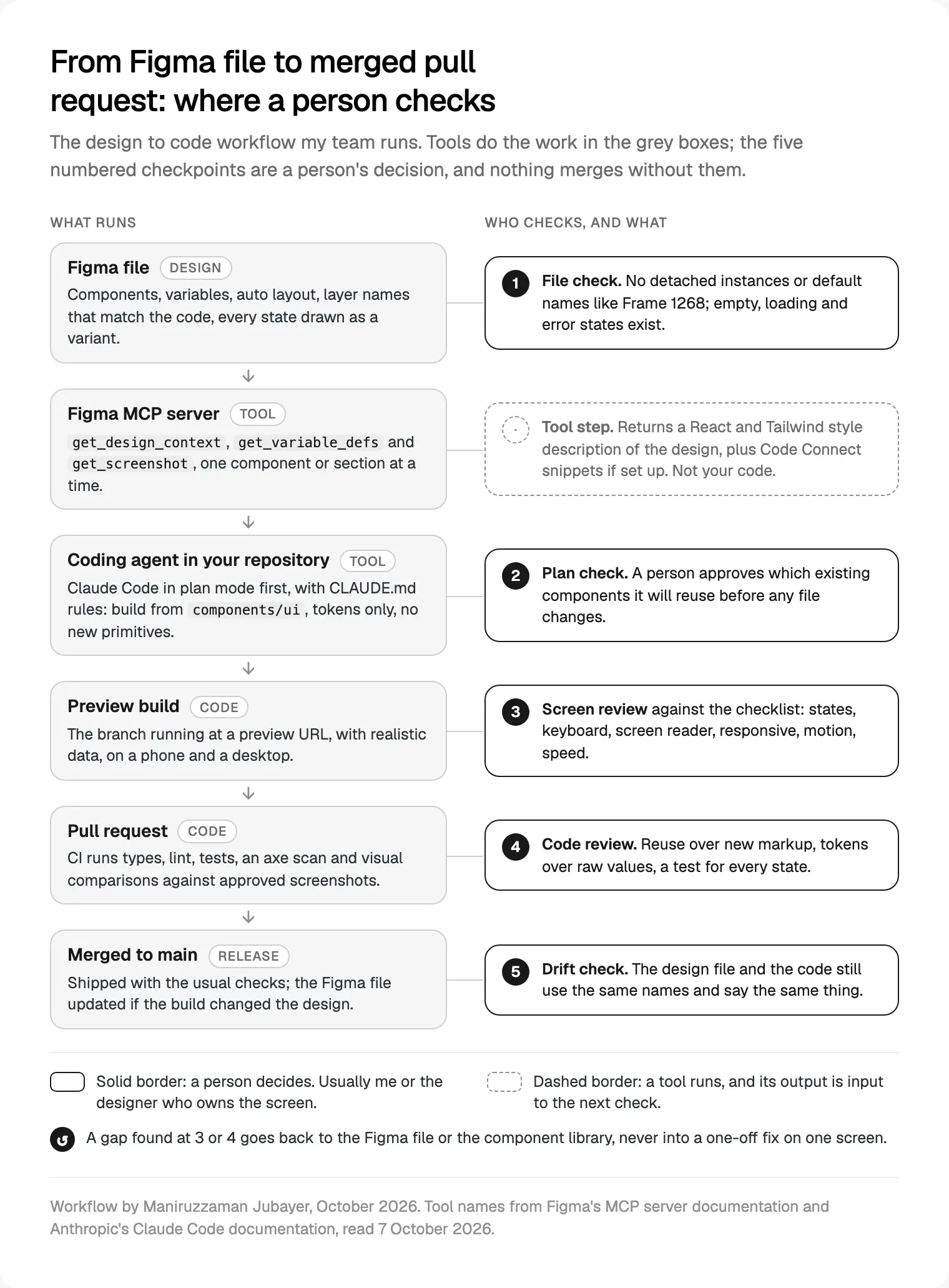
The order my team works in, for every component or screen:
- Prepare the file. The designer makes the frame readable: components, variables, auto layout, real names, every state. A person checks it.
- Fetch the design. The coding agent calls Figma's MCP server for one component or section.
- Plan inside the codebase. The agent maps the design to components we already have. A person approves the plan.
- Build on a branch. The agent writes the code with our components and tokens; the branch deploys to a preview URL.
- Review the screen. A person runs the checklist below, on a phone and a desktop. The deeper version, with code for each check, is my review of AI-generated UI code.
- Review the code, merge, check for drift. CI runs, an engineer reviews the pull request, and after merge we confirm Figma and the code still agree.
Prepare the Figma file so a tool can read it
Bad generated code usually starts as a messy file. Figma's guide to structuring a file for the MCP server asks for what a good handoff always needed: components for anything repeated, variables for spacing, colour, radius and type, semantic layer names instead of Frame1268, auto layout instead of absolute positions, and annotations for behaviour. On Code Connect, which links Figma components to real code, it says: "Without it, the model is guessing."
Figma's guide to variables describes them as reusable values you can use as design tokens, with modes such as light and dark. That's what lets the agent write a token instead of a hex code.
What I check first, and what happens when it's missing:
| In the file | What the agent gets | If it's missing |
|---|---|---|
| Components | A named component to match to code | Divs and a second, slightly different button |
| Variables | Token names | Raw hex codes and pixel values |
| Auto layout | Direction, gap and padding | Absolute positions that break on a phone |
| Names that match the code | Button / primary for <Button variant="primary"> | Guesswork |
| States as variants | Loading, empty, error, disabled | The happy path only |
| Annotations | Focus order, behaviour, motion | Nothing: behaviour is invisible in a screenshot |
What Figma's MCP server gives a coding agent
MCP, the Model Context Protocol, is a standard way for an AI agent to call outside tools. Figma's guide to its MCP server offers a remote server, which Figma recommends and makes available on all seats and plans, and a desktop server that runs through the Figma app and needs a Dev or Full seat on a paid plan.
It works from links: you copy a link to a layer, paste it into your agent, and the agent reads the node ID. Of the tools in Figma's tools reference, four do most of the work:
get_design_context: the design of a layer or selection, returned by default as React and Tailwind.get_variable_defs: the variables and styles used in that selection.get_screenshot: a picture, so the agent can compare its work with the design.get_metadata: a sparse outline of a large selection, so the agent fetches only what it needs.
With Code Connect set up, the design context also carries your real import paths, usage snippets and instructions for each component.
Figma's page on what the MCP sends and what the agent does is clear: the server passes context and a code starting point, doesn't know your design system unless you tell it, and leaves the final code to your agent. The React-like format, Figma explains, is there because models read it well, not because it's production code.
Figma MCP limits, from Figma's own documentation
Figma's rate limits page, read on 7 October 2026, gives tool calls by plan and seat:
| Seat | Starter | Professional | Organization | Enterprise |
|---|---|---|---|---|
| View or Collab | 20 a month | 20 a month | 20 a month | 20 a month |
| Dev or Full | 20 a month | 200 a day, 10 a minute | 200 a day, 15 a minute | 600 a day, 20 a minute |
Figma reserves the right to change these numbers. Twenty calls a month is a trial, not a workflow.
The other limits I plan around:
- Large frames. Figma says large selections can slow the tools, cause errors or return incomplete responses. Work component by component.
- Output size. Anthropic's MCP documentation says Claude Code warns when a tool's output passes 10,000 tokens and caps it at 25,000 by default.
- Code Connect. Only on Organization and Enterprise plans with a Full or Dev seat, says Figma's Code Connect article. Without it, your written rules do more work.
- Clients and pricing. Only clients in Figma's MCP catalogue can connect, and Figma says writing to the canvas through the server is free during the beta and will eventually be a usage-based paid feature.
Claude Code inside the component library you already have
Figma's remote server setup page recommends its plugin for Claude Code, or adding the server by hand:
claude plugin install figma@claude-plugins-official
claude mcp add --transport http figma https://mcp.figma.com/mcp
Then sign in through /mcp. Anthropic's docs warn that servers fetching outside content can expose you to prompt injection, so connect only ones you trust.
The real work is the rules file. Claude Code reads a CLAUDE.md at the project root, and Anthropic's memory documentation suggests keeping it under 200 lines. Mine says, in plain sentences: build from components/ui first; never create a new button, input, dialog or table without asking; tokens only, no raw colours or off-scale spacing; treat Figma's output as a description of the design, not code to paste; build the loading, empty and error variants. Figma's suggested rules say much the same. Because Claude treats CLAUDE.md as context, not enforced configuration, anything that must never happen also lives in lint, types and CI.
Then one component per request, in plan mode, where Claude proposes a plan but makes no edits until you approve:
Implement the BillingSummary card from <link to the node>.
Fetch design context, variables and a screenshot for this node only.
Build it from components/ui and our tokens, with every variant.
List anything you cannot map to an existing component, then stop.
That last list matters most. Each item is a decision for a person: add a variant to an existing component, or design a new one in Figma first.
Figma's client table also lists Cursor, VS Code, Codex, Gemini CLI and others; nothing here depends on the agent. My team builds in TypeScript, React and Next.js, and the same setup carries into Next.js product development with the back end when that's in scope.
Claude Design, Figma Make and other design to code AI tools
Some tools start from a prompt instead of a Figma frame.
Claude Design. Anthropic Labs launched Claude Design on 17 April 2026 for making designs, prototypes and slides by chatting with Claude. Anthropic's getting started article, updated 23 September 2026, says it's in beta on Pro, Max, Team and Enterprise plans. You can import a design system from a GitHub repository, design files or a local codebase with /design-sync in Claude Code, and hand a finished design to Claude Code, which continues from it instead of from a screenshot. Listed limitations include no version history yet and a design system import that is only as good as its source. The article doesn't mention Figma, so I don't treat it as a replacement for a Figma library.
Figma Make. Figma's help centre calls Make an AI prompt-to-app tool for Full seats on paid plans: attach designs, chat, and get an interactive app to preview or publish.
In my view they fit best for exploring a direction or making something clickable to test. Whatever starts a screen, it should enter the repository through the same plan check and review.
For any other design to code AI tool, I ask three questions rather than rank them. Does it read our components and tokens? Does it work in our repository through pull requests? Can a person review before anything merges?
The review checklist a person runs on every generated screen
Checkpoint 3 runs in the preview build, done by the screen's designer or by me. Generated screens look right in a screenshot; this covers what a screenshot hides.
| Check | What I look for | Reference |
|---|---|---|
| Component reuse | Every button, field, table and dialog comes from the library | Code review, Code Connect |
| Tokens | No raw colours, font sizes or off-scale spacing | Lint, review |
| States | Loading, empty, error, success, disabled, long text, huge numbers | The Figma variants |
| Keyboard | Every action works by keyboard; focus visible, never hidden behind a sticky header | WCAG 2.2 2.1.1, 2.4.7, 2.4.11 |
| Screen reader | Names, roles, states and errors announced | WCAG 4.1.2, VoiceOver or NVDA |
| Responsive | Usable at 320 CSS pixels wide; targets at least 24 by 24 CSS pixels | WCAG 1.4.10, 2.5.8 |
| Motion | Timing matches the design; reduced when the device asks | `prefers-reduced-motion` |
| Performance | LCP 2.5 s or less, INP 200 ms or less, CLS 0.1 or less, at the 75th percentile | Core Web Vitals |
Automated checks run in CI at checkpoint 4, but Deque's axe-core README says the engine finds on average 57% of WCAG issues automatically, and Playwright's accessibility testing guide says many problems only manual testing finds. Playwright's visual comparisons catch a screen changing after you approve it, not whether the first version matched the design. For the legal side, see my React checklist for the European Accessibility Act.
What still needs a person
Stack Overflow's 2026 Developer Survey, published on 6 October 2026 with 30,903 responses, shows where developers lean on AI and where they hold back. In its AI data, from 12,547 answers, 69.3% use AI for generating code in a familiar area, 63.8% for debugging or refactoring and 58.1% for writing tests. Only 40.5% use it for reviewing code, pull requests or design decisions, 30.3% for product, UX or visual design, and 17.5% for visual, audio or multimedia elements.
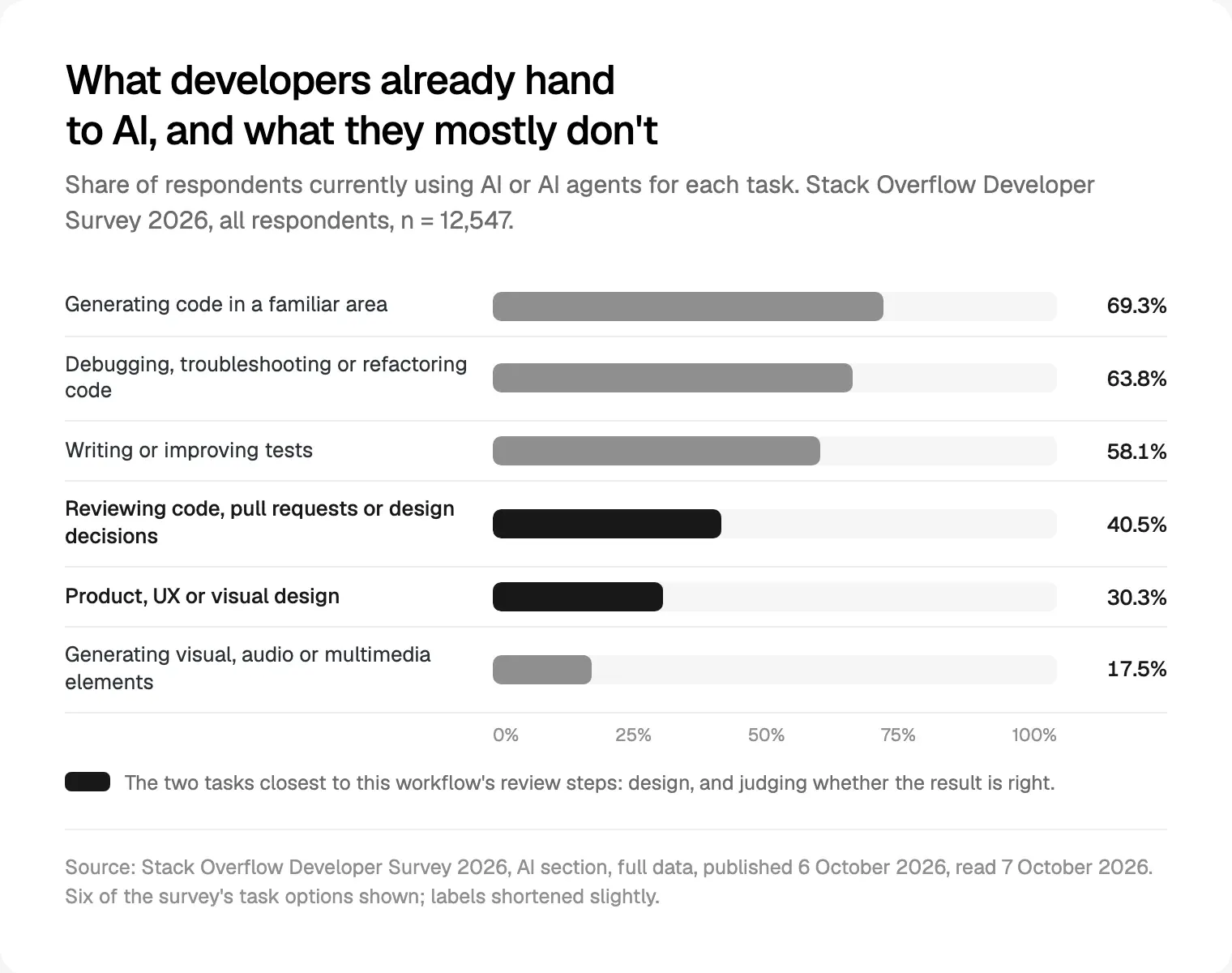
The same survey found 48% trust AI output when they can easily verify it. In the 2025 survey, the top frustration, for 66%, was AI solutions that are "almost right, but not quite". That matches generated screens: the almost is the empty state, the focus ring, the label a screen reader needs.
So a person keeps these: deciding what a screen should do, noticing when the design itself is wrong, judging accessibility beyond what a scan reports, and the final yes on merge. That judgement is the centre of design engineering from Figma to production, and of what a design engineer actually does.
Where the design to code workflow breaks
What fails, and the fix:
- The file is a picture, not a system. Detached instances and default names become hardcoded values. Fix the file first.
- States live in someone's head. The agent builds the happy path. Draw every state as a variant.
- Selections are too big. Slow calls, errors, half answers. Go component by component.
- Names differ between Figma and code. Rename one side, once.
- The agent invents a component. The plan check should catch it; code review is the backstop.
- Calls run out mid-sprint. Give the people who build with it Dev or Full seats.
- Code moves after launch and Figma doesn't. Figma's code to canvas tool, on the remote server with clients including Claude Code, captures live UI back into Figma as editable layers, which makes checkpoint 5 practical.
- Review becomes a rubber stamp. Keep each pull request to one screen or component.
Where I would start
Pick one component that appears on many screens, clean up its Figma version (variants, variables, names that match the code), write a short rules file, and run it through all five checkpoints. Then fix what the review found in the file or the library, not on the screen.
If you'd rather have one person own both ends, the Figma file and the review, see how my design engineering projects run: a free 30 minute intro call, then a written scope and one fixed quote.
Frequently asked questions
What is a design to code workflow?
It's the repeatable path from a design to production code. In my team's version, a structured Figma file feeds an AI coding agent through Figma's MCP server, the agent builds with the existing component library, and a person reviews each screen for states, accessibility, responsive layout, motion and speed before it merges.
How do I connect Figma to Claude Code?
Figma recommends installing its Claude Code plugin with claude plugin install figma@claude-plugins-official, or adding the remote server with claude mcp add --transport http figma https://mcp.figma.com/mcp, then signing in through /mcp. Then paste a link to a Figma layer and ask Claude Code to build it with your components.
What are the Figma MCP server's limits?
Figma lists 20 tool calls a month for Starter plans and View or Collab seats, and 200 to 600 a day for Dev and Full seats on paid plans, with per-minute caps. Large frames can return incomplete answers, Code Connect needs an Organization or Enterprise plan, and only clients in Figma's catalogue can connect.
Does the Figma MCP server generate production-ready code?
No. Figma says the server provides design context and a code starting point, by default in a React and Tailwind style, and your AI agent writes the final code. Quality depends on the file, Code Connect, your rules and your prompt, and a person still reviews the result.
What is Claude Design, and does it replace Figma?
Claude Design is Anthropic's tool for making designs, prototypes and slides by chatting with Claude, in beta on Pro, Max, Team and Enterprise plans. It can import your design system and hand designs to Claude Code. Its help article doesn't mention Figma, so I use it for exploring, not as a replacement for a Figma library.
Do I still need a designer and a developer if I use AI tools?
Yes, or one person who covers both. AI tools speed up drafting, but someone has to decide what the product does, keep the design system coherent and judge every screen. My comparison of a design engineer and a product designer explains which role fits which stage.
Sources and method
I read every source on 7 October 2026. The workflow is how my team works; I ran no benchmark and compared no tools. Plans and limits here change often.
- Figma Help Center, Guide to the Figma MCP server, date read 7 October 2026: help.figma.com
- Figma developer docs, MCP server tools, rate limits, file structure, custom rules and large frames, date read 7 October 2026: developers.figma.com, developers.figma.com, developers.figma.com, developers.figma.com, developers.figma.com
- Figma developer docs, what the MCP sends, web code output, remote setup and code to canvas, date read 7 October 2026: developers.figma.com, developers.figma.com, developers.figma.com, developers.figma.com
- Figma Help Center, Code Connect, variables, auto layout and Figma Make, date read 7 October 2026: help.figma.com, help.figma.com, help.figma.com, help.figma.com
- Anthropic, Claude Code docs on MCP, memory and plan mode, date read 7 October 2026: code.claude.com, code.claude.com, code.claude.com
- Anthropic, Introducing Claude Design (17 April 2026), date read 7 October 2026: anthropic.com
- Anthropic Help Center, Get started with Claude Design (updated 23 September 2026), date read 7 October 2026: support.claude.com
- W3C, WCAG 2.2 and Understanding 2.4.11 and 2.5.8, date read 7 October 2026: w3.org, w3.org, w3.org
- MDN, prefers-reduced-motion, date read 7 October 2026: developer.mozilla.org
- Google, web.dev, Web Vitals, date read 7 October 2026: web.dev
- Deque, axe-core README, date read 7 October 2026: github.com
- Playwright, accessibility testing and visual comparisons, date read 7 October 2026: playwright.dev, playwright.dev
- Stack Overflow, Developer Survey 2026 (6 October 2026) overview and AI data, and 2025 AI section, date read 7 October 2026: survey.stackoverflow.co, survey.stackoverflow.co, survey.stackoverflow.co