European Accessibility Act in the Netherlands: what React teams must fix
European Accessibility Act Netherlands guide: who must comply, ACM and AFM supervision, WCAG 2.1 AA, the statement, and a React checkout checklist.


The European Accessibility Act has applied in the Netherlands since 28 June 2025. If consumers can buy from you through a website or app, your web shop, booking flow or online banking must be accessible, unless you are a micro-enterprise: fewer than 10 employees and a turnover or balance sheet of €2 million or less.
The ACM supervises e-commerce and the AFM supervises financial services. The benchmark is EN 301 549, which points to WCAG 2.1 level AA. You also need an accessibility statement, and you must tell the regulator when your service falls short.
I lead a team of designers and React developers and work as a Next.js developer in Amsterdam for Dutch teams, remotely from Dhaka. This guide is for founders, product leads and developers with a React or Next.js shop or app: the rules first, then the checklist my team works through. I'm not a lawyer, so treat it as a practitioner's guide, not legal advice. For the payment step itself, see iDEAL Wero integration for Dutch checkouts.
Who the European Accessibility Act covers in the Netherlands
The rules come from Directive (EU) 2019/882, transposed by the Implementatiewet toegankelijkheidsvoorschriften producten en diensten of 8 April 2024. For web shops, the operative rules sit in Book 6 of the Dutch Civil Code, articles 230fa to 230fd.
The key definition is the e-commerce service: provided at a distance, through websites and mobile apps, at the individual request of a consumer, with a view to a consumer contract. So the test is who can buy. A shop, booking flow or subscription open to consumers is in. A B2B tool sold only to companies usually is not.
| Service | Typical examples | Supervisor |
|---|---|---|
| E-commerce services | Web shops, booking platforms, meal ordering, subscriptions, marketplaces | ACM |
| Electronic communications | Chat and video calling | ACM |
| Banking and financial e-commerce | Credit, payments, payment accounts, e-money, investment services | AFM |
| E-books and audiovisual media access | E-book services, access to streaming services | Commissariaat voor de Media |
Sources: Business.gov.nl's EAA summary, the ACM on e-commerce accessibility and the AFM on financial services.
Exemptions and grace periods
Article 230fc exempts companies with fewer than 10 employees and an annual turnover or balance sheet total of at most €2 million. You need both. Some official summaries phrase the threshold more loosely, so if you are near the line, ask counsel.
The other routes are a fundamental alteration or a disproportionate burden. Under chapter 8a of the Dutch consumer enforcement act (Whc), you document that assessment, redo it at least every five years and tell the regulator you rely on it.
One detail surprised me: the directive allows a transition until 28 June 2030 for products already in use, but the Dutch act's transitional article excludes e-commerce providers. I found no other grace period for web shops, so don't plan around one.
ACM and AFM: what enforcement looks like so far
In its 24 March 2026 results, the ACM reported checking about 100 of the largest Dutch web shops with Stichting Accessibility and people with lived experience. At 61%, placing an order with assistive technology was impossible, and 33% had serious problems. Its examples: an order button that a keyboard could not press, and an inaccessible CAPTCHA. The ACM says shops that fail to improve after being told risk enforcement.
The Whc lets the ACM impose an order subject to penalty or a fine of up to €900,000 or 1% of turnover, whichever is higher.
The AFM's April 2026 supervision update says it will review financial websites against WCAG with a focus on level A, and wants disabled people involved early in design. If you also build for British banks, my notes on Consumer Duty screens for UK fintechs cover that side.
The standard behind it: EN 301 549 and WCAG
The law does not name WCAG. Article 230fd presumes you comply if you meet the harmonised standards cited in the EU's Official Journal, which for digital services means EN 301 549 v3.2.1 from ETSI. Its web requirements build on WCAG 2.1 level AA.
AccessibleEU reported on 7 September 2026 that EN 301 549 v4.1.1 adopts WCAG 2.2, while v3.2.1 stays the reference until the Commission cites the new version. The ACM already expects WCAG 2.2 AA to become the standard during 2026.
So build to WCAG 2.2 AA now. What's new in WCAG 2.2 lists six new criteria at level A or AA, and four hit checkouts directly:
- Focus not obscured (2.4.11): a sticky basket bar or cookie banner must not cover the focused element.
- Target size (2.5.8): pointer targets of at least 24 by 24 CSS pixels, or enough space around them.
- Redundant entry (3.3.7): don't make people type their address twice.
- Accessible authentication (3.3.8): no puzzle or memory test to sign in without an alternative.
The accessibility statement and the duty to report
Article 230fb, following Annex V of the directive, requires information on how your service meets the requirements, in your general terms and conditions or an equivalent document. It covers:
- a general description of the service, in accessible formats;
- the explanations needed to understand how the service works;
- how the service meets the requirements of Annex I.
It must be available in writing and orally while the service runs: in practice, a statement linked from every footer, plus a spoken version such as the audio clip the ACM suggests.
Reporting is the part teams miss. You must tell the ACM or AFM when your service does not comply, with the problem and your fix. The AFM's EAA notifications page and the ACM set the deadlines: critical or serious problems within one week, moderate or minor ones within one month, unless fixed by then.
I write the statement from the audit record, not marketing copy: if the product filter fails with a screen reader, it says so and gives a fix date.
What the EAA asks of a React checkout
The directive is specific about shops. Annex I, section IV(g), requires the identification, security and payment functions of an e-commerce service to be accessible. Sign-in and checkout come first, which matches the ACM's findings at the order button and the CAPTCHA.
So when a Dutch team asks me for an EAA React checklist, I start with the payment step. For every WCAG 2.2 criterion, component by component, see my WCAG 2.2 React checklist.
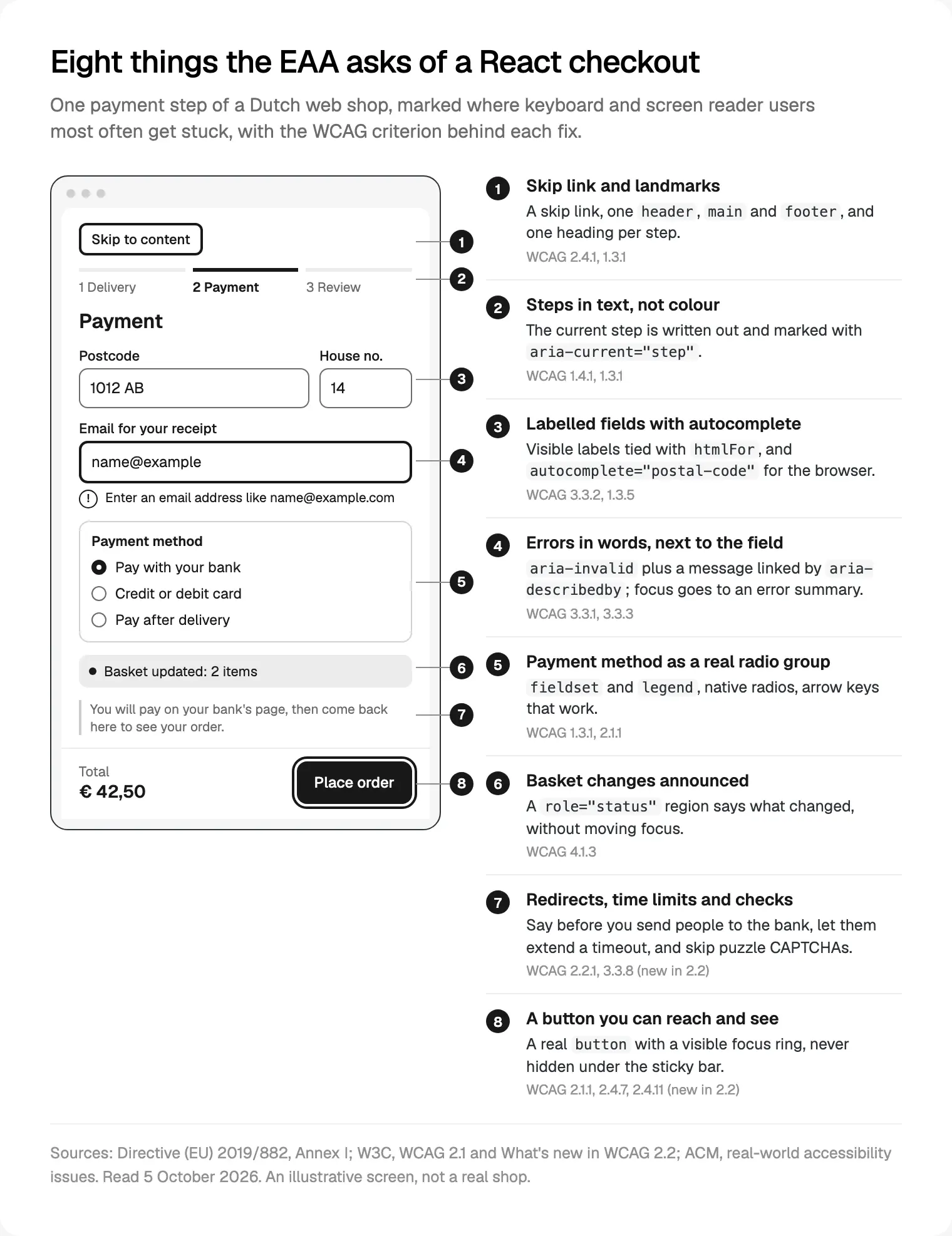
Below are the fixes in the order my developers make them, the approach behind the accessible React front ends for Dutch teams we build.
Semantic components and focus in client-side routing
Fix the components, not the pages
Most accessibility bugs in a React app live in a handful of components: Button, Link, Field, Select, Dialog, Menu. If a div with an onClick stands in for a button, every page using it fails the keyboard, so I fix the library first.
The rules are boring and they work: a real button for actions, next/link for links (it renders an a), one h1 per page, and header, nav, main and footer landmarks with a skip link. Next.js ships eslint-plugin-jsx-a11y in its default lint set, which flags missing alt text and invalid ARIA before review.
Set lang="nl" on the html element per locale and mark English passages with lang="en"; the ACM lists wrong language settings among common problems.
Focus after a client-side route change
Client-side transitions don't reload the page, so Next.js includes a route announcer that reads document.title, then the h1, then the URL. Give every route a unique title in its metadata.
The gap is a multi-step checkout inside one route. Moving from delivery to payment changes state, not the URL, so nothing is announced and focus stays on a button that has gone. My developers move focus to the new step's heading with a ref (and tabIndex={-1}), mark the step with aria-current="step" and update the title.
Forms, errors, modals and menus
Forms and errors
Every field gets a visible label tied with htmlFor; a placeholder is not a label. React's `useId` hook generates the ids that link a field to its hint and error through aria-describedby. Add autocomplete tokens such as postal-code, email and tel, so browsers and password managers can fill the form.
When a Dutch postcode and house number fill in the street, announce it in a status region and keep the street editable.
On submit, show an error summary at the top, move focus to it and link each item to its field. Mark the field with aria-invalid, keep what was typed and write errors as instructions: "Enter an email address like name@example.com", not "Invalid input". Tick "billing address same as delivery" by default.
Modals and menus
I build dialogs to the WAI-ARIA modal dialog pattern: focus moves inside on open, Tab stays inside, Escape closes, and focus returns to the element that opened it. The native dialog element with showModal() does most of this; otherwise use a well-tested headless library rather than your own focus trap.
Menus open on click and Enter, not hover alone, with aria-expanded on the toggle. The cookie banner never covers the focused element.
I don't install accessibility overlays. The ACM's list of real-world accessibility issues names them as a problem, because they can disrupt the assistive tools people already use.
Images, media and the checkout itself
Images and media
I make alt text a required field in the CMS and in the image component's props, written for what a shopper needs to know. Decorative images get alt="". WCAG 2.1 asks for a contrast ratio of at least 4.5:1 for body text and 3:1 for buttons, inputs and focus rings.
Check the layout at 200% zoom and at 320 CSS pixels wide, where reflow applies. Videos need captions; carousels need a pause control.
The checkout
This is where orders are lost:
- Basket updates: "Added to basket" and quantity changes go into a
role="status"region, so a screen reader hears them without focus jumping. - Quantity steppers: labelled "Increase quantity of Rain jacket", not a bare plus sign.
- Payment methods: a
fieldsetwith alegendand native radios. Your provider's card fields need titles and labels too, so test its components, not only yours. - Bank redirects: say before the redirect that people will pay on their bank's page, and land them on a confirmation page with a clear title and
h1. - Time limits: warn before a basket or payment session expires and let people extend it.
- Bot checks: no puzzle CAPTCHA; use background checks with an accessible fallback.
Live order status needs the same care. Shipora, a delivery app built around live tracking, is one my team designed; on a build like that I would announce only changes that matter, such as "Out for delivery", not every map update.
Testing with axe, a keyboard and a screen reader
Deque's axe-core says it finds on average 57% of WCAG issues automatically and flags others as "incomplete" for manual review. Playwright's accessibility testing guide agrees that many problems only show up in manual testing.
This is the order my team tests in:
- Lint in the editor and CI with
eslint-plugin-jsx-a11y. - Run axe on every pull request with
@axe-core/playwrighton the key flows, from search to checkout. Scope it withwithTagstowcag2a,wcag2aa,wcag21a,wcag21aaandwcag22aa, and fail the build on new violations. - Keyboard pass of each flow: Tab, Shift+Tab, Enter, Space, arrows and Escape, with focus always visible.
- Screen reader pass with VoiceOver on Mac and iPhone, NVDA on Windows and TalkBack on Android, because they behave differently.
- Write it down: each finding with its WCAG criterion, impact and fix date, which feeds the statement and any notification.
Still picking a stack? See choosing between Framer, Webflow and Next.js. Selling in the US too? See ADA accessibility for New York fintechs.
Where I would start
I would start with checkout and sign-in, not the homepage. The law names payment and identification, and that is where the ACM found orders failing. Audit those flows by keyboard and screen reader, group the findings by component, fix the components, then add axe to CI so the fixes hold. Write the statement from that record, and notify the regulator if anything serious stays open.
If you want help, that is my Next.js work for Amsterdam teams, part of my React and Next.js development service; you can also read how I work. It starts with a free 30 minute intro call where you share the URL and the flows that worry you, then a written scope and one fixed quote.
Frequently asked questions
Does the European Accessibility Act apply to my web shop in the Netherlands?
Yes, if consumers can buy from it and you are not a micro-enterprise. Since 28 June 2025, Book 6 of the Dutch Civil Code requires consumer e-commerce services to meet the directive's accessibility requirements, supervised by the ACM. That covers web shops, booking platforms, meal-ordering apps, subscriptions and marketplaces. Banking and financial services fall under the AFM.
Is my small business exempt from the EAA?
Only if you meet both conditions in article 230fc: fewer than 10 employees, and an annual turnover or balance sheet total of €2 million or less. A disproportionate burden exemption also exists, but it needs a documented assessment, renewed at least every five years, and you must tell the regulator.
Does the EAA apply to B2B SaaS?
Usually not. The Dutch definition of an e-commerce service covers services provided at the individual request of a consumer, with a view to a consumer contract, so a tool sold only to companies falls outside it. That changes if consumers can sign up and pay. Have counsel check your sign-up and billing set-up.
Which WCAG version do I need for EAA compliance?
Today the cited standard is EN 301 549 v3.2.1, built on WCAG 2.1 level AA. Version 4.1.1, published in September 2026, adopts WCAG 2.2 and becomes the reference once the Commission cites it in the Official Journal. The ACM expects WCAG 2.2 AA to become the standard during 2026, so I build to 2.2 AA, which covers both.
Where do I publish the accessibility statement?
The directive puts the information in your general terms and conditions or an equivalent document, and Dutch guidance asks for an easy-to-find statement on the website or app. Link it from every footer, offer it orally too, and describe the service, how it works and how it meets each requirement.
What fines can the ACM give for an inaccessible website?
Under the Dutch consumer enforcement act, the ACM can impose an order subject to penalty or a fine of up to €900,000 or 1% of turnover, whichever is higher. So far it has led with checks: its 2026 review asked the worst shops to improve or face enforcement. You must also report serious problems yourself within one week.
Is an automated axe scan enough to prove compliance?
No. Deque says axe-core finds on average 57% of WCAG issues automatically and flags some results for manual review. Keyboard traps, unclear errors, focus lost after a step change and poor alt text need a person to find them. Run axe on every pull request, then test each key flow by keyboard and screen reader before release.
Sources and method
I read every source on 5 October 2026. Dutch law texts come from wetten.overheid.nl; the translations are mine. I read the directive in the EU Publications Office copy of the Official Journal text. I tested no shop for this post; the figure is illustrative. Enforcement data is thin: the ACM's March 2026 check is the only Dutch measurement I found, and I found no published EAA fine.
- Publications Office of the EU, Directive (EU) 2019/882 on accessibility requirements for products and services, read 5 October 2026: op.europa.eu
- Overheid.nl, Implementatiewet toegankelijkheidsvoorschriften producten en diensten, read 5 October 2026: wetten.overheid.nl
- Overheid.nl, Burgerlijk Wetboek Boek 6, articles 230fa to 230fd, read 5 October 2026: wetten.overheid.nl
- Overheid.nl, Wet handhaving consumentenbescherming, articles 2.9, 2.15, 8.15 and chapter 8a, read 5 October 2026: wetten.overheid.nl, wetten.overheid.nl
- Business.gov.nl, Rules for accessibility of products and services, read 5 October 2026: business.gov.nl
- ACM, Accessibility of e-commerce and electronic communications services, read 5 October 2026: acm.nl
- ACM, Real-world accessibility issues, read 5 October 2026: acm.nl
- ACM, Majority of large online stores not accessible (24 March 2026), read 5 October 2026: acm.nl
- AFM, Accessibility of (digital) financial services, read 5 October 2026: afm.nl
- AFM, EAA notifications, read 5 October 2026: afm.nl
- AFM, EAA supervision update 3 (23 April 2026), read 5 October 2026: afm.nl
- AccessibleEU, EN 301 549 has been updated (7 September 2026), read 5 October 2026: accessible-eu-centre.ec.europa.eu
- ETSI, EN 301 549 V3.2.1 (2021), read 5 October 2026: etsi.org
- W3C, WCAG 2.1, read 5 October 2026: w3.org
- W3C WAI, What's new in WCAG 2.2, read 5 October 2026: w3.org
- W3C WAI, ARIA Authoring Practices, modal dialog pattern, read 5 October 2026: w3.org
- React, useId reference, read 5 October 2026: react.dev
- Vercel, Next.js Accessibility docs, read 5 October 2026: nextjs.org
- Deque, axe-core README, read 5 October 2026: github.com
- Microsoft, Playwright accessibility testing docs, read 5 October 2026: playwright.dev