


Framer vs Webflow in 2026 comes down to who runs the site: pick Framer if designers will run it and you want it live this month. Pick Webflow if marketers will publish lots of structured content (case studies, posts, integration pages) on their own. Pick Next.js when the website is part of the product, or when a front-end developer will own it for years.
On price, the builders are close. Billed yearly, Framer Pro is $30 a month and Webflow Premium $25, before seats and add-ons. Next.js is free to use, but someone must build, host and patch it: the project shipped four security releases between 20 July and 30 September 2026.
This guide is for founders and product leads choosing how to build a startup marketing site. It compares pricing (checked on 2 October 2026), editing, CMS, localisation, SEO, speed, code, lock-in and maintenance, then gives a decision table, migration paths and costly mistakes.
Framer vs Webflow in 2026: what each is, and where Next.js fits
Framer is a visual builder with hosting, CMS, localisation, analytics and A/B testing in one product. You design on a canvas, publish, and Framer hosts it. Developers can add React code components.
Webflow is a visual development platform whose Designer sits closer to HTML and CSS, with a deeper CMS. Localize, Analyze and Optimize are add-ons, and Webflow Cloud hosts Next.js, Astro and Vite apps beside a site. Its plans changed on 13 May 2026.
Next.js is an open-source React framework (MIT licence) maintained by Vercel. Version 16.3 launched on 3 August 2026, and the latest patch, 16.3.8, on 30 September. It has no visual editor, CMS or hosting: you add a headless CMS such as Sanity and a host such as Vercel, a Node.js server or a static export.
Framer vs Webflow vs Next.js pricing in 2026
Prices are per month billed yearly, with monthly billing in brackets, in US dollars before tax. Next.js has no plan, so its column shows typical tools.
| Framer | Webflow | Next.js stack | |
|---|---|---|---|
| Entry plan, own domain | Basic $10 ($15): 30 pages, 2 collections, 1,000 CMS items, 50 GB | Basic $15 ($25): 300 static pages, no CMS, 10 GB | Framework free; Vercel Pro $20 per developer seat |
| Main plan | Pro $30 ($45): 150 pages, 10 collections, 2,500 items, 100 GB | Premium $25 ($39): 300 static pages, 40 collections, 20,000 items, 50 GB | Sanity Free: 20 seats, 10,000 documents |
| Room to grow | Add-ons to 700 pages, 40,000 items, 2 TB | Bandwidth to 2.5 TB; Team plan $2,500, annual contract | Sanity Growth $15 per seat, 25,000 documents |
| Extra people | Editor $20 ($30); content editor $10 ($15); 10 seats max | Full seat $39 ($45); limited seat $15 ($19); reviewers free | Set by the CMS |
| Languages | $20 ($25) per locale, up to 20 | $9 ($12) per locale up to 3; Advanced $29 ($35) up to 10 | Developer time |
| A/B testing | $50 ($60) per 500,000 events | Optimize from $299 ($379) | Third-party tool |
| Redirects, staging | Pro and above only | 301 redirects from Basic | In code |
Monthly billing costs 50% more on Framer Pro and 56% more on Webflow Premium, so commit yearly once you are sure. Watch Webflow's bandwidth: the first extra 50 GB costs $20 billed yearly ($30 monthly).
A worked example
One designer, two marketers and one extra language, billed yearly:
- Framer Pro: $30 site, the designer as free workspace owner, two content editors at $10, one locale at $20: $70 a month ($100 monthly).
- Webflow Premium: $25 site with the owner's seat, two limited seats at $15, one Localize locale at $9: $64 a month ($89 monthly), or $84 with 100 GB of bandwidth.
- Next.js: Vercel Pro plus Sanity Free is about $20 a month in tools. The real cost is developer time for every layout, upgrade and fix.
Editing and CMS depth: who can change what
Editing for marketers
Framer is the easiest for non-developers. Content editors can update the CMS, edit translations and use on-page editing; roles and permissions arrive on Pro. Anyone with full editor access can move things, so the designer must own the components.
Webflow separates design from content more firmly. Full seats design the site; limited seats edit content or build pages from designer-approved components. In my view marketers belong in that content role, because the Designer expects you to think in classes and layout.
With Next.js, marketers work in the headless CMS. Sanity's free plan includes live preview and visual editing, but new layouts need a developer. If you choose this route, here is how I take a Figma file to Next.js.
CMS limits and structure
Webflow has the deeper CMS: 40 collections and 20,000 items on Premium, reference fields linking collections, CSV import, scheduled and per-item publishing, RSS and content APIs. Case studies, integrations and posts that reference each other work natively.
Framer's CMS is simpler: 10 collections and 2,500 items on Pro, expandable with add-ons, and its Server API can sync content from a source such as Notion. Next.js inherits whatever CMS you choose, shaped to your business, at the cost of designing every content type yourself.

Localisation: launching in more than one language
- Framer charges $20 per locale billed yearly, up to 20. Text, titles and alt text sit in one localisation table; AI translation uses credits, manual translation does not. Paths and CMS slugs can be translated, the lang and hreflang tags are automatic (not editable), and a reverse layout setting handles Arabic and Hebrew.
- Webflow Localize Essential costs $9 per locale for up to 3 locales and 10,000 AI-translated words per locale a month, with locale subdirectories and an hreflang sitemap. Translated URL slugs, per-locale images and visitor routing need Advanced, at $29 per locale.
- Next.js documents locale detection and routing, but the translation workflow, hreflang and switcher are yours to build.
For three extra languages that is $60 a month on Framer, $27 on Webflow Essential or $87 on Advanced. Whichever you use, Google advises against redirecting visitors automatically by perceived language. More on structure in multilingual websites for Malaysia and on right-to-left layouts in Arabic RTL interface design.
SEO controls and performance
SEO controls
None of the three holds back a well-run site. Webflow exposes the most without code: titles, descriptions, Open Graph, canonicals, sitemap controls, robots.txt and llms.txt, schema support, 301 redirects and per-item indexing. Framer has built-in SEO from Basic but redirects only from Pro. Next.js has a metadata API, so anything is possible, and anything can be forgotten.
What the field data says about speed
HTTP Archive joins real Chrome user data with each site's technology. A site passes Core Web Vitals when, at the 75th percentile, Largest Contentful Paint is within 2.5 seconds, Interaction to Next Paint within 200 milliseconds and Cumulative Layout Shift under 0.1. Mobile, August 2026:
| Platform | Sites assessed | Pass all three | Good LCP | Good INP |
|---|---|---|---|---|
| Webflow | 60,684 | 71.2% | 78.1% | 88.6% |
| Framer | 11,240 | 70.6% | 82.5% | 80.2% |
| Next.js | 374,612 | 35.1% | 53.1% | 59.8% |
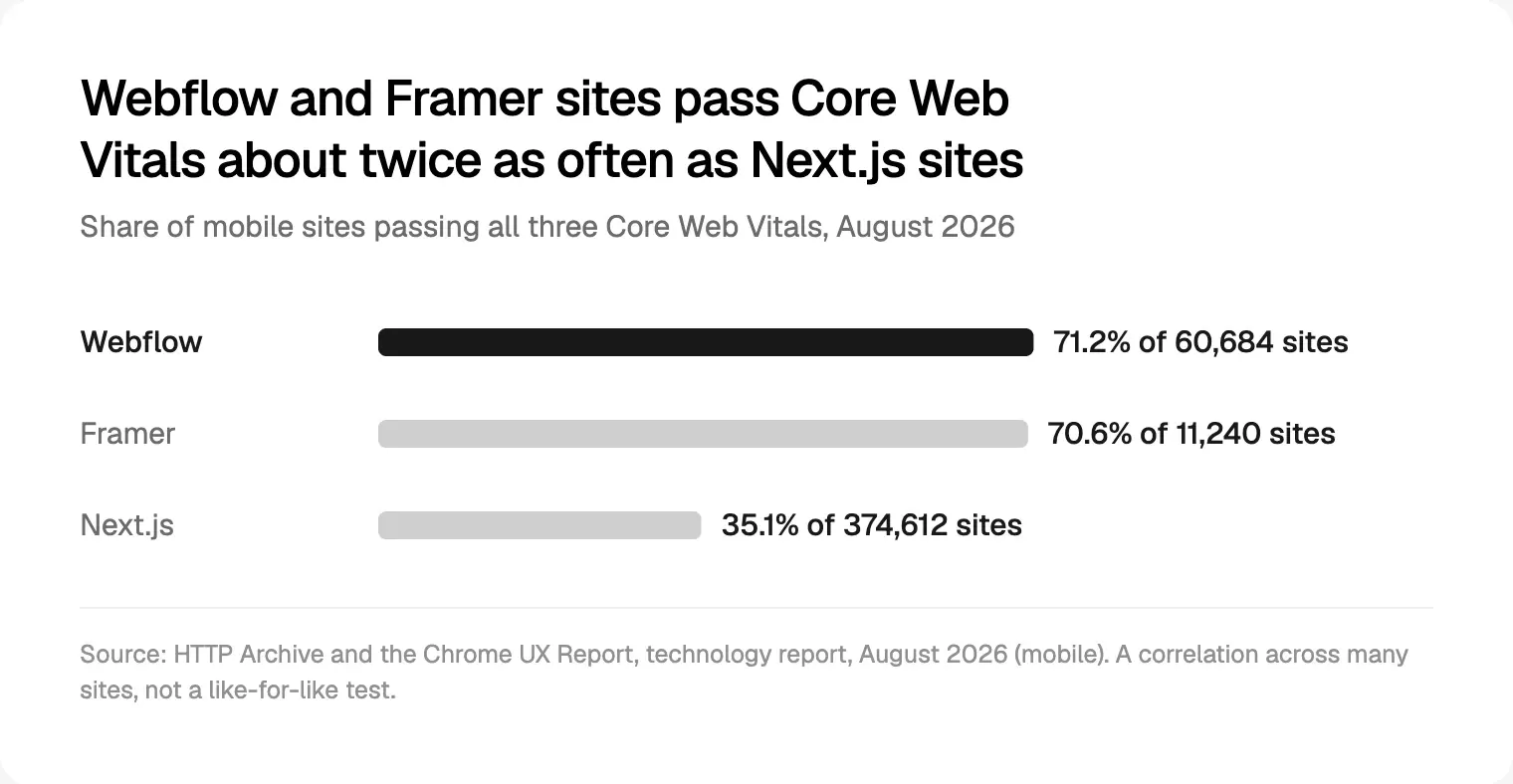
Next.js also powers heavy apps and stores, so this is correlation, not a like-for-like test: builders give you a high floor; Next.js gives a high ceiling and a low floor. Hosting matters too: Framer serves Basic sites from 20 locations and Pro from more than 300.
Interactions, integrations and custom code
Animation. Framer treats motion as a design property on the canvas. Webflow's Interactions, built on GSAP with a visual timeline, are on every plan, and Webflow has made GSAP free for everyone. In Next.js every animation is code someone writes and maintains.
Code. Framer code components are React, written in its built-in editor. Webflow allows custom code from Basic, and Premium adds React code components imported through DevLink, with props designers set on the canvas, plus REST APIs and an MCP server. Next.js can use anything on npm and share authentication with your product.
Hosting, lock-in and who maintains it
Framer does not offer HTML export for self-hosting, because its optimisation runs on its own infrastructure. CMS content exports through plugins as CSV or JSON, and you can sit Framer behind a reverse proxy. Leaving means rebuilding the design.
Webflow exports HTML and CSS on paid Workspace plans (Core is $19 a month billed yearly). CMS content exports collection by collection, forms stop working, and code cannot be imported back. Treat it as a safety net, not a migration.
Next.js runs on a Node.js server, Docker, a static export or adapters, so hosting is never locked. You are locked to your developers instead.
On the builders, the platform patches hosting and security, and you absorb price changes: Webflow's May 2026 reset cut former Business customers' included bandwidth from 100 GB to 50 GB. On Next.js someone owns upgrades. Since July 2026 security releases are pre-announced roughly monthly, and each major version gets maintenance for two years, so 15.x (released 21 October 2024) reaches the end of that window this month.
When a coded Next.js site is worth it
- The site shares the product's login, data or components: signed-in states, live pricing, docs generated from code.
- You need programmatic pages beyond builder limits, past 20,000 Webflow or 40,000 Framer items.
- Security rules are strict: custom headers or a strict Content Security Policy. Webflow keeps custom security headers for its Team plan, and Framer warns a custom CSP can break a site.
- A developer will own it, upgrading and patching for years.
If none applies, a builder is usually the better decision. When code is right, I can build it; see front-end development. Stores face the same platform-or-code question; for Saudi Arabia I compare Salla, Zid and a custom Next.js store.
Decision framework by startup situation
| Situation | My default | Why | Watch for |
|---|---|---|---|
| Pre-seed landing page | Framer | Fastest to live; $10 a month, yearly | No redirects or staging on Basic |
| Seed site, designer-led | Framer Pro | Motion, speed of change, analytics | 2,500 items before add-ons |
| Series A, marketers publishing weekly | Webflow Premium | Content roles, scheduled publishing | Seats and bandwidth |
| Content-heavy, thousands of entries | Webflow Premium | 20,000 items, references, CSV import | Team plan beyond that |
| Two to ten languages | Webflow Localize or Framer | Subdirectories, hreflang, workflow | Translated URLs need Advanced |
| Marketing site plus app | Builder plus Next.js | Marketing ships without engineers | Shared tokens, routing |
| Site is part of the product | Next.js | One codebase and system | A named owner |
For a single launch page, the message and speed of iteration matter more than the platform; see my approach to landing page design.
How to choose in seven steps
- Name who edits the site in twelve months, and how often.
- Count year-one and year-two content: pages, CMS items, collections and languages, against the limits above.
- List what must connect to the product: login, live data, shared components, app routes.
- Name the maintainer: who owns the design system and plan, or who patches the code.
- Price a full year with every seat, locale, bandwidth step and add-on.
- Build one real page first and have the future editors change copy and publish.
- Plan the exit: clean URLs, a redirect list, exportable content.
Migration paths between the three
- Framer to Webflow, or back: neither imports the other's design, so rebuild. Move CMS content as CSV.
- Webflow to Next.js: use the code export as a reference, export components as React through DevLink, and move content by CSV or API, or keep Webflow as the CMS.
- Builder plus Next.js: an app subdomain, Framer behind a reverse proxy, or a Next.js app mounted at /app with Webflow Cloud.
In every case, crawl the old site, map each old URL to a new one, add 301 redirects and check them before switching off, as Google's site move guidance describes.
Common mistakes to avoid
- Choosing for the launch, not year two. Ask who publishes the fortieth case study.
- Missing a plan limit: no CMS on Webflow Basic; no redirects or staging on Framer Basic; 50 GB on Webflow Premium.
- Comparing yearly with monthly prices, a gap of 50% or more.
- Building in Next.js with no owner. An unpatched framework is a security risk.
- Assuming code means speed. The field data says otherwise.
- Publishing machine translation unreviewed. Treat it as a first draft.
- Letting a builder sprawl without shared components and variables.
Frequently asked questions
Is Framer better than Webflow for SEO?
Neither has a ranking advantage. Both produce fast, crawlable pages with editable titles, descriptions and sitemaps. Webflow exposes more controls without code, such as schema support and per-item indexing, and includes 301 redirects from Basic; Framer adds redirects only from Pro. Content, structure and links matter far more than the platform.
Is Next.js overkill for a startup marketing site?
Usually, at the start. If the site is pages, posts and forms, and marketers must publish without engineering, Framer or Webflow will be faster and cheaper. Next.js becomes right when the site shares login, data or components with the product, or when a developer will own upgrades and security patches for years.
Can I export a Framer site to code or to Webflow?
No. Framer says it does not offer HTML export for self-hosting, because its optimisation depends on its own infrastructure. You can export CMS content through plugins as CSV or JSON and import it into Webflow or another CMS, but the design must be rebuilt, so keep your design system documented.
Which is cheapest: Framer, Webflow or Next.js?
For a simple site, Framer Basic at $10 a month billed yearly is the cheapest builder plan with your own domain. With a real CMS, Webflow Premium ($25) and Framer Pro ($30) are close, and seats, languages and bandwidth decide the total. Next.js tools can cost $20 a month, but developer time usually makes it dearest.
Can marketers edit a Next.js site without a developer?
They can edit content if the site uses a headless CMS. Tools like Sanity offer live preview and visual editing, so changing copy, images and posts feels close to a builder. New layouts or sections usually still need a developer, unless the team builds a block-based page builder into the CMS first.
Did Webflow change its pricing in 2026?
Yes. On 13 May 2026 Webflow merged its CMS and Business plans into Premium, at $25 a month billed yearly or $39 monthly, with 20,000 CMS items and 40 collections. Basic rose to $15 billed yearly. Existing sites move at their next renewal or billable change on or after 29 June 2026, or 16 November 2026 in Freelancer and Agency workspaces.
Can I use Framer or Webflow for marketing and Next.js for the app?
Yes, and it is often the best split. The simplest set-up puts the app on a subdomain. For one domain, Framer supports reverse proxy hosting with path-based routing, and Webflow Cloud can mount a Next.js app at a path such as /app. Share design tokens so both feel like one product.
My recommendation
Start with Framer for a designer-led launch, and Webflow if marketing will publish structured content every week. Move to Next.js when the website becomes part of the product, not because it sounds more serious. Whichever you choose, invest in the design system: it is what makes the site easy to change and to move. This is the core of my website design work. For what changes on SaaS sites next year, see the web design trends I expect in 2027.
Sources and method
Prices were read from the official pages on 2 October 2026, in US dollars before tax, using each page's yearly and monthly billing; no conversion was needed. The worked example is my arithmetic. Speed data is HTTP Archive's August 2026 release, mobile, per site, and shows correlation, not cause. Webflow's Help Center blocked automated reading, so I used its pricing, blog and product pages. Framer's help pages differ on export; I followed the article that addresses it directly.
- Framer, pricing page, 2 October 2026: framer.com
- Framer Help, HTML export and self-hosting, 2 October 2026: framer.com
- Framer Help, porting your data, 2 October 2026: framer.com
- Framer Help, reverse proxy hosting, 2 October 2026: framer.com
- Framer Help, adding a locale, 2 October 2026: framer.com
- Framer Help, localised page paths, 2 October 2026: framer.com
- Framer Help, language attribute and hreflang, 2 October 2026: framer.com
- Framer Help, RTL best practices, 2 October 2026: framer.com
- Framer Developers, code components, 2 October 2026: framer.com
- Framer Developers, Server API, 2 October 2026: framer.com
- Webflow, plans and pricing, 2 October 2026: webflow.com
- Webflow Blog, updated pricing and simplified plans (updated 20 July 2026), 2 October 2026: webflow.com
- Webflow, CMS feature page, 2 October 2026: webflow.com
- Webflow Developers, code components, 2 October 2026: developers.webflow.com
- Webflow Developers, Webflow Cloud bring your own app, 2 October 2026: developers.webflow.com
- GSAP, pricing page, 2 October 2026: gsap.com
- Next.js Blog, releases and security posts, 2 October 2026: nextjs.org
- Next.js Blog, security release programme (13 July 2026), 2 October 2026: nextjs.org
- Next.js, support policy, 2 October 2026: nextjs.org
- Next.js Docs, deploying, 2 October 2026: nextjs.org
- Next.js Docs, internationalisation, 2 October 2026: nextjs.org
- Next.js Docs, metadata, 2 October 2026: nextjs.org
- npm, next package (version, licence, release dates), 2 October 2026: npmjs.com
- Vercel, pricing, 2 October 2026: vercel.com
- Sanity, pricing, 2 October 2026: sanity.io
- HTTP Archive, Core Web Vitals technology report (August 2026 data), 2 October 2026: httparchive.org
- web.dev, Core Web Vitals thresholds, 2 October 2026: web.dev
- Google Search Central, multi-regional and multilingual sites, 2 October 2026: developers.google.com
- Google Search Central, site moves with URL changes, 2 October 2026: developers.google.com
Tags: Websites, Framer, Webflow, Next.js, CMS