

The web design trends for 2027 that will matter on a SaaS site aren't a colour or a font everyone copies. They're changes you can check and date: CSS that now ships across browsers, two big design systems that made glass and motion fashionable again, search engines that answer in their own words, and accessibility law that already applies in the EU.
My forecast: in 2027 the sites that stand out will feel like the product, quick, calm and honest about what it does. The flashy part of each trend is usually the part I'd skip.
This is for founders, marketers and product leads planning a site or a redesign. I do SaaS website design and build those sites in code, so each trend gets what it is, the evidence, who it suits, and what I would and wouldn't do. The predictions are mine; the facts are dated and sourced.
How I picked these web design trends for 2027
I started from what actually shipped: a trend you can't build reliably is a picture, not a website. For browsers I used the data behind Baseline (the web-features project), which records when a feature works in Chrome, Edge, Firefox and Safari, and checked it against MDN and the Interop 2026 list, the features browser makers agreed to fix together this year. For design, search and law I read the companies' own pages and the directive itself.
| Trend | Status on 10 October 2026 | Who it suits | My call for a SaaS site |
|---|---|---|---|
| View transitions | Same-page: Baseline. Page-to-page: Chrome and Safari | Sites with a few key paths | Use, as an enhancement |
| Scroll-driven animations | Chrome and Safari, not Firefox | One or two sections | Use lightly, never scroll-jack |
| Container queries | Size queries: widely available | Every CMS-driven site | Use by default |
| Popover and anchor positioning | Popover: Baseline. Anchors: core in all three engines | Menus, tooltips, glossary terms | Use, with a fallback |
| Glass and expressive motion | App design systems, 2025 | Brands that already feel premium | One layer at most |
| Answers written for AI search | Google: no special files needed | Every B2B site | Rewrite key pages plainly |
| Accessibility and INP | EU law; Core Web Vital | Everyone | Non-negotiable |
| Craft against AI-built sites | AI site builders since 2025 | Funded teams with a real product | Show the product |
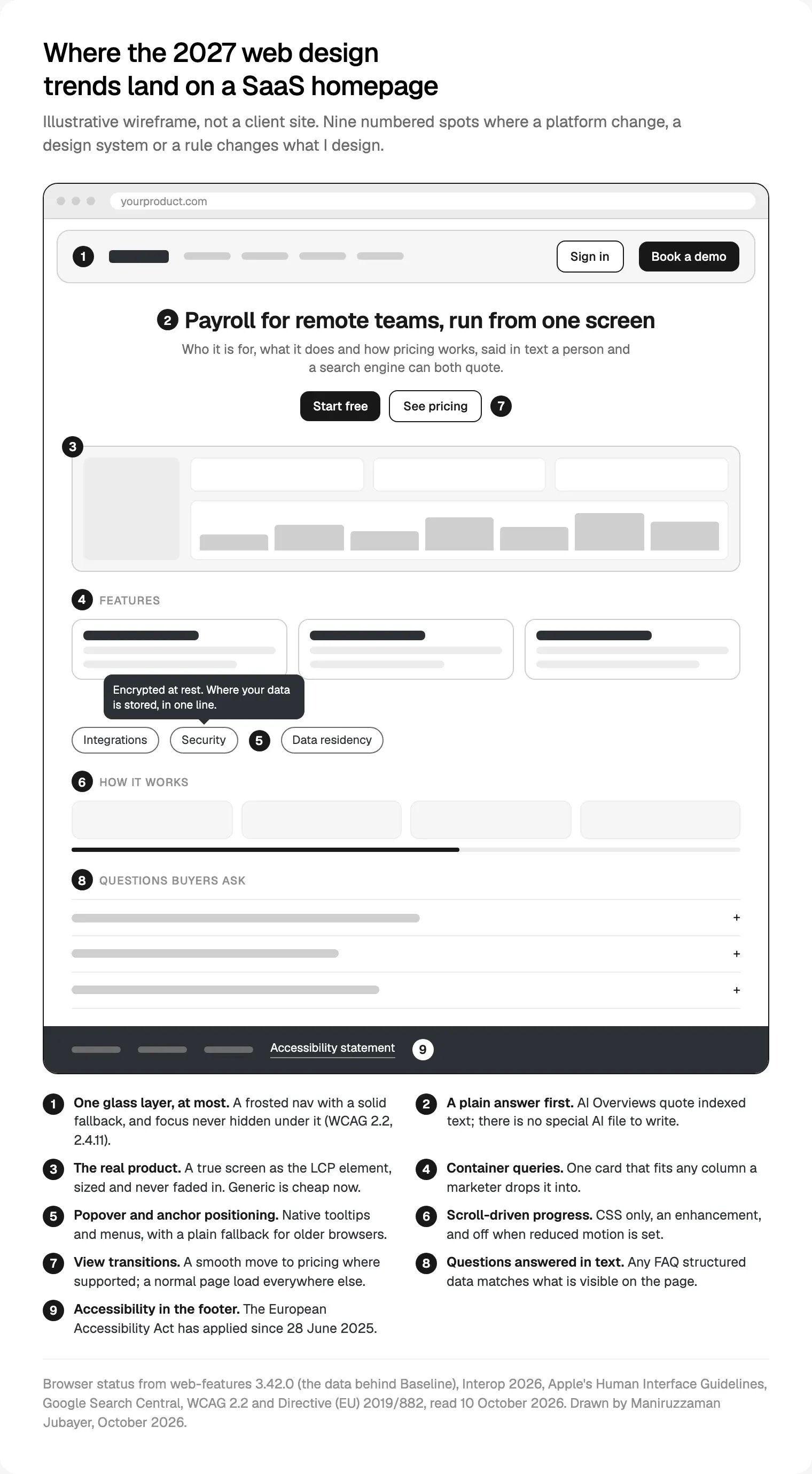
Page transitions without a JavaScript framework
What it is. View transitions let the browser animate between two states of a page, or between two pages: a card grows into the page it opens while the header stays put. That used to need a single-page app.
The evidence. Same-document view transitions reached Baseline on 14 October 2025, when Firefox 144 joined Chrome 111 and Safari 18. The page-to-page kind a normal marketing site uses shipped in Chrome 126 (June 2024) and Safari 18.2 (December 2024), per the web-features data on cross-document view transitions. Firefox doesn't have it yet. It's on the Interop 2026 list published on 12 February 2026, so I expect wider support during 2027, but that's a forecast.
Who it suits. Sites with a few connected pages: homepage to pricing, blog index to post.
What I'd do. Turn on page-to-page transitions for two or three key paths and keep them short. A browser without support just loads the next page, as it does today.
What I wouldn't do. Animate every link, or use a transition to cover a slow page. A pretty fade makes a two-second wait feel longer.
Scroll motion in CSS, and the scroll-jacking I still won't build
What it is. Scroll-driven animations tie motion to scroll position in plain CSS: a reading bar that fills, a product screen that settles as it arrives. Until now this needed JavaScript listening to every scroll, a common cause of janky pages.
The evidence. The scroll-driven animations status shows Chrome 115 (July 2023) and Safari 26 (September 2025), not Firefox, so it isn't Baseline yet. It's an Interop 2026 focus area.
Who it suits. A "how it works" section or a long article.
What I'd do. Use it in one or two sections, as an enhancement: the content reads fully with no motion, and the motion switches off when someone has asked their device to reduce it. WCAG's guidance on animation from interactions names parallax as motion that is often not essential, and I take that as a warning.
What I wouldn't do. Scroll-jacking: taking over the wheel so one flick moves a fixed distance, or pinning a section until an animation ends. It breaks trackpads, keyboards and the reader's sense of place.
Components that fit wherever they land
What it is. Container queries let a component style itself by the space it's given, not the screen size. Popover and anchor positioning give the browser native menus, tooltips and pop-ups placed next to whatever opened them.
The evidence. Container size queries became Baseline on 14 February 2023 and widely available on 14 August 2025; style queries followed on 19 May 2026 with Firefox 151. The popover attribute reached Baseline on 27 January 2025. Anchor positioning is in Chrome 125, Safari 26 and, since 13 January 2026, Firefox 147. The data doesn't mark it Baseline yet, because two values of one property ship only in Safari 27.
Who it suits. Container queries suit every site whose marketers build pages in a CMS: one testimonial card can sit in a three-column row, a sidebar or a full-width band and look designed in each. Anchors suit mega menus, pricing tooltips and glossary terms.
What I'd do. Build every component with container queries from day one. Part of choosing between Framer, Webflow or Next.js for a startup site is how each handles components. Use popover for menus and dialogs, and anchors for placement, with a plain fallback position.
What I wouldn't do. Hide facts a buyer came for inside tooltips. If "data stored in the EU" matters to the sale, it belongs in visible text.
Glass and expressive motion: Liquid Glass and Material 3 Expressive
What it is. In 2025 both big platform design systems moved towards depth and motion. Apple introduced Liquid Glass on 9 June 2025, a translucent material across iOS 26, iPadOS 26, macOS Tahoe 26, watchOS 26 and tvOS 26. Google announced Material 3 Expressive on 13 May 2025 for Android 16 and Wear OS 6, with springier motion, bolder type and more shape.
The evidence for websites. Both companies limit their own trend. Apple's Human Interface Guidelines on materials put Liquid Glass on a layer of controls and navigation above the content, say not to use it in the content layer, and ask for it sparingly. Apple's iOS 26 release notes show iOS 26.1 added a tinted, more opaque option. Google's research write-up on M3 Expressive reports 46 studies with more than 18,000 participants, and warns that what suits a media app might not suit a banking interface.
Who it suits. Consumer brands whose app already uses them. A B2B site selling to finance buyers should borrow much less.
What I'd do. One frosted layer at most, usually the sticky navigation, on a solid fallback. The blur (backdrop-filter) has been Baseline since September 2024, but the query that detects a "reduce transparency" setting works only in Chromium browsers, so I design the solid version first. The sticky bar must never hide a focused link, which WCAG 2.2 covers in its focus not obscured criterion (level AA).
What I wouldn't do. Glass cards over busy gradients, or body text on a translucent panel. Contrast changes with whatever scrolls underneath, so you can't promise it.

Writing for AI answers: plain pages beat AI text files
What it is. Buyers now meet your site through answers: Google's AI Overviews and AI Mode, and chat tools with search. The trend being sold is a file "for AI". The one I believe in is older: say plainly, in text, what the product is and who it's for. I go further in generative engine optimization for a company website.
The evidence. Google's page on AI features and your website, updated 10 December 2025, says a page must be indexed and eligible for a snippet, with no additional technical requirements, and that you don't need new machine-readable files, AI text files or markup. It also says structured data should match the visible text. OpenAI's crawler documentation says sites that block OAI-SearchBot won't be shown in ChatGPT search answers; blocking GPTBot, its training crawler, is a separate choice.
Who it suits. Every B2B site, especially where buyers ask the same questions before a demo: pricing model, integrations, security, data location.
What I'd do. Rewrite the hero and key pages so each answers one question in its first lines. Give security, integrations and pricing their own pages, with headings worded the way buyers search, and decide on purpose which crawlers robots.txt allows. It's how I plan B2B site structure around buyer questions, and people read it better too.
What I wouldn't do. Publish an "AI file" and call it a strategy, or keep answers in images, late-loading tabs or a chat widget. If it isn't in the page text, nothing can quote it.
Accessibility and speed: the floor, not a trend
The European Accessibility Act (Directive (EU) 2019/882) has applied since 28 June 2025 to services including e-commerce and banking, with an exemption for micro-enterprises providing services. A marketing site isn't always in scope; the sign-up or checkout behind it may be. I've covered what the European Accessibility Act asks of React teams separately, and I design to WCAG 2.2 level AA whatever the market.
On speed, Interaction to Next Paint replaced First Input Delay as a Core Web Vital on 12 March 2024. Google's Web Vitals thresholds call an INP of 200 milliseconds or less good, an LCP of 2.5 seconds or less good and a CLS of 0.1 or less good, at the 75th percentile of visits.
Every motion library, glass effect and chat widget costs main-thread time, which INP measures. So motion runs in CSS where possible, the hero image (usually the LCP element) is never faded in, and every third-party script earns its place. It's the same list as the landing page checklist I use before launch.
AI-built sites make craft the difference
What it is. A decent-looking site is now close to free. Figma launched Figma Sites and Figma Make on 7 May 2025, one to publish sites from Figma, one to turn prompts into working prototypes and apps, and many builders now generate a page from a sentence.
The evidence. Google's spam policies name scaled content abuse, including using generative AI to make many pages that add no value for users.
Who it suits. A pre-seed team testing a message can ship an AI-built page. A funded SaaS with a real product needs a site that couldn't belong to anyone else.
What I'd do. Show the real product: true screens and states, sized properly and loaded fast. Write sentences no competitor could truthfully copy. Spend craft where AI tools rarely get it right: focus states, empty and error states, how a menu behaves on a phone. I use AI coding tools where they save time, and a person who knows the design reviews every change.
What I wouldn't do. Fill the site with stock illustrations and invented dashboards, which make a real product look unreal.

Web design fads I would skip in 2027
Everywhere next year, and still not worth it on a SaaS site:
- Scroll-jacking. It fights the reader's own controls.
- Glass on every card. Apple asks for restraint itself, and contrast on a moving background can't be promised.
- Custom cursors. Extra script, nothing on touch screens.
- A chatbot on every page. If the answer matters, put it in the page.
- Autoplay video heroes. Heavy, often the LCP element, and they push the product down.
My take
If I were planning a SaaS site for 2027, I'd work in this order. First, rewrite key pages to answer buyer questions in plain text. Second, rebuild the component library with container queries, native popovers and a fast, accessible baseline. Third, add view transitions and one scroll-driven section as enhancements. Fourth, only if the brand already has the polish, one layer of glass. Most of it can land on the site you have.
If you'd like a team to plan and build it, that's my website design work for SaaS teams. It starts with a free 30 minute intro call, then a written scope and one fixed quote, with no retainer. More about me is on my about page.
Frequently asked questions
What are the biggest web design trends for 2027?
My forecast: page-to-page view transitions, scroll-driven animation in CSS, components built with container queries, native popovers and anchor positioning, restrained glass inspired by Apple's Liquid Glass, and pages written plainly for AI search. Under them sit two requirements rather than trends: accessibility, with the European Accessibility Act applying since June 2025, and speed, measured by Core Web Vitals including INP.
Should my website copy Apple's Liquid Glass?
Borrow the idea, not the whole material. Apple's guidelines put Liquid Glass on controls and navigation, not content, and ask for it sparingly; iOS 26.1 even added a more opaque tinted option. On a website I'd use one frosted layer, usually the sticky navigation, with a solid fallback and contrast checked over the busiest background.
Do I need an llms.txt or AI text file for AI search?
Not for Google. Its documentation on AI features says you don't need new machine-readable files, AI text files or markup to appear in AI Overviews or AI Mode; the page has to be indexed and eligible for a snippet. What helps is plain, specific text that answers real questions, structured data that matches the visible page, and robots.txt rules chosen on purpose.
Are view transitions safe to use on a production website?
Yes, as an enhancement. Same-page view transitions have been Baseline since October 2025. Page-to-page transitions work in Chrome from version 126 and Safari from 18.2, and browsers without support simply load the next page as usual. Keep them short, use them on a few key paths, and respect the reduced motion setting so nobody is forced to watch them.
Do AI website builders make custom SaaS website design pointless?
No, they move the bar. AI tools make an average-looking page cheap, which makes average less persuasive. A funded SaaS still needs real product screens, specific words, accessible components and a fast build its marketing team can extend. AI-built pages suit early message tests, and Google's spam policies warn against mass-producing AI pages that add no value.
Which web design trends affect SEO in 2027?
Speed and clarity matter most. Heavy motion and third-party widgets can hurt INP and LCP, which Google measures as Core Web Vitals. Answers hidden in images, tabs or chat widgets can't be quoted by AI Overviews. The new CSS features barely touch rankings directly, but they replace heavy JavaScript.
Should we redesign our SaaS website to follow the 2027 trends?
Only if something else changed: the product, the buyer, the pricing model or the market. Most of these trends can be added to an existing site in stages. A redesign that only follows fashion tends to date quickly and puts your search traffic at risk for little gain. If you do go ahead, start with a website redesign checklist that protects rankings.
Sources and method
I read every source on 10 October 2026. Browser versions and dates come from web-features 3.42.0, the data behind Baseline. The trends, their order and my calls are a forecast from practice, not measurements. I found no primary research on how B2B buyers respond to these trends, and Google's M3 Expressive figures are its own.
- web-features (W3C WebDX Community Group), browser support data, version 3.42.0, read 10 October 2026: github.com
- webstatus.dev, cross-document view transitions, scroll-driven animations, container queries, popover, anchor positioning, read 10 October 2026: webstatus.dev, webstatus.dev, webstatus.dev, webstatus.dev, webstatus.dev
- web.dev, Interop 2026, 12 February 2026, read 10 October 2026: web.dev
- Apple Newsroom, Liquid Glass announcement, 9 June 2025, read 10 October 2026: apple.com
- Apple, Human Interface Guidelines, Materials, read 10 October 2026: developer.apple.com
- Apple Support, About iOS 26 Updates, read 10 October 2026: support.apple.com
- Google, Material 3 Expressive for Android and Wear OS, 13 May 2025, read 10 October 2026: blog.google
- Google Design, Expressive Design: Google's UX Research, read 10 October 2026: design.google
- Google Search Central, AI features and your website, updated 10 December 2025, read 10 October 2026: developers.google.com
- Google Search Central, spam policies, read 10 October 2026: developers.google.com
- OpenAI, Overview of OpenAI Crawlers, read 10 October 2026: developers.openai.com
- EUR-Lex, Directive (EU) 2019/882, read 10 October 2026: eur-lex.europa.eu
- W3C, WCAG 2.2 and Understanding SC 2.4.11 and SC 2.3.3, read 10 October 2026: w3.org, w3.org, w3.org
- web.dev, INP becomes a Core Web Vital (12 March 2024) and Web Vitals, read 10 October 2026: web.dev, web.dev
- Figma, Config 2025 press release, 7 May 2025, read 10 October 2026: figma.com
Tags: Web design, Trends, SaaS, CSS, Accessibility, AI search