The landing page checklist I run before every launch
The landing page checklist I run before every launch: message, ad match, forms, consent, Core Web Vitals, mobile, accessibility, tracking, SEO and legal.

This landing page checklist is the one I run before any page goes live, whether my team built it as part of my landing page design services or you built it yourself. It has ten groups: message and offer, ad-to-page match, form and consent, speed and Core Web Vitals, mobile, accessibility, tracking and events, SEO basics, legal pages, and what to test after launch. I run them in that order, because a fast page with the wrong promise still wastes the click.
Each item has a pass mark set by the platforms, not by my taste. Google calls a Largest Contentful Paint of 2.5 seconds or less good, an Interaction to Next Paint of 200 milliseconds or less good, and a Cumulative Layout Shift of 0.1 or less good. Google Ads rates landing page experience as one of three parts of Quality Score.
It's for founders, marketers and product leads with a launch date and a page that is nearly ready.
The landing page checklist at a glance
| Group | What I check | How I check it |
|---|---|---|
| 1. Message and offer | One audience, one promise, one action near the top | A cold read by an outsider |
| 2. Ad-to-page match | Headline, offer and button repeat the ad | Click every live ad |
| 3. Form and consent | Few fields, right keyboards, clear errors | Real leads sent from a phone |
| 4. Speed | LCP, INP and CLS in Google's good range | PageSpeed Insights, Chrome DevTools |
| 5. Mobile | Readable, tappable, works in in-app browsers | A real iPhone and Android phone |
| 6. Accessibility | Contrast, focus, labels, target size | Keyboard, VoiceOver, an automated audit |
| 7. Tracking and events | Consent state, key events, UTM tags | Tag Assistant, DebugView, Test Events |
| 8. SEO basics | Title, description, indexing decision | Search Console URL Inspection |
| 9. Legal pages | Policies that match the tags you load | Policy read against firing tags |
| 10. After launch | First test, field data, lead quality | A weekly review call |
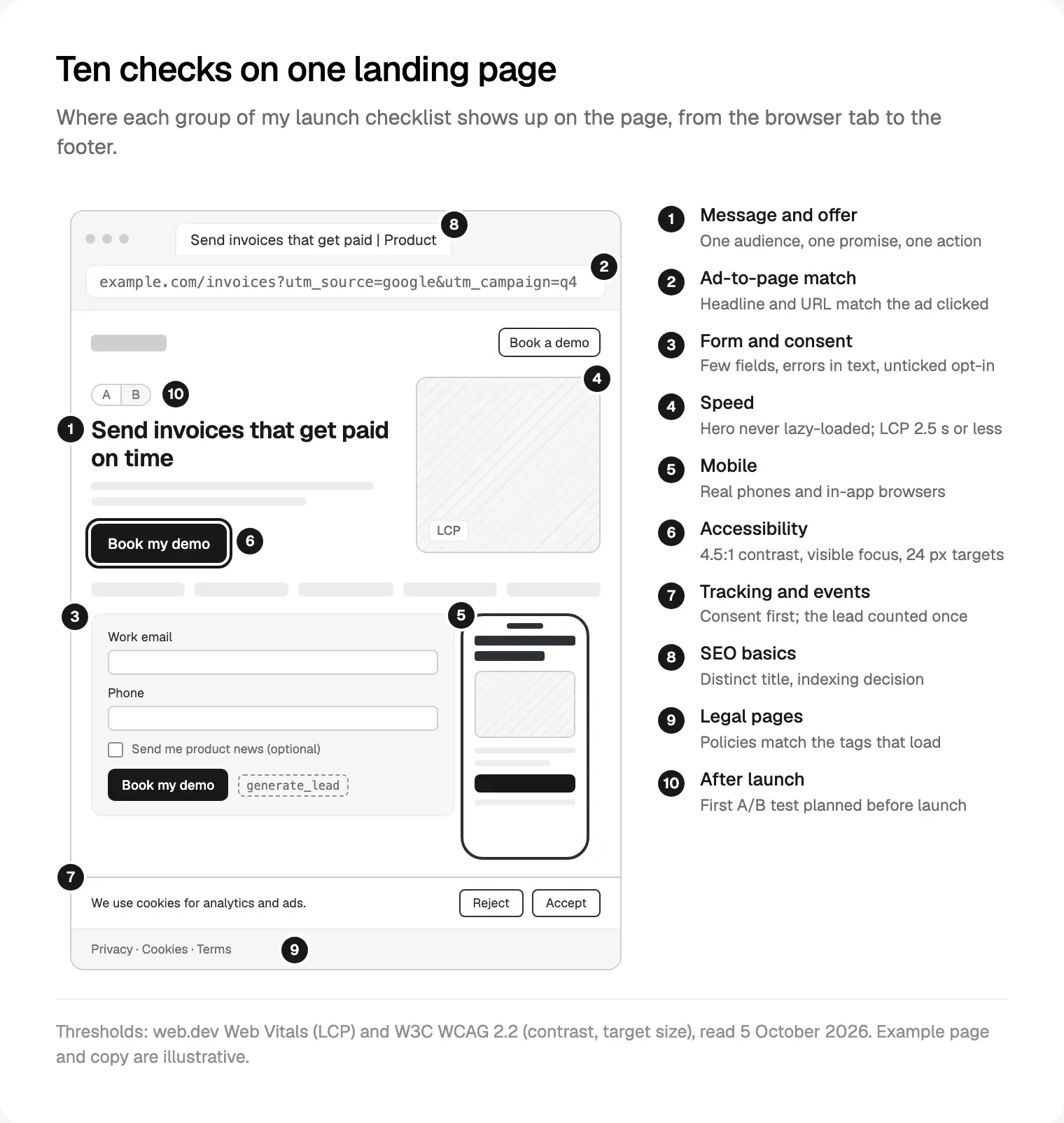
I run it in two passes: groups 1 to 6 on the preview link, while fixes are cheap, and groups 7 to 9 on the live domain before ads go on, since tags, cookies and indexing often behave differently there.
Message and offer: one promise a stranger can repeat
Can a visitor tell, from the top of the page, who it is for, what they get and what to do next? Google's guide to optimising ads and landing pages asks for "useful, original information" and suggests putting important information towards the top.
What I check:
- A headline that names an outcome in the visitor's words, not a slogan.
- One primary action. A softer second one is fine; a newsletter box, a careers link and a demo button competing is not.
- Proof next to the claim it supports.
- What happens after the click: what the demo is, how long it takes, who runs it.
How I check it: someone outside the project reads the hero and tells me, in their own words, what the page offers and what the button does. If they can't, the message fails. I also read the headings alone, in order. They should still sell the product.
Ad-to-page match: does the click keep its promise?
Google's Quality Score documentation defines landing page experience as how relevant and useful the page is to people who click your ad, rated above average, average or below average. Google's landing page guide adds that the page should "mirror the call-to-action in your ad text". For each ad group, I fill in this table:
| What the ad says | What the page must repeat |
|---|---|
| The headline promise | The H1, in the same words where possible |
| The offer (trial, demo, guide) | The same offer, named on the main button |
| The audience | That audience named in the hero |
| The language or country | A page in that language, with local proof |
Then the plumbing. Google's destination requirements can disapprove an ad whose page returns an HTTP error to its AdsBot crawler, redirects to a different domain, or isn't accessible in the targeted location. I open every final URL with its tracking parameters, watch for redirect chains in Chrome DevTools, and load it from the target country over a VPN.
When one page must serve ads with different promises, I make variants rather than a vague headline that fits none of them.
Forms and consent: the part that collects the lead
The form is where the page earns its keep, and it is often tested once, with a fake email, on a laptop.
- As few fields as the next step needs. web.dev's sign-up form guidance says to "ask for as little as possible".
- The right keyboard and autofill:
type="email",type="tel"and matchingautocompletevalues. WCAG 2.2 requires that purpose to be machine-readable (1.3.5). - Visible labels, not placeholders that vanish when you type.
- Errors described in text next to the field (WCAG 3.3.1), never colour alone.
- A button that says what happens ("Book my demo") and a thank-you state that says what comes next.
- A marketing opt-in as its own unticked box, with a privacy link beside the form.
How I check it: on a real phone I submit one lead with autofill, one with mistakes and one with a double tap, then confirm each reaches the CRM with its page, campaign and consent choice. A form that drops the UTM source has quietly broken your reporting.
Speed and Core Web Vitals: the numbers I hold a page to
Google's Web Vitals overview measures at the 75th percentile of page loads, segmented across mobile and desktop. So three in four visits must be good, on each device type.
| Metric | Good | Poor | What usually breaks it |
|---|---|---|---|
| Largest Contentful Paint | 2.5 s or less | Over 4 s | A heavy or lazy-loaded hero, slow fonts |
| Interaction to Next Paint | 200 ms or less | Over 500 ms | Tag stacks, chat widgets, sliders |
| Cumulative Layout Shift | 0.1 or less | Over 0.25 | Images without dimensions, banners, embeds |
I treat the "needs improvement" band in between as a fail before launch, because pages only get heavier after it.
One honest limit: PageSpeed Insights reports real users over the previous 28-day collection period, which a new page doesn't have. At launch you work from lab data: Lighthouse, run on a simulated mid-tier phone on a mobile network.
My first fixes, from web.dev's guides to optimising LCP and optimising CLS:
- Never lazy-load the hero image; give it
fetchpriority="high"instead. - Width and height on every image and video, so the browser reserves the space.
- Reserved space for late arrivals such as cookie banners and embeds.
- Chat widgets and heatmaps delayed until the first interaction.
For INP, I throttle the CPU in the DevTools Performance panel and use the page: menu, FAQ, form. Your platform decides how much of this you control, which I compare in Framer, Webflow or Next.js for a startup site.
Mobile and accessibility, checked on real devices
Mobile
Google indexes the mobile version of a page's content, so I treat the phone layout as the main page. On a real iPhone and a real Android phone, on mobile data, I check that:
- The headline and button are visible with the cookie banner open.
- Nothing scrolls sideways, tables and embeds included.
- A sticky button never covers fields or error messages.
- Phone numbers open the dialler.
- The page works in the in-app browsers of Instagram, Facebook and LinkedIn, opened from the real ad link.
Accessibility
I design to WCAG 2.2 level AA (the W3C edition of 12 December 2024). The failures I find most:
- Contrast below 4.5:1 for text, or below 3:1 for large text, buttons, icons and field borders (1.4.3 and 1.4.11).
- Targets smaller than 24 by 24 CSS pixels without enough spacing (2.5.8), usually footer links and checkboxes.
- Focus hidden behind a sticky header or cookie banner (2.4.11).
How I check: I tab through the page without a mouse, let VoiceOver read the hero and form, then run Lighthouse or axe DevTools. In the EU, the European Accessibility Act covers e-commerce and banking services among others, one reason how I design accessible landing pages starts with these checks.
Tracking and events: prove every number before ads go live
Wrong tracking means launch week runs on bad numbers, so I never hand this group off untested.
Consent. Google's consent mode setup guide lists four parameters (ad_storage, analytics_storage, ad_user_data, ad_personalization), the last two added in November 2023. Where consent is required, all four default to denied before any tag loads, and wait_for_update gives a slow banner time to answer (Google's example uses 500 milliseconds). Google's EU user consent policy covers visitors in the EEA, the UK and Switzerland. In basic mode, tags wait for the visitor's answer; in advanced mode they load with denied defaults and send cookieless measurements, as Google's consent mode overview explains. Choosing a mode is for your privacy counsel; making it work is my job.
Events. The lead is marked as a key event in GA4. Meta's Conversions API best practices say to send the same events through the pixel and the server, and Meta deduplicates them only with a matching event name and event ID, received within 48 hours.
UTM tags. Google's URL builder guidance says to always use utm_source, utm_medium and utm_campaign. Write the naming rules down, or "Facebook", "facebook" and "fb" become three sources.
How I test one event:
- Open the live page in a private window, from a URL with test UTM tags, with Tag Assistant connected.
- Reject cookies. DevTools' Application panel should show no analytics or advertising cookies.
- Reload, accept and submit a test lead.
- See the event in GA4 DebugView, which streams the last 60 seconds and keeps the last 30 minutes.
- See the lead in Meta's Test Events tool from browser and server, counted once.
- Find it in the CRM with the same source, then label or delete the test leads.
Personal data never goes into URLs: the Google Analytics terms (section 7) forbid sending Google personally identifiable information, and ?email= on a thank-you URL does exactly that.
SEO basics and legal pages
SEO basics
Even an ads-only page needs an indexing decision. A page meant to rank gets a distinct title (Google sets no length limit but truncates it to fit the screen), a meta description Google sometimes uses for snippets, and one H1. Campaign variants get noindex or a canonical link to the main version.
A noindex page must not be blocked in robots.txt, or Google never sees the rule. I finish with URL Inspection in Search Console, whose live test shows a screenshot of what Google's crawler renders.
Legal pages
The policies must describe the tags you actually load. The Google Analytics terms require an appropriate privacy policy, and the Meta Business Tools Terms (section 3) require a clear and prominent notice on each page where the pixel runs, plus consent where the law demands it.
So: privacy, cookie and terms links in the footer, a privacy link by the form, and someone reading the policy against the tags that fired in step 2 above. Some markets add rules, such as permit numbers on property ads, which I cover in Dubai property ad rules for websites. I'm a designer, not a lawyer: the wording is your counsel's, and showing it clearly is mine.
What I test in the first weeks after launch
- Launch day: every ad clicked again, one real lead per traffic source, ad policy status checked.
- First week: form starts against submissions, CRM leads against GA4 key events, and lead quality from sales.
- After a few weeks: field data in PageSpeed Insights, and the landing page experience column in Google Ads. Google's Quality Score guidance suggests conversion rate as a proxy for it. What counts as a good rate is in landing page conversion rate benchmarks.
The first A/B test is planned before launch: one variable, usually the headline or the offer, and a written rule for what result would make us switch. During launch month my team posts a written update in Slack every 48 hours and holds a review call each week.
Budgeting the page and its variants? My guide to landing page design costs in Dubai covers what drives the quote.
Where I would start
With one day left, run groups 2, 3 and 7 first: ad match, the form and tracking. Those lose money on every click from the first hour. Then speed, then the rest. For patterns worth borrowing, I collected landing page examples sorted by the job they do.
If you would rather hand the whole list to one team, it is built into my landing page work for launches and campaigns: message and wireframe first, then design, build and every check above on the live URL. It starts with a free 30 minute intro call, then a written scope with one fixed quote and no retainer. More about me and the team I lead is on my about page.
Frequently asked questions
What should be on a landing page checklist?
Ten groups: message and offer, ad-to-page match, form and consent, speed and Core Web Vitals, mobile, accessibility, tracking and events, SEO basics, legal pages, and a test plan for after launch. Each item needs a pass mark you can check with a tool or a real phone, such as Google's 2.5 second target for Largest Contentful Paint.
What is a good page speed for a landing page?
Use Google's Core Web Vitals: Largest Contentful Paint of 2.5 seconds or less, Interaction to Next Paint of 200 milliseconds or less, and Cumulative Layout Shift of 0.1 or less, at the 75th percentile of page loads, mobile and desktop separately. A new page has no field data yet, so test with Lighthouse first.
How do I check conversion tracking before launch?
Submit a real test lead on the live URL with Tag Assistant connected and test UTM tags in the address. Watch the event arrive in GA4 DebugView, marked as a key event. In Meta's Test Events tool, check the lead arrives from the pixel and the Conversions API, deduplicated by a matching event ID. Then find it in your CRM.
Do I need a cookie banner on a landing page?
If the page loads analytics or advertising tags and has visitors in the EEA, the UK or Switzerland, Google's EU user consent policy requires consent where the law does, and Meta's Business Tools Terms require consent before its cookies wherever the law demands it. Set Google's consent defaults to denied before tags load; counsel confirms what applies.
Should a landing page be indexed by Google?
It depends on the page's job. A page meant to rank needs a distinct title, a meta description and one H1. Campaign variants that only receive ad traffic usually get a noindex rule or a canonical link to the main version. Never block a noindex page in robots.txt, or Google can't see the rule.
What should I test after launching a landing page?
Click every ad again on launch day and submit one real lead per traffic source. In the first week, compare form submissions, GA4 key events and CRM leads, and ask sales about lead quality. After a few weeks, check field data in PageSpeed Insights and landing page experience in Google Ads. Run one A/B test at a time.
Sources and method
I read every source on 5 October 2026. The order, tools and trade-offs are my own practice. Google publishes no numeric threshold for landing page experience, only three ratings, so I give none.
- web.dev (Google), Web Vitals, LCP, INP and CLS, read 5 October 2026: web.dev, web.dev, web.dev, web.dev
- web.dev (Google), optimising LCP and CLS, and sign-up form best practices, read 5 October 2026: web.dev, web.dev, web.dev
- Google for Developers, About PageSpeed Insights, read 5 October 2026: developers.google.com
- Google Ads Help, Quality Score, landing page optimisation and Quality Score improvements, read 5 October 2026: support.google.com, support.google.com, support.google.com
- Google Advertising Policies Help, Destination requirements, read 5 October 2026: support.google.com
- Google Tag Platform, consent mode setup and overview, read 5 October 2026: developers.google.com, developers.google.com
- Google, EU user consent policy, read 5 October 2026: google.com
- Meta for Developers, Conversions API best practices and deduplication, read 5 October 2026: developers.facebook.com, developers.facebook.com
- Meta, Business Tools Terms, section 3, read 5 October 2026: facebook.com
- W3C, WCAG 2.2, Recommendation of 12 December 2024, read 5 October 2026: w3.org
- European Commission, European Accessibility Act, read 5 October 2026: commission.europa.eu
- Google Analytics Help, key events, DebugView and URL builders, read 5 October 2026: support.google.com, support.google.com, support.google.com
- Google, Google Analytics Terms of Service, section 7, read 5 October 2026: marketingplatform.google.com
- Google Search Central, title links, snippets, noindex and mobile-first indexing, read 5 October 2026: developers.google.com, developers.google.com, developers.google.com, developers.google.com
- Search Console Help, URL Inspection tool, read 5 October 2026: support.google.com