



A website redesign checklist is mostly about order. Before anyone opens Figma, I write down the goal, save a baseline from Search Console and analytics, and list every URL the old site has, marking the pages that rank, convert or earn links. During design and build, structure and real copy come first, then the design system, accessibility and a performance budget per template.
On launch day the 301 redirect map, canonicals, sitemaps, Search Console checks, structured data and analytics events go live together. After launch I compare 404s, clicks and Core Web Vitals against the baseline for months, not days.
This is for founders and marketing or product leads at SaaS and B2B companies planning a new site. I do SaaS website design, and the 26 checks below are the list I work from. When a redesign loses search traffic, the first place I look is checks 3 and 15: nobody listed the old URLs, so nobody could redirect them.
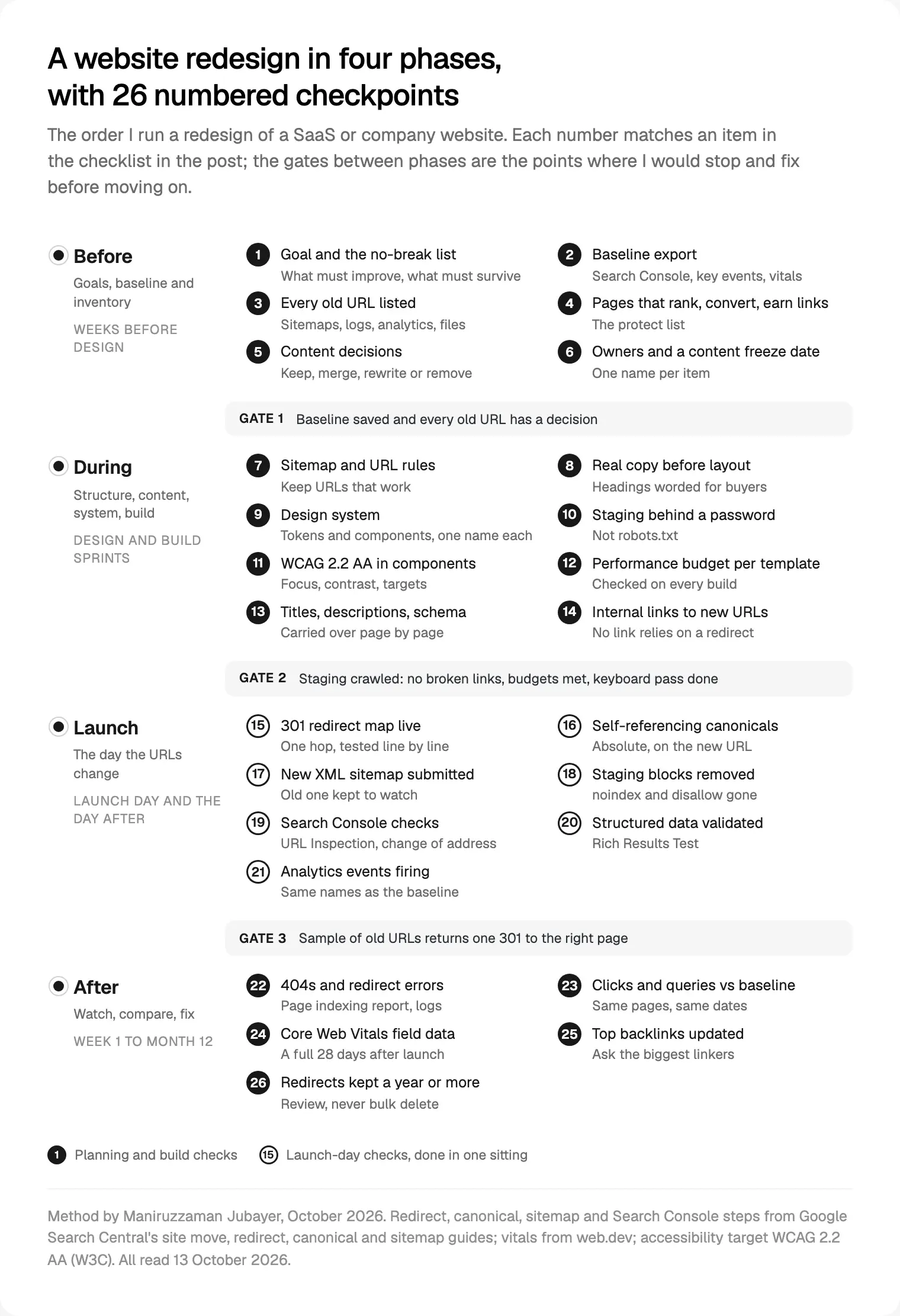
The website redesign checklist at a glance
Checks 1 to 6 come before design, 7 to 14 during design and build, 15 to 21 on launch day and 22 to 26 after.
- Goal, plus a list of what must not break
- Baseline export: Search Console, key events, Core Web Vitals
- Every old URL listed, files included
- Pages that rank, convert or earn links marked to protect
- A decision per URL: keep, rewrite, merge or remove
- One owner per check, and a content freeze date
- New sitemap and written URL rules
- Real copy before layout
- Design system: tokens and components
- Staging behind a password
- WCAG 2.2 AA built into components
- A performance budget per template
- Titles, descriptions and structured data carried over
- Internal links pointing at new URLs
- 301 redirect map live and tested
- Self-referencing canonicals
- New XML sitemap submitted
- Staging blocks removed
- Search Console checks, and a change of address if the domain moves
- Structured data validated
- Analytics events firing under the same names
- 404s and redirect errors fixed
- Clicks and queries compared with the baseline
- Core Web Vitals checked on field data
- Top backlinks updated
- Redirects kept for a year or more
Before: a goal and a baseline you can compare against
Check 1, the goal. In the intro call I ask three things. What has changed since the site was built: the product, the buyer, the pricing model or the market? What should the new site do better, in a number you already track? And what must not break? That last answer becomes a list: the pages that bring in most leads, URLs your product or help centre links to, and links printed in sales decks and partner pages.
If the real problem is inside the product, start with my UX audit checklist for live products instead.
Check 2, the baseline. You can't measure a drop you didn't record, so I save three things:
- Search Console: clicks, impressions and queries per page. Search Console keeps data for the last 16 months, so I export the full window, not the default three months.
- Analytics: the key events, written down by their exact names. If the new site renames them, before and after can't be compared.
- Core Web Vitals: the Search Console Core Web Vitals report groups similar pages using real Chrome user data from the last 28 days. I screenshot each group, mobile and desktop.
Before: the URL and content inventory
Check 3, every old URL. This makes the redirect map possible. Google's guide to site moves with URL changes (updated 20 August 2026) suggests building the list from sitemaps, server logs, analytics, Search Console's links reports and the CMS, including images and videos. I add a crawl and an export of every CMS collection.
Check 4, the protect list. I mark pages that get search clicks, pages where people land before a key event, and pages that earn links. The Search Console Links report shows your top linked pages, but it's a sample, so I treat it as a floor.
Check 5, a decision per URL. A protect-list page never gets "remove" without a destination. Pages with no equivalent can return 404 or 410: Google says it doesn't index URLs that return a 4xx code, treats every 4xx except 429 the same, and flags error pages served with a 200 as soft 404s.
Check 6, owners and a freeze date. A check without an owner is a check nobody does, so each gets one name. After the freeze date any change to the old site is logged, so a page published in the project's last month doesn't fall out of the map.
During: structure, content and the design system
Check 7, sitemap and URL rules. The cheapest redirect is the one you don't need, so I keep every URL that works. Where URLs do change, the rules are written down: lowercase, hyphens, no dates in post URLs, one trailing-slash style. Plans differ on redirects and staging, which is part of choosing between Framer, Webflow and Next.js.
Check 8, real copy before layout. The words decide the structure, so I don't design around placeholder text. On SaaS sites that usually means headings worded the way buyers ask, about security, integrations and how pricing works.
Check 9, the design system. Every page is assembled from components with the same names in Figma and in code, plus tokens for colour, type and spacing. That's what keeps page forty, built by a marketer, on brand. For the newer CSS that belongs in it, see the web design trends I expect in 2027.
During: build, accessibility and performance budgets
Check 10, staging behind a password. An indexed staging site is a duplicate of your launch. Google's advice on controlling what you share is to password protect private content. A robots.txt disallow isn't enough, because Google may still index disallowed URLs without their content, and a `noindex` rule only works if robots.txt doesn't block the page. Whatever you use, its removal goes on the launch list.
Check 11, accessibility in the components. I design and build to WCAG 2.2 level AA. W3C's what's new in WCAG 2.2 lists nine new success criteria, four at AA: focus not obscured (2.4.11), dragging movements (2.5.7), target size (2.5.8) and accessible authentication (3.3.8). When focus styles, contrast and target sizes live in the components, every new page inherits them. I still tab through each template.
Check 12, a performance budget per template. web.dev defines a performance budget as "a set of limits imposed on metrics that affect site performance". The article dates from 2018, so I use its idea, not its numbers: limits on hero image weight, script weight, font files and third-party tags, checked on every build. Targets are Google's Web Vitals: Largest Contentful Paint within 2.5 seconds, Interaction to Next Paint of 200 milliseconds or less, Cumulative Layout Shift of 0.1 or less, at the 75th percentile, mobile and desktop separately. Lighthouse can't measure INP without a user, so in the lab I watch Total Blocking Time.
Check 13, metadata carried over. Old titles and descriptions of protect-list pages go into the new CMS as the starting point; anyone who changes one does it on purpose. Structured data comes across too, in JSON-LD, which Google recommends in its introduction to structured data, describing only what is visible on the page.
Check 14, internal links. Menus, footers and in-text links point straight at new URLs, never through a redirect. Google's guide to crawlable links says it can't reliably extract URLs from <a> elements without an href, and every page you care about needs a link from another page.
Launch: the 301 redirect map
Check 15 decides if your search value moves with you. My map is a spreadsheet with one row per old URL from check 3: old URL, new URL, status code, note. The rules come from Google:
- Server-side permanent redirects. Google's page on redirects and Google Search (updated 14 April 2026) treats 301 and 308 as a signal that the target should be canonical; temporary 302, 303 and 307 redirects aren't.
- One hop. Googlebot can follow up to 10 hops, but the site move guide asks you to redirect straight to the final URL, or keep chains under five.
- No dumping on the homepage. Google advises against sending many old URLs to one irrelevant page. Merged pages can share a destination; removed pages return 404 or 410.
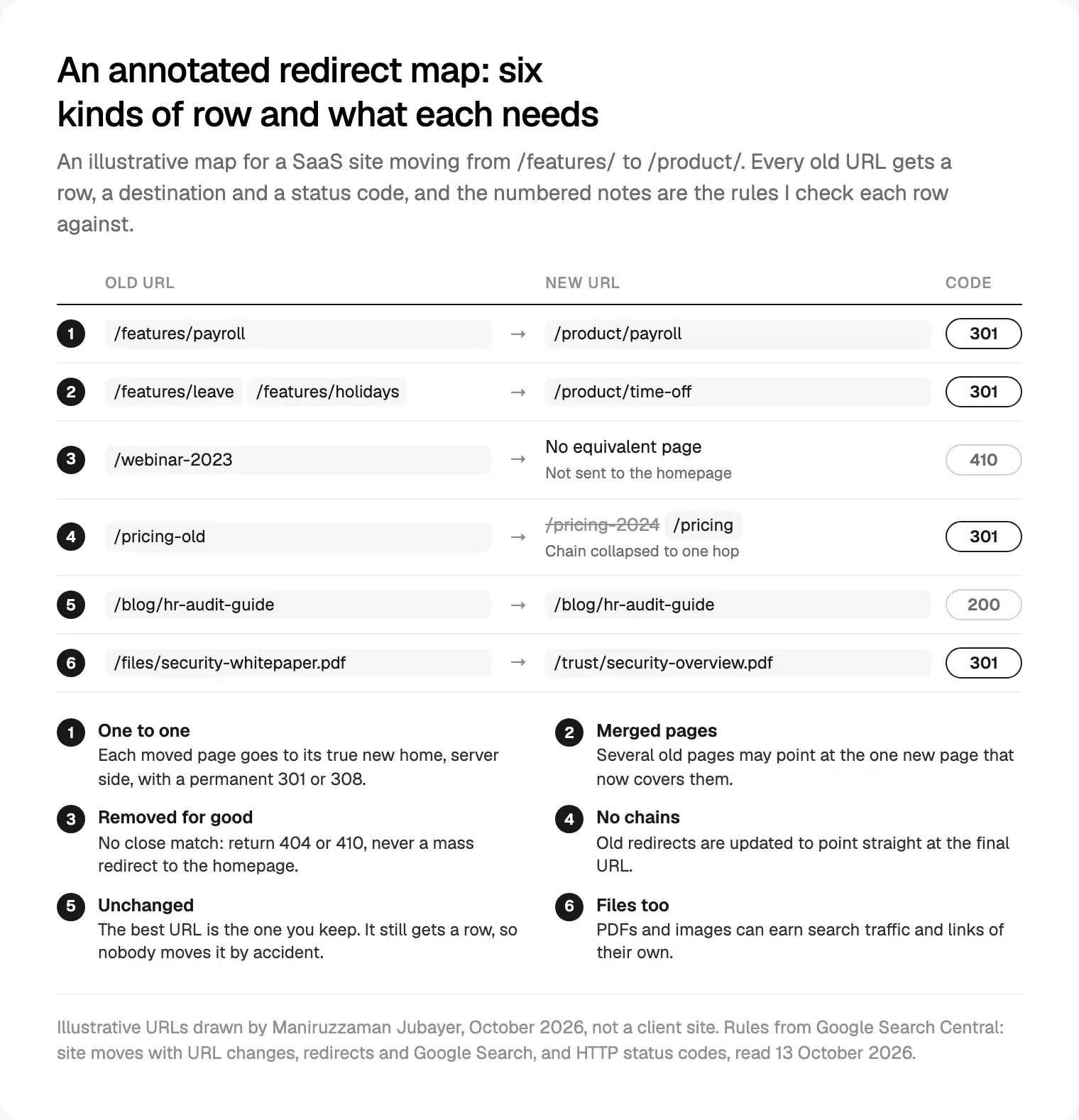
I test the map with a script on staging and again on the live domain: every old URL should return one 301 to a page that returns 200. That's how I plan redirects before a site moves.
Launch: canonicals, sitemaps, Search Console, structured data and analytics
The rest of launch day runs in this order:
- Remove staging blocks (18): password,
noindex, robots.txt disallow. - Turn on redirects (15) and run the test script on the live domain.
- Check canonicals (16). Each page carries a self-referencing
rel="canonical"with an absolute URL. Google's page on consolidating duplicate URLs rates redirects andrel="canonical"as strong signals and sitemap inclusion as weak, and asks for no conflicts between them. - Submit the new sitemap (17). Google's sitemap guide asks for absolute URLs, allows 50,000 URLs or 50 MB per file, and ignores
priorityandchangefreq. I keep the old sitemap submitted too, because the site move guide expects its indexed count to fall as the new one rises. - Search Console (19). Verify both properties and every variant, then run URL Inspection on a sample. The Change of Address tool is only for a new domain or subdomain, not path changes, HTTPS or www switches; Google then gives the new site extra weight for 180 days. If only the host changes, follow Google's guide to changing your hosting.
- Validate structured data (20) per template with the Rich Results Test. Valid markup makes a page eligible, nothing more.
- Fire every analytics event (21). Submit a real demo request and sign-up, and confirm each key event arrives under its baseline name.
What breaks SEO in a redesign, and how to prevent it
The symptoms use the status names in Search Console's Page indexing report.
| What breaks | What you see afterwards | Prevented by |
|---|---|---|
| Old URLs left without redirects | "Not found (404)"; clicks gone from those pages | Checks 3 and 15 |
| Old URLs all sent to the homepage | Visitors and search land on the wrong page | A one-to-one map |
| 302 used instead of 301 | The old URL can stay canonical | Server-side 301 or 308 |
| Chains from earlier redesigns | "Redirect error" | One hop per old URL |
Staging noindex or disallow shipped | "URL marked 'noindex'", "URL blocked by robots.txt" | Check 18 |
| Canonicals pointing at staging | The wrong URL indexed | Check 16 |
| Ranking copy and titles rewritten | Queries drop on the same pages | Checks 4 and 13 |
| Heavier templates | Vitals groups move to "Need improvement" or "Poor" | Check 12 |
After: the first weeks and months
Check 22, 404s and redirect errors. In the first week I read the Page indexing report and server logs daily and fix 404s on URLs with links or clicks first.
Check 23, clicks and queries. Compare the same pages over matching dates. Google says rankings fluctuate while it recrawls, a medium-sized site's new URLs may take "a few weeks or more" to appear, and the move is complete only once Googlebot has visited every old and new URL. A protect-list page still down after several weeks needs its redirect, canonical and copy checked.
Check 24, Core Web Vitals on field data. A new template has no real-user history on launch day, and the Search Console report works from the last 28 days. Its poor bands start above 4 seconds for LCP, 500 milliseconds for INP and 0.25 for CLS. I check after a full 28 days, against the screenshots from check 2.
Check 25, backlinks. Redirects carry links, but I still ask the sites linking most to old URLs to update them, and update every link you control, from profiles to ads.
Check 26, keep the redirects. Google says to keep them as long as possible, generally at least a year, and to consider keeping them for good; the Change of Address help asks for at least 180 days. I keep them indefinitely where the platform allows, and never delete them in bulk.
Where I would start
If launch is next month and none of this is done, do checks 2, 3 and 15 first: save the baseline, list every URL, build the redirect map.
If you'd like me to run the whole list, that's my website design service for B2B companies. I design the site and build it in Framer, Webflow or React and Next.js, with redirects, analytics and search checks part of launch. It starts with a free 30 minute intro call, then a written scope and one fixed quote, with no retainer. More about me is on my about page.
Frequently asked questions
What should be on a website redesign checklist?
Four phases. Before: goals, a baseline from Search Console and analytics, and every URL listed with the pages that rank, convert or earn links. During: structure, real copy, a design system, staging, accessibility and performance budgets. Launch: redirects, canonicals, sitemaps, Search Console, structured data and analytics. After: 404s, rankings and Core Web Vitals against the baseline.
How do I redesign a website without losing SEO?
List every old URL before design starts, keep the URLs that work, and map each one that changes to its closest new page with a server-side 301 redirect. Carry over titles, copy and structured data on ranking pages. On launch day check canonicals, submit the new sitemap and remove staging blocks, then compare clicks per page with your baseline.
How long should I keep 301 redirects after a redesign?
Google's site move guide says as long as possible, generally at least one year, and suggests considering keeping them indefinitely. If you moved domain and used the Change of Address tool, Google asks for at least 180 days, longer while old URLs still get search traffic. I keep them for good wherever the platform allows.
How long does it take rankings to recover after a website redesign?
Google says to expect temporary fluctuations while it recrawls, and that a medium-sized site's new URLs may take a few weeks or more to appear; larger sites take longer. The move is complete only after Googlebot has visited every old and new URL. If a key page is still down after several weeks, check its redirect, canonical and content.
Should I redirect deleted pages to the homepage?
No. Google's site move guide advises against redirecting many old URLs to one irrelevant destination such as the homepage. Send each old page to its closest new equivalent; merged pages can share one. If a page has no equivalent, let it return 404 or 410, which Google treats the same way and drops from the index.
When should I check Core Web Vitals after a redesign?
Test in the lab before launch with Lighthouse and Chrome DevTools, then judge on field data. Search Console's Core Web Vitals report uses the last 28 days of real Chrome user data, so give new templates a full 28 days. Good means LCP within 2.5 seconds, INP of 200 milliseconds or less and CLS of 0.1 or less.
Sources and method
I read every source on 13 October 2026. The order of checks and the gates are my own practice, and the redirect map is illustrative, not a client site. I found no reliable primary data on how much traffic a typical redesign loses, so I give none.
- Google Search Central, site moves with URL changes (updated 20 August 2026), read 13 October 2026: developers.google.com
- Google Search Central, redirects and Google Search (updated 14 April 2026), read 13 October 2026: developers.google.com
- Google Search Central, consolidating duplicate URLs (updated 10 July 2026) and building a sitemap (updated 8 July 2026), read 13 October 2026: developers.google.com, developers.google.com
- Google Search Central, HTTP status codes and network errors (updated 4 February 2026), read 13 October 2026: developers.google.com
- Google Search Central, changing your hosting, noindex, controlling what you share, crawlable links and structured data (all updated 10 December 2025), read 13 October 2026: developers.google.com, developers.google.com, developers.google.com, developers.google.com, developers.google.com
- Google, Rich Results Test, read 13 October 2026: search.google.com
- Search Console Help, Change of Address tool, Page indexing report, Links report and Core Web Vitals report, read 13 October 2026: support.google.com, support.google.com, support.google.com, support.google.com
- Google Analytics Help, GA4 Queries report (16 months of data) and key events, read 13 October 2026: support.google.com, support.google.com
- web.dev, Web Vitals (updated 31 October 2024) and Performance budgets 101 (5 November 2018), read 13 October 2026: web.dev, web.dev
- W3C, WCAG 2.2 and What's new in WCAG 2.2 (Recommendation of 5 October 2023), read 13 October 2026: w3.org, w3.org
Tags: Website redesign, SEO, Site migration, Core Web Vitals, Accessibility, SaaS