

ChatGPT apps design is the work of shrinking your product to the few things it does best and presenting them as small cards inside someone else's conversation. You don't own the screen, the navigation, the fonts or the text box. You own a handful of tools, the data they return, and an optional view the assistant draws in a sandboxed frame.
This guide is for founders and product leads deciding whether their product belongs inside ChatGPT or Claude, and what to design first. It's the method I use when teams hire a product designer for SaaS and ask whether an assistant should be their next front door.
The short version: pick three to five jobs, start each as an inline card, mark every tool honestly as read-only or destructive so the host can ask for approval, ask for sign-in only when a job needs it, and keep your brand to content and one accent colour. Money, onboarding and long editing stay in your own app.
What shipped, and when
The vocabulary keeps changing, so here is the dated record I worked from, all from the publishers' own announcements and documentation.
| Date | What happened |
|---|---|
| 6 Oct 2025 | OpenAI introduces apps in ChatGPT and the Apps SDK in preview, built on MCP |
| 24 Nov 2025 | OpenAI's blog publishes what makes a great ChatGPT app |
| 18 Dec 2025 | The app directory opens in ChatGPT (ChatGPT release notes) |
| 26 Jan 2026 | MCP Apps becomes the first official MCP extension; Claude launches interactive connectors with nine partners |
| 9 Jul 2026 | OpenAI replaces the App Directory with a Plugin Directory; existing app connections keep working |
| 28 Jul 2026 | MCP version 2026-07-28 moves MCP Apps into versioned extensions; Claude lists over 950 MCP servers |
| 29 Sep 2026 | ChatGPT plugins can add panels, sidebar views and file viewers |
Confirmed: in OpenAI's plugin architecture, a plugin holds skills, an MCP server and optional UI, and its guide to adding UI to an MCP server says to build on the open MCP Apps standard first.
My reading: the label will keep moving, but the shape has settled. A few tools, plus a web view on one standard that runs in ChatGPT, Claude and other hosts.
Which jobs belong inside the assistant, and which stay in your app
OpenAI's November post gives the filter I use first. An app earns its place if it lets the assistant know something it can't see, do something on the person's behalf, or show information more clearly than text. Its sharpest advice: select capabilities, don't port the product, because people arrive mid-conversation, not on your home page.
Anthropic's MCP Apps design guidelines for Claude agree: good candidates have a clear start and end, like booking, and the patterns to avoid are long static content, complex multi-step workflows and deep navigation.
The order I work in:
- Collect requests people actually type, from support tickets, search logs and sales calls.
- For each, ask what the assistant can't do without you: reach your data, act in your system, or render a view.
- Mark the risk: does it read, add, change, delete, send or spend?
- Keep three to five, each named as a verb a model can pick, such as
get_invoice_status. - Write down what stays in your app, and the deep link that gets people there.
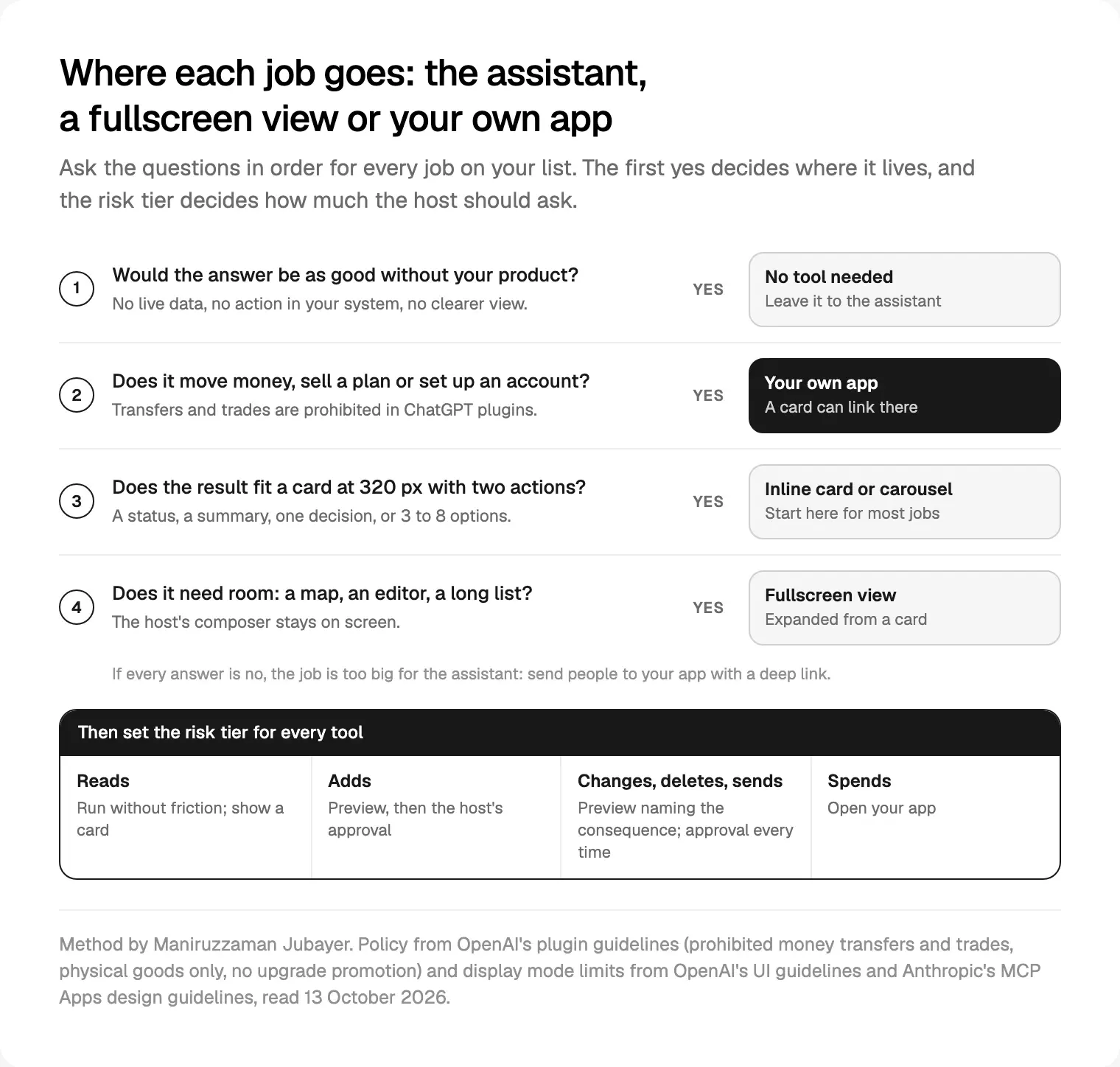
| Kind of job | In the assistant | In your own app |
|---|---|---|
| Answer from your data | An inline card | Full history and exports |
| Choose between a few options | A carousel of 3 to 8 items | Advanced filters |
| A small change to one record | Preview, then approval | Bulk edits |
| Long editing, complex settings | Fullscreen at most | Yes |
| Onboarding, plans, billing | No | Yes |
| Moving money or placing trades | No in ChatGPT, by policy | Yes |
That last row is policy, not opinion. OpenAI's plugin guidelines list "execution of money transfers, crypto transfers, or investment trades" as prohibited, allow commerce only for physical goods, and bar plugins from showing plans or promoting upgrades. On a product like Nexfolio, an AI-powered investment dashboard I designed, I would put portfolio summaries and explanations in the assistant and keep every trade in the app.
ChatGPT apps design: inline card, carousel, fullscreen or picture in picture
The MCP Apps specification defines three display modes: inline, fullscreen and picture in picture. Here is how the two hosts' guidelines compare, as I read them on 13 October 2026.
| Mode | Use it for | ChatGPT | Claude |
|---|---|---|---|
| Inline card | One decision, a status, a summary | Up to 2 actions; no tabs or drill-ins; no nested scrolling | Up to 2 actions; 4 to 5 data points; no menus or popovers |
| Carousel | Similar items with images | 3 to 8 items; one action each | 3 to 8 items; up to 3 lines of metadata |
| Fullscreen | Maps, editors, long browsing | Composer stays; your own domain's editor can be embedded | Composer stays; no floating panels |
| Picture in picture | Live sessions, games | Pinned to the top until the session ends | Listed as a mode, no guidance yet |
Two details from OpenAI's UI guidelines for ChatGPT change how I lay out a card. The inline view appears before the model's reply, and the model then writes a short follow-up, so the card shouldn't repeat it. And edits made in a card are saved, so a card can hold a small form.
Claude's guidelines go further on mobile: apps render in a native WebView without camera, microphone or location access, widths start at 320 pixels, tap targets are at least 44 points, vertical swipes scroll the conversation, and the host caps inline height. Loading is a skeleton, not a spinner.
So I design every inline card at 320 pixels first. If it needs its own scroll, it's a fullscreen view or a deep link, not a taller card.
Claude's guidelines also draw a useful line: direct manipulation, like "Mark complete", happens in your view; anything that needs language, like "try next week instead", goes through the chat.
Confirmation before actions: what the host does and what you design
The MCP tools specification says there should always be a human in the loop who can deny a tool call, and that applications should show confirmation prompts. In practice the host draws that prompt, not you.
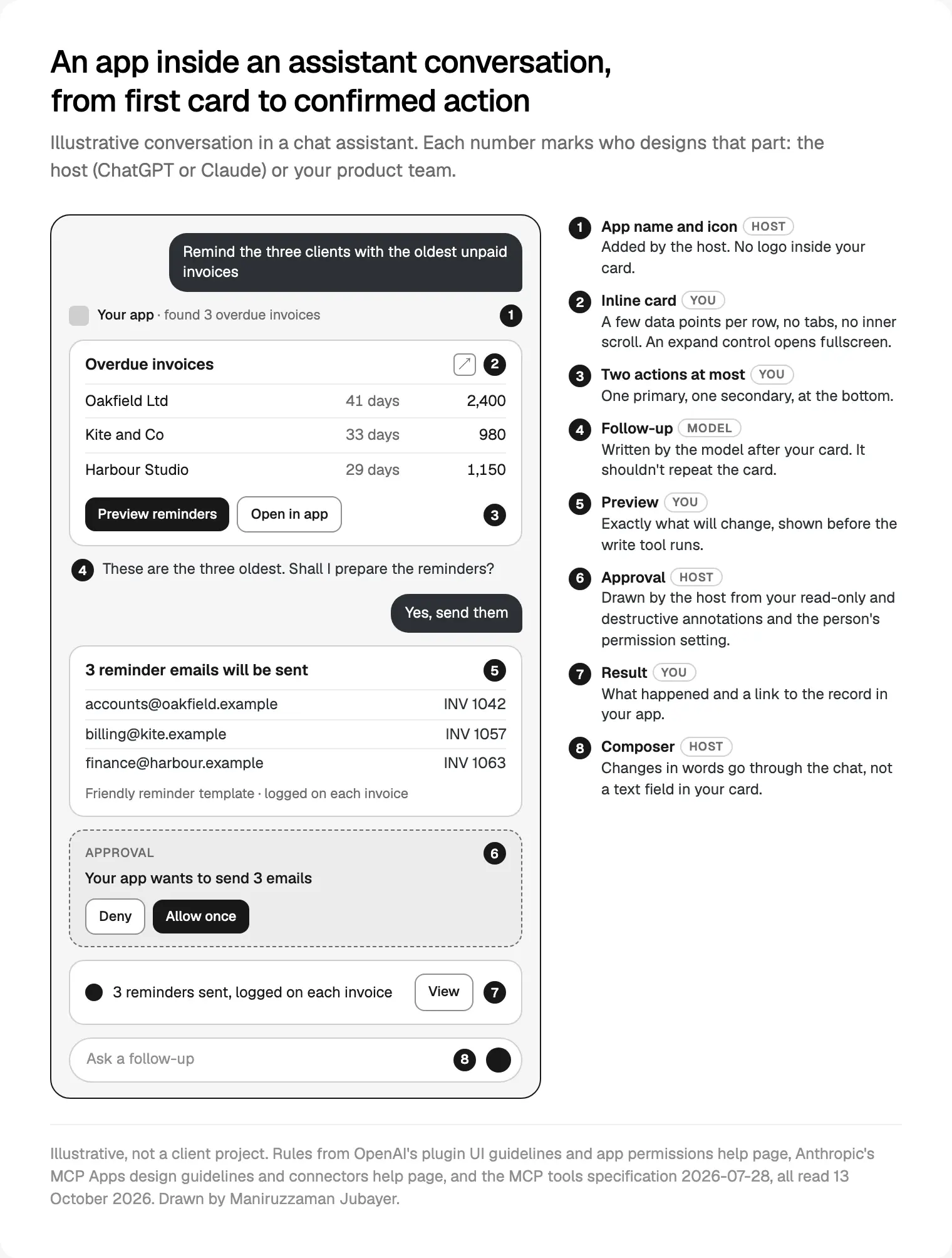
In ChatGPT, people pick a default in app permissions: Always ask, Allow read actions, Allow low-risk actions or Allow all actions, and an approval card may offer Deny or Allow once. In Claude, the connectors help page shows tools set to Always allow, Needs approval or Blocked, and on Team and Enterprise plans an Owner sets them for everyone.
Hosts lean on your annotations. OpenAI requires readOnlyHint, destructiveHint and openWorldHint as explicit values, and notes that being able to undo an action doesn't by itself make it non-destructive. Claude's connector submission rules require a title and a read-only or destructive hint on every tool.
Your job splits in three:
- Honest annotations. A wrong
readOnlyHinteither nags people or skips a prompt they needed. - A preview before the call. Show exactly what will change: which invoices, which recipients. The host's prompt names the action; your card shows the detail.
- A result after the call. What happened, a link to the record, and undo where you have it.
OpenAI's guide to defining tools adds a rule I apply early: split operations with different permissions or confirmation needs, so send_reminders and delete_invoice are never one tool with a mode flag.
How I tier it:
- Reads should run without friction and show a card.
- Additive writes, like a draft, show a preview, then go through approval.
- Changes, deletions and messages to other people get a preview that names the consequence, and approval every time.
- Money opens your app.
For undo windows and agent logs, my guide to AI features people trust has the patterns, and they're the core of how I design AI features in SaaS products.
Sign-in and permissions without losing the thread
OpenAI's plugin authentication guide uses OAuth 2.1 with PKCE, started when a person first calls a tool that needs it. Each tool can declare noauth, oauth2 or both, so public tools run anonymously and signing in opens the rest.
Claude calls this lazy authentication: when the model reaches a protected tool, a Connect card appears inline, the person signs in, and Claude retries the same call with no context lost.
What I design here:
- Public tools on purpose. A catalogue or help search should work before sign-in, because the first answer is your pitch.
- One line on why, in the task's words: "Sign in to see your own orders."
- The smallest scopes. OpenAI requires that people are told every permission requested.
- No conversation history. OpenAI's guidelines forbid tools that ask for chat history or precise location, and bar collecting card data, health records, government IDs or passwords.
For review, OpenAI wants a demo account with sample data, so plan it while you design.
Branding inside someone else's interface
Most teams push back here, so these are the rules as written. ChatGPT asks for system colours on text, icons and dividers, brand accents on primary buttons and badges, no custom gradients, and no custom fonts, "even in full screen modes". Don't put your logo in the view: ChatGPT adds your logo and name above it.
Claude asks for host tokens on structure, your colours for accents only, three type sizes and two weights, and both light and dark. The host passes its colours, fonts and radii as CSS variables through the MCP Apps bridge.
My reading: you need a guest theme. Map your components to the host's variables, keep your accent for one button, and let content carry the brand. I name tokens the same in Figma and in code, so a guest theme becomes a set of mappings rather than a second library.
Errors, empty results and the follow-up message
OpenAI's guidelines require errors to be handled with clear messaging or a fallback, and tools to be safe to retry or say when a retry repeats an effect. The model reads your error and decides what to tell the person.
So every tool result I design carries a short message and a reason with a next step. "No invoices are overdue; the oldest unpaid one is due on 28 October" gives the model something to say. An empty list doesn't.
Two more details. OpenAI's blog says your first response should explain your role in one line and deliver something useful straight away. And Claude mounts a new frame each time a tool renders, with earlier copies still live unless you supersede older widget instances.
Siri, App Intents and Android AppFunctions
Phones work the same way. Apple's Human Interface Guidelines on snippets pair a confirmation snippet (Cancel plus a primary button, "Order" rather than "OK") with a result snippet. Android's AppFunctions lets agents such as Gemini run an app's functions; Google calls it an experimental preview. I covered both in mobile app design trends for 2027. The job list and confirmation wording you write for ChatGPT serve them too.
Measuring use when the screen isn't yours
You lose page views and funnels. Claude gives directory connectors a listing dashboard with usage metrics: accounts that made a tool call in 30 days, tool calls, error rate, and usage by product and tool. Its health badge reads Healthy at request errors of 2% or less, Worth a look above 2%, and Degraded above 5%. The metrics are in beta and count only Claude traffic.
OpenAI's release notes of 21 August 2026 say plugin rankings now favour plugins people keep using after installation.
| Signal | Source | What it tells you |
|---|---|---|
| Accounts that called a tool | Claude dashboard, your logs | Real reach, not installs |
| Calls per job | Your logs | Which jobs matter |
| Previews against completed writes | Your logs | Where people stop |
| Error rate by tool | Claude dashboard, your logs | Which message to fix |
| Accounts back within 30 days | Your logs | Whether it's a habit |
I put these on one small dashboard the team opens weekly; my notes on dashboards founders actually open cover the layout.
Where I would start
- Write the job list and a risk tier for each job, before any code.
- Design the inline card for your most common read at 320 pixels, light and dark, on host variables.
- Design one write job end to end: preview, approval, result, error and undo.
- Build on MCP Apps first and test in both ChatGPT and Claude.
An MCP App's view is a web page in a sandboxed frame, and I build front ends in React and TypeScript, with a person who knows the design reviewing every change. If you want help deciding what your product should do inside an assistant, see my product design work for SaaS and AI teams.
Frequently asked questions
What is a ChatGPT app?
A ChatGPT app connects ChatGPT to your service through an MCP server: tools the model calls to read your data or act in your system, plus an optional view inside the chat. OpenAI launched them on 6 October 2025. Since 9 July 2026 they are packaged as plugins, in a directory shared with Codex.
How do I design a ChatGPT app?
Start from three to five jobs people already ask your product to do, not from your screens. Make each a clearly named tool, mark it read-only or destructive, and design an inline card for its result with at most two actions. Add fullscreen only for maps, editors or long lists.
Can I use my brand colours and fonts in a ChatGPT app?
Only partly. OpenAI asks for system colours on text, icons and dividers, brand colour only on accents such as the primary button, and no custom fonts, even in fullscreen. ChatGPT adds your logo and name above the view. Claude's rules are similar and require light and dark support.
Will the same app work in Claude?
Often, if you build the view on the open MCP Apps standard. OpenAI says ChatGPT implements it and recommends it before ChatGPT-only extensions, and Claude supports MCP Apps as interactive connectors. Expect differences: Claude restricts third-party iframes, renders apps in a native WebView on mobile, and runs its own directory review.
Do ChatGPT apps ask before taking actions?
The host decides. ChatGPT offers settings from Always ask to Allow all actions and may show an approval card before a supported action runs. Claude lets people or admins set each tool to Always allow, Needs approval or Blocked. Your part is honest read-only and destructive annotations, a preview of what will change, and a clear result.
Can a ChatGPT app take payments?
Only in narrow cases. OpenAI's plugin guidelines allow commerce for physical goods, normally through external checkout on your own domain, with Instant Checkout in beta for select partners. Selling digital products or subscriptions isn't allowed, plugins can't promote upgrades, and executing money transfers or investment trades is prohibited.
How do I measure whether my ChatGPT app is working?
Count successful tool calls per job, returning accounts, and how many previews become completed writes, from your own server logs. Claude adds a directory dashboard with accounts that used a tool, error rates and usage by product. OpenAI says its rankings favour plugins people keep using, so retention matters more than installs.
Sources and method
I read every source on 12 and 13 October 2026. OpenAI's website and help centre block automated requests, so I opened those pages in a browser. I found no independent data on how people use apps inside assistants, so this guide relies on official documentation.
- OpenAI, Introducing apps in ChatGPT and the Apps SDK, 6 October 2025, date read 13 October 2026: openai.com
- OpenAI, What makes a great ChatGPT app, 24 November 2025, date read 13 October 2026: developers.openai.com
- OpenAI Help Center, ChatGPT release notes (18 December 2025, 9 July, 21 August and 29 September 2026) and app permissions, date read 13 October 2026: release notes, permissions
- OpenAI, plugin developer documentation, date read 13 October 2026: plugin architecture, UI guidelines, adding UI, plugin guidelines, defining tools, authentication
- Model Context Protocol, MCP Apps announcement (26 January 2026), MCP Apps specification 2026-01-26 and Tools in version 2026-07-28, date read 13 October 2026: announcement, MCP Apps spec, tools
- Anthropic, Interactive connectors inside Claude, 26 January 2026, and Bringing MCP 2026-07-28 to Claude, 28 July 2026, date read 13 October 2026: interactive connectors, MCP 2026-07-28
- Anthropic, Claude connector documentation, date read 13 October 2026: MCP Apps design guidelines, submission, lazy authentication, widget supersession, external links, listing metrics, connectors help
- Apple, Human Interface Guidelines, Snippets, date read 13 October 2026: developer.apple.com
- Android Developers, AppFunctions, date read 13 October 2026: developer.android.com
Tags: ChatGPT apps, MCP Apps, AI UX, Product design, Claude connectors