

The dashboard design examples worth studying are the ones built for a clear job. Operations asks "is anything broken right now?", analytics "what changed, and where from?", finance "what do we have and what is due?", admin and CRM "what is my work today?", and an AI product "is the model doing its job, and at what cost?". Each job puts something different on the first screen.
So this isn't a gallery. For each job I picked a public dashboard you can open yourself, plus the design system or vendor guidance behind it, and wrote down the pattern, why it works and what to take. It's the method I use when founders hire a product designer for SaaS to fix a data-heavy product. I opened every page on 13 October 2026; products change, so check before you copy.
It's for founders, product leads and designers briefing a new dashboard, or fixing one people have stopped opening.
Dashboard design examples at a glance
Five jobs, each with a live product and public guidance. None is ranked above another; each does one job well.
| Job | First-screen question | What I opened | What to take |
|---|---|---|---|
| Operations | Is anything broken right now? | Grafana Play, PatternFly | Symptoms first, exceptions only |
| Analytics | What changed, and where from? | Plausible's demo, Carbon | Tiles that switch the chart, rows that filter |
| Finance | What do we have, and what is due? | Mercury's demo, Stripe's docs | Balance, then what to pay or chase |
| Admin and CRM | What is my work today? | Shopify's patterns, HubSpot's docs | The queue is the dashboard |
| AI products | Is it working, and at what cost? | Langfuse's docs, Carbon for AI | Quality and cost beside volume |
How I decide what goes on the first screen
Most dashboards fail on the first screen, not in the charts: too many modules compete for the top, so nothing stands out. My guide to dashboards founders open daily covers metrics, chart types, states and alerts. Here I'll stick to placement, the decision I make on every project.
- Name the job and its question. One dashboard, one question. If the brief has two, it needs two views or a role switch.
- List every candidate module, with no layout yet.
- Ask the next-hour question. Would a change here make someone act in the next hour? Then it's a first-screen candidate. If it changes a weekly decision, it goes one click down.
- Ask what it costs to miss. A failed payment beats a nicer chart. A high cost to miss moves a module up, as long as it stays quiet when nothing is wrong.
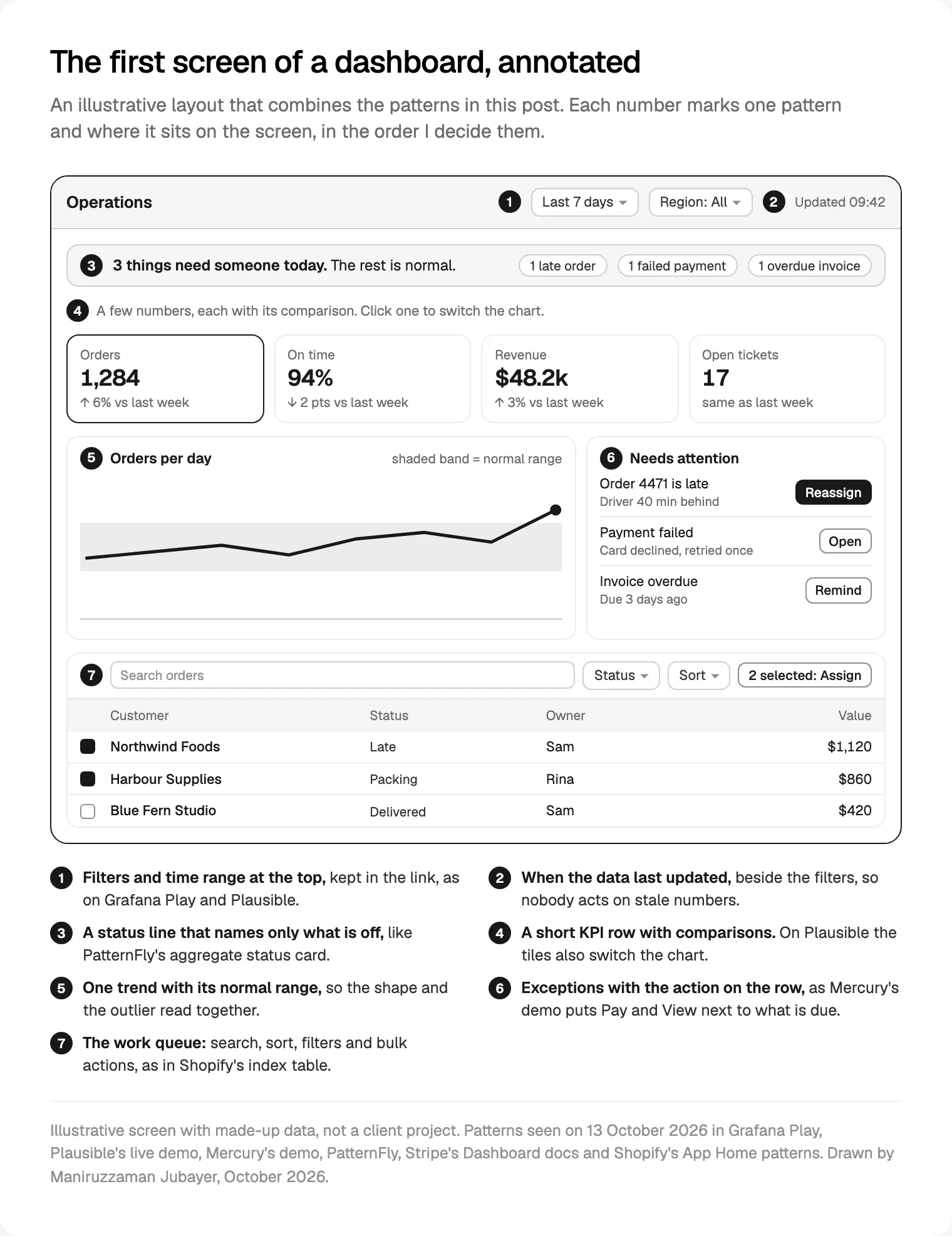
- Fill the screen in a fixed order: filters and freshness, a status line of exceptions, a short row of numbers with comparisons, one trend, then the start of the work queue.
- Write the phone order down. PatternFly's guidelines note that card order matters most when a grid collapses to one column.
| Job | Earns the first screen | One click down |
|---|---|---|
| Operations | Errors, latency, saturation, open incidents | Per-host detail, logs |
| Analytics | The headline metric, its change, top sources | Funnels, cohorts, raw events |
| Finance | Balance, money due, failed or disputed items | Reports, exports |
| Admin and CRM | Today's queue, overdue items, stage totals | Record detail, history |
| AI products | Quality, cost, latency, volume, flagged outputs | Single traces, prompt versions |
It's the order behind how I design data-heavy SaaS products: the question, then the placement, then the pixels.
Operations and monitoring: Grafana Play and PatternFly
The example. Grafana Play is Grafana's public sandbox, open without signing up. Its RED dashboard for a demo service has an endpoint selector top left and the time range top right. Below sit request usage, overall error percentage and errors by target, then the highest endpoint latencies. The time range and endpoint choice are both in the page address.
Why it works. It follows Grafana's dashboard best practices: RED (rate, errors, duration) for services, USE (utilisation, saturation, errors) for hardware, a clear goal per dashboard, and template variables instead of a copy for every node. Google's SRE book makes the same cut with its four golden signals: latency, traffic, errors and saturation.
The design system view. PatternFly's dashboard guidelines give each card one metric or a small group of related ones. Its aggregate status card shows a total and only the non-zero exception counts, each linking to detail.
What to take.
- Symptoms users feel (errors, slowness) on the first screen; causes one level down.
- Exception counts only when they're above zero, so a calm day looks calm.
- Filters in the address, so a link pasted into an incident channel opens the same view.
Analytics: Plausible's live demo and Carbon's two kinds of dashboard
The example. Plausible's live demo shows its own website's analytics in public. Six metric tiles (unique visitors, visits, pageviews, views per visit, bounce rate, visit duration) each carry a percentage change, and the selected tile drives the one big chart. Filter and date range sit top right. Below, panels come in pairs with tabs: channels, sources and campaigns; top, entry and exit pages; then location, devices and goals. Every row is a link that adds a filter to the whole page, and the filter lands in the address.
Why it works. The tiles are both the summary and the chart switch, so six metrics cost one chart's space. Every breakdown is also a way in, so exploring never needs a separate report builder.
The design system view. Carbon's dashboard guidance separates presentation dashboards (the current state of key numbers) from exploration dashboards (search, filter, drill down). For the first it asks for few metrics, with the most important data given the highest contrast and the largest area; for the second, linked charts that mirror filter and zoom. Plausible does both on one screen.
What to take.
- Let a KPI tile select the chart instead of giving every metric a chart.
- Make every list row a filter for the whole page, and say so in its accessible name.
- One date range for the page, never one per card.
Finance: Mercury's demo and Stripe's Home
The example. Mercury's demo opens a sample business account without signing up. Home starts with actions (send, transfer, deposit, request, upload a bill), then the balance with a switch between graph and table. Below come the accounts, then small modules for the credit card, bill pay and invoicing, each counting what's outstanding, overdue or open, with a Pay or View action. Money in and out for the month list top sources or top spend, with a three-month average beside each total. The transactions table marks a failed payment on its row.
Why it works. Finance users arrive with two questions: how much do we have, and what needs doing? Mercury answers the first in one number and the second in modules that each end in an action. The graph or table switch serves both the founder who wants the shape and the accountant who wants the figures.
The vendor docs view. Stripe's Dashboard docs describe Home as analytics and charts that also surface "important notifications", such as unresolved disputes or identity verifications, with widgets you can add or remove.
What to take.
- The actions people came to do go at the very top, before any chart.
- Pair each total with a reference point, as Mercury does with its three-month average.
- Failed and disputed items get their own row or notice, never only a dip in a chart.
On WealthWise, an AI personal finance dashboard I designed, each AI insight sits beside the numbers it comes from, phrased as a next step. An insight that floats away from its number is hard to check.
Admin and CRM: Shopify's App Home and HubSpot's board
The design system view. Shopify's App Home patterns are written for apps inside the Shopify admin. The homepage template asks for key information at a glance: performance metrics, items needing attention and onboarding guidance. Its example stacks page actions, one banner, a setup guide with a progress count, then metrics cards. A comment in its code says "Only one banner should be visible at a time", and a dismissed section is stored so it doesn't come back.
The index table pattern is the work queue: search, sort and filters above the table, checkboxes and a bulk action bar, a confirmation before destructive bulk actions, a toast when they finish, rows that open the detail page, and pagination.
The example. CRM work happens on boards as much as dashboards. HubSpot's guide to board cards (updated 5 September 2026) allows up to 15 display items per card, previous and upcoming activities, quick actions for a task or a note, and lane summaries of up to 3 metrics per stage.
Why it works. In admin and CRM tools, the screen people open is a list of their work with a few totals on top. A capped lane summary keeps a pipeline readable, and quick actions mean the next step needs no page load.
What to take.
- Design the queue first, then the numbers above it.
- Cap totals per stage; HubSpot stops lane summaries at three.
- Let banners and setup guides be dismissed for good, one at a time.
AI products: Langfuse's dashboards and Carbon for AI
The example. Langfuse is a product for tracing and monitoring AI features in production, with public docs. Its metrics overview names four things to watch: quality (user feedback, model-based scoring, human review or custom scores), cost, latency and volume, with cost and latency broken down by user, session, feature, model and prompt version. Its custom dashboards page lists curated latency, cost and usage dashboards and filters that include score thresholds, and your first edit to a managed dashboard makes a copy in your project.
Why it works. A normal dashboard counts activity. An AI feature can be busy and wrong at once, so quality sits beside volume, and cost sits beside both because every call has a price.
The design system view. Carbon for AI (last updated 12 August 2026) makes the AI label the main sign that AI is present, with an explainability popover that should "Start with summarized explanations". If someone edits AI-suggested content, the component drops its AI styling, and a revert action brings the AI version back. Carbon warns against using the AI look as decoration.
What to take.
- A quality signal next to every volume chart for an AI feature.
- Cost and latency per model and prompt version, so changes can be compared.
- AI-written summaries marked on the dashboard, with a short "why" one click away.
For agent screens and approvals, see my notes on agent screens and other 2027 interface trends.
What goes wrong when teams copy a dashboard example
These are the mistakes I watch for when a team brings a screenshot to the intro call.
- Copying a different job's layout. An analytics layout on an operations tool buries the incident under a traffic chart.
- Copying the density without the users. Grafana's panels suit engineers who read them all day; a sales team needs fewer, larger numbers.
- Copying the demo data. Demo accounts are tidy. Real ones have long names, gaps and zeros, so design with an export of your own.
- Mixing patterns from five products. Each card behaves differently and users learn the screen twice. When I audit a dashboard, consistency between modules is where I spend the most time; my UX audit checklist for live SaaS products has the full pass.
Take the pattern and the reason; a layout idea is fair to reuse, another company's copy, data and screenshots are not.
Where I would start
Pick the one job your dashboard does and say its question out loud. Open the matching example above and note what it puts on the first screen and what it leaves one click down. Run the next-hour test on your own modules, and write the phone order before you draw the desktop grid.
If you want help, this is the core of my product design work for SaaS and fintech teams. A project starts with a free 30 minute intro call, then a written scope and one fixed quote, with no retainer. I design the dashboard in Figma and can build it in React and Next.js, with the same component names in both.
Frequently asked questions
What is a good example of dashboard design?
One that answers one question for one kind of user within seconds. Plausible's public demo is a clear analytics case: metric tiles with changes, one chart the tiles control, and breakdowns where every row filters the page. For operations, Grafana Play's RED dashboard shows rate, errors and latency for a service. Pick the example that matches your job, not the one that looks best.
What are the main types of dashboards?
Carbon's design system splits them into presentation dashboards, which show the current state of key numbers, and exploration dashboards, which let people search, filter and drill down. By job, I sort them into operations, analytics, finance, admin and CRM, and AI monitoring. The job decides what earns the first screen, so it's the more useful way to sort examples.
What should be on the first screen of a dashboard?
Whatever would make someone act in the next hour. Usually that's the filters and data freshness, a status line of exceptions, a short row of numbers with comparisons, one trend and the start of the work queue. Weekly questions go one click down. Then check the order again for a single-column phone layout.
Where can I find real dashboard examples to study?
Public demos beat galleries, because you can click through them. On 13 October 2026, Grafana Play, Plausible's live demo and Mercury's demo all opened without an account. For the thinking behind them, PatternFly and Carbon publish dashboard guidance, Shopify publishes admin page patterns, and Stripe's and Langfuse's docs describe what their dashboards show.
How do you design a CRM dashboard?
Start with the work queue, because CRM users spend their day in lists and boards. Add a few totals per stage, the next activity on each record and quick actions, so the next step needs no page load. HubSpot's board cards allow up to 3 lane summary metrics per stage, a sensible limit. Keep detailed reports one click down.
What makes an AI product dashboard different?
It has to show whether the output is any good, not only how much there is. Langfuse's docs track quality, cost, latency and volume, broken down by model and prompt version. Mark AI-generated summaries clearly, with a short explanation on request, as Carbon for AI recommends. Then a team can see whether a prompt change helped or just cost more.
Can I copy a dashboard design from another product?
Copy the patterns and the reasoning, not the visuals, words or data. A layout idea such as KPI tiles that switch the chart is fair to reuse; another company's screenshots, copy and brand are theirs. Copying also fails on its own terms: their users and data aren't yours, so test any borrowed pattern with your own.
Should a dashboard be customisable?
Partly. Stripe lets people add or remove Home widgets, Mercury's demo has a customise option, and Langfuse copies a managed dashboard on first edit. I ship strong defaults for each role first, then allow pinning, hiding and saved filters. A blank canvas hands the design work back to users, and most won't do it.
Sources and method
I opened every page on 13 October 2026 and read its visible text; for the three live demos I clicked through the home screen without signing in. I describe patterns in my own words and reproduce no screenshots or demo data. Demos change often, and none of these companies publishes results for these patterns, so I quote none. Most pages are undated.
- Grafana Labs, Grafana Play and its RED dashboard for a demo service, read 13 October 2026: play.grafana.org, play.grafana.org
- Grafana Labs, dashboard best practices, read 13 October 2026: grafana.com
- Google, Site Reliability Engineering, chapter 6, 2017, read 13 October 2026: sre.google
- PatternFly, dashboard design guidelines, read 13 October 2026: patternfly.org
- Plausible Analytics, live demo, read 13 October 2026: plausible.io
- IBM, Carbon Design System, dashboards, read 13 October 2026: carbondesignsystem.com
- Mercury, product demo, read 13 October 2026: demo.mercury.com
- Stripe, Web Dashboard docs, read 13 October 2026: docs.stripe.com
- Shopify, App Home homepage template and index table, read 13 October 2026: shopify.dev, shopify.dev
- HubSpot, customise the updated board cards, updated 5 September 2026, read 13 October 2026: knowledge.hubspot.com
- Langfuse, metrics overview and custom dashboards, read 13 October 2026: langfuse.com, langfuse.com
- IBM, Carbon for AI, last updated 12 August 2026, read 13 October 2026: carbondesignsystem.com
Tags: Dashboards, Product design, SaaS, Data visualisation, Design systems