

The mobile app design trends 2027 will reward have little to do with a new look. They come from one change: your app no longer lives in a single portrait rectangle. Apple's first foldable, iPhone Duo, goes on sale on 23 October with two displays and bars that move to the side, and Android 17 removed the last opt-out for fixed orientation on large screens.
Around that, assistants run actions inside apps, Live Activities carry your app onto the Lock Screen, passkeys are pushing out SMS codes, and accessibility is a legal condition of selling in the EU. This is for founders and product leads planning an iOS or Android release in the next 18 months, and anyone comparing mobile app design services who wants to know what good looks like in 2027.
For the visual side, read my UI design trends for 2027; marketing sites are in my web design trends for 2027. Here, each trend gets what is confirmed, with a date, and then my reading of it. For theming, see dark mode design for apps.
The mobile app design trends 2027 will reward, at a glance
| Trend | Confirmed | My reading | What I would do |
|---|---|---|---|
| Apps that resize | iPhone Duo, 23 October 2026; Android 17, 16 June 2026 | Portrait-only is over | Compact and regular layouts from week one |
| Bars that move | Vertical bars on iPhone Duo; forced edge to edge on Android 16 | Custom bars become a liability | System bars and insets |
| Apps as actions | Siri AI in iOS 27; AppFunctions in preview | A second way into your app | Expose your top five actions |
| Live surfaces | Live Activities on Mac and CarPlay; Android 16 progress notifications | Glanceable status beats push alerts | Design the Lock Screen state |
| Passkeys first | FIDO index, October 2025; Android 17 SMS delay | SMS codes get worse | Passkey at sign-up |
| The new look by default | Opt-out key ignored for iOS 27 builds | The old iOS look has an end date | Test at both ends of the glass slider |
| Accessibility labels | EAA since 28 June 2025; Apple's labels voluntary for now | Labels will sit on your product page | Audit against the nine labels |
Apps that resize: iPhone Duo, Android 17 and large screens
Apple announced iPhone Duo on 9 September 2026: a 5.4 inch outer display and a 7.6 inch inner one, Split View with two apps side by side, and availability from 23 October in more than 70 countries and regions.
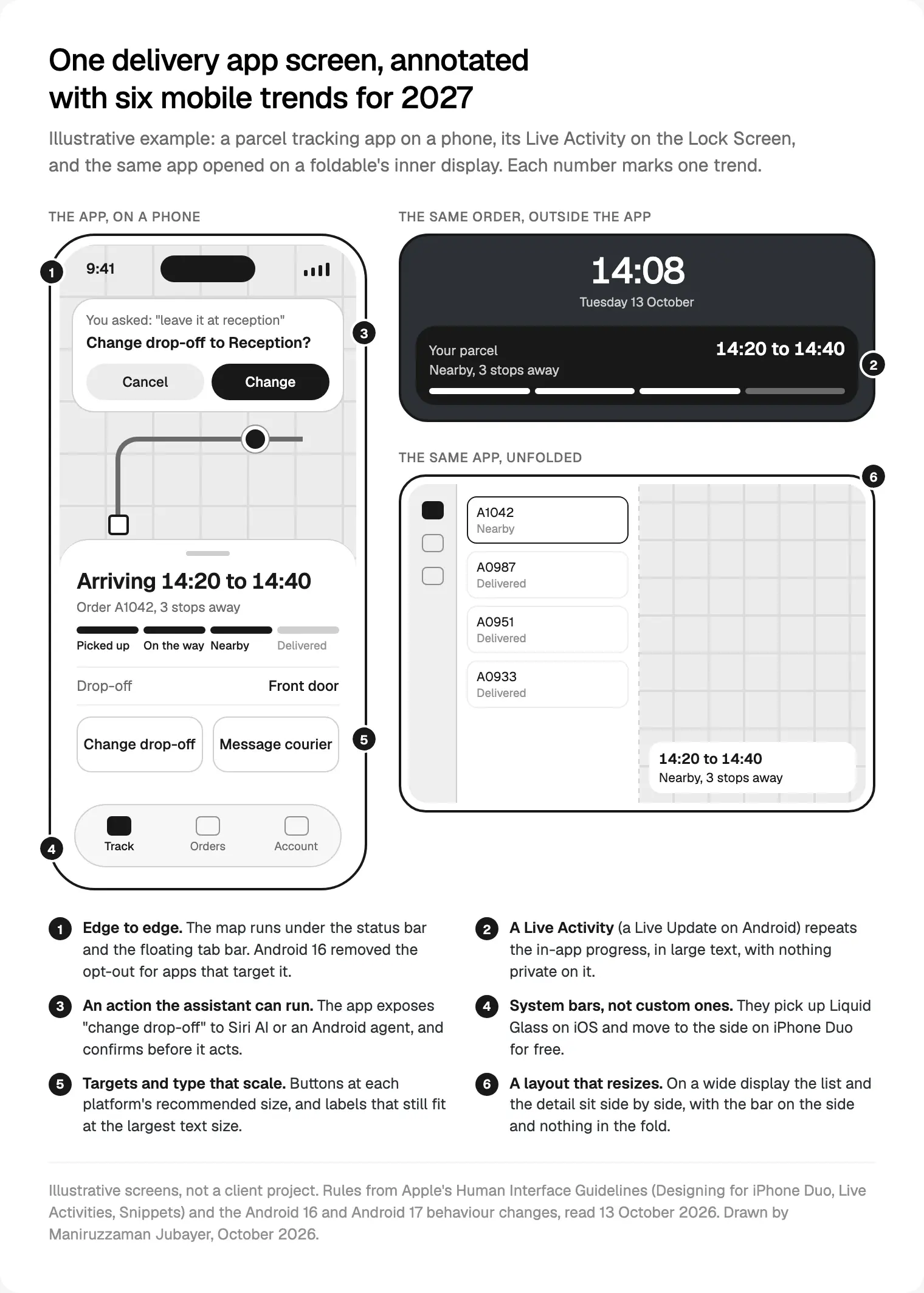
Apple's new HIG page, Designing for iPhone Duo, is plain: a compact width layout for the outer display and a regular width layout for the inner one cover every pose, with the same functions and state on both.
The new work is in reserved regions: the fold and the cameras. Apple's developer article, Preparing your app for iPhone Duo, says system containers work around them, while custom views must read the regions and move. When the phone is half open, nothing important should sit in the crease.
Android got there first. In the Android 16 behaviour changes, apps targeting API level 36 have orientation, resizability and aspect ratio settings ignored on displays at least 600 dp wide, with a temporary opt-out. Google's Android 17 release post (16 June 2026) removes it for apps targeting API 37; games are exempt. Google Play's target API level page has required updates to target Android 16 since 31 August 2026, so your next update is already inside that rule.
My reading: a portrait-only layout is now a bug, not a scope decision. When I scope an app, every key screen gets two drawn states, compact and regular. The usual failures are fixed widths, camera screens that assume one orientation, and, as Google warns, lost state when the activity is recreated: a form that empties itself when someone unfolds the phone.
Your app as a set of actions: Siri AI, App Intents and AppFunctions
At WWDC on 8 June 2026, Apple introduced Siri AI, which can act on what's on screen and inside apps, and said it would not be available in the EU at first. Apple's developer announcement says App Intents connects apps to its app actions and onscreen awareness. iOS 27 arrived on 14 September with Siri AI in beta.
Apple's HIG added a Snippets page on 8 June 2026: compact views that appear when someone runs your action through Siri, Spotlight or Shortcuts. A confirmation snippet asks to confirm or cancel; a result snippet shows the outcome. Apple caps them at 400 points tall and wants a button that names the action, "Order" rather than "OK".
Android is following. AppFunctions lets apps expose functions that agents can discover and run, on Android 16 or later. Google calls it an experimental preview, and as of May 2026 its Gemini integration was in private preview with trusted testers.
My reading: the assistant becomes a second front door with no screens you control. This is how I prepare an app for it:
- List the five things people do most, from analytics, not the feature list.
- Name each in the words customers use: a "parcel" or an "order", whichever they actually say.
- Sort by risk. Reading a status runs straight away; changing an order asks first; moving money opens the app.
- Design each snippet: one line, one verb on the button, a deep link for more.
- Write the failure message, because nobody is looking at your screen when it fails.
Live Activities, widgets and Live Updates: the app outside the app
Apple's Live Activities guidance, updated on 16 December 2025, puts them on the Lock Screen, the Dynamic Island, StandBy, the Mac menu bar, the Apple Watch Smart Stack and CarPlay. Use them for tasks with a defined beginning and end, under eight hours. No ads, nothing sensitive, medium weight or heavier text.
Apple's widgets guidance says people can pick clear and tinted appearances on the Home Screen, where the system desaturates your widget and splits it into an accent group and a primary group. A widget that relies on colour to mean "late" or "paid" loses that meaning, so I design every widget in monochrome first.
Android 16 added progress-centric notifications through Notification.ProgressStyle, with points and segments for milestones. Google's key uses are rideshare, delivery and navigation.
My reading: when something is on its way (a parcel, a ride, a transfer), the Lock Screen becomes one of your most viewed screens, and it must agree with the in-app screen: same steps, words and times.
Passkeys first, SMS codes last
Apple's WWDC25 session What's new in passkeys introduced an account creation API in iOS 26: a system sheet with a prefilled name and email that saves a passkey and signs people in with Face ID. Automatic upgrades can then create a passkey in the background after a password sign-in.
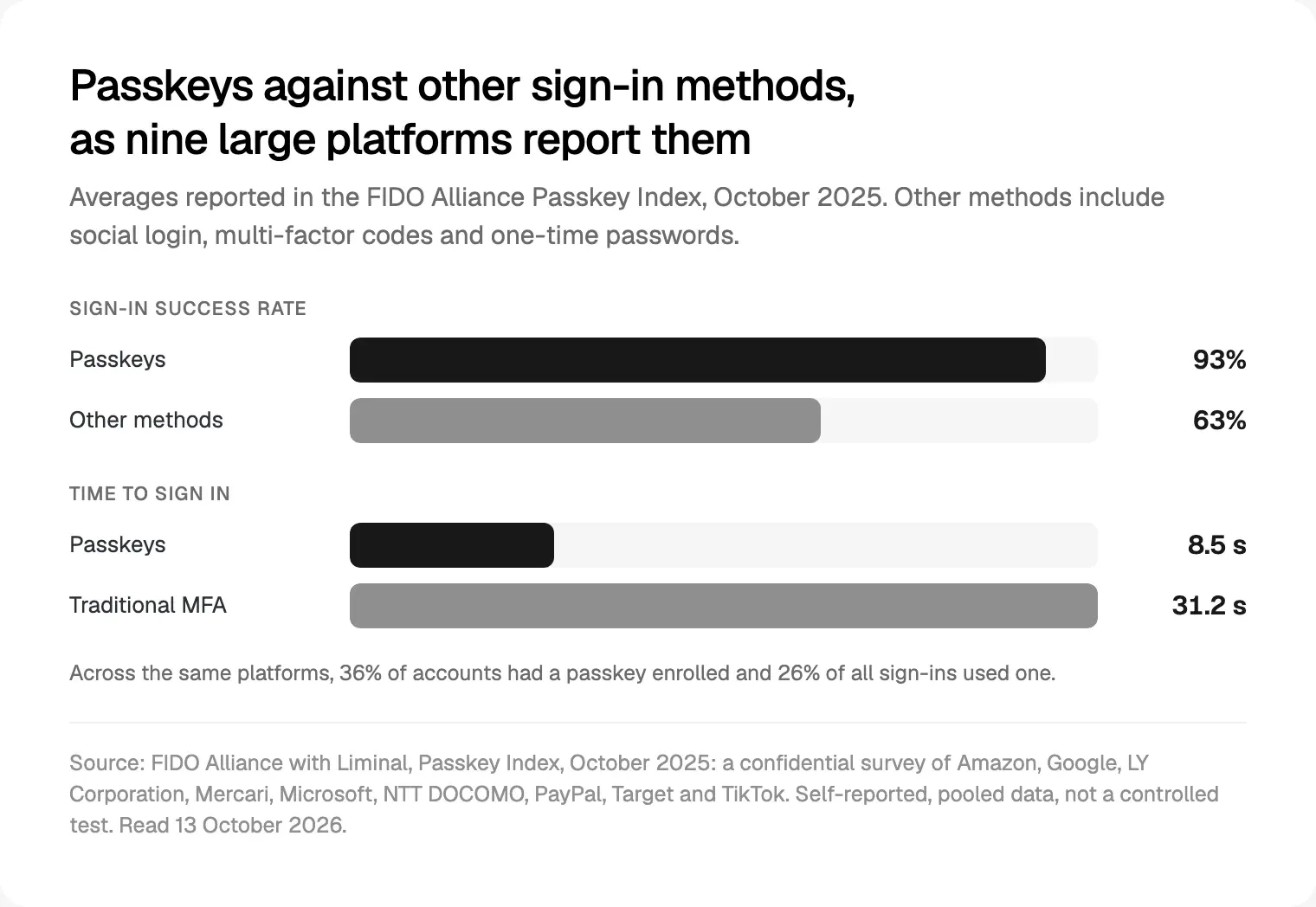
The evidence is thin but improving. The FIDO Alliance's Passkey Index (October 2025) surveyed nine large platforms, including Amazon, Google, Microsoft and PayPal. They reported 93% sign-in success with passkeys against 63% for other methods, and 8.5 seconds per sign-in against 31.2 seconds with traditional multi-factor methods. It's self-reported and pooled, so I read it as direction.
Android 17 pushes from the other side: it delays access to SMS messages with one-time codes by three hours for apps targeting SDK 37, and Google points apps to the SMS Retriever or SMS User Consent APIs. Apps that read their own code from the inbox will break.
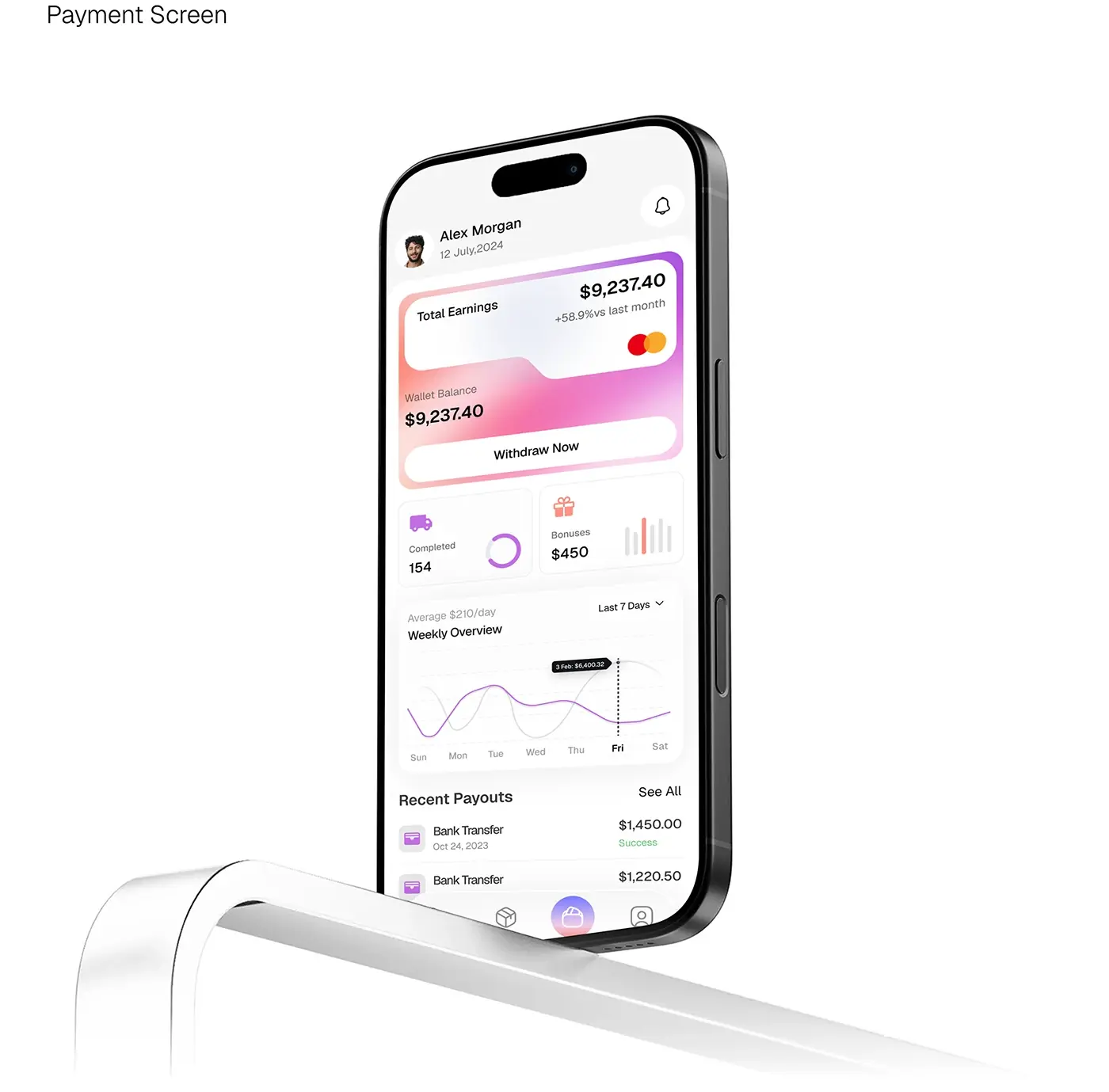
For 2027 I'd design sign-in as a passkey at sign-up through the system sheet, a typed password or email code as the fallback, and a silent upgrade for existing users. If you offer Google sign-in, Apple's Sign in with Apple rule still applies; my App Store rejection checklist covers it. On a wallet like ZenPay, a mobile wallet for sending, receiving and tracking money, which I designed, sign-in and payment confirmation are the two screens I'd look at first.
Accessibility: the EAA and Apple's labels
The European Accessibility Act has applied since 28 June 2025. The European Commission's AccessibleEU centre summed it up the day before: banks, e-commerce platforms and transport information apps must be accessible. Selling to EU consumers? Assume you're in scope and check with a lawyer.
Apple is putting accessibility on the product page. Its Accessibility Nutrition Labels cover nine features: VoiceOver, Voice Control, Larger Text, Dark Interface, Differentiate Without Color Alone, Sufficient Contrast, Reduced Motion, Captions and Audio Descriptions. Apple says they are "voluntary to start", but will be required to submit new apps and updates over time. No date is published.
My reading: once labels are required, a missing "Larger Text" is a public statement. Larger text now has to fit a Live Activity, a side toolbar and a 400 point snippet too. I test every key flow with VoiceOver and TalkBack at the largest text size, using the nine labels as the checklist.
What it means for React Native and Flutter apps
I build in both, so founders ask me this most.
| Trend | React Native | Flutter |
|---|---|---|
| New iOS look | Native components get it with the iOS 27 SDK; JavaScript-drawn bars don't | Flutter draws its own widgets; the look ships in cupertino_ui |
| Edge to edge and back | 0.81 targets Android 16, no opt-out, predictive back on | Same Android rules; test insets and back |
| Foldables | Lay out from the window size, never the device model | Same: read the available size |
| Siri, AppFunctions, widgets | Native Swift and Kotlin extensions | Native Swift and Kotlin extensions |
The React Native 0.81 release (12 August 2025) made Android 16 the default target, deprecated the built-in SafeAreaView for edge-to-edge friendly alternatives, and turned on predictive back. In Flutter 3.47 (12 August 2026), Material and Cupertino moved into standalone material_ui and cupertino_ui packages at 1.0, with weekly releases planned. The same post says the iOS 27 SDK makes the UIScene lifecycle mandatory for UIKit apps, and Flutter's iOS minimum rises to 15.
My reading: neither framework skips native work in 2027, so I budget a small Swift and Kotlin layer from the start. In React Native, native tab and stack navigators are the cheapest way to get vertical bars and glass right. In Flutter, the new packages should bring platform changes faster, but that's a forecast. My Flutter and React Native comparison covers the rest of the choice, and it's part of how I design iOS and Android apps.
Where I would start
If I joined your app team next week, I'd go in this order:
- Open the app in an iPhone Duo simulator and an Android tablet emulator; rotate, resize and fold, and list every screen that breaks.
- Replace custom bars with system ones, with an icon, title and priority for every item.
- Pick your top five actions and design their snippets before anyone writes App Intents code.
- Design the Lock Screen state for every task with a start and an end.
- Move sign-up to passkeys and keep a typed fallback.
- Run the nine accessibility label checks on your ten most used screens.
Most of this is plannable scope, not a redesign; my guide to what app design costs shows how screens and states add up. To work through it on your app, book a free 30 minute intro call about my iOS and Android app design work for startups, then I write a scope and one fixed quote.
Frequently asked questions
What are the mobile app design trends for 2027?
The biggest are structural: layouts that resize for foldables and large screens, system bars that move to the side, apps exposing actions to Siri AI and Android agents, Live Activities on the Lock Screen, passkeys replacing SMS codes, and accessibility labels on the App Store. The new iOS look also becomes unavoidable once you build for iOS 27.
Do I need to design for the foldable iPhone?
If your app runs on iPhone, it will run on iPhone Duo, so yes. Apple asks for a compact width layout on the outer display and a regular width layout on the inner one, the same functions on both, and nothing important in the fold. Apps built from system components and size classes need little work; apps with fixed widths or custom tab bars need the most.
Will my React Native or Flutter app get Liquid Glass automatically?
Partly. In React Native, native components such as system tab bars take the new look when you build with the latest iOS SDK, while bars drawn in JavaScript keep your design. Flutter draws its own widgets, so its Cupertino look comes from the cupertino_ui package, now separate from the SDK. Test custom controls with Reduce Transparency on.
Should my app work with Siri AI and Gemini?
If people repeat a few clear tasks in your app, yes. On iOS you expose actions through App Intents, and Siri AI can run them and show a snippet to confirm. On Android, AppFunctions does the same job but is still an experimental preview, with Gemini support in private preview as of May 2026. I start with read-only actions, then add ones that change data behind a confirmation.
Are passkeys worth adding to a mobile app in 2027?
For most consumer apps, yes. Apple's iOS 26 account creation API makes a passkey the default at sign-up, and automatic upgrades convert password users quietly. The FIDO Alliance's October 2025 index reported 93% sign-in success with passkeys against 63% for other methods, from nine large platforms' own data. Keep a typed fallback, because not every phone or person will use one.
Does the European Accessibility Act apply to mobile apps?
Yes, for many consumer apps. Since 28 June 2025 it has covered services such as consumer banking, e-commerce and transport information, including their mobile apps. Tools sold only to businesses may fall outside it, so confirm your position with a lawyer. In practice, designing to WCAG 2.2 AA and testing with VoiceOver and TalkBack at large text sizes is the safe baseline.
Sources and method
I read every source on 13 October 2026 and built no test apps for this post. The diagram is illustrative, not a client project. Passkey data is thin and self-reported, and data on how people use foldables is too new to cite.
- Apple Newsroom, iPhone Duo, 9 September 2026, date read 13 October 2026: apple.com
- Apple, HIG: Designing for iPhone Duo, date read 13 October 2026: developer.apple.com
- Apple Developer, Preparing your app for iPhone Duo, date read 13 October 2026: developer.apple.com
- Android Developers, Android 16 behaviour changes, date read 13 October 2026: developer.android.com
- Android Developers Blog, Android 17 is here, 16 June 2026, date read 13 October 2026: developer.android.com
- Google Play Console Help, target API level requirements, date read 13 October 2026: support.google.com
- Apple Newsroom, WWDC26 and Siri AI, 8 June 2026, date read 13 October 2026: apple.com
- Apple Newsroom, developer frameworks and tools, 8 June 2026, date read 13 October 2026: apple.com
- Apple, HIG: Snippets, date read 13 October 2026: developer.apple.com
- Android Developers, AppFunctions, date read 13 October 2026: developer.android.com
- Apple, HIG: Live Activities, date read 13 October 2026: developer.apple.com
- Apple, HIG: Widgets, date read 13 October 2026: developer.apple.com
- Android Developers, progress-centric notifications, date read 13 October 2026: developer.android.com
- Apple, WWDC25 What's new in passkeys, date read 13 October 2026: developer.apple.com
- FIDO Alliance, Passkey Index, October 2025, date read 13 October 2026: fidoalliance.org
- Apple Developer, UIDesignRequiresCompatibility, date read 13 October 2026: developer.apple.com
- AccessibleEU (European Commission), the EAA enters into force, 27 June 2025, date read 13 October 2026: accessible-eu-centre.ec.europa.eu
- Apple, App Store Connect Help, Accessibility Nutrition Labels, date read 13 October 2026: developer.apple.com
- React Native blog, 0.81, 12 August 2025, date read 13 October 2026: reactnative.dev
- Flutter blog, Flutter 3.47, 12 August 2026, date read 13 October 2026: docs.flutter.dev
Tags: Mobile apps, iOS, Android, Trends, React Native, Flutter