


AI UX design is the work of making a probabilistic feature dependable enough to rely on. AI features work most of the time, and nobody can tell in advance when they will not. The design job is to make that visible and cheap.
People trust an AI feature when they know what it can do, can see how sure it is and where an answer came from, can undo a wrong answer in a click, and are told plainly that it is AI. In the EU that last point is law: since 2 August 2026, Article 50 of the AI Act requires it, with fines of up to EUR 15 million or 3% of worldwide turnover, whichever is higher.
This guide is for product teams adding assistants, generation, recommendations or automation to a SaaS product: when to use AI, the trust patterns, a checklist, how to measure trust and the EU rules. If your product will also live inside ChatGPT or Claude, see designing apps for AI assistants.
When AI is the right tool, and when it is not
Google's People + AI Guidebook (PAIR) starts with a question many teams skip: would a simple rule do? Rules are easier to build, explain and debug. PAIR finds AI is probably better for personalised recommendations, prediction, natural language and spotting rare events that change over time, such as fraud. It is probably not better when predictability is the point, errors are costly, people need full transparency, or users have said they do not want the task automated.
PAIR also suggests automating tasks that are tedious or need scale, and augmenting tasks people enjoy or where there is no single right answer. Apple adds: offer generative features only where they bring clear value, and keep a non-AI path where you can.
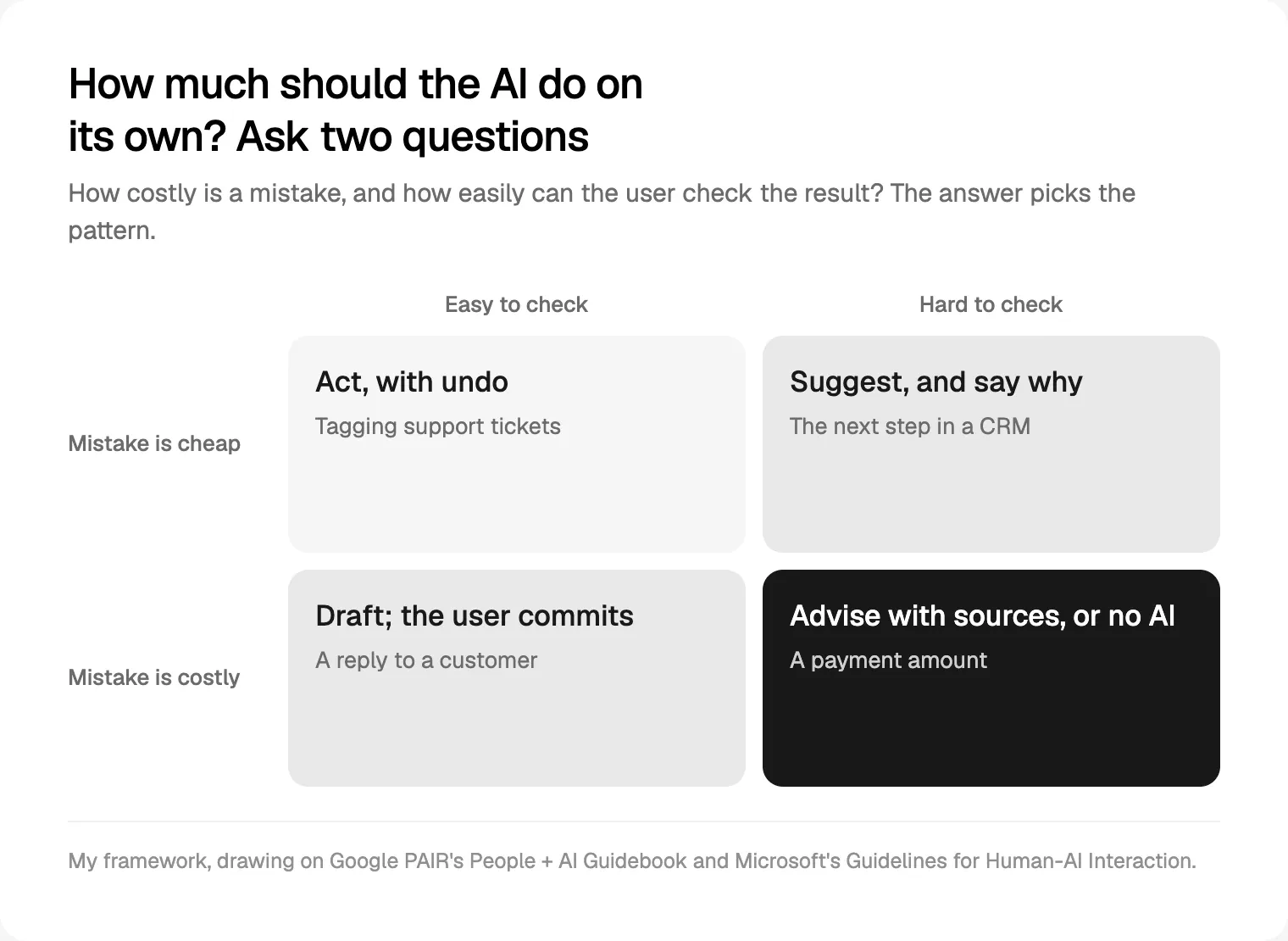
Then ask two questions: what does a wrong answer cost, and can the user spot it quickly?
| Cost of a mistake | Easy to check? | Pattern | Example |
|---|---|---|---|
| Low | Yes | Act, with undo | Tagging support tickets |
| Low | No | Suggest, and say why | Next step in a CRM |
| High | Yes | Draft; the user commits | A reply to a customer |
| High | No | Advisory with sources, or no AI | A payment amount |
Set expectations and onboard in stages
Microsoft's 18 Guidelines for Human-AI Interaction, tested by 49 design practitioners against 20 AI products, open with this: make clear what the system can do (G1) and how well it can do it (G2).
- Name the job, not the technology: "Drafts replies from this ticket's history", not "Powered by AI".
- Put limits next to the feature. Apple advises stating known limitations up front and explaining why weak results happen.
- Seed open inputs with example requests. An empty prompt box teaches nothing.
PAIR recommends onboarding in stages: what it can do, what it cannot, how it may change and how to improve it. Show each when it becomes relevant, not in one tour.
Give the assistant a function, not a personality. Nielsen Norman Group (NN/g) reports a study of 410 US participants in which perceived intelligence raised advice-taking from ChatGPT and perceived emotion lowered it. Its advice: no human names or fake avatars.
Show confidence, uncertainty and sources
The goal is calibrated trust. PAIR puts it plainly: users should not trust an AI system completely; they should know when to trust it and when to apply their own judgement.
Apple's warning on confidence comes first: check that your scores track real quality, and if you are unsure, do not show them. When you do:
- Use categories with actions (high, medium, low), with carefully chosen cut-offs.
- Prefer reasons to numbers. Apple's example: "Because you listen to pop music" beats "97% match".
- Let ranking imply confidence, and show alternatives when the top answer may be wrong.
- Hedge in the first person: NN/g recommends "I'm not sure" over "It's not clear".
On explanations, NN/g's December 2025 article notes that chat citations are sometimes hallucinated and rarely clicked, yet still raise confidence, and step-by-step "reasoning" can be a rationalisation written after the fact. Put each source beside the claim it supports and link to the passage. Ground answers in the customer's own records and name them. Explain right after a user action, when PAIR says people learn fastest.
Human in the loop: review, editing and undo
Make mistakes cheap: suggestions instead of silent changes, drafts instead of sent messages, undo right where the action happened. People try more when trying is safe. Apple advises against automating destructive or hard-to-undo actions, such as deleting photos or making purchases, and recommends confirmation before significant actions.
| What the AI does | Control pattern |
|---|---|
| Reversible, low impact | Act, then show undo and a log entry |
| Visible to other people | Draft and preview; the user sends |
| Changes many records | Diff preview, one-click revert |
| Spends money or deletes | Confirmation that names the consequence |
| Runs as an agent | Plan first, step log, pause and stop |
For editing, Microsoft asks for efficient dismissal and correction (G8 and G9), and Apple recommends Edit, Undo, Retry and Adjust beside generated content. Let people regenerate one part without losing their edits, and persist corrections. Apple's sharpest line: never rely on corrections to make up for low-quality results. NN/g adds that chat nudges people on to the next question, which discourages checking, so place review before the next prompt.


Latency, streaming, errors and refusals
Jakob Nielsen's response-time limits still hold: 0.1 seconds feels instant, 1 second keeps the flow of thought, and after 10 seconds people need progress and a way to interrupt. Generative models often run longer, so:
- Stream text people read top to bottom, with a Stop button that keeps the partial output.
- Replace the spinner with specific steps. Apple's example: "Finding substitutions for ingredients", not "Processing...".
- Run long jobs in the background and notify on completion.
- Do not stream structured output you validate later; show a skeleton, then fill it.
PAIR notes that what counts as an error depends on expectations: a recommender useful 60% of the time can be a success to one person and a failure to another. Give every failure a path forward:
- Timeout: keep the input, offer Retry and the manual route.
- Low confidence: ask a clarifying question (Microsoft's G10).
- Refusal: say so plainly, as Apple's Image Playground does ("Unable to use that description"), and suggest a request that works.
- Reported mistake: fix it in place and remember the correction.
Feedback loops and privacy disclosures
PAIR separates implicit feedback (accepts, edits) from explicit feedback (ratings), and says to tell people what you collect and how to opt out. Apple wants feedback voluntary and unobtrusive, such as thumbs up and down, and Microsoft's G15 asks for granular feedback on parts of an answer. Be honest about impact: if a thumbs-down goes to a review queue, say so.
For privacy, answer four questions one tap from the feature. Is data sent to a third-party model provider? Is it used for training? How long is it kept? Can an admin switch the feature off (Microsoft's G17)? Apple's guidance is to ask permission, use the minimum and say whether data trains models.
The EU AI Act transparency rules that apply from August 2026
I am a designer, not a lawyer, and this is not legal advice: it is my reading of the official text and the European Commission's guidance as of 2 October 2026.
Article 50 of the AI Act (Regulation (EU) 2024/1689) applies from 2 August 2026. The AI Omnibus, in force since 27 July 2026, delayed the high-risk rules but kept that date, adding one grace period: generative systems on the market before 2 August 2026 have until 2 December 2026 for machine-readable marking. Providers outside the EU are covered when they place a system on the EU market or its output is used there.
| Rule | Who | In the product |
|---|---|---|
| 50(1) Say it is AI, unless obvious | Provider | Disclosure at the first interaction |
| 50(2) Machine-readable marking of generated content | Provider | Metadata or watermarks |
| 50(3) Emotion recognition, biometric categorisation | Deployer | Notice at exposure |
| 50(4) Deepfakes, public-interest text | Deployer | Visible label (text is exempt after human editorial review) |
| 50(5) Clear, distinguishable, accessible | Both | Never only in the terms |
The Commission's guidelines of 20 July 2026 are non-binding but practical:
- Use plain-language labels and a first-turn line in chatbots, optionally with a persistent badge, near the input or output field.
- One prominent notice is likely enough in most cases; financial, legal and health advice, vulnerable users and AI agents are likely to need periodic reminders.
- Not enough alone: disclosure only in the terms, a vague "assistant" label, "Services on this website use AI" or "this system uses LLMs".
- The system must disclose its nature whenever someone asks.
Recommender systems, translation and autocompletion fall outside the interaction rule; AI summaries need marking, grammar fixes do not. A voluntary Code of Practice on marking and labelling was published on 10 June 2026, with about 190 signatories by the end of July. For SMEs and small mid-caps, the lower fine cap applies.
Write the labels in every language you ship; for German and English products, see my UI/UX design for Berlin startups. Outside the EU, Texas has expected a plain AI disclosure in health care and government services since 1 January 2026, which I plan for as a SaaS product designer in Austin.
AI UX design patterns at a glance
| Pattern | When to use it | Example |
|---|---|---|
| Capability line | Every AI entry point | "Drafts replies from this ticket's history" |
| AI disclosure | Any direct interaction | A badge plus a first-turn line |
| Confidence category | Scores you have checked | "Needs review" on extracted fields |
| Reason attribution | Recommendations | "Because this deal went quiet after the demo" |
| Inline sources | Factual answers | A citation chip that opens the passage |
| Specific progress | Waits over a second | "Reading the attachments" |
| Coached refusal | Blocked requests | A suggested request that works |
| Global controls | Admins | A workspace switch to turn it off |
How to ship an AI feature: a pre-launch checklist
- Write the job and the limits in one sentence each, and test both with real users.
- Map the cost of a wrong answer for each output and pick the pattern.
- Build an evaluation set from real inputs, including the vague, out-of-scope and sensitive requests Apple recommends testing.
- Show confidence only after checking scores against that set.
- Design every state: loading, streaming, low confidence, refusal, timeout and undone.
- Put the AI disclosure and data notice in the interface.
- Build undo, history and global controls before launch.
- Test the disclosure and streamed text with screen readers.
- Re-test before model updates and tell users when behaviour changes (Microsoft's G14 and G18).
How to measure trust after launch
Trust is not usage. NN/g advises judging a time-saving feature by whether it saves time, not by adoption. Track behaviour and a short question after key tasks on a dashboard your team will open.
| Signal | Watch out for |
|---|---|
| Acceptance without edits | High rates on risky tasks may mean nobody checks |
| Edits before use | A rise after a model change |
| Undo and override rate | Spikes in one feature |
| Retries and rephrasing | Long chains before people give up |
| Source opens, review time | Near zero on high-stakes outputs |
NN/g notes that people often treat confident output as finished work, so over-trust is as real a risk as distrust.
Common mistakes to avoid
- A chatbot where a button would do.
- A generic disclaimer instead of design; NN/g notes such warnings lose impact through repetition.
- Unchecked confidence scores, and citations that do not support the claim.
- Silent actions with no undo or log.
- A human name and face for the assistant.
- Errors and refusals with no next step.
- Swapping models quietly.
Frequently asked questions
What is AI UX design?
AI UX design is designing the experience of features driven by machine learning or generative models: assistants, generated content, recommendations and automation. Beyond the usual UX work, it handles outputs that vary, confidence, explanations, undoing what the AI did, long waits, refusals and disclosing AI use. The aim is calibrated trust: people rely on the feature when it is right and notice when it is not.
How do you design AI features people trust?
Say clearly what the feature can and cannot do, show confidence only when it is reliable, and put sources next to claims. Keep people in control with drafts, previews and undo. Design the wait with specific progress and a Stop button, give every error a next step, and explain how data is used.
Should I show AI confidence scores to users?
Only if you have checked that the scores track real quality; Apple's guidance is not to show confidence when you are unsure what the values mean. When you do, translate them into categories with clear actions, reasons such as "because you listen to pop music", or a ranked list of options. Raw percentages suit places where people expect numbers, such as forecasts.
Does the EU AI Act require labelling AI features?
From 2 August 2026, providers must tell people when they are interacting directly with an AI system unless it is obvious, and generative AI outputs must be marked in a machine-readable way. Deployers must label deepfakes and some AI text on matters of public interest. Providers outside the EU can be covered too. This is general information, not legal advice.
Is a chat interface the best way to add AI to a product?
Often not. Chat suits open-ended questions, but many SaaS jobs are better served by AI inside the existing workflow: a suggested field value, a drafted reply, a summary on a record or a one-click action with undo. These are easier to discover, check and reverse. Use chat when requests are truly open, and seed it with example prompts.
How do you measure trust in an AI feature?
Combine behaviour with what people say. Track acceptance without edits, edits before use, undo and override rates, retries, and whether people open sources or review outputs on risky tasks. Compare task time and quality with and without AI, and ask after key tasks whether people knew when to rely on the result. High acceptance with no checking is a warning sign.
My recommendation
Start with one AI feature, not an AI strategy. Map the cost of a wrong answer, pick the pattern, and design the disclosure, failure and undo states before the happy path. Sources, approvals and undo are also among the interface trends I expect in 2027.
If you want help, see how I approach product design for SaaS teams, and how I build these states in React and Next.js development. Owning both the design and the code of states like these is what a design engineer does.
Sources and method
All sources were opened on 2 October 2026. EUR-Lex blocked automated access, so the AI Act text was read on the Commission's AI Act Service Desk (EUR-Lex consolidated version as at 27 July 2026). Independent data on which trust patterns work best in SaaS is thin; this guide relies on design guidelines and research reviews.
- Google PAIR, People + AI Guidebook chapters, read 2 October 2026: user needs, mental models, explainability and trust, feedback and control, errors
- Microsoft, HAX Guidelines for Human-AI Interaction (CHI 2019 paper by Amershi et al.), read 2 October 2026: guidelines, library, paper
- Apple, Human Interface Guidelines, updated 8 June 2026: generative AI, machine learning
- Nielsen Norman Group, articles from 12 December 2025, 7 February 2025, 16 May 2025, 19 September 2025, 1993 (updated 2014) and 14 May 2017: explainable AI, hallucinations, error checking, smarts over sentience, response times, UX goals
- European Commission, AI Act Service Desk, Articles 50 and 99, consolidated as at 27 July 2026: Article 50, Article 99
- European Commission, Article 50 guidelines, C(2026) 5054, 20 July 2026: ai-act-service-desk.ec.europa.eu
- European Commission, Article 50 FAQ, quick facts and AI Act timeline, read 2 October 2026: FAQ, quick facts, timeline
- European Commission, AI Omnibus enters into force, 27 July 2026: digital-strategy.ec.europa.eu
- European Commission, Code of Practice on labelling AI-generated content, 10 June 2026, and signatories update, 31 July 2026: code, signatories
- Texas Legislature, HB 149 enrolled, Texas Responsible Artificial Intelligence Governance Act (Sec. 552.051 AI disclosure by government agencies and in health care, clear and conspicuous, plain language, no dark pattern; takes effect 1 January 2026), 2025, read 5 October 2026: capitol.texas.gov
Tags: AI, AI UX design, Product design, SaaS, EU AI Act