How to scope an MVP: the one job, the core flow and the features to cut
How to scope an MVP: name the one job, map the core flow, do some work by hand, cut the rest, and write a scope your team can price once.

To scope an MVP, start with the one job the product must do for one kind of user, then map the shortest flow that gets that job done. Everything on that flow gets built properly. Everything around it is done by hand at first, borrowed from a tool that already exists, or written on a "later" list. What comes out is a short written scope that a small team can build in weeks and price as one project.
This is the method I use with founders before my team designs and builds the product in React and Next.js, the work behind my MVP development for startups.
The hard part isn't listing features. It's cutting without losing what you'll need in week one: a way to see what users do, a first screen that explains the product, and a small admin view for support.
This guide is for founders and product leads about to brief a design or development team.
What an MVP is actually for
Eric Ries, in his original guide to the minimum viable product (2009), defined it as the version of a new product that gives a team the most validated learning about customers for the least effort. The word that matters is learning. An MVP isn't a smaller copy of your vision; it's the cheapest test of whether the vision deserves the rest of your money.
Y Combinator's Michael Seibel is blunter in his talk How to plan an MVP: build it in weeks, not months, with very limited functionality, and get it in front of users. Airbnb's first product had no payments and no map view. Stripe's founders went to their first users' offices and integrated the product for them.
Hold the problem and the customer tightly and the solution loosely, he says. The Lean Startup principles call the loop build, measure, learn, and the measure step is why analytics stays in scope below.
Start with the one job the product must do
Before I look at a feature list, I ask the founder to finish one sentence: "[This user] uses the product to [get this outcome]." One user and one outcome, not three.
Most of my questions on the free 30 minute intro call are about that sentence:
- Who is the first user, by role or situation rather than market size?
- What do they do today instead, and what does it cost them?
- What does "done" look like after one session?
- How often does the problem happen: daily, weekly, a few times a year?
- Who pays, and is that the person who uses it?
- What exists already: designs, code, a no-code version, a spreadsheet?
Frequency changes the scope. Seibel's test is whether people with a daily problem come back the next day; a monthly problem needs a different signal, often a reminder email, which then joins the scope.
If the sentence needs "and also", I split it. The MVP picks one job; the other goes on the later list with a line saying why it waits, so nobody reopens it in sprint three.
Map the core flow before you write the feature list
Next I draw the shortest path from a user arriving to the job being done. Basecamp's Shape Up calls this breadboarding: places such as screens, affordances such as buttons and fields, and the lines between them, written as words rather than drawn. I aim for about five steps. If the flow needs twelve, the job sentence is usually too wide.
Then the rule is simple: a feature belongs in the MVP only if a step on the flow fails without it. Settings, team roles, notification preferences, dark mode and product tours all get tested against it, and most fail.
What to fake or do by hand at first
Paul Graham's essay Do Things That Don't Scale (July 2013) is still the best case for the middle column: recruit users one by one, serve them by hand, and automate only once you know what is worth automating.
"Fake" doesn't mean deceive: the user gets a working product, and a person does part of the work until volume justifies code. What I most often move here:
| Feature | How to do it at first | Build it properly when |
|---|---|---|
| Importing a customer's data | The founder imports it on a call | Imports take more of your week than selling |
| Billing | A hosted payment link, then a hosted customer portal | You need usage-based or custom plans |
| Matching or assigning work | A person assigns it from the admin view | You can write the rule down and it holds |
| Reports | A CSV export, or an email you write | Users ask for the same view every week |
| AI steps | A person checks each output before it goes out | You can measure quality and handle failure |
Billing is the easiest win. Stripe's Payment Links take payments without code on a Stripe-hosted page, and its customer portal lets customers update payment methods, change or cancel subscriptions and download invoices. That's a billing area you don't design, build or secure.
If a model sits on the core flow, I'd rather start with a person checking its output than ship answers nobody trusts; my guide on how to ship AI features people trust covers the states to design first.
What to cut from an MVP, and the three cuts founders regret
These usually go to the later list without argument: roles beyond two (usually a user and an owner), settings the flow doesn't require, native apps when a responsive web app can prove the job, integrations only some users need, a second language unless your market expects it, and anything "for power users".
Three other cuts look sensible on paper, and I push back on all of them.
Analytics
Without events, you can't tell whether people came back. I use Google's HEART framework (CHI 2010): happiness, engagement, adoption, retention and task success, worked from goals to signals to metrics. For an MVP I pick adoption and task success, and about five named events. Google Analytics 4's recommended events, such as sign_up and tutorial_complete, are a fair starting vocabulary whichever tool you use.
Onboarding
Not a product tour: the first-run state, and the one action it asks for. A new product has more empty screens than full ones, and an empty table with no words reads as broken. My team designs every empty, loading and error state on the core flow. How that first session should run is in SaaS onboarding that gets users to value.
Admin tools
In the first weeks, someone will need a password reset, a refund or an email resent. If the only way is to edit the production database, sooner or later someone edits the wrong row. A thin internal view (find an account, resend an email, change a status) is a small build with an outsized payoff.
I also never cut accessibility basics. WCAG 2.2, the W3C's accessibility standard, says sign-in can't rely on remembering or retyping a password unless something helps, such as paste or a password manager, and sets a minimum pointer target of 24 by 24 CSS pixels, with exceptions. Both are cheap in the first sprint.
Sort the MVP feature list into must have, fake at first and later
My three columns are a version of MoSCoW. DSDM, where MoSCoW comes from, defines a Must Have as a requirement without which the project should be cancelled, and its MoSCoW guidance keeps Must Haves to no more than 60% of the effort, with about 20% in Could Haves as contingency. If every item is a must, there's no room for the surprises every build brings.
I borrow the logic, not the labels. "Should have" invites arguments; "fake at first" asks a better question: can a person do it for now?
To sort each item, I use the questions Shape Up asks when scope hammering:
- Is this a must-have for the job sentence?
- Could we ship without it?
- How likely is the case it handles?
- Is it core to the flow, or an edge case?
- What actually happens to the user if it's missing?
Shape Up also sets boundaries with an appetite, a time budget instead of an estimate: one designer and one or two programmers for one or two weeks in a small batch, or six weeks in a big one. Seibel's version: for a launch in three weeks, only what fits in three weeks goes on the spec.
Shape Up fixes time and lets scope vary; a fixed quote fixes scope. They meet in the written scope: must-haves are fixed, the later list is explicitly out, and anything new goes through the same three columns first.
A worked example: how to scope an MVP for an illustrative SaaS idea
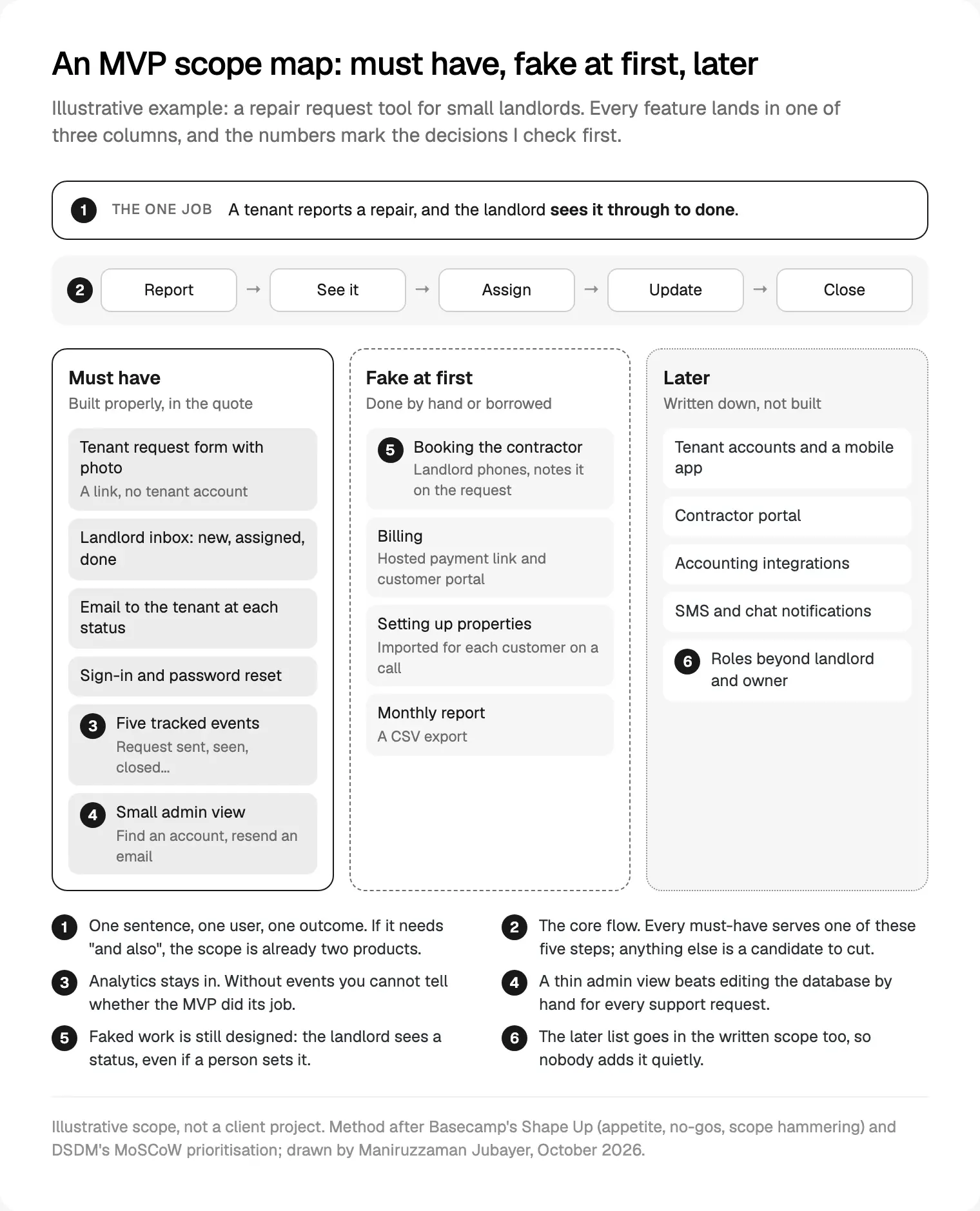
This example is illustrative, not a client project: a repair request tool for small landlords who manage a handful of flats and juggle texts and calls today.
The job sentence: a tenant reports a repair, and the landlord sees it through to done. The core flow has five steps: report, see it, assign, update, close.
| Area | Must have | Fake at first | Later |
|---|---|---|---|
| Tenants | Request form by link, with photo | Nothing | Tenant accounts, mobile app |
| Landlords | Sign-in, password reset, an inbox with three statuses | Property set-up imported on a call | Team roles |
| Contractors | A name and phone number on each request | Booking by phone, noted on the request | Contractor portal |
| Messages | An email to the tenant at each status change | Reminders sent by the founder | SMS and chat apps |
| Money | Nothing inside the product | Hosted payment link and customer portal | Billing in the app |
| Insight | Five events: sign-up, request sent, seen, assigned, closed | A CSV export for the monthly report | Dashboards |
| Support | Admin view: find an account, resend an email, change a status | Not needed | Audit log |
The must-have column is a short list of screens (form, confirmation, sign-in, inbox, request detail, two admin views) plus the status emails, and every step of the job works on day one.
Before any code, I'd put a clickable prototype of the form and inbox in front of five landlords. Jakob Nielsen's research on testing with five users (March 2000) found five users uncover about 85% of usability problems, and recommends several small rounds over one large one.
Write the scope down so it becomes one fixed quote
Seibel's other hack is to write the spec down, because an unwritten one quietly turns three weeks into three months. Shape Up's pitch has five parts: problem, appetite, solution, rabbit holes and no-gos. Most briefs I read have no no-gos at all.
My written scope covers, in this order:
- The job sentence and the first user.
- The core flow, and every screen on it with its states.
- What is faked or borrowed, and who does the manual part.
- Each integration by name, with the account in your company's name.
- The analytics events, and the question each answers.
- The later list and the no-gos.
- The stack, hosting and the sprint plan.
For most web MVPs the stack is Next.js, a React framework for full-stack web applications, as its docs put it. If you only need a marketing site for now, compare Framer, Webflow or Next.js for your site first. For the layers beyond the framework, see my SaaS tech stack, layer by layer.
That document becomes one fixed quote for the whole project, with no retainer and nothing billed by the hour. It's also the list my designers and developers build from, which is much of how my team designs and builds MVPs in Next.js without the app drifting from its Figma file. Collecting quotes from several teams? Send each the same scope; my notes on how to brief developers and compare quotes explain why.
Signs your MVP scope is too big
- The job sentence contains "and".
- More than two roles have different permissions.
- There is more than one core flow.
- Every item is a must-have.
- An integration on the critical path hasn't been tried in a sandbox.
- A native app and a web app are both in version one.
- Nobody can name the event that will show the MVP worked.
When I see three or more, I go back to the job sentence, rerun the hammering questions and move items right until the must-have column serves one flow. Drop features, never the states that make the remaining ones work.
Where I would start
Write the job sentence today and draw the core flow on one page. Sort every feature into three columns, honestly marking what a person could do for the first weeks. Keep analytics, the first-run screen and a small admin view. That page is most of a scope, and once it's agreed, the path from Figma file to Next.js app is the build.
If you'd like a senior team to turn it into a product, bring that page to a free intro call about my MVP design and build service. You can read how I work with founders first; my team works remotely from Dhaka, with evening calls for the Americas. A written scope and one fixed quote follow the call.
Frequently asked questions
How do you scope an MVP?
Write the product's one job as a sentence: one user, one outcome. Map the shortest flow that delivers it, then sort every feature into must have, fake at first and later. Must-haves are only what the flow fails without. Do the rest by hand, borrow hosted tools or list it for later, then write it down with the no-gos.
What should be included in an MVP?
Everything the core flow needs to work end to end, with its empty, loading and error states. Add sign-in with password reset, a handful of analytics events, a first-run screen that explains the product and a small admin view for support. Leave out extra roles, settings, integrations and native apps unless the job can't be done without them.
How long should it take to build an MVP?
Y Combinator's Michael Seibel says weeks, not months, and suggests time-boxing the spec so only what fits the deadline goes on it. Shape Up's big batch is six weeks for one designer and one or two programmers. Regulated products such as banking take longer. If your plan runs to months, cut scope first.
What is the difference between an MVP and a prototype?
A prototype shows how the product would work, usually as clickable screens in Figma, and you test it to find usability problems. An MVP is a working product that real users rely on for a job, so you learn whether they come back. I test a prototype of the core flow first, then build the MVP from what the test shows.
Do I need an admin panel in my MVP?
A small one. In the first weeks you'll reset passwords, resend emails, fix records and change statuses for users. Doing that by editing the production database is slow and risky. A thin internal view to find an account, view it, resend an email and change a status is a modest build that pays off from the first support request.
Can I change the scope once the build starts?
Yes, through the same three columns. A new item goes into must have, fake at first or later. If it's a must-have, something of similar size moves out, or the scope and quote are updated in writing. A written scope makes those changes visible, instead of a short plan quietly growing into a long one.
Sources and method
I read every source on 5 October 2026. The method is how I scope projects with founders, checked against the frameworks below. The worked example is illustrative and contains no client data. I found no reliable public data on how many MVP features go unused, so the post makes no claim about it.
- Y Combinator, Michael Seibel, How to plan an MVP (talk and transcript), date read 5 October 2026: ycombinator.com
- Eric Ries, Minimum Viable Product: a guide (3 August 2009), date read 5 October 2026: startuplessonslearned.com
- The Lean Startup, principles, date read 5 October 2026: theleanstartup.com
- Paul Graham, Do Things That Don't Scale (July 2013), date read 5 October 2026: paulgraham.com
- Basecamp, Shape Up, chapters 3 (appetite), 4 (breadboarding), 6 (the pitch and no-gos) and 14 (scope hammering), date read 5 October 2026: basecamp.com, basecamp.com, basecamp.com, basecamp.com
- Agile Business Consortium, DSDM MoSCoW prioritisation, date read 5 October 2026: agilebusiness.org
- Google Research, Rodden, Hutchinson and Fu, the HEART framework paper (CHI 2010), date read 5 October 2026: research.google
- Google, Google Analytics 4 recommended events, date read 5 October 2026: developers.google.com
- Stripe, Payment Links and customer portal documentation, date read 5 October 2026: docs.stripe.com, docs.stripe.com
- W3C, WCAG 2.2 (latest version 12 December 2024), date read 5 October 2026: w3.org
- Nielsen Norman Group, Jakob Nielsen, Why You Only Need to Test with 5 Users (18 March 2000), date read 5 October 2026: nngroup.com
- Vercel, Next.js documentation, date read 5 October 2026: nextjs.org