Reviewing AI-generated code before it merges: twelve checks for interfaces
Reviewing AI-generated code for a product interface: the twelve checks I run before a merge, with React fixes, what to automate and what needs a person.

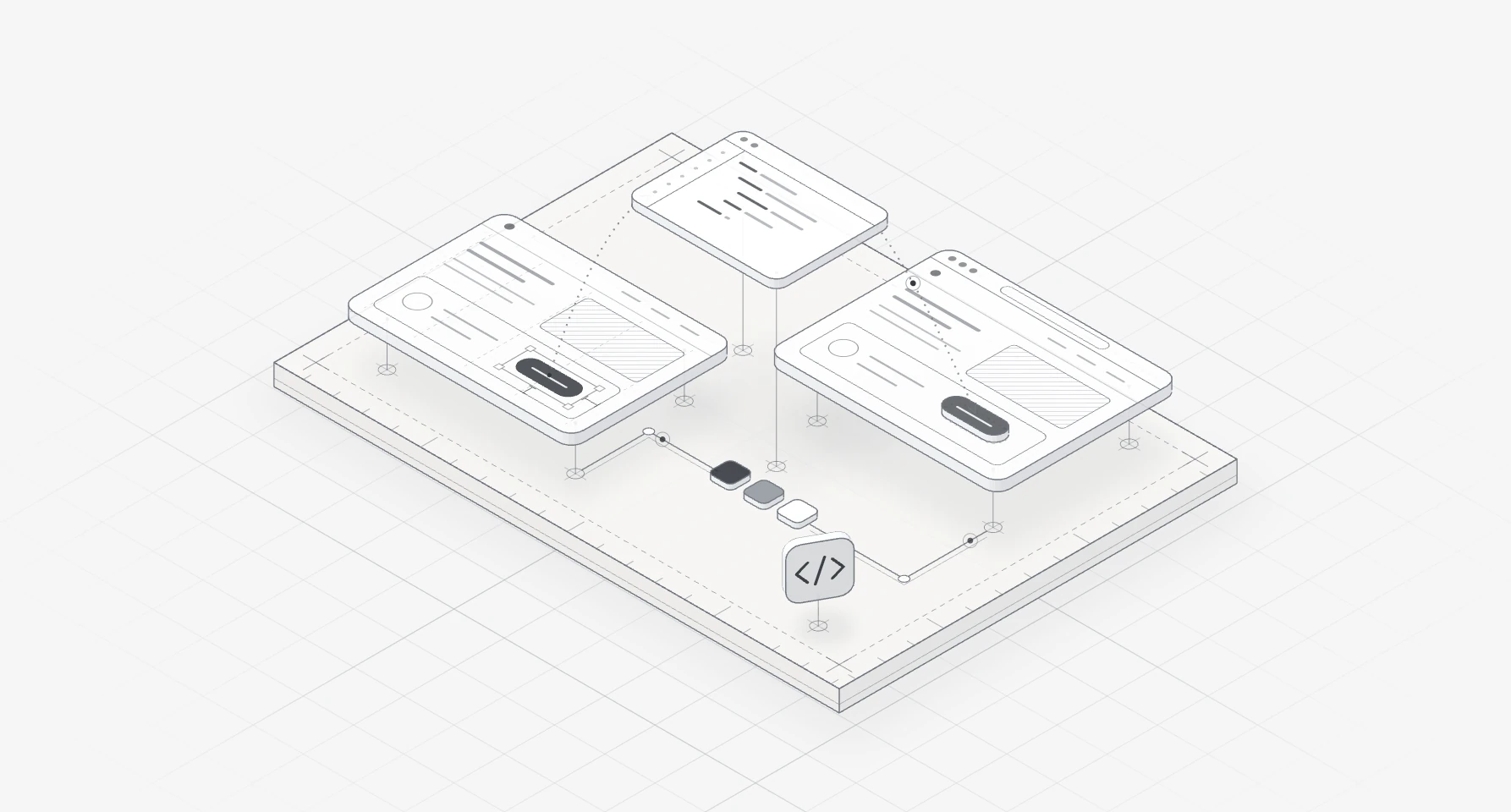
Reviewing AI-generated code for a product interface means checking what passing tests and a good screenshot both hide. Did the agent use your components and tokens, or write look-alikes? Is there a loading, empty and error state? Does the screen work by keyboard, and does a screen reader hear sensible names? Does it hold up on a narrow phone, calm its motion when asked, load quickly and render nothing unsafe?
I run twelve checks on every generated pull request before it merges, in the same order. Types, lint, axe and visual tests catch part of the list. The rest needs a person who knows the design, and that's much of my work as a design engineer for startups: my team uses AI coding tools where they save time, and a person reviews every change.
It's for founders, product leads and engineers shipping interface code from Claude Code, Cursor or Copilot. The workflow around the review is in my Figma to Claude Code workflow; this is the review itself, mistake by mistake. If the whole app came from an AI builder, start with taking a vibe-coded app to production.
Why AI-generated interface code needs its own review
General advice on AI-generated code review still applies: read it as a stranger's work, question the logic, run the tests. Interface code adds a question tests rarely ask: is this the design, for everyone? The research is thin and partly from vendors, but it points one way:
- CodeRabbit, which sells AI code review, compared 470 open-source pull requests in its December 2025 report. Those it marked as AI co-authored had about 1.7 times as many issues (10.83 against 6.45 each), and AI code "often looks consistent but violates local patterns": the look-alike component in one phrase.
- Veracode's 2025 GenAI Code Security Report, from a security vendor, tested more than 100 models on 80 tasks. Offered a secure and an insecure way, they chose the insecure one 45% of the time and failed to secure code against cross-site scripting in 86% of cases.
- A CHI 2026 paper by Calò, Guriță and De Russis found 541 semantic accessibility violations in 300 interfaces from three commercial models: attributes that exist but say nothing, such as
alt="image", which automated checkers pass. - In the CodeA11y study, 16 developers without accessibility training, building with an AI assistant, didn't prompt it for accessibility and skipped manual steps such as replacing placeholder attributes.
In a Stanford study at CCS 2023, people with an AI assistant wrote less secure code and were more likely to believe it was secure. So I review generated code more slowly than a colleague's, not faster.
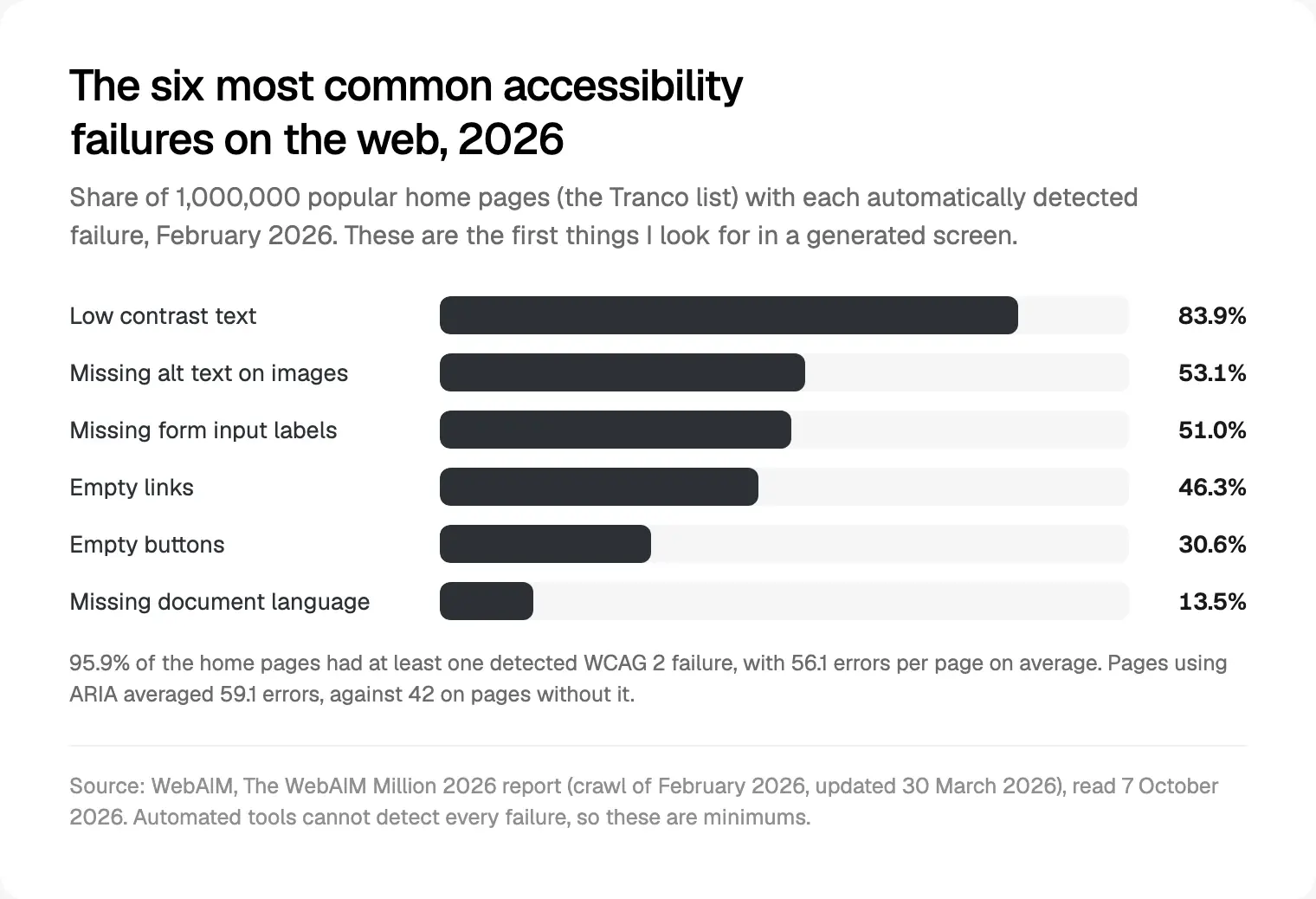
The public web has the same gaps. WebAIM's 2026 analysis of a million home pages found detectable WCAG failures on 95.9% of them, 56.1 errors per page on average, up from 51 in 2025, and thinks AI-assisted coding is likely one reason.
The order I use for reviewing AI-generated code
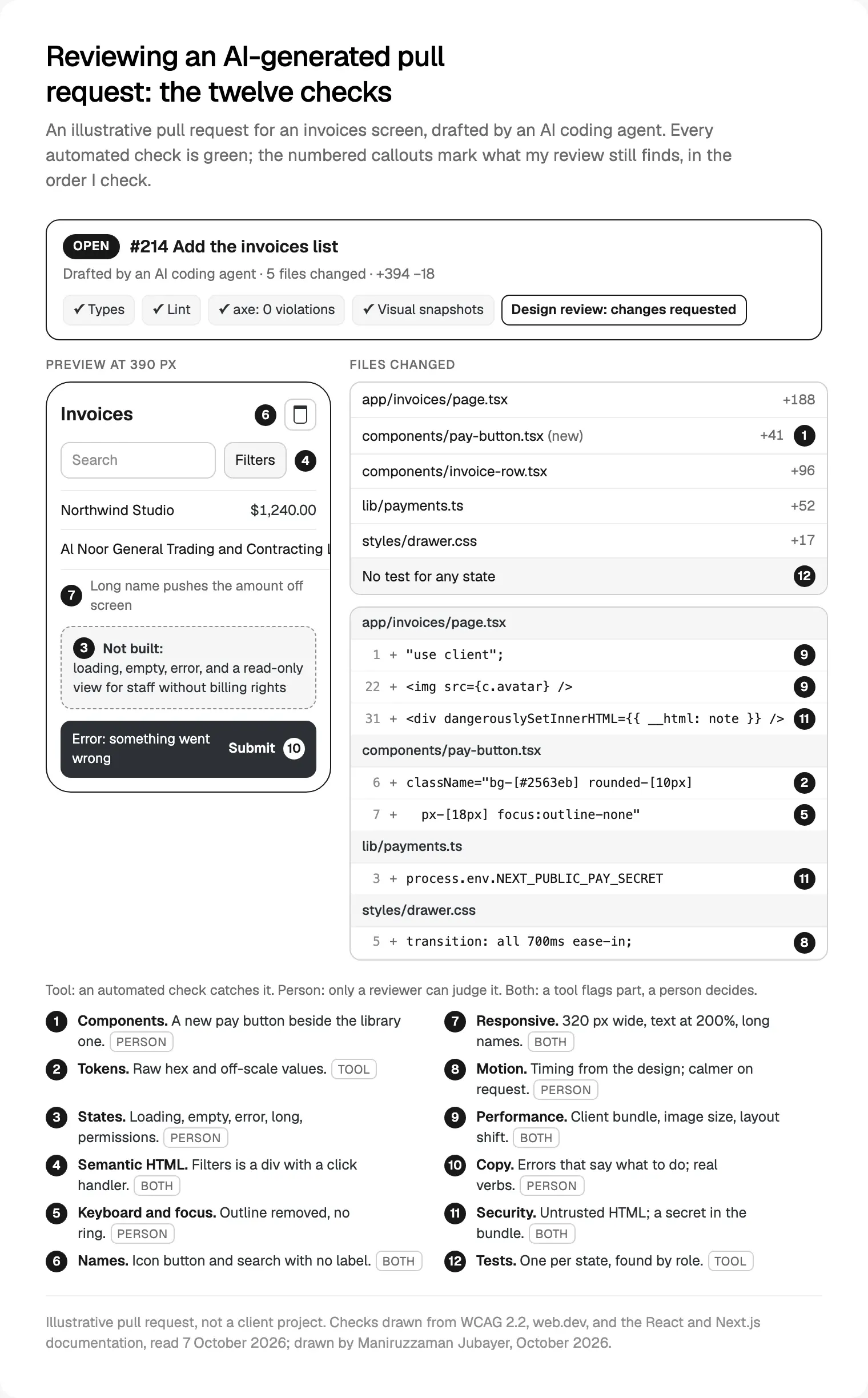
One screen or component per pull request, and the preview before the diff, so tidy code that renders the wrong thing never gets through. Order matters: why check the focus ring on a button that should be the library's?
| # | Check | Typical generated mistake | Caught by |
|---|---|---|---|
| 1 | Components | A look-alike of a library component | Person |
| 2 | Tokens | Raw hex, pixels, arbitrary classes | Lint or CI search |
| 3 | States | Happy path only | Person, then tests |
| 4 | Semantic HTML | div with onClick | Lint, then person |
| 5 | Keyboard and focus | outline-none, nothing in its place | Person |
| 6 | Names | Icon buttons with no name | axe, then person |
| 7 | Responsive | Fixed widths that overflow | Visual tests, person |
| 8 | Motion | Long transitions, no reduced motion | Person |
| 9 | Performance | "use client" on whole pages | Lint, then person |
| 10 | Copy | "Submit", "Something went wrong" | Person |
| 11 | Security | Untrusted HTML, client secrets | Lint, scanning, person |
| 12 | Tests | None, or found by test id | CI, person reads them |
Components and design tokens before new markup
First I look for a component that already exists, written again. The agent can't see that your Button has a loading state and a focus ring someone tested, so it writes one that matches the screenshot.
// Generated: a look-alike with raw values
<div onClick={pay} className="rounded-[10px] bg-[#2563eb] px-[18px] py-[9px] text-white">
  Pay now
</div>

// After review: the library component, which carries the tokens
<Button variant="primary" loading={isPaying} onClick={pay}>
  Pay invoice
</Button>
Does every button, field, dialog, table and toast in the diff come from the library? If something is genuinely missing, the fix is a new library variant, designed in Figma first, never a one-off.
Tokens are the same check, smaller. A raw hex or px-[18px] won't follow the next theme or dark mode, and a lint rule or CI search for hex codes and arbitrary class values catches it. How tokens get from Figma into code is in turning Figma variables into a Tailwind theme.
Every state: loading, empty, error, long content and permissions
Generated screens follow the example data, so they show the happy path. I ask for these by name:
- Loading: a skeleton shaped like the content, so nothing jumps.
- Empty: what this is, and the one action that fills it.
- Error: what failed, whether anything was saved, and a retry.
- Long content: a 60 character company name, a ten-digit amount, a German translation.
- Permissions: a read-only view, with the reason shown.
The generated invoice list was data.map(...) and nothing else. A discriminated union, explained in the TypeScript handbook's narrowing chapter, makes every case explicit:
type Invoices =
  | { status: "loading" }
  | { status: "error"; retry: () => void }
  | { status: "ready"; rows: Invoice[]; canEdit: boolean };

function InvoiceList({ state }: { state: Invoices }) {
  switch (state.status) {
    case "loading": return <TableSkeleton rows={5} />;
    case "error": return <ErrorState onRetry={state.retry} />;
    case "ready":
      if (state.rows.length === 0) return <EmptyState action="Create invoice" />;
      return <InvoiceTable rows={state.rows} readOnly={!state.canEdit} />;
  }
}
Hiding a button is design, not security. Next.js's data security guide says to treat Server Actions as reachable by direct POST requests and check authorisation in each, so the server must refuse what the interface hides.

Semantic HTML, keyboard and focus
Generated markup leans on divs. A clickable div gives a keyboard nothing: no Tab stop, no Enter or Space, no role. The W3C's ARIA Authoring Practices Guide says ARIA roles don't add keyboard behaviour, and that no ARIA is better than bad ARIA.
// Generated
<div className="chip" onClick={() => setOpen(!open)}>Filters</div>

// After review
<button
  type="button"
  className="chip focus-visible:ring-2 focus-visible:ring-focus"
  aria-expanded={open}
  aria-controls="invoice-filters"
  onClick={() => setOpen(!open)}
>
  Filters
</button>
Then I put the mouse away:
- Tab through every control. Does the order follow the reading order?
- Is focus always visible?
outline-nonewith no replacement fails WCAG 2.2's Focus Visible. - Does Escape close each dialog and menu, and does focus return to what opened it?
- Is the focused item ever hidden under a sticky header?
- Were headings chosen for structure or for size?
eslint-plugin-jsx-a11y catches the clickable div with no-static-element-interactions, but the config Next.js 16.3 ships turns on only six of its rules, not that one, so I enable the recommended set. For the legal side, see a React checklist for the European Accessibility Act.
Names, labels and microcopy: what a screen reader hears
Every control needs a name that means something. Generated code often has neither:
// Generated
<button onClick={() => remove(file.id)}><TrashIcon /></button>
<input placeholder="Email" />

// After review
<IconButton icon={TrashIcon} label={`Delete ${file.name}`} onClick={() => remove(file.id)} />
<Field label="Work email" hint="We send invoices here">
  <Input type="email" autoComplete="email" />
</Field>
What I listen for with VoiceOver or NVDA:
- Icon buttons say what they act on: "Delete March invoice", not "button".
- Placeholders aren't labels. They vanish once someone types.
- The name contains the visible words, as WCAG's Label in Name asks, so voice control users can say what they see.
- Changes are announced: "Saved" goes in a
role="status"region, under WCAG's Status Messages. - ARIA is earned. WebAIM found pages with ARIA averaged 59.1 errors, against 42 without. I remove ARIA that native HTML already provides.
Microcopy gets the same review. Generated screens ship "Submit", "Something went wrong" and leftover sample text; I rewrite each to say what happened and what to do: "We couldn't reach your bank. Nothing was charged. Try again." No tool flags a vague sentence.
Responsive layout, motion and performance
Responsive. I check every screen at 320 CSS pixels wide, where WCAG's Reflow criterion expects no sideways scrolling, and with text at 200%. Generated layouts break through fixed widths, tables with no phone layout and long names with nowhere to wrap.
Motion. Generated motion is often a long transition: all. I take timing from the design, and anyone whose device asks for less movement, through prefers-reduced-motion, gets a fade or nothing. web.dev's guide to layout shift adds: animate transform, not top or left.
Performance. Three habits cost the most:
"use client"on a whole page. Next.js's docs say everything that file imports and renders joins the client bundle, so the directive moves down to the interactive part.<img>without width and height. web.dev lists images without dimensions among common causes of layout shift and asks for a CLS of 0.1 or less on at least 75% of visits; Next.js's Image component reserves the space.- Old APIs. Next.js 16 deprecated Image's
priorityforpreload, and its ESLint docs notenext lintis gone. Agents write the API they learned, so I check it against the version you run, a habit from my team's React and Next.js development.
Security basics in interface code
Generated code has two security habits worth their own pass:
// Generated
<div dangerouslySetInnerHTML={{ __html: invoice.note }} />
const pay = createPayClient(process.env.NEXT_PUBLIC_PAY_SECRET);

// After review: plain text, and the secret stays on the server
<p className="whitespace-pre-line">{invoice.note}</p>

// lib/payments.ts
import "server-only";
const pay = createPayClient(process.env.PAY_SECRET);
React's documentation warns that unless markup comes from a completely trusted source, dangerouslySetInnerHTML makes cross-site scripting trivial. When HTML is genuinely needed, OWASP's XSS prevention cheat sheet recommends sanitising it with DOMPurify.
Next.js's environment variables guide says anything prefixed NEXT_PUBLIC_ is inlined into the JavaScript sent to the browser. A secret with that prefix is public; if it shipped, rotate it. With the server-only import, Next.js gives a build-time error if a client component imports that module. Next.js's audit list also asks whether client components receive private data in props, so I pass only the fields a screen shows.
Tests for states, and what to automate
Each state gets a test that finds elements as people do. Testing Library's guide to queries puts getByRole first and warns that if you can't find something by role, the interface may be inaccessible:
it("offers a way forward when there are no invoices", () => {
  render(<InvoiceList state={{ status: "ready", rows: [], canEdit: true }} />);
  expect(screen.getByRole("button", { name: "Create invoice" })).toBeEnabled();
});
The rest runs in CI:
| Tool | Catches | Misses |
|---|---|---|
| TypeScript, strict, unions for state | A state with no branch | Whether the state helps |
| ESLint with jsx-a11y recommended | Clickable divs, missing alt | Whether a name means anything |
| CI search for raw values | Hex codes, arbitrary classes | The wrong token |
| axe through Playwright | Missing names, contrast | Focus order, meaning |
| Visual snapshots per state and width | Changes after approval | Whether it matched the design |
Playwright's guide says many accessibility problems only show up in manual testing; its emulateMedia option sets reducedMotion: "reduce" for a motion test. Green checks shrink the review; they don't replace it.
What only a person can judge
After the tools, these stay with someone who knows the design:
- Whether the screen does what was decided. It can be accessible, fast and wrong.
- Whether names, alt text and copy mean something. The CHI 2026 paper's point is that
alt="image"passes automated checks. - How the keyboard path feels: where focus lands, what Escape does.
- Whether motion explains something or only decorates.
- Whether empty and error states help someone recover.
- The final yes on merge.
That judgement is what design engineering for AI product teams is for.
Where I would start
Take the next generated pull request and review only checks 1 and 3: is every component from the library, and does every state exist? In my reviews, those two find the most rework. Then add one automated check each week.
If you'd rather one person owned the design, the review and the build, my design engineering projects for startups start with a free 30 minute intro call, then a written scope and one fixed quote.
Frequently asked questions
What are the best practices for reviewing AI-generated code?
Keep each pull request to one screen or component, and open the preview before the diff. Check reuse and tokens, then every state, then keyboard, screen reader names, layout at 320 pixels, motion, performance, copy and security. Automate what can fail a build, and never approve because the checks are green.
How is reviewing AI-generated UI code different from a normal code review?
A normal review asks whether code works, is safe and can be maintained. Interface review also asks whether it is the design: the right components, every state, a usable keyboard path, meaningful names for screen readers and copy that helps. Those questions need someone who knows the design, not only the codebase.
Can an AI tool review AI-generated code?
As a first pass, yes. In the CHI 2026 study, an LLM judge found 80 to 92% of deliberately injected accessibility faults that attribute checkers miss. I use AI review to catch obvious problems early, then a person decides, because a model doesn't know what your design decided or why.
How do you check AI-generated code for accessibility?
Run eslint-plugin-jsx-a11y in the editor and axe in CI, then test by hand: every control by keyboard, focus always visible, dialogs that return focus, and a pass with VoiceOver or NVDA listening to names, roles and announcements. Check the layout at 320 CSS pixels and with text at 200%.
Are AI-generated UI components safe to use in production?
They can be, once reviewed. The risks are look-alikes that drift from your library, missing states, inaccessible markup, untrusted HTML and secrets in client code. Veracode found models failed to secure code against cross-site scripting in 86% of cases, so treat every bit of rendered HTML and every environment variable as a review item.
Who should review AI-generated interface code?
Someone who knows both the design and the code: the screen's designer if they read code, a design engineer, or a front-end developer working beside the designer. In my team, a person who knows the design reviews every change before it merges, and an engineer reviews the code itself.
Sources and method
I read every source on 7 October 2026 and rechecked the links on 9 October. The checklist is how my team reviews; the code and the diagram's pull request are illustrative, not client work. Research here is thin: the CHI paper is an extended abstract (read through OpenAlex, as ACM blocks automated checks), and CodeRabbit and Veracode are vendors. The Next.js lint rules come from eslint-config-next 16.3.6.
- CodeRabbit, State of AI vs Human Code Generation report, 17 December 2025, date read 7 October 2026: coderabbit.ai
- Veracode, 2025 GenAI Code Security Report release, 30 July 2025, date read 7 October 2026: veracode.com
- Calò, Guriță and De Russis, Measuring the Semantic Accessibility Gap in LLM-Generated Web UIs, CHI 2026, date read 7 October 2026: doi.org
- Mowar and others, CodeA11y, arXiv, 15 February 2025, date read 7 October 2026: arxiv.org
- Perry and others, Do Users Write More Insecure Code with AI Assistants?, CCS 2023, date read 7 October 2026: arxiv.org
- WebAIM, The WebAIM Million 2026, February 2026, date read 7 October 2026: webaim.org
- W3C, WCAG 2.2 and its Understanding pages, date read 7 October 2026: w3.org, w3.org, w3.org, w3.org, w3.org
- W3C WAI, ARIA Authoring Practices Guide, Read Me First, date read 7 October 2026: w3.org
- React, dangerously setting the inner HTML, date read 7 October 2026: react.dev
- OWASP, XSS Prevention Cheat Sheet, date read 7 October 2026: cheatsheetseries.owasp.org
- Next.js docs, version 16, date read 7 October 2026: nextjs.org, nextjs.org, nextjs.org, nextjs.org, nextjs.org
- Google, web.dev, Optimize CLS, updated 7 February 2025, date read 7 October 2026: web.dev
- MDN, prefers-reduced-motion, date read 7 October 2026: developer.mozilla.org
- eslint-plugin-jsx-a11y, README, date read 7 October 2026: github.com
- Testing Library, About Queries, date read 7 October 2026: testing-library.com
- Playwright, accessibility testing, visual comparisons and emulateMedia, date read 7 October 2026: playwright.dev, playwright.dev, playwright.dev
- TypeScript Handbook, Narrowing, date read 7 October 2026: typescriptlang.org