

Layouts that group, align and mirror the way people read
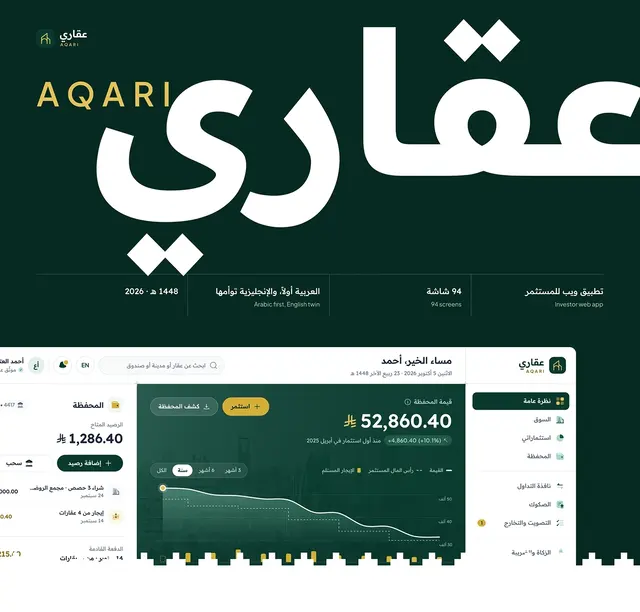
jubayer-layout teaches Claude to group with space, align to shared edges, order by importance and adapt to any width, then mirror the whole page cleanly for right to left.
- Free, MIT License
- 6 files, 17 KB zip
Updated 28 October 2026
When Claude uses it
Claude reads this description from the skill's SKILL.md and loads the skill when your request matches it.
Builds and reviews layout structure, covering grouping with space, shared alignment edges, reading order by importance, progressive disclosure cues, spacing between targets, safe-area margins, content-driven breakpoints and room for translated text. Includes right-to-left and bilingual rules for Arabic/English and Bangla/English products, such as dir and lang on html, CSS logical properties, what flips by itself and what needs an override, mirroring rules, Tailwind rtl variants and RTL forms. Use when you lay out a page, screen or component, review spacing, alignment or hierarchy, make a layout responsive, prepare it for translation, or build or fix an RTL or mixed-direction interface.
What it covers
Group with space, not lines
Gaps between groups at least twice the gap inside them, before any divider or box.
Align to shared edges
Elements line up on a few edges, and controls stay distinct from content.
Order by importance
The main task first, with hidden content hinted at so people know it is there.
Room to tap and to grow
Breathing room between targets, buttons inset from edges, and layouts that plan for long text.
Logical properties
margin-inline, padding-inline and inset-inline, so a layout mirrors by itself when dir changes.
What does not flip by itself
Transforms, gradients, background positions, shadows and scroll positions need an RTL override.
Mirror the right things
Arrows and progress mirror; logos, media controls and numbers do not. Phone, email and URL fields stay left to right.
What this version adds
A full RTL and bilingual layout reference: the physical to logical properties table, overrides under :dir(rtl), what mirrors and what never does, Tailwind logical utilities, Arabic blocks inside English pages, RTL forms and a test checklist. It also fixes a safe-area bug in one original example.
Try it with a prompt like this
I'm adding an Arabic version of my Next.js landing page. Can you check the layout so everything mirrors properly in RTL and the contact form still works?
Or run it by name in Claude Code: type /jubayer-layout and what you want checked.
View SKILL.md
The skill's main file, as it is in the zip. The reference files it links to are listed below it.
jubayer-layout/SKILL.md · Show the full file
---
name: jubayer-layout
description: Builds and reviews layout structure, covering grouping with space, shared alignment edges, reading order by importance, progressive disclosure cues, spacing between targets, safe-area margins, content-driven breakpoints and room for translated text. Includes right-to-left and bilingual rules for Arabic/English and Bangla/English products, such as dir and lang on html, CSS logical properties, what flips by itself and what needs an override, mirroring rules, Tailwind rtl variants and RTL forms. Use when you lay out a page, screen or component, review spacing, alignment or hierarchy, make a layout responsive, prepare it for translation, or build or fix an RTL or mixed-direction interface.
---

# Layout

A reader sees structure before reading a word: what sits close together, what lines up and what comes first already says what belongs together and what matters. This skill sets up that structure and then tries to break it by resizing the viewport, swapping in longer translated strings and flipping the page to right to left.

Make every fix in the styling system the project already uses. The values below are starting points for interfaces that have no density system of their own; where the project has one, apply it exactly instead of a value that merely looks close. Leave deliberate platform chrome, compact professional tools and project tokens alone as long as they still pass the stress tests.

Hit areas and focus behavior belong to `jubayer-accessibility`. Radius, shadows and animation belong to `jubayer-ui`. Line length and text spacing belong to `jubayer-typography`.

## Group with space, not lines

Space groups first, background shapes second, separator lines last and only where space alone can't carry the structure. The gap between groups must be at least 2× the gap within one (`8px` intra-group to `16px`+ inter-group), or the grouping reads as noise. Alignment edges and importance ordering are in [grouping-and-alignment.md](grouping-and-alignment.md).

## Keep controls distinct from content

Give every interactive element a background shape, a border, or a consistent placement zone. A control styled like the static text beside it does not read as a control.

## Align to shared edges

Pick alignment edges and stick to them; every stray edge reads as noise. Use one project spacing step per level of subordination, where `16px` is a useful default.

Use logical properties for direction-dependent layout: `padding-inline-start`, `margin-inline-end`. Reserve physical left and right for genuinely physical geometry.

## Order by importance

The most important content sits near the top and the leading edge. Reading order flows top-to-bottom, leading-to-trailing. Think in leading and trailing, not left and right.

## Lay out for right to left

The RTL mirror in the stress test is a layout job, not a translation job. Core rules, with the full mapping table, override recipes, mirroring list, forms and test checklist in [rtl-and-bilingual-layout.md](rtl-and-bilingual-layout.md):

- Set direction in markup: `<html lang="ar" dir="rtl">`, not only CSS `direction`. A block in another language inside the page gets its own `lang` and `dir`, and its alignment follows that block.
- Flexbox, grid, `text-align: start` and logical properties flip by themselves. Transforms, gradients, `background-position` keywords, physical `left`/`right` offsets, shadow x offsets and `scrollLeft` in JS do not; override them under `:dir(rtl)`.
- Never fake RTL with `flex-direction: row-reverse` or `order`. Visual order then disagrees with DOM, focus and reading order.
- Mirror navigation, chevrons, back arrows, progress and sliders. Keep media playback controls, clocks, logos, photos, numbers, code and phone numbers unmirrored.
- Phone, email and URL inputs stay `dir="ltr"` inside an RTL form.

## Hint at hidden content

Progressive disclosure needs a visible affordance. Use the project's established cue, or let the next item peek `16` to `32px` past the scroll edge, or show a disclosure control. Content hidden with zero cue may as well not exist.

## Breathing room between targets

Without an established density system, start with `12px` between adjacent bordered or filled controls and `24px` around borderless text- and icon-only ones. Compact layouts may use less, as long as `jubayer-accessibility` hit areas don't overlap and the controls stay distinct. Layout margins and breakpoint recipes are in [spacing-and-adaptivity.md](spacing-and-adaptivity.md).

## Inset buttons from the edges

In content layouts, keep full-width buttons inside the layout margins with a visible radius, starting near `16px` inline on mobile. Edge-to-edge actions work when they follow established platform chrome, account for safe areas and stay distinguishable from system UI.

## Content bleeds, controls float

Backgrounds and media extend to the viewport edges. Controls and text stay inside the layout margins and safe areas (`env(safe-area-inset-*)`). Sticky chrome floats above the content layer rather than blocking it.

## Hold structure until it breaks

Breakpoints come from the content, not device presets. Keep the expanded layout as long as it genuinely fits and collapse late. Prefer container queries for component-level adaptation, and test the smallest and largest sizes first.

## Plan for growth and clipping

Translated strings grow, and short ones grow proportionally more, so a one-word button label is the riskiest thing on the screen. Put no fixed width or height on a text container, and let rows wrap. Test with pseudo-localization and one representative locale rather than budgeting a percentage. Arabic is often shorter than English in characters but needs more vertical room, so a fixed height fails it even when the width fits.

Never park a critical action where resizing or scrolling clips it. Keep it in the normal flow, or in stable chrome suited to the product.

## Before you finish

| Mistake | Fix |
| --- | --- |
| `margin-left` / `padding-right` in a localizable layout | `margin-inline-start` / `padding-inline-end` |
| Direction set only with CSS `direction: rtl` | `dir="rtl"` and `lang` on `<html>`, and on any block in the other language |
| `flex-direction: row-reverse` or `order` used to mirror for RTL | Logical layout plus `dir`; DOM order stays the reading order |
| `translateX()`, `to right` gradient, `left: 0` or positive shadow x offset with no RTL override | Logical property where one exists, else an override under `:dir(rtl)` |
| Back arrow or chevron points the same way in RTL | Mirror it under `:dir(rtl)`; leave play, clocks, logos and numbers alone |
| Phone, email or URL input inherits `dir="rtl"` | `dir="ltr"` on the input; its label still follows the page |
| Carousel or scroller JS that assumes `scrollLeft` grows from `0` | Read direction and handle negative `scrollLeft` in RTL |
| Content-layout button touches the viewport edge | Inset within the project margins; keep intentional platform chrome |
| Breakpoints at 768/1024 because they're the defaults | Break where the content actually stops fitting |
| Fixed-width text container sized to one language | `max-width` and wrapping; test pseudo-localization |
| Primary action at the clip-prone bottom of a pane | Sticky positioning or stable chrome with safe-area padding |

## Reporting

**Severity.** `HIGH` blocks content or an action at a supported viewport or supported direction. `MEDIUM` harms hierarchy, reading order, or adaptability. `LOW` is isolated alignment or spacing polish.

**Verification.** Without a browser: logical properties in place of physical ones, no `row-reverse` or `order` standing in for RTL, `dir` and `lang` on `<html>` and on other-language blocks, `:dir(rtl)` overrides for transforms, gradients, shadows and physical offsets, container and media queries against the supported viewport list and DOM order against the intended reading order. With one: every supported width, 200% zoom, the RTL mirror (switch `dir` on `<html>`), pseudo-localized strings and the longest supported locale, following the checklist in [rtl-and-bilingual-layout.md](rtl-and-bilingual-layout.md). Report every check you could not run as `Not verified`.

**Format.** Group findings under the principle each violates, ordered by severity, one row per root cause listing every location it appears in:

| Severity | Location | Before | After | Why |
| --- | --- | --- | --- | --- |

`Location` is `path/to/file:line`. `Why` names the principle and the user impact.

End with `Block` when any `HIGH` remains, `Approve` otherwise, leaving the rest in the table as work to do. Never `Approve` coverage you did not inspect. With nothing to report, state "No actionable layout findings" and report verification.

## Origin

Based on Jakub Krehel's `better-layout` skill (MIT License), renamed and edited by Maniruzzaman Jubayer, with added right-to-left and bilingual rules. See LICENSE.
Files in the zip
- jubayer-layout/LICENSE1 KB
- jubayer-layout/SKILL.md9 KB
- jubayer-layout/agents/openai.yaml1 KB
- jubayer-layout/grouping-and-alignment.md6 KB
- jubayer-layout/rtl-and-bilingual-layout.md15 KB
- jubayer-layout/spacing-and-adaptivity.md7 KB
Based on Jakub Krehel's better-* skills, MIT License. The LICENSE in the zip keeps his copyright and mine.
Install jubayer-layout in 3 steps
Pick where you use Claude. The same zip works in both places.
In the Claude app or on Claude.ai
- Step 1:
Open Settings › Capabilities. Under Code execution and file creation, switch on Run code in the cloud. Skills need it.
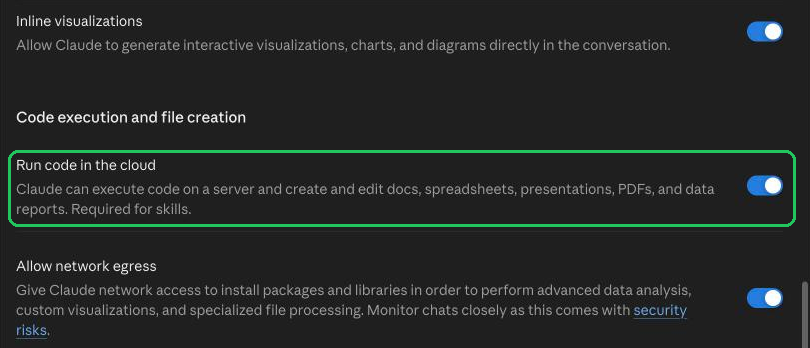
Settings › Capabilities: Run code in the cloud, on - Step 2:
Open Settings › Customize › Skills, choose + Add, then Upload skill.

Customize › Skills › + Add › Upload skill - Step 3:
Drop the skill's zip, as it downloads from here, on Upload a skill and choose Upload. Claude scans it, then lists it under Skills, where you switch it on or off.
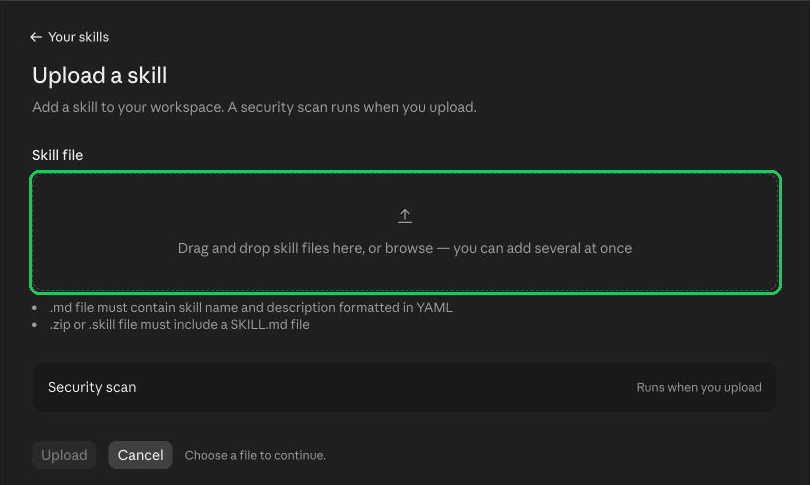
Upload a skill: drop the .zip, then Upload
In Claude Code
- Step 1:
Unzip the skill into your skills folder:
~/.claude/skills/for every project, or.claude/skills/in one project.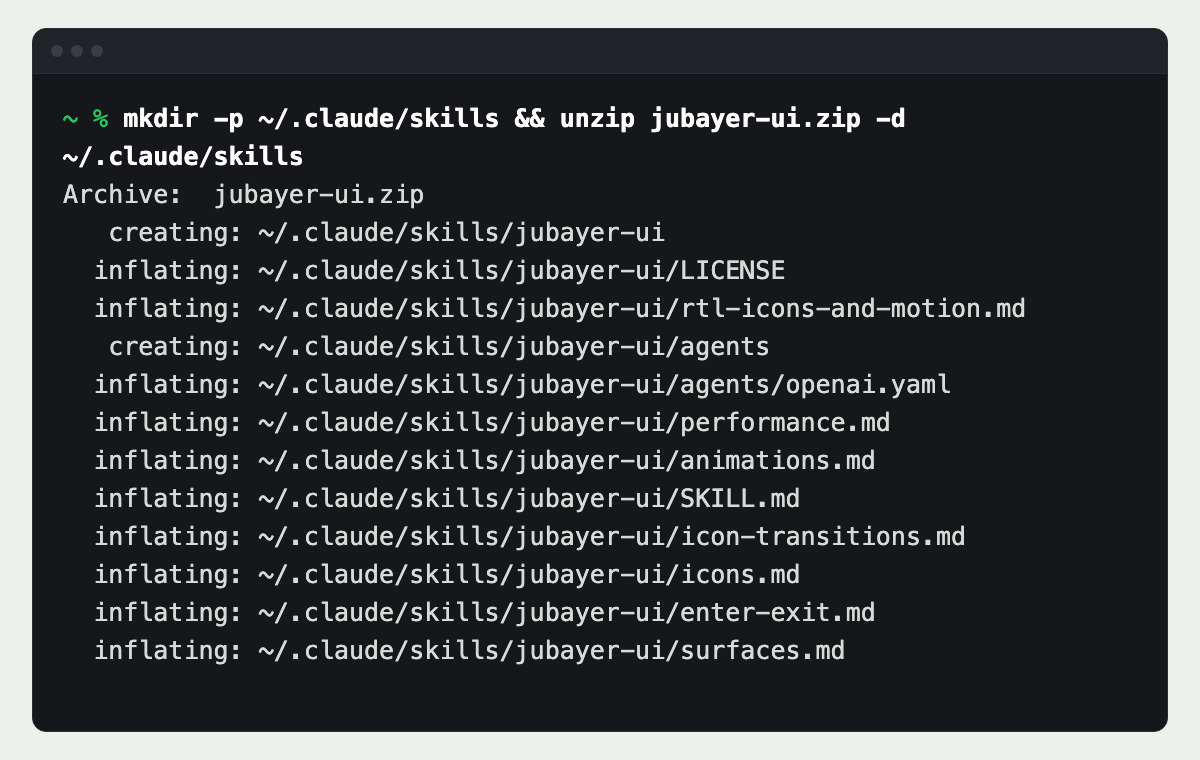
Unzip into ~/.claude/skills - Step 2:
Check the folder is there. Each skill is a folder with a SKILL.md inside.
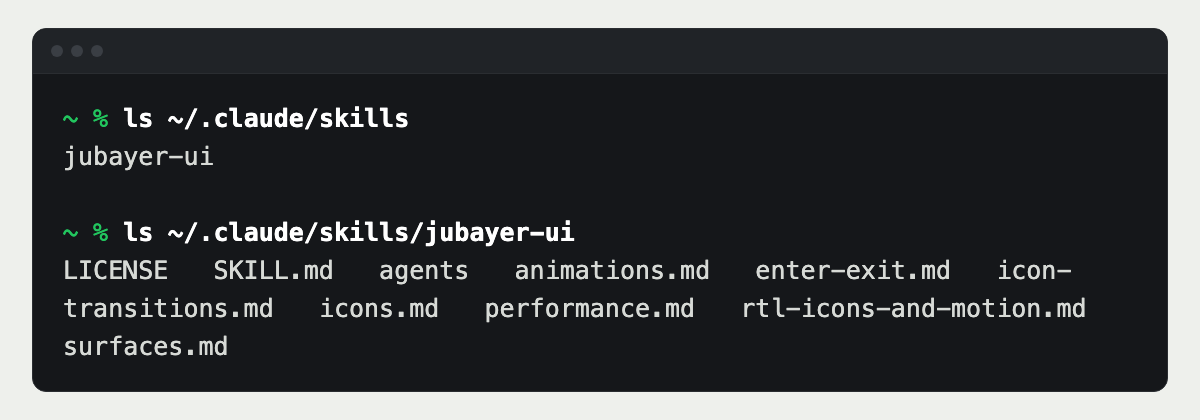
Each skill is its own folder - Step 3:
Ask Claude for the job in plain words, or type the skill's name as a command, such as
/jubayer-ui.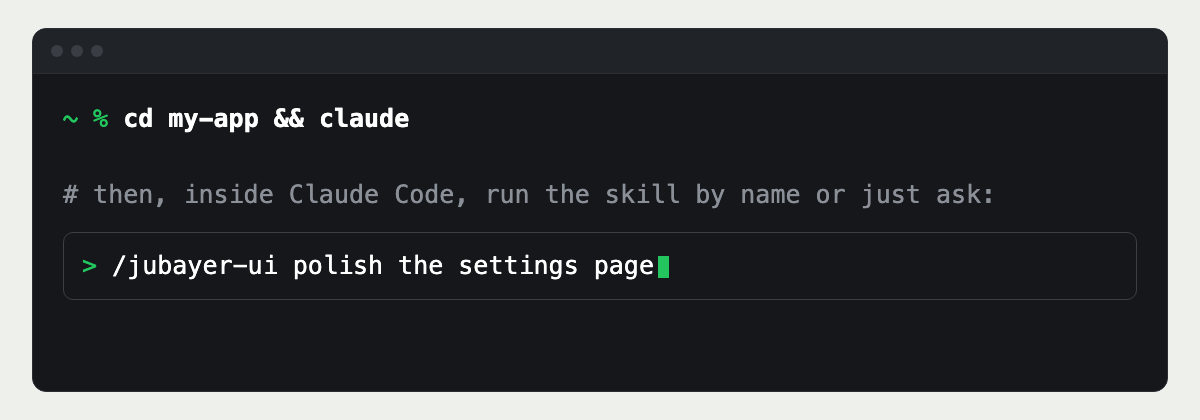
Run it by name or just ask
Launching in Arabic and English?
I design and build bilingual products where both directions are designed, not flipped at the end.
Questions people ask
- Properties named by flow rather than side: margin-inline-start instead of margin-left. They follow the page's direction, so one stylesheet serves English and Arabic.
- No. It reverses the visual order but not the DOM order, so focus and reading order stop matching what people see. Set dir on the page instead.
- Yes. It uses Tailwind's logical utilities, such as ms-4, pe-2 and start-0, and the rtl: variant for the few overrides.