


Type that reads well in English, Arabic and Bangla
jubayer-typography covers the scale, spacing, wrapping and font details that make text comfortable to read, and the rules Arabic and Bangla need that Latin type rules get wrong.
- Free, MIT License
- 10 files, 25 KB zip
Updated 28 October 2026
When Claude uses it
Claude reads this description from the skill's SKILL.md and loads the skill when your request matches it.
Reviews and fixes how text renders in a web interface, with exact CSS values for type scale, line-height, letter-spacing, font loading, variable fonts, OpenType features, wrapping, truncation, tabular numbers, punctuation and underlines. Also covers Arabic and Bangla next to Latin, including font stacks scoped with lang and unicode-range, size matching, no letter-spacing on cursive or matra scripts, no case or italics, digit sets with Intl, script punctuation, mixed-direction text and RTL truncation. Use when choosing or pairing fonts, setting a type scale, fixing text that wraps, truncates or reads badly, auditing typography before shipping, or setting type for an Arabic/English or Bangla/English product.
What it covers
A scale with semantic names
Fewer fonts, sizes and weights, headings that descend with level, and the right font formats and weights loaded.
Line height and letter spacing by role
Tighter for display, looser for body, with tracking that changes with size.
Measure and wrapping
Capped line length, balanced headings, and truncation that never hides content for good.
Numbers and details
Tabular numbers on changing values, underlines from the font, and 16px inputs on phones.
Arabic type
No letter spacing, no italics or caps, more line height, and a size that matches the Latin beside it.
Bangla type
A font that shapes conjuncts, generous line height for the signs above and below, and no letter spacing.
Digits and mixed direction
Pick Western, Arabic-Indic or Bangla digits explicitly, and isolate names and code inside Arabic text.
What this version adds
A reference on Arabic and Bangla type: font stacks scoped with :lang() and unicode-range, size matching beside Latin, line height, emphasis without italics, numerals with Intl, punctuation, mixed-direction text and truncation in RTL.
Try it with a prompt like this
My site has Arabic and English versions and the Arabic text looks cramped and too small next to the English. Can you fix the typography?
Or run it by name in Claude Code: type /jubayer-typography and what you want checked.
View SKILL.md
The skill's main file, as it is in the zip. The reference files it links to are listed below it.
jubayer-typography/SKILL.md · Show the full file
--- name: jubayer-typography description: Reviews and fixes how text renders in a web interface, with exact CSS values for type scale, line-height, letter-spacing, font loading, variable fonts, OpenType features, wrapping, truncation, tabular numbers, punctuation and underlines. Also covers Arabic and Bangla next to Latin, including font stacks scoped with lang and unicode-range, size matching, no letter-spacing on cursive or matra scripts, no case or italics, digit sets with Intl, script punctuation, mixed-direction text and RTL truncation. Use when choosing or pairing fonts, setting a type scale, fixing text that wraps, truncates or reads badly, auditing typography before shipping, or setting type for an Arabic/English or Bangla/English product. --- # Typography Good type in an interface comes from a few decisions held consistently: a short scale, line-height and tracking chosen per role, and enough contrast to read. Each kind of text gets its own settings, because a button label, a table cell, a hero headline and a paragraph of an article are read in different ways. Review the page as it renders, with real content, not the stylesheet alone. Awkward breaks, single words on a last line and cut-off strings appear only at real lengths, and in a bilingual product they differ by language. Write every fix in the project's styling system, and use the exact values below rather than familiar-looking equivalents. The [cheat sheet](css-cheat-sheet.md) maps each declaration to its Tailwind equivalent. The words themselves belong to `jubayer-writing`. Semantic heading structure belongs to `jubayer-accessibility`. Spatial RTL layout and logical properties belong to `jubayer-layout`. Contrast measurement belongs to `jubayer-colors`. This skill owns how text renders, wraps and behaves in mixed-direction content, including Arabic and Bangla set next to Latin. ## Serve the right format Use `.woff2` on the web, for Brotli compression and broad support. `.woff` is a fallback for very old browsers. `.ttf` and `.otf` are desktop formats with no web compression. How the files load is the project's concern. ## Properties over raw tags When a CSS property exists, use it. `font-weight: 650` instead of `font-variation-settings: "wght" 650`. `font-optical-sizing: auto` instead of `"opsz"`. `font-variant-numeric: tabular-nums` instead of `font-feature-settings: "tnum" 1`. Properties keep working when a non-variable fallback renders. Reserve raw tags for custom axes (`"GRAD" 80`) and niche features (`"ss01" 1`) with no property of their own. Axes and feature tags are listed in [variable-fonts-and-opentype.md](variable-fonts-and-opentype.md). ## Load intended weights and styles Browsers synthesize a weight or style the active family doesn't provide, distorting the real face. Load the faces the design uses. `font-synthesis: none` turns synthesis off, but it erases emphasis rather than reporting it. Set it only after checking every required bold, italic, small-cap, superscript and subscript form stays distinct across the fallback stack. Arabic and Bangla have no true italic, so emphasis there needs weight or color instead; see [Arabic and Bangla](#arabic-and-bangla-next-to-latin). ## Fewer fonts, sizes and weights Rarely use more than three fonts. Weight and size define hierarchy; overusing them hurts readability fast. Pair for contrast, not similarity: a serif headline over a sans body reads as deliberate, two near-identical sans-serifs read as a mistake. Below `18px`, stay at weight `400` or heavier. Weights under `300` are display-only at `28px`+; they disappear at text sizes. Pairing guidance is in [choosing-fonts.md](choosing-fonts.md). ## Use a type scale with semantic names Define a small set of sizes and deviate from it as little as possible. Hard-coded sizes with no system behind them break down at scale. Solo, default names like `text-sm` are fine when the usage rules are clear. On a team, name sizes by use (`text-body-sm`) so the rules survive other people. Scale construction is in [spacing-and-sizing.md](spacing-and-sizing.md). ## Heading sizes descend with level Map heading levels to descending steps of the type scale, so a visually subordinate heading never overpowers its parent. Adjacent levels may share a size toward the small end of the scale, as long as weight or spacing keeps them distinct. The semantic element is `jubayer-accessibility`'s; this skill sets only the visual treatment. ## Line-height by role Headings tighter, around `1.1`. Body copy `1.5` to `1.6`. Prefer unitless values, so line-height scales with the font size; a fixed `24px` does not. Tight line-height is for short text. Anything that wraps to three or more lines needs at least `1.4`, even in a height-constrained row. Arabic and Bangla need more room than Latin; see [Arabic and Bangla](#arabic-and-bangla-next-to-latin). ## Letter-spacing by size Large headings often look better with slightly negative letter-spacing. Small uppercase labels need a little positive letter-spacing, or the letters feel crowded. Body copy at reading sizes needs neither. Never letter-space Arabic or Bangla, at any size. ## Cap the measure Long lines make it hard for the eye to find the next one. Cap long-form text around 60 to 75 characters per line. Any unit works, as long as a cap exists and the line length lands in range. See [unit choices and the pixel equivalents](wrapping-and-punctuation.md#measure-line-length). ## Wrap deliberately Four declarations, four jobs: - `text-wrap: balance` distributes text evenly across lines. Use it on headings. - `text-wrap: pretty` stops a single short word landing on the final line. Use it on descriptions. - `overflow-wrap: break-word` where a long word, link, or ID could escape the container. - `white-space: nowrap` on labels and badges where a line break looks broken. Skip `balance` and `pretty` in long-form text. ## Tabular numbers on changing values Digits have different widths by default, so timers, counters and prices shift the layout as they update. Apply `font-variant-numeric: tabular-nums` to any value that changes. ## Truncate without losing content For a single line, `text-overflow: ellipsis` with `overflow: hidden` and `white-space: nowrap`. For several, `line-clamp`. Truncation hides content. When the missing text matters, keep the full value reachable in a tooltip or an expanded view. ## Write copy naturally, style with CSS Store text in natural case and control presentation with `text-transform`, so a redesign never means rewriting copy. Use smart punctuation in rendered text: - Curly quotes in prose, straight quotes in code. - The en dash (U+2013, `–`) for ranges, as in `2010–2020`, not a hyphen. - The single ellipsis character, not three periods. - ` ` to hold `16 px` together across a line break. - `­` to say where a long word may break. ## Underlines from the font Default underlines sit wherever the browser decides. Pull position and thickness from the font's own metrics with `text-underline-position: from-font` and `text-decoration-thickness: from-font`. Tune by hand with `text-decoration-thickness`, `text-underline-offset` and `text-decoration-skip-ink`. `text-decoration-style` draws the line dotted, dashed, or wavy. A dotted underline is a common hint that a word carries extra information, such as an abbreviation or a defined term. Color is the only part of a real underline that animates reliably. So unless the only thing animating is the color, build the underline as a separate element rather than using `text-decoration`. ## Inputs at 16px on mobile iOS Safari zooms the whole page when an input's text is smaller than `16px`. Two fixes hold the size at `16px` and look different, so ask which one the design wants: - Size the input up on mobile (`text-base sm:text-sm`). Changes how it looks on small screens. - Keep `font-size: 16px` and render the intended size with `transform: scale()`, compensating width and `line-height`. Identical at every viewport, more code to maintain. Both recipes are in [details-and-accessibility.md](details-and-accessibility.md). ## Size and contrast floors Start long-form body text at `16px`, the browser default. Move off it only for a reason you can name: the typeface runs small, the measure is narrow, or the product is a dense professional tool. UI text can go smaller. `14px` is a useful starting point for inputs and menus, `13px` for captions and rarely below `12px`. Inputs still need `16px` on mobile. When text looks low-contrast, use `jubayer-colors` to measure the rendered pair and `jubayer-accessibility` to classify the requirement. Leave the colors alone unless asked. ## Font smoothing on the root On macOS, text renders heavier than intended. Apply `-webkit-font-smoothing: antialiased` and `-moz-osx-font-smoothing: grayscale` once on the root layout, never per component. Tailwind's `antialiased` covers both. ## Language and bidi behavior Set `lang` so browsers and assistive technology pick the right pronunciation, quotes, hyphenation and font. Set `dir` in markup at the document (`<html lang="ar" dir="rtl">`) and at every content boundary where direction changes, not only CSS `direction`. Use `dir="auto"` on user-generated content and inputs of unknown language. Preserve digit order, and use `<bdi>` to isolate a mixed-direction value; `‎` or `‏` pin stray punctuation where no element can wrap it. Recipes, including Latin brand names and code inside Arabic, are in [arabic-and-bangla-type.md](arabic-and-bangla-type.md#mixed-direction). Spatial mirroring and logical CSS properties belong to `jubayer-layout`. ## Arabic and Bangla next to Latin Arabic is cursive and right to left; Bangla is left to right with a headline (matra) joining the letters. Neither has case, and neither has a traditional italic. Full rules and code are in [arabic-and-bangla-type.md](arabic-and-bangla-type.md). - Name a designed face per script and scope it with stack order, `unicode-range` or `:lang()`, so no character falls back to a random system font. Include the danda (U+0964 to U+0965) in a Bangla range. - Match sizes with `size-adjust` on the script's `@font-face`, tuned by eye. Arabic often looks smaller than Latin at the same size. - Give body text more line-height than Latin; `1.6` to `1.8` is a starting point. Headings must never clip dots, harakat or vowel signs. - `letter-spacing: normal` always. Tracking breaks Arabic joins and the Bangla matra. - No `text-transform` or italic treatments: emphasize with weight or color, and consider `font-synthesis: none` on these scripts. - Avoid `text-align: justify` for Arabic unless tested. Prefer regular or medium weights at small sizes. - Format numbers with `Intl` and an explicit `-u-nu-` numbering system (`latn`, `arab`, `beng`). Check the script face has tabular digits. - Use script punctuation: Arabic comma U+060C, semicolon U+061B, question mark U+061F; Bangla danda U+0964, never a vertical bar. - Truncated and clamped text needs its own `dir` (often `dir="auto"`) and `text-align: start`, so the ellipsis lands at the right end. ## Keep useful text selectable Keep text selectable by default. `::selection` can carry brand into the reading experience, as long as the selected combination stays legible. `user-select: none` belongs on a draggable or gesture-driven surface where accidental selection interferes. Never across the interface and never because a button label can be highlighted. ## Before you finish | Mistake | Fix | | --- | --- | | Synthesized face differs from the design | Load the real face; disable only the verified synthesis mode | | Child heading visually overpowers its parent | Map that section's hierarchy to descending scale steps | | Heading element picked for its default size | Choose semantics first, then set the size in CSS | | Orphan on the last line of a paragraph | `text-wrap: pretty` | | Lopsided two-line heading | `text-wrap: balance` | | Justified text in an interface | `text-align: start`; reserve justify for specific editorial layouts | | Underline cuts through descenders | `text-decoration-skip-ink: auto`, `from-font` metrics | | Mixed-direction value renders in the wrong order | Correct `lang`/`dir`; isolate the value with `<bdi>` | | Selection disabled across application chrome | Restore it; suppress only where it conflicts with a drag or gesture | | Extra-info hint with no visual cue | Dotted underline via `text-decoration-style: dotted` | | Thin/Light weight on `14px` UI text | Weight `400`+ below `18px`; thin weights are display-only | | Arabic or Bangla renders in a system fallback | Name a face per script; scope with `unicode-range` or `:lang()` | | Letter-spacing or uppercase on an Arabic or Bangla label | `letter-spacing: normal`, `text-transform: none`; use size, weight or color | | Slanted synthetic italic on Arabic emphasis | `font-style: normal` plus weight; `font-synthesis: none` | | Diacritics or vowel signs clipped between lines | Raise line-height for the script; check two-line headings | | Digits from the wrong set, or mixed sets | `Intl.NumberFormat` with an explicit `-u-nu-` numbering system | | `C++` shows as `++C` inside Arabic | `<bdi>`, `dir="ltr"` on the element, or `‎` after it | | Ellipsis on the wrong side or start of string cut | `dir="auto"` on the truncated element, `text-align: start` | | Vertical bar typed instead of the Bangla danda | U+0964 `।` | | `leading-none` on a three-line card description | At least `1.4` on any text that wraps to 3+ lines | ## Reporting **Severity.** `HIGH` makes text unreadable or truncates content with no way to recover it. `MEDIUM` breaks the type system or the heading hierarchy. `LOW` is isolated polish. **Verification.** Without a browser: computed size and weight for each heading level, checked descending; declared line-height and measure; truncation rules against realistic string lengths; for Arabic and Bangla, `lang`/`dir` on the root and on mixed passages, the font stack each script resolves to, and no `letter-spacing`, `text-transform` or italic reaching those scripts. With one: resize the viewport to catch wrapping, widows and truncation at real content lengths. In a bilingual product, repeat in every language: check which face drew each script (Rendered Fonts in Chrome's Computed pane, the Fonts panel in Firefox), dots and vowel signs on wrapped headings, digit sets, and where the ellipsis lands on Arabic and English strings in both directions. Report every check you could not run as `Not verified`. **Format.** Group findings under the principle each violates, ordered by severity, one row per root cause listing every location it appears in: | Severity | Location | Before | After | Why | | --- | --- | --- | --- | --- | `Location` is `path/to/file:line`. `Why` names the principle and the user impact. End with `Block` when any `HIGH` remains, `Approve` otherwise, leaving the rest in the table as work to do. Never `Approve` coverage you did not inspect. With nothing to report, state "No actionable typography findings" and report verification. ## Origin Based on Jakub Krehel's `better-typography` skill (MIT License), renamed and edited by Maniruzzaman Jubayer, with added right-to-left and bilingual rules. See LICENSE.
Files in the zip
- jubayer-typography/LICENSE1 KB
- jubayer-typography/SKILL.md15 KB
- jubayer-typography/agents/openai.yaml1 KB
- jubayer-typography/arabic-and-bangla-type.md12 KB
- jubayer-typography/choosing-fonts.md3 KB
- jubayer-typography/css-cheat-sheet.md4 KB
- jubayer-typography/details-and-accessibility.md4 KB
- jubayer-typography/spacing-and-sizing.md4 KB
- jubayer-typography/variable-fonts-and-opentype.md4 KB
- jubayer-typography/wrapping-and-punctuation.md3 KB
Based on Jakub Krehel's better-* skills, MIT License. The LICENSE in the zip keeps his copyright and mine.
Install jubayer-typography in 3 steps
Pick where you use Claude. The same zip works in both places.
In the Claude app or on Claude.ai
- Step 1:
Open Settings › Capabilities. Under Code execution and file creation, switch on Run code in the cloud. Skills need it.
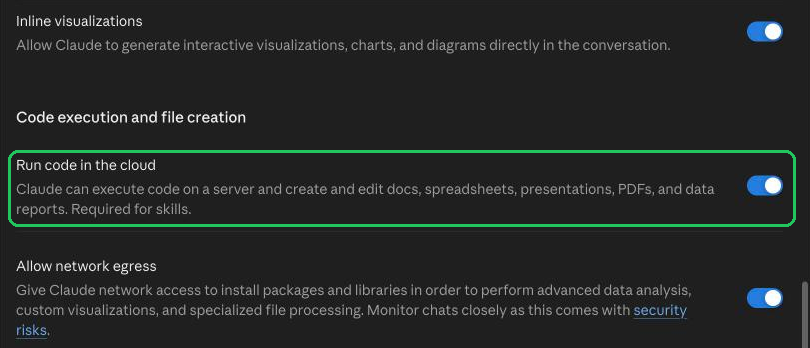
Settings › Capabilities: Run code in the cloud, on - Step 2:
Open Settings › Customize › Skills, choose + Add, then Upload skill.

Customize › Skills › + Add › Upload skill - Step 3:
Drop the skill's zip, as it downloads from here, on Upload a skill and choose Upload. Claude scans it, then lists it under Skills, where you switch it on or off.
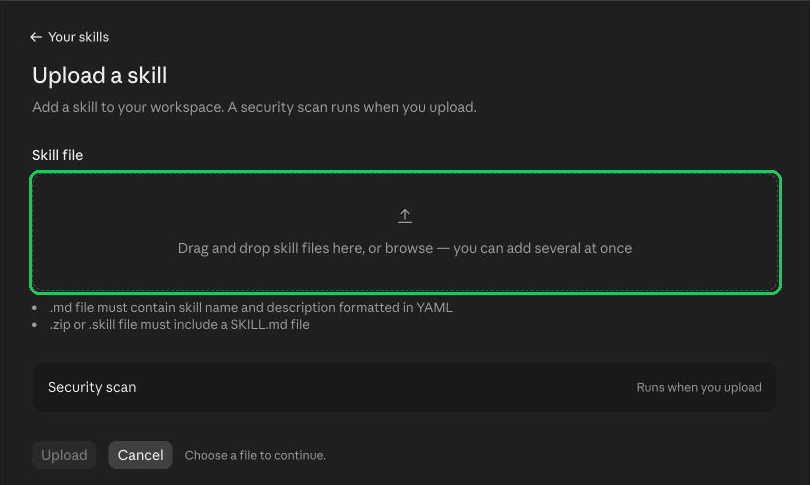
Upload a skill: drop the .zip, then Upload
In Claude Code
- Step 1:
Unzip the skill into your skills folder:
~/.claude/skills/for every project, or.claude/skills/in one project.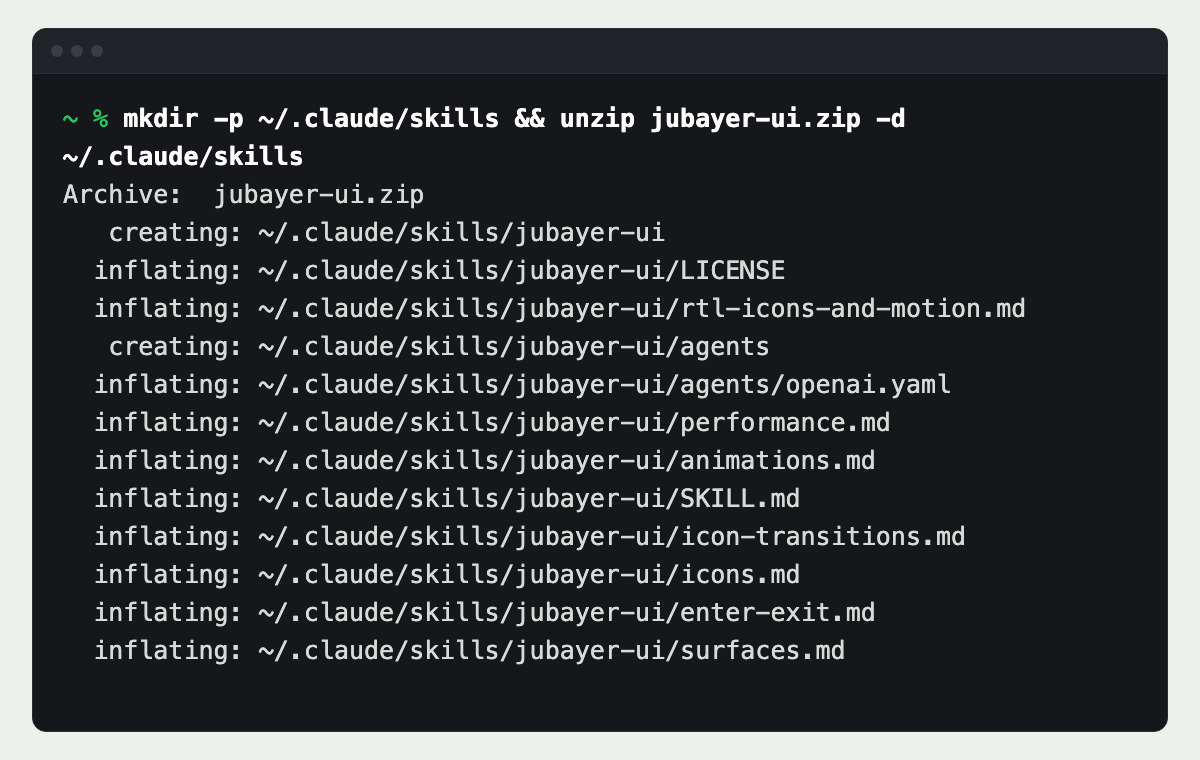
Unzip into ~/.claude/skills - Step 2:
Check the folder is there. Each skill is a folder with a SKILL.md inside.
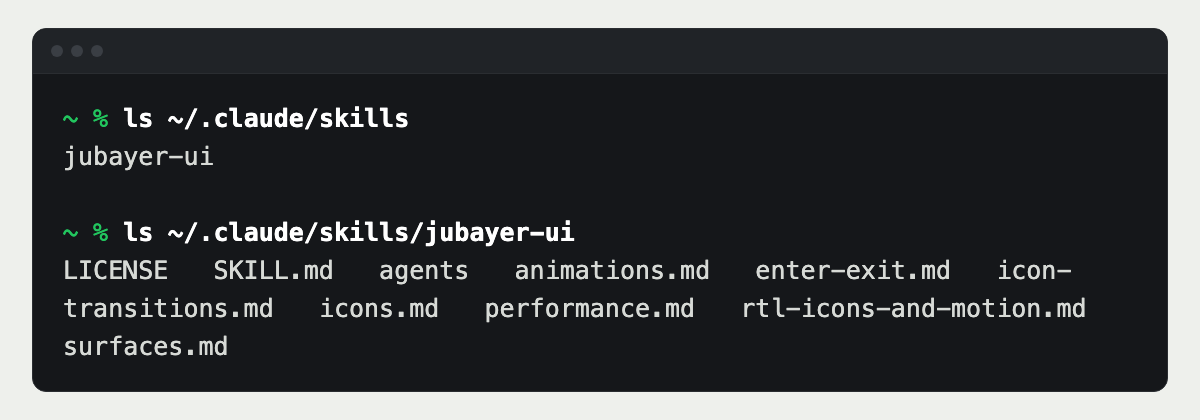
Each skill is its own folder - Step 3:
Ask Claude for the job in plain words, or type the skill's name as a command, such as
/jubayer-ui.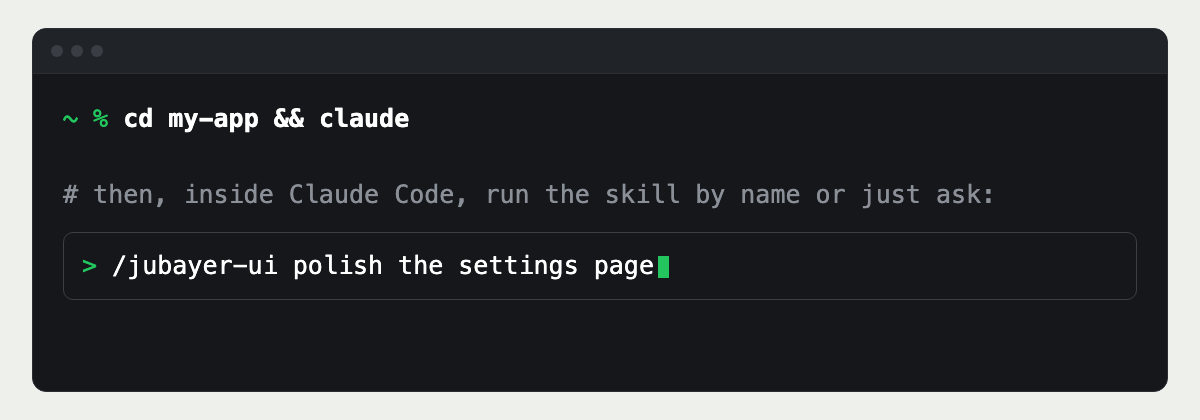
Run it by name or just ask
Need type that works in two scripts?
I design and build products in English, Arabic and Bangla, with type tuned for each script rather than one size for all.
Questions people ask
- Arabic letters often sit smaller in the em than Latin ones and carry dots and marks above and below. It usually needs a larger size and more line height.
- No. Arabic is cursive, and spacing breaks or distorts the joins between letters. Keep letter-spacing at normal for Arabic, and for Bangla, whose letters join along a top line.
- It depends on the market. Choose the numbering system on purpose, for example with Intl.NumberFormat and -u-nu-latn or -u-nu-arab, instead of trusting a locale default.