

To install a Claude skill in the Claude app or on Claude.ai, open Settings › Capabilities and switch on Run code in the cloud, then go to Settings › Customize › Skills, choose + Add, then Upload skill, and drop the skill's zip. To install one in Claude Code, unzip the skill folder into ~/.claude/skills/ (every project) or .claude/skills/ (one project), then ask for the job in plain words or type /skill-name. That's the whole install. Most problems come from three things: code execution switched off, a zip with the wrong layout, or a description Claude never matches.
I'm a design engineer: I design products and build them in production code, and I use Claude skills every day. I also share seven free design skills on my Claude skills page, built on Jakub Krehel's MIT-licensed better-* skills. I use them as the worked example below, with screenshots of each step.
What a Claude skill is, in one minute
A skill is a folder with a SKILL.md file: a short YAML header with a name and a description, then instructions, and optionally reference files and scripts. Anthropic's Agent Skills overview explains that Claude loads only the name and description at the start, about 100 tokens per skill, reads the full SKILL.md when a request matches, and opens the other files only when it needs them. That's why you can install many skills without filling the conversation.
The same folder works in Claude Code and in the Claude app. The app wants it zipped; Claude Code wants it unzipped.
Where to download Claude skills
- Anthropic's own. The app already has document skills for Word, Excel, PowerPoint and PDF, which Claude uses with no setup. Anthropic also publishes open-source skills in its skills repository.
- Authors who publish on GitHub. Jakub Krehel's skills repository holds the better-* interface skills, under the MIT License.
- Your own. Anthropic's help article on creating custom skills shows the folder layout.
- Mine. Seven design skills on /claude-skills, one zip each or all seven in one download.
Treat a skill like software you install. Anthropic's overview advises using skills only from trusted sources and auditing every bundled file, because a skill can tell Claude to run code or call tools. Before I install someone else's skill, I open SKILL.md and every script, and look for network calls I didn't expect.
How to install a skill in the Claude app or on Claude.ai
Anthropic's help article Use Skills in Claude lists skills on the Free, Pro, Max, Ultra, Team and Enterprise plans, and says the feature needs code execution. These are the steps as I checked them in the app for my skills page.
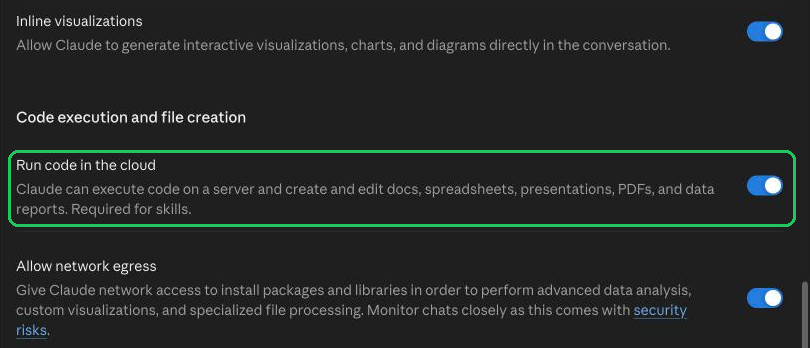
1. Switch on code execution. Open Settings › Capabilities. Under Code execution and file creation, switch on Run code in the cloud. The app's own note says it's required for skills.
2. Open the upload screen. Go to Settings › Customize › Skills, choose + Add, then Upload skill.

3. Upload the zip. Drop the skill's zip on Upload a skill and choose Upload. A security scan runs, then the skill appears in your list with a switch to turn it on or off.
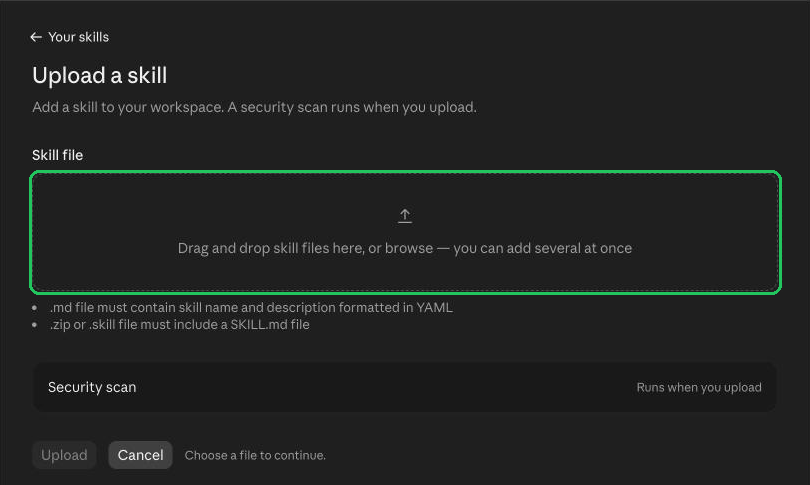
Menu labels move between app versions. Anthropic's help article words step 2 as + then Create skill, then Upload a skill, and names the setting Code execution and file creation. If your screen differs, look for those words.
On Team and Enterprise, the organisation decides. The help article says skills are on by default for Team organisations, while on Enterprise an owner switches on both code execution and Skills in Organization settings › Plugins & skills, under Policy. Owners can also turn off user-created skills.
How to install a skill in Claude Code
Claude Code reads skills from folders, as its skills documentation explains:
~/.claude/skills/<skill-name>/SKILL.mdfor you, in every project..claude/skills/<skill-name>/SKILL.mdfor one project. Commit it and everyone on the repository gets the skill.
1. Unzip into the skills folder.
mkdir -p ~/.claude/skills
unzip jubayer-ui.zip -d ~/.claude/skills
2. Check the folder is there. ls ~/.claude/skills should list a folder per skill, each with a SKILL.md inside.
3. Use it. Ask for the job in plain words and Claude loads the skill when your request matches its description, or type its name as a command, such as /jubayer-ui polish the settings page.
Edits to a SKILL.md in those folders are picked up in the current session. If the skills folder itself didn't exist when the session started, the docs say to run /reload-skills.
There are two other routes. Skills packed as plugins install from a marketplace: Anthropic's repository README gives /plugin marketplace add anthropics/skills, then a pick from Browse and install plugins. Some authors also offer a one-line installer; Jakub Krehel's README lists npx skills add jakubkrehel/skills. Both end in the same place, a folder Claude Code reads.
Skills from the app can follow you. The help article says skills you've switched on in the app load in Claude Code (version 2.1.273 or later) when you sign in with the same Claude account; /skills lists them under claude.ai sync. It's one-way, and it doesn't work when Claude Code runs on an API key or a cloud provider such as Amazon Bedrock. Skills you upload through the Claude API stay separate.
Worked example: installing my design skills
My seven skills cover accessibility, layout, typography, colour, interface writing and UI polish, plus jubayer-interface, a review that runs the other six in order and merges what they find. Each skill has its own page with a download button and its SKILL.md in full.
- In the app, upload each skill's own zip (for example
jubayer-accessibility.zip). Each zip holds one folder with SKILL.md, the reference files and the LICENSE at its root, which is the layout the uploader expects. The all-seven download is meant for Claude Code; for the app, use the single zips. - In Claude Code, unzip the all-seven download into
~/.claude/skills/and you get seven folders. Then try a prompt from a skill's page, such as asking jubayer-accessibility to check the Arabic version of a pricing page for keyboard and screen reader problems.
What I changed from Jakub's originals: new names and descriptions, a reference file in each skill for right-to-left and bilingual interfaces (Arabic and English, Bangla and English), and an MIT LICENSE in every folder that keeps his copyright beside mine. If you share or edit them, keep that LICENSE file.
Troubleshooting: when a Claude skill won't install or won't run
The Skills section is missing or greyed out. Code execution is off, in your settings or, on Team and Enterprise, for the whole organisation. Switch it on, or ask an owner.
The upload fails. The help articles list the usual causes: the zip has loose files instead of one folder at its root, SKILL.md is missing, the folder name doesn't match the skill's name, the name or description has invalid characters, or the zip is too large. Anthropic's overview gives the name rules: up to 64 characters, lowercase letters, numbers and hyphens only, no "anthropic" or "claude", and a description of up to 1,024 characters.
You can't upload at all on a work plan. An owner may have switched off user-created skills, or your role may not include creating skills. That's a setting, not a bug.
The skill is installed but Claude ignores it. Check its switch is on. Then name the skill in your request. If it still doesn't trigger, its description doesn't match how you ask; edit the description so the words you use appear in it.
In Claude Code, `/skill-name` isn't recognised. Check the folder holds SKILL.md with the YAML header on the very first line. The docs say a header that doesn't parse leaves Claude unable to match the description; run claude --debug to see the error. Ask "What skills are available?" to see what Claude Code loaded.
You have dozens of skills and some stop triggering. Claude Code keeps every skill's name in context but drops descriptions when the list passes its budget, about 1% of the model's context window, starting with the skills you use least. /doctor shows the cost. Remove skills you don't use, or shorten descriptions so the main use case comes first.
It worked on the first answer and then drifted. After a long conversation is compacted, Claude Code may keep only the start of a skill. Run the skill again.
Alternatives to a skill
- Project instructions in the Claude app or a
CLAUDE.mdfile in Claude Code load on every message. Use them for short rules that always apply; use a skill for a longer method you only need for some tasks. - Pasting a prompt works once. A skill saves you pasting it again and stays the same each time.
- Hooks in Claude Code run on every matching event. The docs suggest a hook for any rule that must hold every time, such as a check before each file edit.
Frequently asked questions
Are Claude skills free?
Skills are a feature of the Claude plans listed in Anthropic's help article, including Free. Many skills are free to download; mine are free under the MIT License.
Do I need Claude Code to use skills?
No. The Claude app and Claude.ai take skills as uploaded zips. Claude Code takes the same skill as a folder.
What is the difference between a skill and a plugin?
A plugin is a package for Claude Code that can hold skills along with other extensions. A skill inside a plugin runs as /plugin-name:skill-name. A skill on its own is just the folder.
Can I install several skills at once?
In Claude Code, unzip as many folders as you like into the skills folder. In the app, the upload screen accepts several files at once, each a zip with one skill folder.
How do I update or remove a skill?
In the app, switch the skill off, choose the menu beside it and delete it, then upload the new version. In Claude Code, replace or delete its folder.
Do skills work with every model?
Anthropic's overview says Agent Skills are available on every model.
Sources and method
I read every source on 1 November 2026, and checked the app steps and screenshots in the Claude app for my skills page on 28 October 2026. Menus change, so trust the words on your own screen over any guide, including this one.
- Anthropic, Claude Code Docs, Extend Claude with skills, date read 1 November 2026: code.claude.com
- Anthropic, Claude Help Center, Use Skills in Claude, date read 1 November 2026: support.claude.com
- Anthropic, Claude Help Center, How to create custom skills, date read 1 November 2026: support.claude.com
- Anthropic, Agent Skills overview, date read 1 November 2026: platform.claude.com
- Anthropic, skills repository README, date read 1 November 2026: github.com
- Jakub Krehel, skills repository and MIT License, date read 1 November 2026: github.com
If you want the interfaces you build with Claude designed and built to this standard, see my design engineering work and book a free 30 minute intro call. After it, you get a written scope and one fixed quote.
Tags: Claude skills, Claude Code, AI, Design engineering