

AI prototyping tools get you from an idea to something you can see and click in minutes. Figma Make, v0, Lovable, Bolt, Google Stitch, Claude Design and UX Pilot all do a version of it. None of them decides which direction is right, keeps your design system intact, covers every state or writes code your engineers would want to keep. So I name the job before I pick a tool.
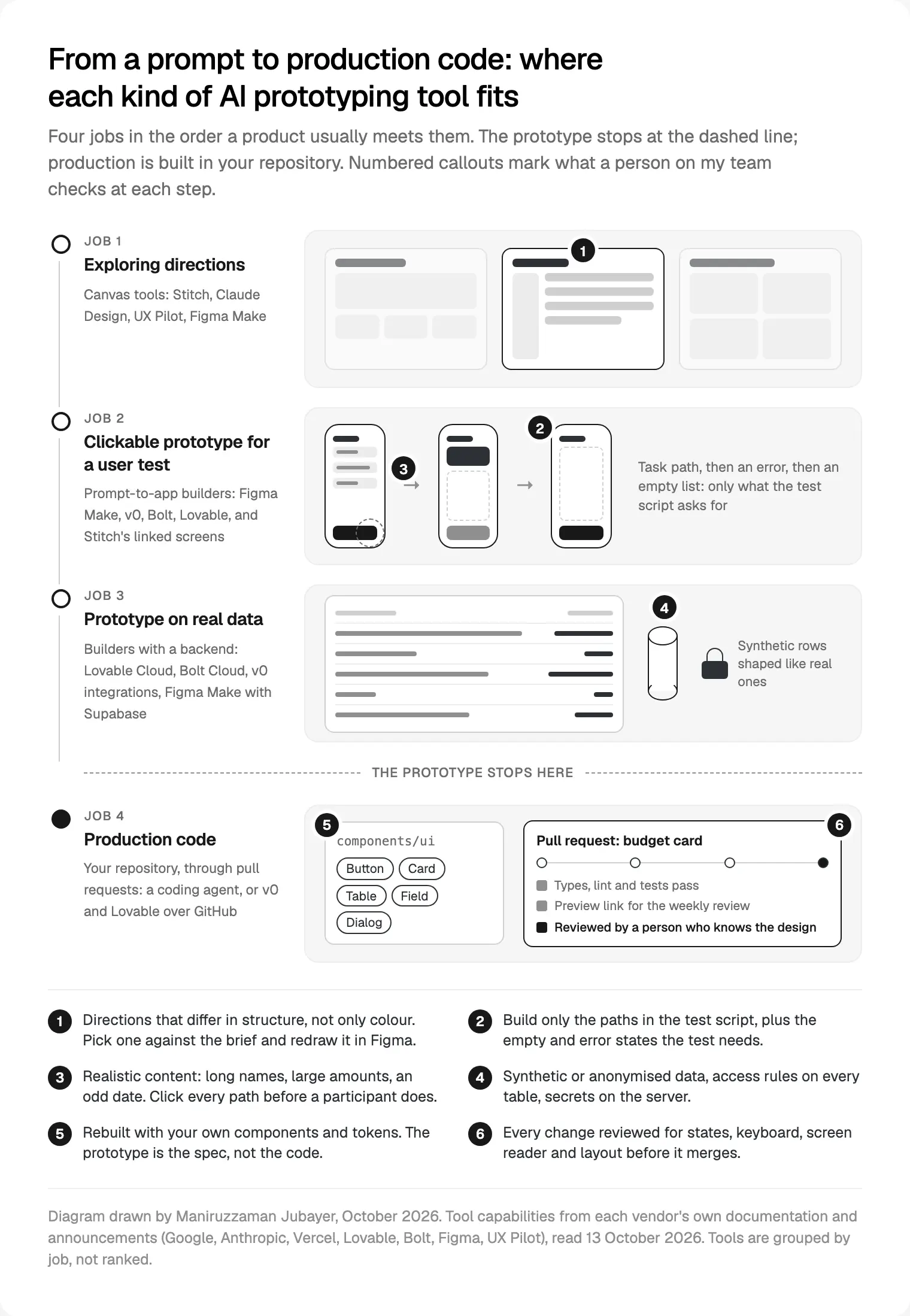
In my work as a design engineer for startups, I see four jobs: exploring directions, a clickable prototype for a user test, a prototype on real data, and handing a design to production code. Each tool is strong at one or two, and each job has its own checks. In my work, nothing these tools make reaches production until a person who knows the design has reviewed it.
It's for founders, product designers and product leads deciding where these tools help, and where they cost time later.
What changed in AI prototyping tools in 2026
Confirmed facts first, from each company's own pages, read on 13 October 2026.
- Google Stitch. Google Labs introduced Stitch on 20 May 2025, turning prompts and sketches into interfaces and front-end code with Gemini 2.5 Pro. On 18 March 2026 Google rebuilt Stitch as a design canvas with a design agent, an agent manager for parallel ideas, a DESIGN.md file that carries design rules between tools, linked screens you can play as a prototype, and an MCP server for coding tools.
- Claude Design. Anthropic launched Claude Design on 17 April 2026. Its release notes say that from 16 September 2026 it works inside any Claude conversation, on every plan including Free. The help article covers importing a design system with
/design-syncand handing a design to Claude Code, and says the standalone claude.ai/design is due to close on 14 December 2026. - v0. Vercel's v0 docs describe an agent that writes full-stack apps, deploys on Vercel or opens a pull request. Its Design Systems 2.0 guide learns your system from your repository, docs and Figma frames, and tells v0 not to use a component, prop or token it can't verify there.
- Lovable. A Lovable design system is its own project of React components, tokens and rules, on paid plans, and Lovable flags raw colours and customised components as you work. The changelog added a default design system per group on 21 September 2026.
- Bolt. Bolt's design system guide compiles one from your library and docs on a Team plan. Bolt's introduction lists starting from a prompt, a Figma frame, a Stitch design, a GitHub repository or a Lovable project, with mobile apps through Expo.
- Figma Make. Figma describes Make as a prompt-to-app tool for Full seats on paid plans: attach designs, edit by pointing, publish to a URL, and set up a Make kit from npm packages and your library's variables.
- UX Pilot. UX Pilot's site describes wireframes and high-fidelity screens from a prompt, sketch or product brief, exported to Figma or code.
My reading: the 2026 news isn't faster generation. It's that every one of these tools now asks for your design system. That moves the hard work rather than removing it: output now depends on how clean your components, tokens and names are, the same problem a human handoff always had.
Sort AI prototyping tools by the job, not the brand
A ranking goes stale within a month. The better question: for which job, with which design system, ending up in whose repository? This is the table I use.
| Job | What to use them for | What to check |
|---|---|---|
| Exploring directions | Several layouts or visual directions from one brief, in an afternoon | Does each answer the brief? Is the hierarchy right before anyone discusses colour? |
| Clickable prototype for a user test | The few paths in your test script, on the device you'll test on | Will participants meet the states you care about? What breaks off the script? |
| Prototype on real data | Whether the design holds with real volumes, long names and awkward values | Is the data synthetic or anonymised? Are access rules on and secrets on the server? |
| Handing off to production code | A working reference for the build, or a draft pull request in your repository | Your components and tokens, every state, keyboard and screen reader, code your engineers would accept |
Job 1: exploring directions
What they're good at. Breadth, fast. Stitch's agent manager runs several ideas side by side, Claude Design's help article suggests asking for two or three alternative layouts, and UX Pilot generates several looks from one prompt.
Where they break. Nielsen Norman Group tested this. In its study of AI prototyping in real design contexts, published 24 October 2025 and reviewed 19 August 2026, researchers gave tools including UX Pilot, Stitch, v0, Bolt, Lovable and Figma Make a real redesign brief. Their verdict: "good from afar, but far from good." Outputs looked generic and interchangeable, often defaulting to shadcn and Tailwind, with overused colour, poor contrast, uneven spacing and weak grouping. The tools tended to read "profile" as a social media profile, pushing the attendee's course tasks down the page. Vague prompts varied widely; prompts with a Figma frame attached came closest.
How I use them. I write the brief before the prompt: who the person is, the one task on the screen, the number or action that matters most. I ask for directions that differ in structure (a list, a table, cards), not colour, because structure is what's expensive to change later. We pick one in the weekly review call, and I redraw it in Figma with my own components. The generated screens are thrown away; the decision is kept.
Job 2: clickable prototypes for user tests
What they're good at. Real interaction, early. A generated prototype has fields you can type into and filters that filter, on a real phone. Figma Make publishes to a URL you can send a participant, Stitch plays linked screens as a flow, and v0's prototyping guide is written for this kind of early validation.
Where they break. Three places I watch:
- State. Generated prototypes follow the example data, so they show the happy path, and many keep everything in the browser. Figma's guide to adding a backend to a Make app says you need one to keep state across browsers or offer a real sign-in.
- Accessibility. If you test with people who use a screen reader or keyboard, a prototype that fails WCAG 2.2 basics measures the prototype, not your design. Body text contrast of at least 4.5 to 1 and targets of at least 24 by 24 CSS pixels are what I check first.
- Polish. A finished-looking screen draws comments on button colour. Nielsen Norman Group advises telling stakeholders plainly what a prototype is for, and I say the same to participants.
How I use them. The test script comes first: only the paths the tasks need, plus the one empty state and one error the test should reach. Content is realistic, with a long name, a large amount and an odd date. I click every path on the test device before a participant does, because a dead end mid-session wastes the session.
Job 3: prototypes on real data
What they're good at. Showing whether a design holds. A dashboard that looks calm with six tidy rows can fall apart with four hundred rows and a merchant name that wraps three times. Lovable Cloud gives a database, sign-in and storage built on Supabase; Bolt Cloud offers databases and hosting; v0 connects to databases such as Neon and Supabase through Vercel Marketplace integrations; and Figma Make connects to Supabase, though Figma says it sets up basic key-value stores, not a full SQL database.
Where they break. Security and privacy, because a prototype was never built to guard anything. Lovable's security overview is candid: its scans look for tables without row-level security and for leaked secrets, but they don't replace a thorough review, and you're responsible for your app. Supabase's row-level security guide says a table in an exposed schema without it can be read and written by any role granted access. For people in the EU or UK, the GDPR's data minimisation principle in Article 5 limits personal data to what the purpose needs, and a design test rarely needs any.
How I use them. Synthetic data first, shaped like the real thing: the same spread of name lengths, currencies, empty fields and outliers. When a client needs to see their own data, it goes through a backend in their own account, with access rules on every table and secrets on the server, never as a customer export pasted into a chat.
Job 4: handing a prototype off to production code
What they're good at. Getting a working reference to the people who build. v0 works with GitHub on its own branch, through pull requests and CI. Lovable syncs to GitHub, GitLab or Bitbucket, Bolt imports a repository, Figma Make exports its code, Stitch exports to Google's developer tools, and Claude Design hands a design to Claude Code instead of a screenshot.
Where they break. Code written for speed is rarely code you'd keep: one large component, local state, copy typed into the markup, no tests, and often a button that looks like yours but isn't. Design system features help, but only as much as your sources allow; Bolt's guide says sources and instructions strongly affect quality. Each builder has its own stack too: Lovable's current template is TanStack Start, v0 leans on Next.js and shadcn. If your product runs on something else, the generated code is a reference, not a starting point.
How I use them. One of two routes, agreed before the build starts:
- The prototype is the spec. I rebuild it in your repository with your components and tokens, through my design to code workflow with Figma MCP. The prototype answers questions about behaviour; the code is written fresh.
- The tool works in your repository. When v0 or Lovable pushes to a branch, its pull request gets the same review as anyone's, using the twelve checks I run on AI-generated UI code. Nothing merges straight from a builder to the main branch. If a whole app was built that way, see taking a vibe-coded app to production.
Choosing the route is where I take a prototype into production code myself, because it decides what your team maintains for years.
Four things I check in every generated prototype
The same four failure points turn up in every job. At prototype stage I check them quickly; before production, properly.
- Design system fidelity. Is each button, field, table and dialog yours, or a look-alike? Are colours and spacing tokens or raw values? Lovable and v0 now try to enforce this; I still look.
- Accessibility. Contrast, visible focus, keyboard access, names a screen reader can announce and targets big enough to tap, against WCAG 2.2 level AA. After Nielsen Norman Group's contrast findings, I never assume a generated palette passes.
- State handling. Loading, empty, error, success, long content and read-only. A prototype with one state is a picture with buttons.
- Code quality. Only if the code might survive: your components, data fetching kept out of the view, your types and lint passing. If it wouldn't pass review from a colleague, it doesn't pass from a tool.
How I run AI prototypes, week by week
This sits inside how I always work: weekly design sprints in Figma, a written update in Slack every 48 hours and a review call each week.
- Brief before prompt. The user, the task and the question we need answered, written down.
- Explore wide. A canvas tool produces structural directions; we decide in the weekly call.
- Redraw in Figma. The chosen direction becomes real components, named the same as in code.
- Prototype for the test. Only the paths in the script, on synthetic data, clicked through by a person first.
- Build in your repository. A rebuild or the tool's pull request, with a preview link each week.
- Review and merge. States, keyboard, screen reader, layout and code, checked by someone who knows the design.
Where I would start
Pick the job you actually have this week. Exploring? Give one canvas tool a written brief and a Figma frame, and judge the results on structure only. A user test? Write the script before you open a builder. Someone wants to merge what a builder made? Put it through a normal pull request review and see what it finds.
If you'd rather one person owned the whole path, from the first prompt to the merged pull request, my design engineering work with founders starts with a free 30 minute intro call, then a written scope and one fixed quote.
Frequently asked questions
What are AI prototyping tools?
Tools that turn a prompt, sketch, screenshot or Figma frame into an interface you can see or click, sometimes with working code behind it. Some work on a canvas, like Google Stitch, Claude Design and UX Pilot. Others build running apps, like v0, Lovable and Bolt. Figma Make sits between, working from your Figma designs and producing an interactive app you can publish.
Which AI prototyping tool is best for product designers?
It depends on the job. For exploring, a canvas tool that generates several layouts quickly. For a user test, a builder that publishes a clickable app to a URL. For real data, one with a backend you can lock down. For production, whichever works through pull requests in your own repository. Judge any of them on whether it reads your design system and lets a person review first.
Can AI prototyping tools use my design system?
Increasingly, yes. v0 learns one from your repository and docs, Lovable treats it as a project of React components, Bolt compiles one from your library on a Team plan, Figma Make uses kits and your library's variables, Stitch reads a DESIGN.md file and Claude Design imports systems through Claude Code. Results depend on how clean your components and tokens are, so check the output anyway.
Is the code from v0, Lovable or Bolt production-ready?
Sometimes it's a fair start; often it isn't. Prototype code is written for speed, so expect missing states, local state, hard-coded copy and look-alike components, on a stack that may not match yours. My rule: generated code goes through the same pull request review as any other, and if it wouldn't pass from a colleague, it doesn't pass from a tool.
Are AI-generated prototypes good enough for user testing?
Often, and they can beat a Figma prototype for forms, filters and scrolling. Build only the paths in your test script, add the empty and error states the tasks reach, use realistic content and click every path yourself first. If participants use assistive technology, check WCAG 2.2 contrast, focus and labels, or you'll be testing the prototype's flaws.
Is it safe to connect an AI prototype to real customer data?
Only with care. Use synthetic or anonymised data wherever you can, because a design test rarely needs real people's details. If real data is needed, keep it in a backend your company owns, turn on row-level security for every table and keep secrets on the server. Lovable's documentation says its scans don't replace a proper security review, a good default for any tool.
Will AI prototyping tools replace Figma or product designers?
Not in my work. They shorten exploring and make testing cheaper, but someone still decides what the product does, keeps the design system coherent and judges every screen. Nielsen Norman Group reached a similar view: the tools follow instructions, but weighing design trade-offs needs a person who understands the craft. Figma remains where I decide; the tools feed it.
Sources and method
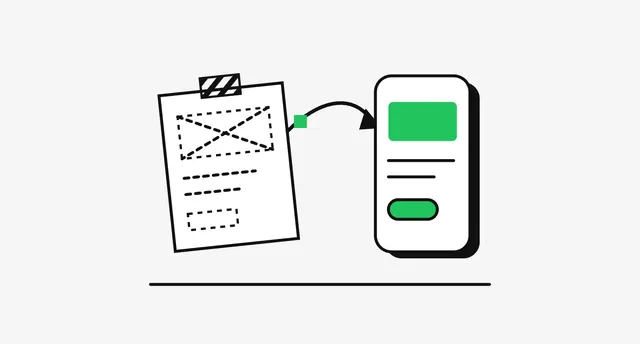
I read every source on 13 October 2026; tool features change monthly, so treat details as a snapshot of that date. I grouped tools by job and ran no benchmark; evidence on output quality comes from Nielsen Norman Group. The method is how I work, and the diagram is illustrative, not client work.
- Google, Introducing Stitch (Google Developers Blog, 20 May 2025) and Introducing "vibe design" with Stitch (18 March 2026), date read 13 October 2026: developers.googleblog.com, blog.google
- Anthropic, Introducing Claude Design by Anthropic Labs (17 April 2026), date read 13 October 2026: anthropic.com
- Anthropic Help Center, release notes (16 September 2026 entry) and Get started with Claude Design, date read 13 October 2026: support.claude.com, support.claude.com
- Vercel, v0 docs: What is v0, Design Systems 2.0, Prototyping and GitHub (updated 10 October 2026), date read 13 October 2026: v0.app, v0.app, v0.app, v0.app
- Lovable docs: Design systems, Lovable Cloud, Security overview and Changelog, date read 13 October 2026: docs.lovable.dev, docs.lovable.dev, docs.lovable.dev, docs.lovable.dev
- Bolt Help Center, Intro to Bolt and Introduction to design systems, date read 13 October 2026: support.bolt.new, support.bolt.new
- Figma Help Center, Explore Figma Make and Add a backend to a functional prototype or web app, date read 13 October 2026: help.figma.com, help.figma.com
- UX Pilot, homepage, date read 13 October 2026: uxpilot.ai
- Nielsen Norman Group, Good from Afar, But Far from Good: AI Prototyping in Real Design Contexts (24 October 2025, reviewed 19 August 2026), date read 13 October 2026: nngroup.com
- W3C, WCAG 2.2, date read 13 October 2026: w3.org
- Supabase, Row Level Security guide, date read 13 October 2026: supabase.com
- European Union, GDPR (Regulation (EU) 2016/679), Article 5, date read 13 October 2026: eur-lex.europa.eu
Tags: Design engineering, AI tools, Prototyping, Design systems, Figma