


Medical website design is the work of planning, writing and building a site that helps a patient or a healthcare buyer trust you, find what they came for and act: book, call, request a demo or log in. A good one shows who provides the care or the software, what it covers, where and when, and what the next step is, in the first screen. It loads fast on a phone, works with a keyboard and a screen reader, and keeps health information away from tracking tools that shouldn't see it.
I'm a design engineer: I design websites and products and build them in production code, front ends in React and Next.js. I designed Wave, a Webflow website for a medical software SaaS, and walk through it below. It's written for a clinic, a practice group or a medical software marketing lead about to commission a site. The service behind it is my website design work.
Two kinds of medical website, and why the difference matters
Most guides treat every medical site as a practice website. In my experience the brief splits into two:
- A practice or clinic site. The visitor is a patient, often worried, often on a phone. They want to know if you treat their problem, whether you take their insurance, where you are and how to book. Speed to the booking button decides the page.
- A medical software or SaaS site. The visitor is a practice manager, a clinical lead or a procurement team. They want to know what the product does, who uses it, how data is handled and what it costs. Clarity about modules, proof and security decides the page.
Some sites carry both. Decide who the homepage is for, then give the second audience its own clear path rather than half the hero.
What a medical website must include, and why
| Page or element | Practice site | Medical SaaS site | Why it's a must |
|---|---|---|---|
| A hero that says who you serve and the next step | Book or call | Request a demo | Visitors need to know at once they're in the right place |
| Service or condition pages | One per service | One per module | Each answers one search and one question |
| Clinician or team profiles with credentials | Yes | Clinical advisers, if any | Health is a topic where Google gives more weight to trust signals |
| Locations, hours, parking and accessibility | Yes | Office and support hours | Saves a call to reception |
| Insurance, fees or plans | Accepted insurers | Plans and what each includes | Price surprises lose the booking or the demo |
| Booking, forms or portal login | Yes | Login and trial sign-up | The action the site exists for |
| Security and privacy page | Privacy notice | Data handling, hosting, certifications you actually hold | Buyers and patients both ask before they share data |
| FAQ split by audience | Patients, referrers | Buyers, clinicians, admins | Answers what would become a call or a ticket |
Google says trust matters most among the qualities it looks for, and that its systems give even more weight to strong experience, expertise, authoritativeness and trust on topics that can affect health, in its guidance on creating helpful, reliable content. On a medical site that means real names, real photos, real credentials and accurate bylines on articles.
Common mistakes on medical websites
Stock smiles instead of real people. A patient wants to see the dermatologist; a buyer wants to see the product. I plan the photo and screenshot list in the scope, not at the end.
A booking button that leads to a phone number. If online booking isn't possible, say what happens next: a form that says "Request a time and reception calls you back within one working day" beats a dead end.
Tracking scripts on forms and portal pages. The US Department of Health and Human Services says tracking tools on pages behind a login generally have access to protected health information, and that registration or login details typed into a patient portal page count too, in its bulletin on online tracking technologies. Its example: if a clinic's appointment page sends the appointment and the visitor's IP address to a tracking vendor, that vendor is a business associate and a business associate agreement is required.
Small grey text. WCAG asks for a contrast ratio of at least 4.5:1 for normal text, under success criterion 1.4.3 of WCAG 2.2. I set the colour tokens against it before any page is drawn.
Slow pages on a phone. Google's Core Web Vitals call a page good when the largest content loads within 2.5 seconds, the page responds to input within 200 milliseconds and layout shift stays at 0.1 or less, measured at the 75th percentile of visits.
Rules that apply (general information, not legal advice)
These are the US rules I check most often. Your lawyer or compliance lead has the final word, and other countries have their own laws.
- HIPAA and tracking. The HHS bulletin above applies to covered entities and their business associates. On 20 June 2024 a federal court in Texas vacated one part of it: the idea that connecting an IP address with a visit to a public page about a health condition or provider, on its own, triggers HIPAA. The guidance on logged-in pages, portals and forms still stands.
- Accessibility for HHS-funded providers. Under Section 504, the HHS Office for Civil Rights requires recipients of its funding to meet WCAG 2.1 Level AA on websites and apps. An interim final rule published on 11 May 2026 moved the dates: 11 May 2027 for recipients with 15 or more employees, and 10 May 2028 for those with fewer.
My guide to healthcare app design covers the app side of these rules.
How I'd approach your medical website, from intro call to launch
- A free 30 minute intro call. I ask who the site is for, what action matters most and which systems it must connect to (booking, portal, CRM).
- A written scope and one fixed quote for the whole project. No retainer, nothing billed by the hour.
- A page map and a data map. Before any design, I list every page, every form and where each form's data goes, so tracking and consent decisions are made early.
- A style guide and components. Type, colour tokens checked for contrast, a grid and a named component for every section.
- Weekly design sprints in Figma, with a written update in Slack every 48 hours and a review call each week.
- The build. I build in Next.js when the site needs custom booking, logged-in areas or tight performance control, or design for Webflow when your team wants to edit pages without a developer. My post on Framer, Webflow or Next.js compares the three. I use AI coding tools where they save time, and a person who knows the design reviews every change.
- Checks before launch: keyboard and screen reader passes, Core Web Vitals on a mid-range phone, every form tested end to end, redirects from the old site.
Case study: how I designed Wave's medical SaaS website
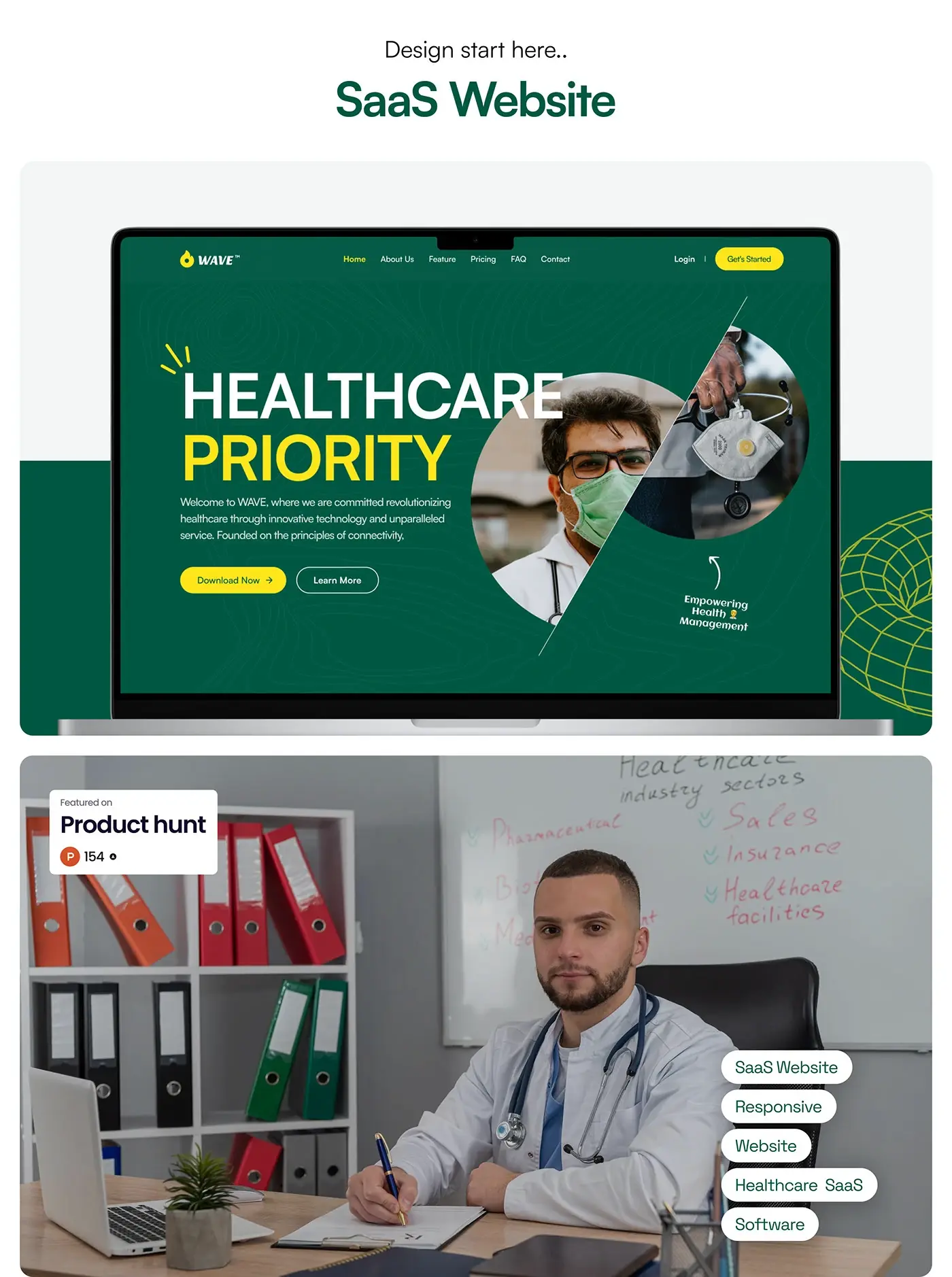
Wave is a medical software SaaS covering electronic health, telehealth, billing and invoicing, and analytics and reporting. I designed its marketing website for Webflow in 2024: the homepage, the inner pages and a style guide, responsive from laptop to phone, in Figma and Photoshop.
The challenge. Healthcare buyers need to trust a vendor before they read the details, so the site had to earn trust fast, fit four product areas on one homepage without crowding it, and keep inner pages consistent so the Webflow CMS stays easy to extend.
The process. Research into the product and its market, a moodboard, then a style guide: Inter, deep green with yellow, purple and orange, a 12 column grid and a named component for every section. Then the homepage, then the inner pages from the same components, then mockups on laptop, tablet and phone.
The homepage. "Healthcare Priority" sits in large white and yellow type on deep green, beside a round clinician photo. Download Now and Learn More give two clear paths, and a logo strip sits directly under the hero, so proof comes before the first scroll ends. Yellow marks every main action across the site, so buttons are easy to find on any page.
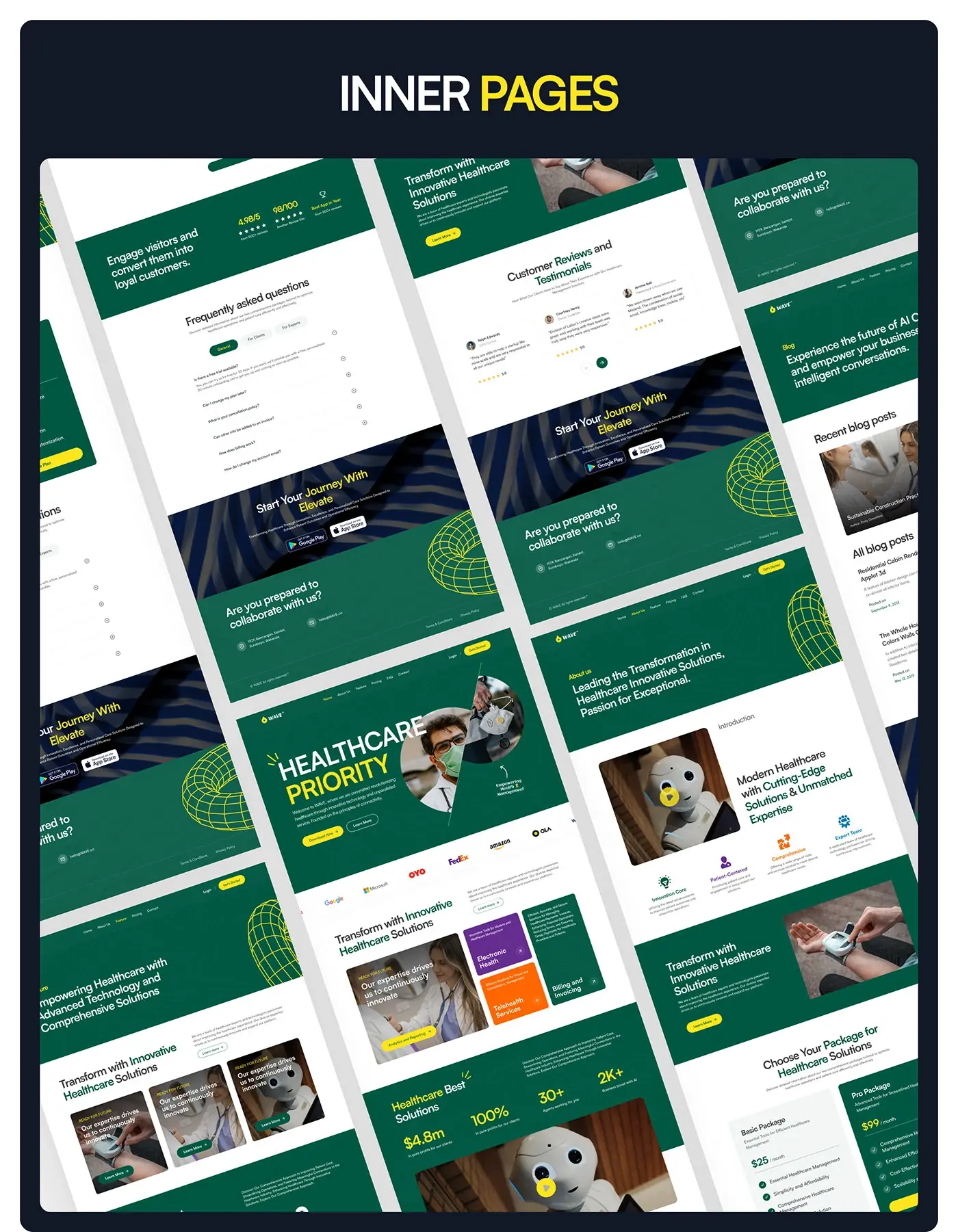
Four modules, one grid. A large photo card links to analytics and reporting, and three cards cover the rest: Electronic Health in purple, Telehealth Services in orange, Billing and Invoicing in green. A clinic looking only for telehealth spots its card in a second.
Proof and plans. A green band of four figures sits above a video block, close to the calls to action. In the two plans below, the Pro card is filled in green with a yellow button, so the fuller plan stands out without a badge.
Inner pages. About, features, pricing with an FAQ split into General, For Clients and For Experts tabs, and a blog, all with the same header, green hero bands and footer. On the phone the hero stacks the headline, the intro line and both buttons above the clinician photo, and the navigation folds into a menu icon.
What decides the cost of a medical website
I don't publish prices; after the intro call you get one fixed quote for your scope. These move it:
- Page count and templates. Ten services, twenty clinicians and five locations mean templates and a CMS, not twenty hand-made pages.
- Integrations. Online booking, a patient portal login, insurance checks, a CRM or a demo scheduler each add design and testing.
- Who writes the content. Clinical copy needs review by a clinician. That time belongs in the plan.
- Accessibility and privacy work. Audits, consent tools and vendor agreements take time before launch.
- People. The US Bureau of Labor Statistics puts median pay at $92,650 a year for web developers and $104,000 for web and digital interface designers, from May 2025 data, in its Occupational Outlook Handbook.
How to choose who designs your medical website
- Ask to see healthcare work and what the designer did on it: design only, or design and build.
- Ask how they handle forms and analytics on pages that collect health information. A good answer mentions a data map and vendor agreements.
- Ask how they test accessibility. An overlay script is not a test; keyboard, screen reader and contrast checks are.
- Ask who builds the live site and how it's kept matching the design.
- Ask who owns the accounts. The domain, the CMS, analytics and the code belong in your organisation's name.
Frequently asked questions
What pages does a medical practice website need?
A homepage, a page per service or condition, clinician profiles, locations and hours, insurance or fees, booking or a request form, a patient forms or portal page, a privacy notice and an FAQ.
Is my medical website covered by HIPAA?
If you are a US covered entity or business associate, HIPAA applies to the health information your site collects, such as appointment requests, portal logins and forms. The HHS bulletin on tracking technologies explains how. Ask your compliance lead to confirm what applies to you.
Does a medical website need to meet WCAG?
For US providers that receive HHS funding, yes: WCAG 2.1 Level AA by 11 May 2027 with 15 or more employees, or 10 May 2028 with fewer. For everyone else, meeting WCAG 2.2 AA is still the clearest way to make the site usable for every patient.
Can you design and build the whole medical website?
Yes. I design the site and build it in Next.js, or design it for Webflow when your team wants to edit it, with a style guide and named components so the live site matches the design.
How long does a medical website take?
It depends on the number of pages, the integrations and how fast clinical content is approved. Your timeline goes in the written scope after the intro call.
Sources and method
I read every source on 1 November 2026. Rules change, so check them before you rely on them; this post is general information, not legal advice. I looked at the current top search results for "medical website design" to see what they cover, and cite only primary sources here.
- US Department of Health and Human Services, Use of Online Tracking Technologies by HIPAA Covered Entities and Business Associates, date read 1 November 2026: hhs.gov
- Federal Register, HHS Office for Civil Rights, Extension of Compliance Dates for Nondiscrimination on the Basis of Disability (11 May 2026), date read 1 November 2026: govinfo.gov
- W3C, Web Content Accessibility Guidelines (WCAG) 2.2, date read 1 November 2026: w3.org
- Google Search Central, Creating helpful, reliable, people-first content, date read 1 November 2026: developers.google.com
- web.dev, Web Vitals, date read 1 November 2026: web.dev
- US Bureau of Labor Statistics, Occupational Outlook Handbook, Web Developers and Digital Designers, date read 1 November 2026: bls.gov
If you're planning a medical website and want it designed and built so patients or buyers trust it from the first screen, book a free 30 minute intro call. After it, you get a written scope and one fixed quote.
Tags: Healthcare, Medical websites, Website design, Case study, Webflow