



The View Transitions API lets the browser animate from one state of a page to the next, or from one page to another, without an animation library. You name the elements that persist, the browser snapshots the before and after, and it morphs between them: a card grows into the page it opens while the header stays still.
There are two kinds. Same-document transitions (a single-page app or a React state change) work in Chrome, Safari and Firefox, and have been Baseline since 14 October 2025. Cross-document transitions (a click between two normal pages) work in Chrome from 126 and Safari from 18.2, but in no Firefox release yet. React made <ViewTransition> stable in 19.3 on 9 September 2026, and Next.js 16.4 ships it with no configuration.
This is for founders and product leads deciding where motion belongs. It's how I work as a design engineer for startups: what I animate, the timing I start from, and what I check before it ships.
What the View Transitions API actually does
The CSS View Transitions Module Level 1 spec sets the lifecycle: capture the current state as an image, pause rendering, run your update, capture the new state, then animate a tree of pseudo-elements (::view-transition-group, ::view-transition-old, ::view-transition-new) before removing them.
Three spec details shape my decisions:
- The default is a crossfade of 0.25 seconds, set in the user agent stylesheet.
- Each named element is captured on its own. Give it a
view-transition-nameand it gets its own group, which moves and resizes from its old box to its new one. That's the shared element morph. - It fails safe. If two elements share a name at once, the transition aborts but your update still runs. The spec calls it "an enhancement around the state change".
MDN's View Transition API reference splits it in two. Same-document transitions run inside one page: you call `document.startViewTransition()`, or React does. Cross-document transitions run between two pages of one site: both opt in with the `@view-transition` at-rule, and the browser animates a normal navigation.
View Transitions API browser support in October 2026
I checked each engine's release notes and the web-features data behind Baseline on 13 October 2026.
| Feature | Chrome and Edge | Safari | Firefox | Status |
|---|---|---|---|---|
| Same-document | 111, March 2023 | 18, September 2024 | 144, 14 October 2025 | Baseline since 14 October 2025 |
view-transition-class | 125, May 2024 | 18.2, December 2024 | 144 | Baseline since 14 October 2025 |
Transition types, :active-view-transition-type() | 125 | 18.2 | 147, 13 January 2026 | Baseline since 13 January 2026 |
Cross-document, @view-transition | 126, June 2024 | 18.2, 11 December 2024 | No release | Limited |
Element-scoped, element.startViewTransition() | 147, 7 April 2026 | No | No | Limited |
web.dev marked the Baseline milestone when Firefox 144 shipped. Firefox 147's notes add transition types for single-page apps, "not cross-document". Safari 18 added Level 1 and Safari 18.2 added @view-transition. Chrome's posts cover Chrome 111, Chrome 126 and element-scoped transitions in Chrome 147.
webstatus.dev lists cross-document transitions as limited, with no Firefox entry. caniuse marks Firefox "partial", but its note says that means Level 1 only, the same-document part.
Interop 2026, published 12 February 2026, includes cross-document view transitions. My reading is that Firefox will ship them, but I found no date, so I plan for a normal page load there.
Same-document or cross-document: which one your site needs
The kind follows from how the site is built:
| Your site | Use | What to know |
|---|---|---|
| Next.js App Router or React app | Same-document, through <ViewTransition> | All three engines; React calls the API |
| Static or server-rendered multi-page site | Cross-document, @view-transition | Chrome and Safari; both pages opt in |
| Site and app on different domains | Neither | Cross-document is same-origin only |
Chrome's cross-document guide lists the limits. With navigation: auto, typing a URL, opening a bookmark and reloading don't animate. If a navigation takes more than four seconds in Chrome, the transition is skipped.
For a multi-page site, this is the opt-in plus one morph and a reduced motion rule:
/* On both pages */
@view-transition { navigation: auto; }

/* List: <img style="view-transition-name: case-emura">  Detail: same name on the hero */
::view-transition-group(case-emura) {
  animation-duration: 350ms;
  animation-timing-function: cubic-bezier(0.2, 0, 0, 1); /* ease out */
}

@media (prefers-reduced-motion: reduce) {
  ::view-transition-group(*) { animation: none; }          /* nothing travels */
  ::view-transition-old(*),
  ::view-transition-new(*) { animation-duration: 150ms; }  /* short crossfade */
}
Names must be unique per page, so on a list I name one card inline, not through a shared class.
React's ViewTransition and Next.js in 2026
React. The React 19.3 release post, dated 9 September 2026, says <ViewTransition> is "now stable". The ViewTransition reference lists four triggers: enter, exit, update and share, the last being the shared element morph. `addTransitionType` tags an update, for example "forward", so CSS can pick a direction.
Four caveats from React's docs I design around:
- Only updates inside
startTransition, a<Suspense>reveal oruseDeferredValueanimate. A plainsetStatedoesn't. - Each
namecan be mounted once at a time, so names come from ids. - A boundary animates as one snapshot, so text inside a growing image stretches. Give the title its own boundary.
- React doesn't turn motion down for
prefers-reduced-motion. That's your CSS.
Next.js. Next.js 16.4, released 6 October 2026, "ships with React 19.3, bringing stable View Transitions". Its view transitions guide says they "work in the App Router with no configuration", and route navigations are transitions. The Link reference added transitionTypes in 16.2.0.
A list row in Next.js; the detail page wraps its hero and title with the same names:
import { ViewTransition } from 'react'
import Link from 'next/link'

export function ProjectRow({ project }) {
  return (
    <Link href={`/projects/${project.id}`} transitionTypes={['nav-forward']}>
      <ViewTransition name={`cover-${project.id}`} share="morph" default="none">
        <img src={project.cover} alt="" />
      </ViewTransition>
      <ViewTransition name={`title-${project.id}`} share="morph" default="none">
        <h3>{project.name}</h3>
      </ViewTransition>
    </Link>
  )
}
Two traps from the Next.js guide. The morph only pairs when the destination renders in the same commit, as prefetched pages do; if the detail page suspends into a skeleton first, you get an enter animation instead. And the browser's back button carries no transition type, so directional slides won't play there. The guide also warns that "some animations may behave differently in Safari", so I test on an iPhone before review. All of this sits on top of the path from Figma to Next.js I follow; components must work without any transition first.
What deserves a view transition, and what doesn't
My test: did something move from one place to another? If yes, motion can show where it went. If not, it's decoration, which costs attention every time.
Apple's Human Interface Guidelines on motion say to make motion optional and to "generally avoid adding motion to UI interactions that occur frequently". I apply that to the web too.
Where I use view transitions:
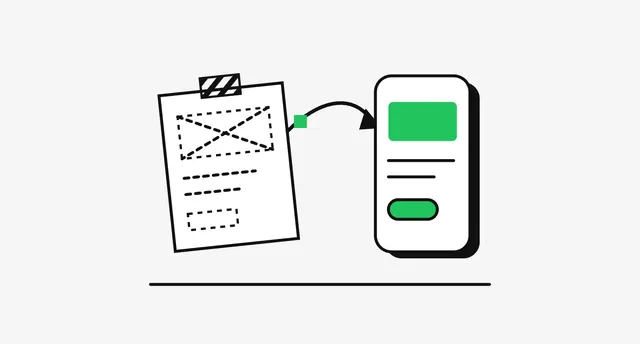
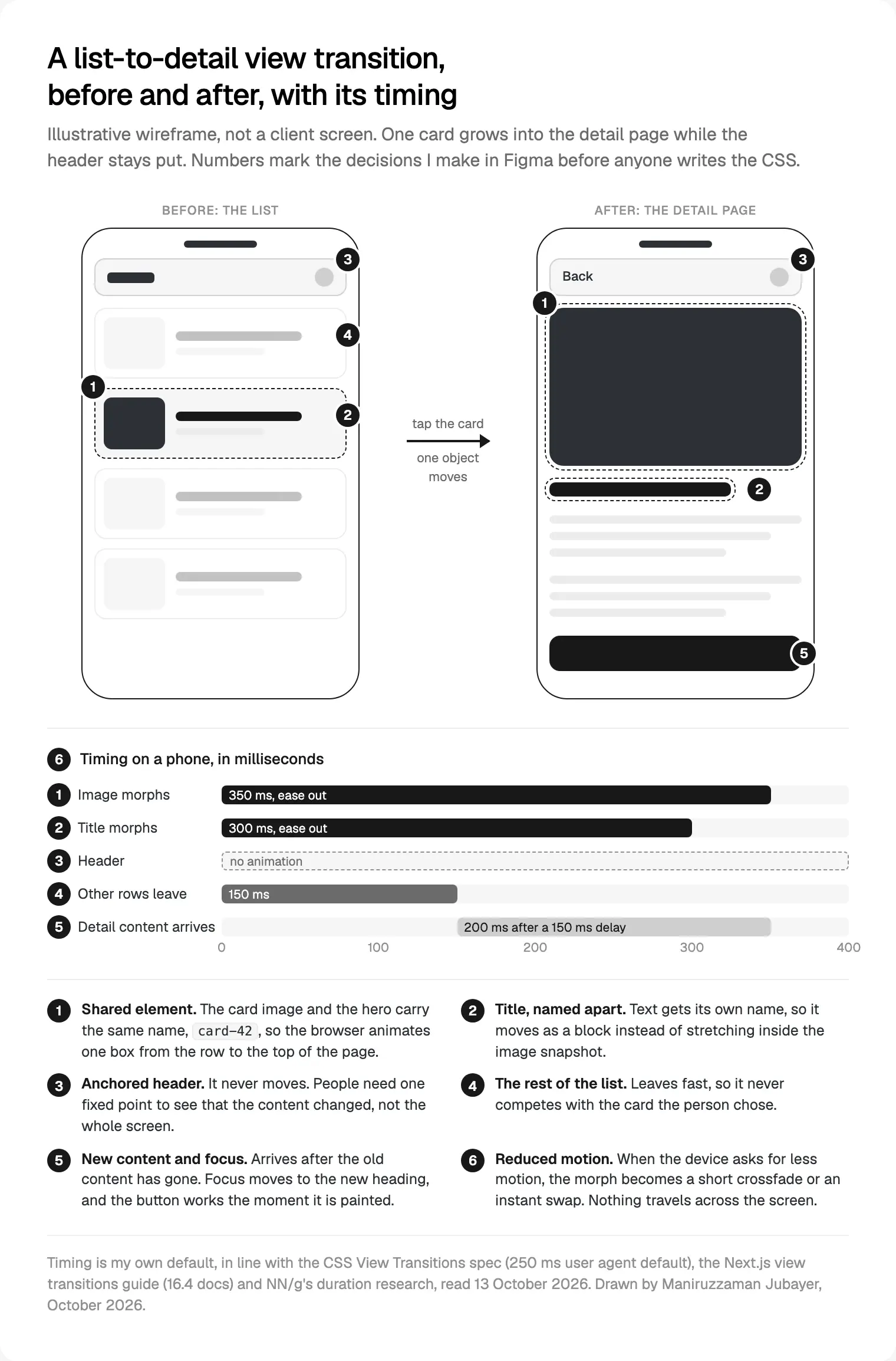
- List to detail. A row or card that becomes the page it opens. The strongest case, and the one in the diagram below.
- Tabs and filters on one route. A short crossfade says "same place, different content".
- Steps in a form. A slide with a direction, so back feels like back.
Where I don't:
- Every link on a marketing site. Two or three key paths, as in my 2027 web design trends forecast.
- Actions people repeat all day. Row selection, toggles, triage. By the tenth time, motion feels slow.
- Covering a slow page. A fade on a two-second wait makes it feel longer. Fix the wait.
Durations, easing and shared element morphs
The Nielsen Norman Group's article on animation duration (February 2020) puts most interface animation between 100 and 500 ms: about 100 ms for small feedback, 200 to 300 ms for a substantial change such as a modal, and 400 ms as "very slow", for big movements across large screens. It favours ease-out for entrances. The Next.js guide uses 150 ms exits, 210 ms enters and 400 ms for directional movement.
My starting points on a phone:
| What moves | Duration | Easing |
|---|---|---|
| Shared image or card morph | 300 to 350 ms | Ease out |
| Title, named separately | 250 to 300 ms | Ease out |
| Old content leaving | 150 ms | Linear fade |
| New content arriving | 200 ms, after the exit | Ease out |
| Tab or filter crossfade | 150 to 200 ms | Linear fade |
On a large desktop screen I may go towards 400 ms for the morph, never beyond.
The snapshot is an image, so a box that changes aspect ratio stretches its contents. I keep the crop similar in both states, and text gets its own name.
Reduced motion and focus management
WCAG 2.2's criterion 2.3.3, Animation from Interactions, sits at level AAA, so it's outside most legal targets, but its goal is plain: "Users are not harmed or distracted by motion." The `prefers-reduced-motion` media query is how a site hears the device setting.
Every project gets one rule, like the CSS above: with reduced motion on, nothing travels. I keep a short crossfade, because a fade still says something changed; the Next.js guide uses an instant swap. Either is fine. Forgetting isn't.
Focus is the part a transition hides best. Two things I check:
- Clicks during the animation. While a transition runs, the spec sends pointer hit testing to the document element, so clicks can be lost. The Next.js guide sets
pointer-events: noneon::view-transitionto let them through. - Where focus lands. Next.js's route announcer reads the new title to screen readers, but as I noted in my WCAG 2.2 checklist for React, it doesn't move keyboard focus. After list to detail, I move focus to the new heading, so a keyboard user starts where the eye does.
Performance and INP: keep the update small
INP measures how long the next paint is blocked after an interaction: at the 75th percentile, 200 ms or less is good and more than 500 ms is poor.
The spec pauses rendering after capturing the old state until your update finishes. My reading: a heavy update there holds a frozen frame and can hurt responsiveness. So the update stays small, and data loads first, which in Next.js is what prefetching does.
My other rules:
- Name only what moves. Each named element is captured and animated separately, so naming hundreds of rows adds work for nothing.
- Let rapid clicks win. The spec skips the active transition when a new one starts. Don't fight that with locks.
- Measure on a mid-range phone, with reduced motion on and off.
Without React, feature detection takes a few lines. Transition types (Chrome 125, Safari 18.2, Firefox 147) let one stylesheet handle both directions; older engines accept only a callback, hence the fallback:
function navigate(update, direction = 'forward') {
  if (!document.startViewTransition) return update()      // no support: just update
  try {
    document.startViewTransition({ update, types: [direction] })
  } catch {
    document.startViewTransition(update)                  // support without types
  }
}How I design the motion in Figma and ship it
Motion described only in a ticket gets built as a guess. This is how I take designs into production code when they move:
- Draw both states as frames, list and detail side by side, at phone and desktop width, skeleton included.
- Name shared layers the way the code will. The card image layer is
cover-{id}in Figma because that will be itsview-transition-name. - Put timing in tokens. Durations and easing live as variables in Figma and CSS custom properties in code, with the same names.
- Prototype the feel. Figma's Smart Animate relies on layer names and hierarchy to match layers between frames, close to how a view transition pairs elements.
- Tune in the browser, on a preview link of working code, on a phone, beside the Figma file.
- Review with reduced motion on, in the same review.
Figma Motion, in open beta since 24 June 2026, adds a timeline, preset animation styles, easing variables and a Dev Mode tab that copies animation code as CSS or React. It doesn't know your routes, names or reduced motion rule, so I treat its code as a reference for values, not the build.
Where I would start
Add one transition: the list-to-detail path people use most. Design both states as a pair, name the shared element, set the timing above, write the reduced motion rule on day one, and check focus with a keyboard.
For a Next.js app, move to 16.4; no flag needed. For a multi-page site, add @view-transition to two pages.
If you want one person who designs the motion and stays with it into the code, that's my design engineering service: a free 30 minute intro call, then a written scope and one fixed quote. Read more about how I work.
Frequently asked questions
What is the View Transitions API?
A browser API that animates between two states of a page, or between two pages of one site. The browser snapshots the before and after, then animates named elements from their old position and size to the new one, with a crossfade for the rest. You style it in CSS, and browsers without support simply show the change.
Do view transitions work in Firefox?
Same-document view transitions do, from Firefox 144 (14 October 2025), with transition types from Firefox 147 (13 January 2026). Cross-document transitions between two normal pages are in no Firefox release as of 13 October 2026. Firefox just loads the next page, so a site using @view-transition still works there, without the animation.
Is React's ViewTransition component stable?
Yes. React 19.3, released on 9 September 2026, made <ViewTransition> and addTransitionType stable. It animates only updates inside startTransition, a Suspense reveal or useDeferredValue, so a plain state update won't trigger it. It works only in the DOM; React says React Native support is in progress.
Do I need a config flag for view transitions in Next.js?
Not in Next.js 16.4. Its documentation says view transitions work in the App Router with no configuration, and 16.4 ships React 19.3. Navigations are transitions, so <ViewTransition> boundaries animate on route changes. The transitionTypes prop on <Link>, added in 16.2, tells your CSS whether a navigation goes forward or back.
How long should a view transition last?
For most interface changes, 150 to 400 ms. Nielsen Norman Group research puts most animation between 100 and 500 ms and calls 400 ms very slow, for big movements on large screens. The browser's default crossfade is 250 ms. On a phone I use about 300 to 350 ms for a shared element morph and 150 ms for content leaving.
Do view transitions hurt Core Web Vitals or SEO?
Not by themselves. The risk is responsiveness: rendering pauses while your update runs, so a heavy update inside a transition holds a frozen frame, which INP may catch. Keep the update small, load data first, and name only elements that move. Then measure on a mid-range phone.
Do view transitions respect reduced motion automatically?
No. Neither the browser nor React tones a transition down when a device asks for reduced motion. Add a prefers-reduced-motion: reduce rule that removes movement, either by switching off the group animation and keeping a short crossfade, or by setting durations to zero. Then test with the setting on as part of normal review.
Sources and method
I read every source on 13 October 2026. Browser data comes from release notes and webstatus.dev, cross-checked with caniuse; React and Next.js versions also from npm. The timing tables are my own defaults, not study results. I found no date for Firefox cross-document support.
- W3C CSS Working Group, CSS View Transitions Level 1 and Level 2 drafts, date read 13 October 2026: drafts.csswg.org, drafts.csswg.org
- MDN, View Transition API, startViewTransition(), @view-transition, prefers-reduced-motion, date read 13 October 2026: developer.mozilla.org, developer.mozilla.org, developer.mozilla.org, developer.mozilla.org
- MDN, Firefox 144 (14 October 2025) and Firefox 147 (13 January 2026) release notes, date read 13 October 2026: developer.mozilla.org, developer.mozilla.org
- web.dev, view transitions Baseline (16 October 2025), Interop 2026 (12 February 2026), INP, date read 13 October 2026: web.dev, web.dev, web.dev
- webstatus.dev, view transition features, date read 13 October 2026: webstatus.dev, webstatus.dev, webstatus.dev, webstatus.dev
- caniuse, View Transitions and cross-document View Transitions, date read 13 October 2026: caniuse.com, caniuse.com
- Chrome for Developers, New in Chrome 111 and 126, Chrome 147 release notes (7 April 2026), cross-document guide, date read 13 October 2026: developer.chrome.com, developer.chrome.com, developer.chrome.com, developer.chrome.com
- WebKit, features in Safari 18.0 and 18.2, date read 13 October 2026: webkit.org, webkit.org
- React, 19.3 release post (9 September 2026), ViewTransition and addTransitionType references, date read 13 October 2026: react.dev, react.dev, react.dev
- Next.js, 16.4 release post (6 October 2026), view transitions guide, Link reference, accessibility, date read 13 October 2026: nextjs.org, nextjs.org, nextjs.org, nextjs.org
- W3C WAI, Understanding SC 2.3.3 Animation from Interactions, date read 13 October 2026: w3.org
- Apple, Human Interface Guidelines, Motion, date read 13 October 2026: developer.apple.com
- Nielsen Norman Group, Executing UX Animations: Duration and Motion Characteristics (9 February 2020), date read 13 October 2026: nngroup.com
- Figma, Introducing Figma Motion (24 June 2026), preset animation styles, Smart Animate, date read 13 October 2026: figma.com, help.figma.com, help.figma.com
Tags: View transitions, CSS, React, Next.js, Motion design, Design engineering