



ZATCA e-invoicing integration means your billing system builds every invoice as XML, hashes and signs it, and sends it to ZATCA's Fatoora platform by API. Standard (B2B) invoices go for clearance and reach the buyer only once ZATCA has stamped them. Simplified (B2C) invoices are stamped by your own system, handed over at once and reported within 24 hours.
Phase 1, generation, has applied since 4 December 2021. Phase 2, integration, arrives in waves by revenue, and Wave 25 brings businesses with more than SAR 187,500 of VAT-able revenue in any year from 2022 to 2025 onto Fatoora by 1 February 2027.
This guide is for founders and product leads of SaaS, marketplace and e-commerce products sold in Saudi Arabia, and it is the method behind my web app development in Riyadh. The API call is the easy part. The work is in what surrounds it: invoices nobody can edit, credit notes instead of deletes, an Arabic invoice view, a clear message when clearance fails, and an admin area for certificates. It is design and build guidance from ZATCA's own documents, not tax advice.
Phase 1, Phase 2 and the wave your customers are in
ZATCA's roll-out phases page sets out two phases. Phase 1 has required compliant electronic invoices and notes since 4 December 2021, for all taxpayers except non-residents. Phase 2 has been enforced in waves since 1 January 2023, with each group notified at least six months ahead.
The last two waves reach far down the market. Wave 24, announced on 26 September 2025, covered VAT-able revenue above SAR 375,000 in 2022, 2023 or 2024, with a deadline of 30 June 2026. Wave 25, announced on 24 July 2026, halves that to SAR 187,500 and sets 1 February 2027. On 13 October 2026 I found no 26th wave announced, but ZATCA says later waves will be told directly.
Phase 2 is why old billing modules break: invoices become XML (or PDF/A-3 with the XML inside), carry a UUID and the previous invoice's hash, and are stamped and sent through ZATCA's APIs.
First question: are you invoicing, or building the invoicing?
I ask this in every intro call, because it sets the size of the job.
| Your product | Who the seller is | What you build |
|---|---|---|
| A SaaS billing its own subscribers | Your company | One integration, your invoices |
| A store selling its own goods | Your company | The same, plus refunds as credit notes |
| A POS, booking or store platform | Each merchant | A solution every tenant onboards, each with a CSID |
| A marketplace billing for sellers | Each seller | Third-party billed invoices, flagged as ZATCA requires |
The last two rows are the big ones: each merchant becomes a taxpayer inside your product, with their own VAT number, certificate and invoice sequence. And if your company sits abroad, note that ZATCA's detailed e-invoicing guideline exempts non-resident taxable persons; ask your tax adviser before building.
Standard or simplified, clearance or reporting
The same guideline draws the line between the two invoice types:
| Standard tax invoice | Simplified tax invoice | |
|---|---|---|
| Usually for | B2B and B2G | B2C; optionally B2B below SAR 1,000 |
| Buyer details | Required | Generally not; required for private education and health care sold to citizens |
| Sent to ZATCA | Before the buyer gets it (clearance) | Within 24 hours (reporting) |
| Stamped by | Fatoora | Your solution |
| QR code | Fatoora updates it on clearance | Your solution makes all nine tags |
Clearance blocks: until a B2B invoice comes back cleared, it is not a valid tax invoice, so your product must not email it. Reporting does not: ZATCA's technical guidelines say B2C sales should not stop over XML errors. So the B2B "Send" button needs a pending state and a failure path, while the B2C receipt goes out at once and reporting runs in the background.
What goes on the invoice, and what the QR code holds
Annex (2) of ZATCA's E-Invoicing Implementation Resolution lists every field and which must be visible. On a simplified invoice: the title, the seller's name, address and VAT number, the invoice number, the issue date, each line's description, quantity, unit price and total with VAT, the VAT total, the gross total and the QR code.
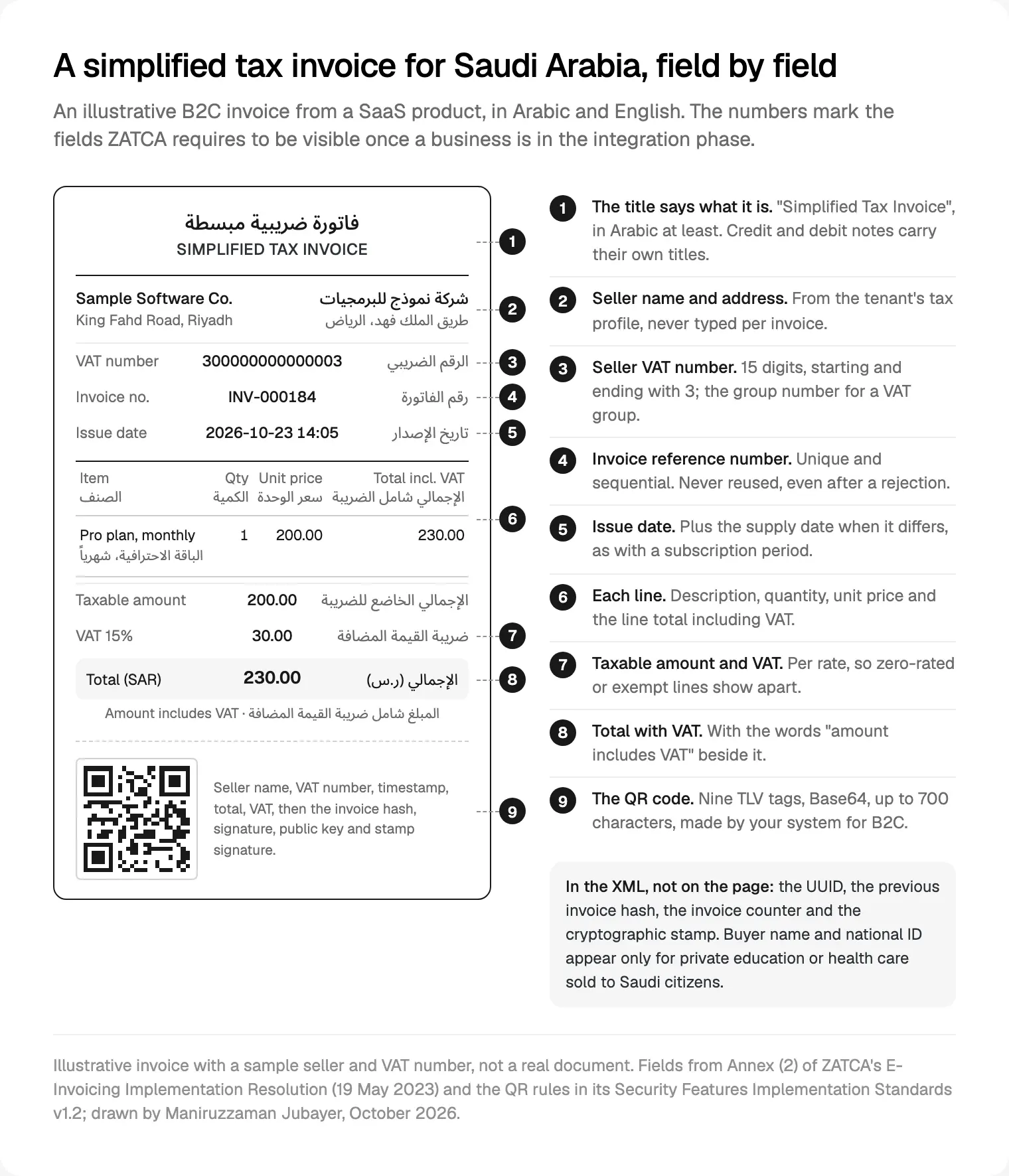
Arabic is compulsory. The technical guidelines' FAQ says every visible field must be in Arabic, with English allowed alongside, and the detailed guideline accepts Arabic or Hindi numerals. I design the invoice in Arabic first and add English; my notes on Arabic right-to-left layout cover the mirroring, and amounts and VAT numbers stay left to right inside it.
The QR code follows ZATCA's Security Features Implementation Standards: Base64 text of up to 700 characters, built from Tag-Length-Value fields with a one-byte tag, a one-byte length and a UTF-8 value.
| Tag | Field | Required from |
|---|---|---|
| 1 to 5 | Seller name, seller VAT number, timestamp (ISO 8601), total with VAT, VAT total | 4 December 2021 |
| 6 | Hash of the XML invoice | 1 January 2023 |
| 7 | ECDSA signature of the hash | 1 January 2023 |
| 8 | ECDSA public key | 1 January 2023 |
| 9 | For simplified invoices, the signature of the stamp issued by ZATCA's CA | 1 January 2023 |
Two traps I test for. The length is one byte, so an Arabic seller name counts in UTF-8 bytes, not characters. And tag 3 is a moment in time: show Riyadh time on the page, but take the timestamp from one server clock, never the browser.
The cryptographic stamp and CSID onboarding
Every unit that issues invoices, a server, a POS device or a tenant in your SaaS, needs a CSID: a certificate from ZATCA's certificate authority. The technical guidelines describe onboarding:
- Generate an OTP on the Fatoora portal, signed in as the taxpayer. Up to 100 at a time, each valid for one hour.
- Send a certificate signing request from the unit with the OTP, carrying its name, serial number, the VAT number and a functionality map: 1000 for standard invoices, 0100 for simplified, 1100 for both.
- Receive a compliance CSID, a test certificate.
- Pass the compliance checks with a sample invoice, credit note and debit note for each type mapped.
- Receive the production CSID, which authenticates every clearance and reporting call.
A CSID lasts for years but does expire, and the portal lists each unit as active, expired or revoked. Renewal repeats the OTP and request; revocation is for a stolen key, a retired device or wrong details.
Three rules shape the architecture. The private key must not be exportable, so it lives in a key vault, not an environment variable. One CSID covers one unique invoice sequence. And each invoice carries the hash of the one before, in a single chain per unit, so two workers issuing for the same unit at once break it; I serialise issuing per unit with a queue.
ZATCA's developer portal, SDK and sandbox
ZATCA's Developer Portal manual describes three tools on its developer portal: the Compliance and Enablement Toolbox SDK, a Java tool that validates XML invoices, notes and QR codes offline; a web validator for less technical colleagues; and the Integration Sandbox, a test backend for onboarding, clearance and reporting. The sandbox is open to anyone, production needs the taxpayer's credentials, and both work from anywhere, which is how I use them remotely.
The SDK download page warns that passing the SDK does not mean ZATCA has approved your invoices; the field rules sit in the XML standard and data dictionary on its e-invoice specifications page. My order: the SDK in continuous integration, so every pull request validates sample XML, then the sandbox, then the Fatoora simulation portal, an optional end-to-end test on the taxpayer's own login, then production.
Build it yourself, or hand it to a solution
You do not have to write the signing code. ZATCA keeps a solution providers directory, and on Salla or Zid the platform links to ZATCA for you; my comparison of Salla, Zid or a custom store says which plans include it.
| Route | When I suggest it | What you still build |
|---|---|---|
| Your accounting system issues invoices | Low volume, raised by finance | A webhook from billing, status shown in your app |
| A solution provider's API | Most SaaS invoicing its own customers | Invoice screens, credit notes, statuses, Arabic view |
| Your own e-invoicing solution | Platforms invoicing for many merchants | Everything here, plus key storage and audit logs |
For a SaaS invoicing its own customers I default to the middle row. For a platform, building your own usually wins, because a CSID per tenant is part of the product. Either way I do the product side within my web and Next.js development: screens, hand-off and states.
Credit notes, debit notes and the invoice nobody can edit
The detailed guideline lists prohibited functions: editing or deleting an issued invoice, resetting the counter, changing the system date, running more than one sequence per unit, editing logs and exporting the stamping key. To cancel an invoice you issue a credit note and, if needed, a new invoice.
A note follows the type of invoice it corrects, so a refund on a simplified invoice is a simplified credit note, reported within 24 hours. It references the original invoice number, or a range, and Annex (2) makes the reason mandatory. Debit notes raise the original value. In the product:
- No edit button on an issued invoice. "Correct this invoice" opens a credit note prefilled from the original, with a required reason.
- Refunds create credit notes automatically once the gateway confirms them; my guide to Saudi checkout with mada and Tamara covers the payment side.
- Drafts are not invoices. Finance edits freely until "Issue", which locks the number, UUID and counter.
- The audit log is read-only, from sign-in onwards.
The screens: invoice list, error states and admin settings
Every invoice lands in one of five states, each with its own label and next step:
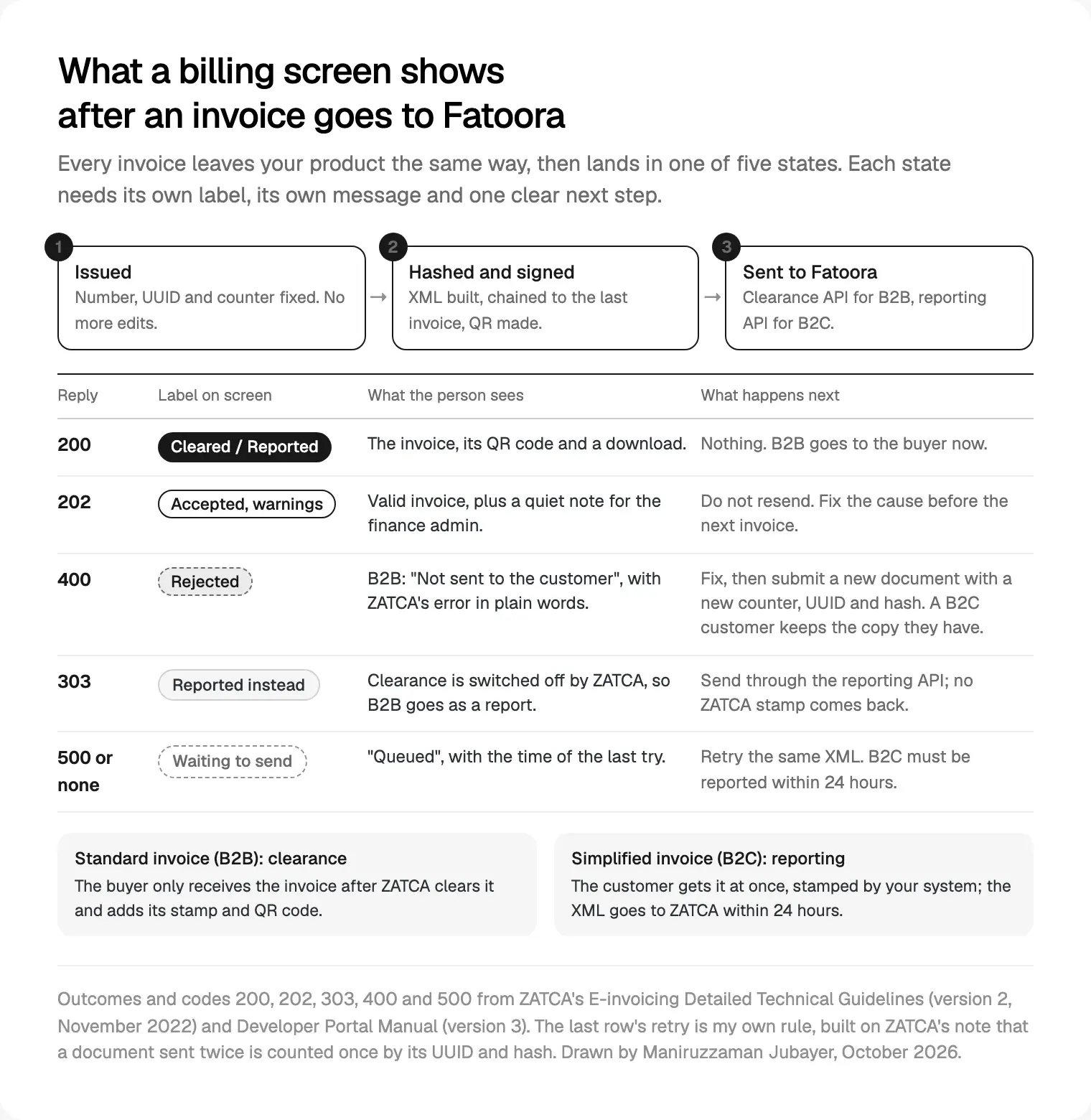
The Developer Portal manual lists 200 for success, 202 for accepted with warnings, 303 when clearance is switched off and a standard invoice must be reported instead, 400 for an invalid request and 500 for a server error. Three need care.
Accepted with warnings (202). Valid, and must not be resent. Show it as done and flag the warning to the finance admin, since the FAQ says repeated warnings may be investigated.
Rejected (400). For B2B, say plainly that the customer has not received it, translate ZATCA's error for a finance person, and offer "Fix and reissue": a new document with a new UUID, counter, hash and date. A B2C customer keeps the copy they have.
No reply or 500. ZATCA counts a document sent twice only once, by UUID and hash, so the safe move is to retry the same XML. The screen says "Queued" with the last attempt time, and B2C warns well before 24 hours pass. For longer outages ZATCA runs a failure notification service; I link it from the admin's outage banner.
The admin area needs four things:
- Tax profile: legal name in Arabic and English, VAT number (15 digits, starting and ending with 3), commercial registration and address, editable only by an owner.
- Units and certificates: CSID status, onboarding date, expiry, renew and revoke.
- Environment: simulation or production, with a banner on every invoice screen in simulation.
- Archive export: files named by VAT number, timestamp and invoice number, as the guideline asks.
Bilingual tables break first, so this is the part of my Next.js builds for Saudi billing I prototype earliest.

Mistakes I plan around
- Treating the PDF as the invoice. In Phase 2 the XML is the invoice.
- Reusing a counter after a rejection; ZATCA's FAQ forbids it.
- Parallel workers on one unit, which break the hash chain.
- Testing only the happy path. I run every state, including a deliberate rejection, in simulation.
- Missing a tenant's VAT deregistration. The technical guidelines say Fatoora then revokes their CSIDs automatically.
Where I would start
Decide whether you are invoicing or building the invoicing, and name your units. Then design the five states and the credit note flow before any XML is written, because those are what customers and their accountants see. Signing and the API come last, tested against the SDK throughout.
If Wave 25 has reached your Saudi customers, this is the kind of project I take on. Read how I work, or book a free 30 minute intro call about my web app development work for Riyadh teams; after it you get a written scope and one fixed quote.
Frequently asked questions
What is ZATCA e-invoicing integration?
It is Phase 2 of Saudi e-invoicing. Your e-invoicing solution generates each invoice as XML with a UUID, the previous invoice's hash and a QR code, and connects to ZATCA's Fatoora platform by API. Standard B2B invoices are cleared before the buyer receives them; simplified B2C invoices are stamped by your system and reported within 24 hours.
Which ZATCA wave applies to my business?
ZATCA selects each wave by VAT-able revenue and notifies taxpayers directly, at least six months ahead. Wave 24 covered revenue above SAR 375,000 in 2022 to 2024, due 30 June 2026. Wave 25 covers revenue above SAR 187,500 in any year from 2022 to 2025, due 1 February 2027. Check ZATCA's site and your notification.
What fields does the ZATCA QR code contain?
Nine Tag-Length-Value fields in Base64, up to 700 characters: seller name, seller VAT number, timestamp, total with VAT and VAT total, then the XML hash, the ECDSA signature, the public key and, for simplified invoices, the signature of ZATCA's stamp. Tags 1 to 5 date from December 2021; tags 6 to 9 from January 2023.
How do I get a production CSID from ZATCA?
Generate an OTP on the Fatoora portal; it is valid for one hour. Your solution sends a certificate signing request with it and receives a compliance CSID, then submits a sample invoice, credit note and debit note for each invoice type it will issue. Once those checks pass, it requests the production CSID used for live calls.
Do ZATCA invoices have to be in Arabic?
Yes. ZATCA's technical guidelines say every field visible on the human-readable invoice must be in Arabic, and the invoice may also carry English. The detailed guideline accepts Arabic or Hindi numerals, so ordinary 0 to 9 digits are fine. Design the Arabic version first and keep amounts left to right inside it.
What happens when ZATCA rejects an invoice?
The API returns errors and the document is not valid. For a standard invoice, the buyer must not receive it: fix the error and submit a new document with its own UUID, counter, hash and date. For a simplified invoice already given to the customer, fix it and report a new document; you need not reissue it to the customer.
Sources and method
I read every source on 13 October 2026; all are ZATCA's own pages and documents. I did not run the SDK or call the sandbox for this post, so flows and codes come from the documents, several dated 2022 and 2023, the newest ZATCA listed that day. The invoice in the figure is illustrative. This is design and build guidance, not tax advice.
- ZATCA, E-invoicing roll-out phases (page updated 1 September 2026), date read 13 October 2026: zatca.gov.sa
- ZATCA, criteria for Wave 25, 24 July 2026, date read 13 October 2026: zatca.gov.sa
- ZATCA, criteria for Wave 24, 26 September 2025, date read 13 October 2026: zatca.gov.sa
- ZATCA, Detailed Guidelines for E-Invoicing, version 2, May 2023, date read 13 October 2026: zatca.gov.sa
- ZATCA, E-invoicing Detailed Technical Guidelines, version 2, November 2022, date read 13 October 2026: zatca.gov.sa
- ZATCA, E-Invoicing Implementation Resolution with Annexes (1) and (2), 19 May 2023, date read 13 October 2026: zatca.gov.sa
- ZATCA, Security Features Implementation Standards, version 1.2, 19 May 2023, date read 13 October 2026: zatca.gov.sa
- ZATCA, e-invoice specifications page (XML Implementation Standard and data dictionary), date read 13 October 2026: zatca.gov.sa
- ZATCA, Fatoora Portal User Manual, version 3 (simulation portal), May 2023, date read 13 October 2026: zatca.gov.sa
- ZATCA, Developer Portal Manual, version 3, November 2022, date read 13 October 2026: zatca.gov.sa
- ZATCA, Compliance and Enablement Toolbox SDK download page, updated 28 May 2025, date read 13 October 2026: zatca.gov.sa
- ZATCA, developer portal and Integration Sandbox, date read 13 October 2026: sandbox.zatca.gov.sa
- ZATCA, Fatoora portal, date read 13 October 2026: fatoora.zatca.gov.sa
- ZATCA, e-invoicing failure notifications service, date read 13 October 2026: zatca.gov.sa
- ZATCA, solution providers directory, date read 13 October 2026: zatca.gov.sa
Tags: ZATCA, E-invoicing, Saudi Arabia, Riyadh, SaaS, Next.js