


Do accessibility overlays work? As a way to make a website compliant, no. An overlay is a script that changes your page in the visitor's browser. It can enlarge text or swap colours, and it can try to patch some errors as the page loads, but it can't rewrite your source, write meaningful alt text or caption your videos.
I do SaaS website design for B2B companies, and this question comes up whenever a founder has been offered a widget as the quick fix. The public record is clear. In 2025 the US Federal Trade Commission made accessiBe stop claiming, without evidence, that its widget could make any website WCAG compliant, and pay $1 million. More than a thousand practitioners have signed the Overlay Fact Sheet, which says no overlay can make a site fully compliant.
This guide is for founders and marketing leads who are weighing a widget or already pay for one. I'm a designer, not a lawyer.
What an accessibility overlay is, and the two things it does
"Overlay" covers products that add third-party JavaScript to your site. The Overlay Fact Sheet splits them into two jobs, and each fails in a different way.
The widget is a floating button that opens controls for text size, contrast, spacing and sometimes a "screen reader mode". Automated repair is a script that scans the page as it loads and tries to fix problems, such as guessing alt text or adding labels to fields.
Both run after your page has been sent. Nothing in your codebase or CMS changes, and that one fact explains most of what follows.
Do accessibility overlays work? What the FTC's accessiBe order says
The clearest primary record is a US enforcement action, so it's worth reading exactly.
On 3 January 2025 the FTC announced a complaint and proposed order against accessiBe Inc. and accessiBe Ltd., sellers of a plug-in called accessWidget. The complaint alleged that:
- the company said accessWidget could make any website WCAG compliant, but it did not make all user websites compliant, so the claims were false, misleading or unsubstantiated;
- the company formatted third-party articles and reviews to look like independent opinions, without disclosing its connections to the reviewers.
The Commission voted 5 to 0 to accept the order and, after public comment, made it final on 22 April 2025 by 3 to 0. It bars accessiBe from claiming its automated products can make any website WCAG compliant, or keep it compliant over time, unless it has evidence. It bars presenting reviews and endorsers as independent when they aren't, and required a $1 million payment the FTC may use for refunds. The case page holds the complaint and order.
Two points get lost in retellings. This was an advertising case settled by consent order, not a court ruling on overlays as a technology. And it concerns one vendor; the record says nothing about others, so neither do I. The FTC's business blog on the case draws the lesson: have evidence before you claim a product works.
My reading for a site owner: if a sales page promises automatic compliance, ask for the evidence before you repeat that claim in your own accessibility statement.
The Overlay Fact Sheet and what users report
The Overlay Fact Sheet is a statement written and signed by accessibility practitioners. Its conclusion: no overlay can make a website fully compliant with any existing accessibility standard, so none can eliminate legal risk. When I counted the signatories on 13 October 2026 the list passed a thousand names, including editors of the WCAG, ARIA and HTML specifications and contributors to the JAWS and NVDA screen readers.
Its technical points match what I see in code review:
- automated repair of alt text, form labels, error handling, focus and keyboard access is "not reliable";
- React, Angular and Vue interfaces change the page independently of the overlay, so fixes go stale;
- widget controls duplicate settings people already have in their browser, operating system or assistive technology;
- overlays that switch on modes when they detect a screen reader reveal that someone uses assistive technology, which is sensitive personal data.
That last point is the fact sheet's claim; I haven't tested it, but it's worth putting to a vendor in writing.
WebAIM's survey of web accessibility practitioners, run in January 2021 with 758 valid responses, found 67% rated overlays not very or not at all effective, and 72% of respondents with disabilities. A 2024 study of blind and low-vision users by Makati, Tigwell and Shinohara, presented at the ACM's ASSETS conference, found that as many as 42% of survey respondents stopped using websites with overlays, most often because the site had become less accessible.
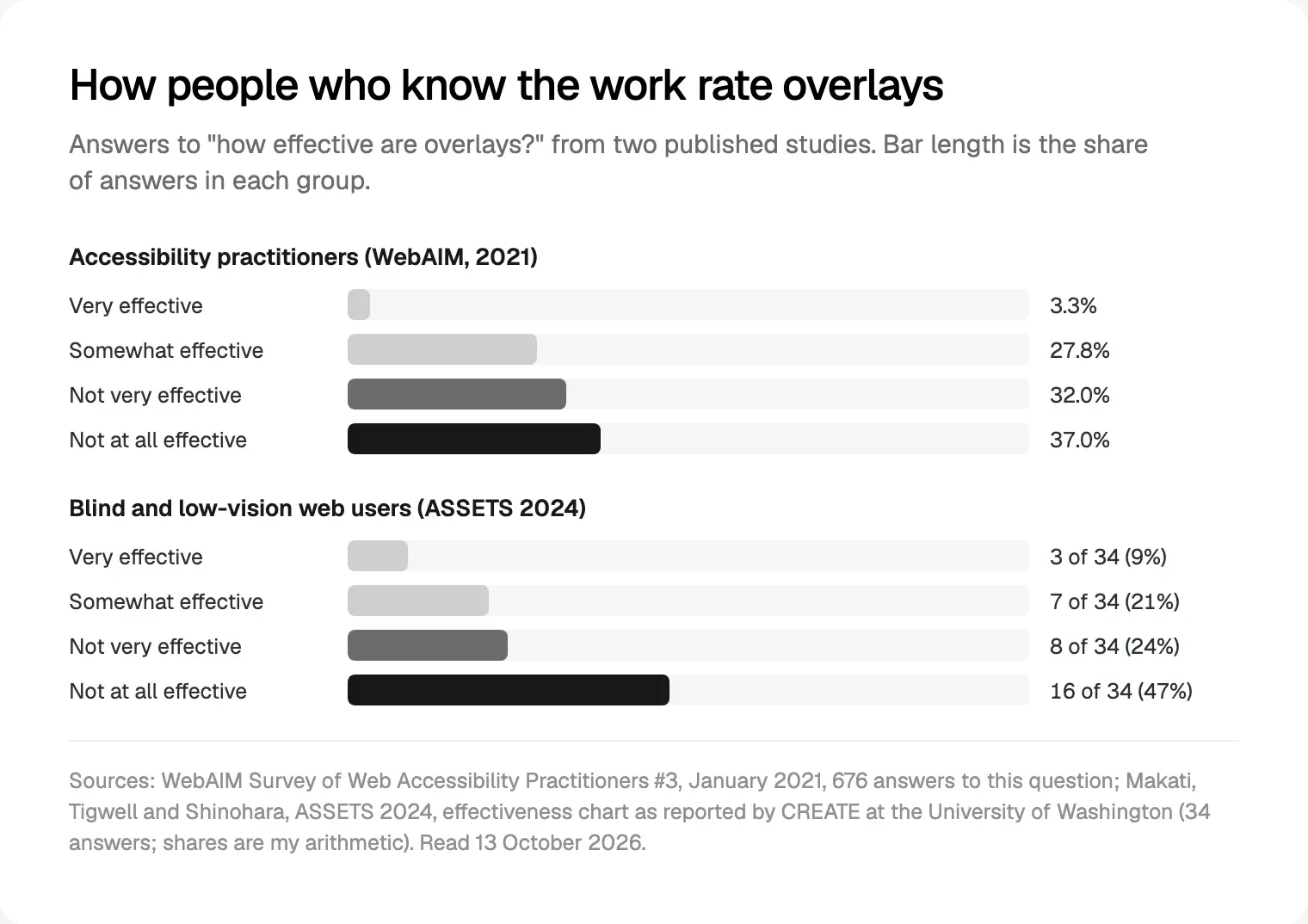
Neither sample is controlled or large, and WebAIM says so of its own. I found no independent study pointing the other way.
What WCAG conformance actually requires
The idea of a compliance widget falls apart inside the standard itself. Section 5 of WCAG 2.2 sets the conformance requirements, and three matter here:
- Full pages. Conformance is for full web pages, and can't be achieved if part of a page is excluded.
- Complete processes. If a page is one step in sign-up or checkout, every step must conform.
- Non-interference. Content that isn't accessibility supported must not block access to the rest, and four criteria apply to everything on the page, including no keyboard trap.
So the overlay is content too. If its button traps focus or its panel fights a screen reader, the page fails because of the tool meant to help it.
W3C also says software can't certify any of this. Its guide to selecting evaluation tools states that tools cannot check every accessibility aspect automatically and human judgement is required, and its page on involving users in evaluation warns against treating accessibility as a checklist. A script that can't reliably detect a problem can't reliably repair it.
The European Accessibility Act and the ADA: what the rules ask for
Laws don't name overlays. They ask for an accessible service, and the bodies that interpret them have said what that means.
European Accessibility Act. Directive (EU) 2019/882 has applied since 28 June 2025 (Article 31). It covers consumer services such as e-commerce and banking, and Annex I asks for websites and apps made accessible on the same four principles WCAG is built on. Microenterprises providing services (fewer than 10 staff and €2 million or less in turnover or balance sheet) are exempt. For one country's rules, see what the European Accessibility Act asks of Dutch shops.
The European Disability Forum and the International Association of Accessibility Professionals said in a joint statement of 17 May 2023 that overlays don't make a website accessible or compliant with European law, and can override users' own settings. Germany's federal and state monitoring bodies, in a March 2025 assessment of overlay tools for public-sector sites, say a site counts as accessible only if it meets the requirements without the overlay, and any overlay must itself be fully accessible and possible to switch off. The Dutch regulator ACM lists overlays among real-world accessibility problems.
ADA, private businesses. The Justice Department's 2022 web accessibility guidance says automated checkers and overlays can help but "need to be used carefully", because a clean report doesn't mean a site is accessible.
ADA Title II, governments. The DOJ's web and mobile app rule, published on 24 April 2024, sets WCAG 2.1 AA for state and local governments. An interim final rule of 20 April 2026 moved compliance to 26 April 2027 for governments of areas with a population of 50,000 or more, and 26 April 2028 for smaller ones and special districts. It reaches private companies that provide web content for a public body.
None of these texts tells you to buy or ban a product. They all point at the experience people actually get, measured against WCAG.
What an overlay can and can't change on your page
Here's the split I draw for founders. A few surface settings a script can change in the browser; everything else lives in the source.
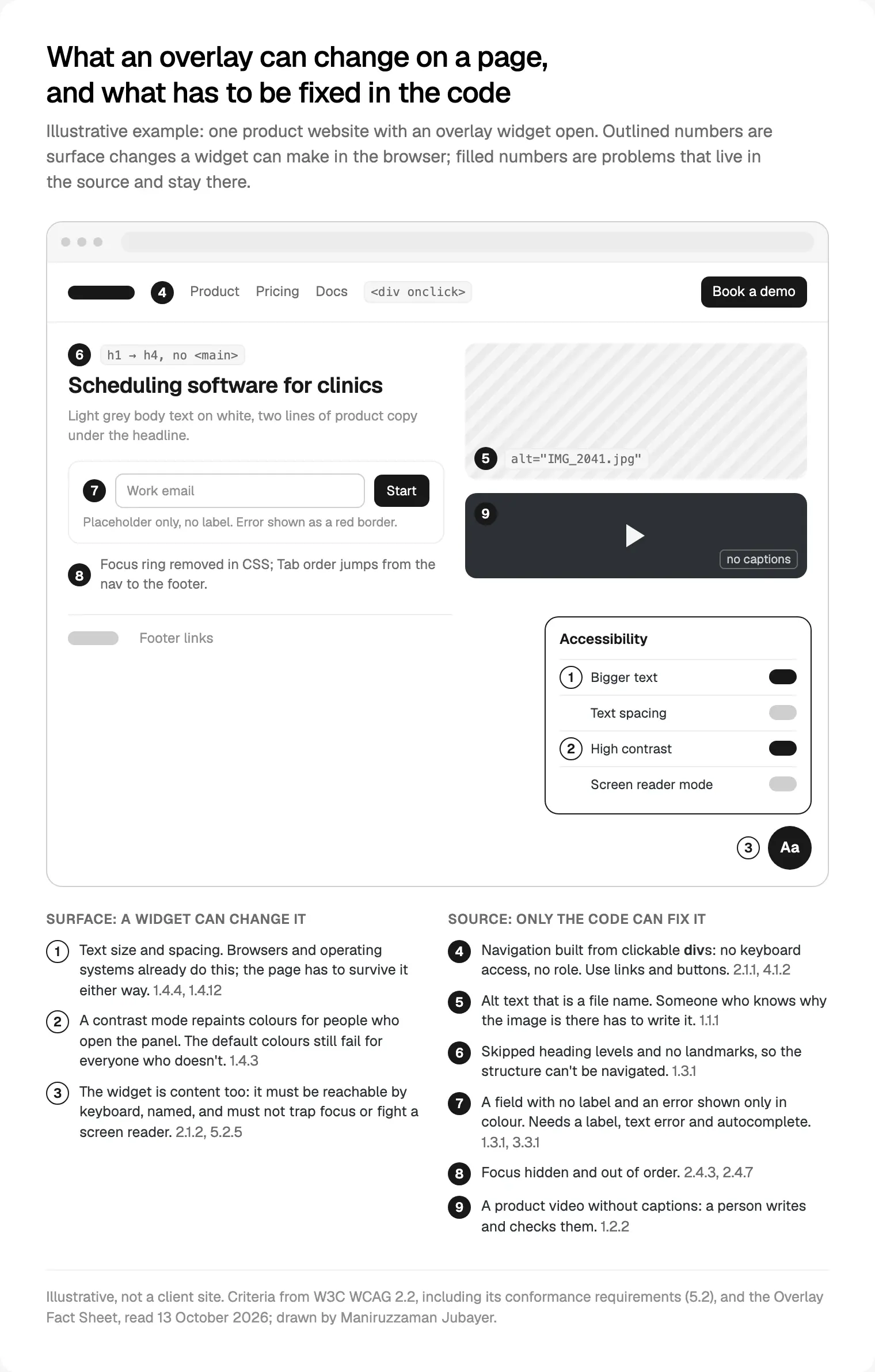
The surface controls help some people; some participants in the ASSETS study found the font and contrast adjustments useful. But WCAG already requires the page itself to survive 200% text (1.4.4) and changed spacing (1.4.12), and to meet contrast by default (1.4.3). A contrast toggle helps the visitor who finds it. Everyone else still gets the failing colours.
The source problems are where the barriers are. A script can add a role to a clickable div, but it can't know what the control does or where focus should go when a submenu opens. A model can describe a photo, but only someone who knows the page can say whether it's decoration, a product shot or a chart that needs its data in text. Captions need a person to write or check every line (criterion 1.2.2).
What actually fixes a website
The WebAIM Million 2026 found detected WCAG failures on 95.9% of the top million home pages. Six error types made up 96% of everything detected: low contrast text (83.9% of pages), missing alt text (53.1%), missing form labels (51%), empty links (46.3%), empty buttons (30.6%) and missing page language (13.5%). Every one is a source fix.
This is the order I work in, and it's how I build accessible SaaS websites:
- Semantic HTML. Real
buttonandaelements, headings in order, landmarks, a skip link andlangon the page. - Keyboard. Every link, menu, tab and dialog works with Tab, Enter, Space and Escape, with no traps.
- Focus. A visible focus style, a logical order, and focus moved on purpose when a dialog opens.
- Forms. A visible label per field, autocomplete tokens, and errors in text next to the field, never colour alone.
- Contrast. Text at 4.5:1 and control borders and icons at 3:1, checked once in the design tokens.
- Images. Alt text written by whoever owns the content, following W3C's images tutorial: empty for decoration, the data for charts.
- Media. Captions on every product video and no autoplay with sound.
- Testing. Automated checks on every change, then a keyboard pass and a screen reader pass (VoiceOver and NVDA at least) on each key template.
For React or Next.js, the code for each criterion is in my WCAG 2.2 React checklist. On Webflow or Framer the same list goes into the component library and the CMS fields.
If you already pay for an overlay: how to decide and take it off
I don't tell people to rip a widget out on day one. I tell them to stop relying on it.
| What you hear | What the record says | What I would do |
|---|---|---|
| "Install this and you're compliant" | The FTC found one vendor's version of this claim unsupported | Ask for evidence; don't repeat it |
| "It fixes alt text and labels automatically" | The Overlay Fact Sheet calls these repairs not reliable | Fix them in the source and the CMS |
| "Users can adjust the site to their needs" | Browsers and assistive technology already do this | Make the page meet 1.4.3, 1.4.4 and 1.4.12 itself |
| "Public sites may use it" | German monitors: accessible only if it passes without it | Test with it switched off |
The removal is short in this order:
- Turn it off on staging and audit the real site: a scan, a keyboard pass and a screen reader pass on your main templates and sign-up flow.
- Fix the shared components first, starting with navigation, forms and dialogs.
- Rewrite your accessibility statement from the audit, naming what still fails and when it will be fixed.
- Check the contract and privacy notice for renewal dates and what the script collects about visitors.
- Retest in production. If you keep it for its comfort settings, test once with it on to make sure it doesn't trap focus or override a screen reader.
Where I would start
Spend 20 minutes with your own site before you spend anything on tools. Switch the widget off, put the mouse away and press Tab from the top of your homepage to your sign-up form. Then turn on VoiceOver or NVDA and try again. You'll learn more than any score will tell you, and you'll know which components to fix first.
If you'd rather have that built into a new site from the first sprint, that's my website design work for SaaS teams: a free 30 minute intro call, a written scope and one fixed quote, then weekly sprints and a staging site reviewed every week. More on how I work is on my about page.
Frequently asked questions
Do accessibility overlays make a website ADA compliant?
No product can promise that. The ADA sets no technical standard for private businesses, and the DOJ's 2022 guidance says overlays need careful use because a clean report doesn't mean a site is accessible. In 2025 the FTC made one overlay vendor stop claiming, without evidence, that its tool could make any website WCAG compliant. What counts is whether people can use the site.
What did the FTC order against accessiBe say?
Announced on 3 January 2025 and made final on 22 April 2025, the order settled allegations that accessiBe falsely claimed its accessWidget plug-in could make any website WCAG compliant, and disguised paid reviews as independent. It bars those claims without evidence, requires disclosure of connections to endorsers, and required a $1 million payment the FTC may use for refunds.
Are accessibility overlays allowed under the European Accessibility Act?
The directive doesn't mention them. It requires covered services, such as e-commerce and banking, to be accessible. The European Disability Forum and IAAP say overlays don't make a site compliant with European law, and the Dutch regulator ACM calls them not an appropriate solution. You can keep one, but the site must pass without it.
Can an overlay make my site worse for disabled users?
It can. In a 2024 ASSETS study of blind and low-vision users, as many as 42% of survey respondents stopped using websites with overlays, most often because the site had become less accessible. Clashes with their own screen reader, slow pages and disruptive prompts were common causes. Under WCAG's non-interference rule, a widget that traps focus makes the page fail.
What is the Overlay Fact Sheet?
It's a public statement by accessibility practitioners explaining what overlay widgets and automated repair can and can't do. It concludes that no overlay can make a website fully compliant with any accessibility standard. Its signatories, more than a thousand when I counted, include editors of the WCAG, ARIA and HTML specifications and contributors to the JAWS and NVDA screen readers.
What should I do instead of an accessibility overlay?
Fix the source, in this order: semantic HTML, keyboard access, visible focus, labelled forms with clear errors, contrast in your design tokens, real alt text, captions, then testing with a keyboard and a screen reader. Fix shared components first, since one change there reaches every page. Then write your accessibility statement from the audit.
Sources and method
I read every source on 13 October 2026. ftc.gov refuses scripted requests, so I opened its pages in a browser; I checked every other link with curl. I counted the Overlay Fact Sheet's signatories myself. The ASSETS 2024 paper sits behind a bot check, so its figures come from the co-author's summary published by CREATE at the University of Washington; the chart's shares are my arithmetic. The German assessment is in German; the summary is my translation. I tested no overlay product, and the diagram is illustrative.
- Federal Trade Commission, proposed order (3 January 2025), final order (22 April 2025), case page and business blog on accessiBe, read 13 October 2026: ftc.gov, ftc.gov, ftc.gov, ftc.gov
- Overlay Fact Sheet, statement and signatories, read 13 October 2026: overlayfactsheet.com
- WebAIM, Survey of Web Accessibility Practitioners #3 (January 2021) and The WebAIM Million 2026, read 13 October 2026: webaim.org, webaim.org
- CREATE, University of Washington, summary of Makati, Tigwell and Shinohara, ASSETS 2024 (31 October 2024), read 13 October 2026: create.uw.edu
- W3C, WCAG 2.2 conformance requirements, and W3C WAI, Selecting Evaluation Tools, Involving Users, Understanding 1.2.2 and the Images Tutorial, read 13 October 2026: w3.org, w3.org, w3.org, w3.org, w3.org
- EUR-Lex, Directive (EU) 2019/882, the European Accessibility Act, read 13 October 2026: eur-lex.europa.eu
- European Disability Forum and IAAP, joint statement on overlays (17 May 2023), read 13 October 2026: edf-feph.org
- BFIT-Bund, joint assessment of the federal and state monitoring bodies on overlay tools (March 2025), read 13 October 2026: bfit-bund.de
- ACM (Netherlands), Real-world accessibility issues, read 13 October 2026: acm.nl
- US Department of Justice, Guidance on Web Accessibility and the ADA (2022) and the Title II web rule fact sheet with the interim final rule of 20 April 2026, read 13 October 2026: ada.gov, ada.gov
Tags: Accessibility, WCAG 2.2, Website design, European Accessibility Act, ADA