


Agentic UX design is the work of letting an AI agent act inside your product on someone's behalf, without that person losing track of what was done, why, or how to reverse it. The agent stops being a text box that answers and starts sending, editing, booking and spending.
The patterns are few and well documented: a scope of what the agent may do, a plan before it acts, approvals tiered by risk, a live log, a way to stop or take over, an honest result when only part of the job worked, and an audit trail. This guide is for founders and product leads adding an agent to a SaaS, fintech or AI product, and for teams about to hire a product designer for SaaS.
Apple, Microsoft, Google, Anthropic, OpenAI and NIST point the same way in what they've published; below, I turn their guidance into screens. If your product lives inside someone else's assistant instead, read my guide to designing apps for AI assistants.
What agentic UX design covers, and what it doesn't
Anthropic's post Building effective agents (19 December 2024) draws the line I use: workflows run models and tools through code paths written in advance, while agents decide their own steps and tools. OpenAI's practical guide to building agents (April 2025) agrees that a chatbot or single-turn feature isn't an agent.
A bad answer from a writing assistant costs a reread. A bad step from an agent can send an email or move money before anyone looks. So the screens shift from "show the answer" to "show the intent, the action and the consequence".
My guide to shipping AI features people trust covers confidence, sources and disclosure; here I go deeper on what only exists once software acts.
Delegation: write down what the agent may do
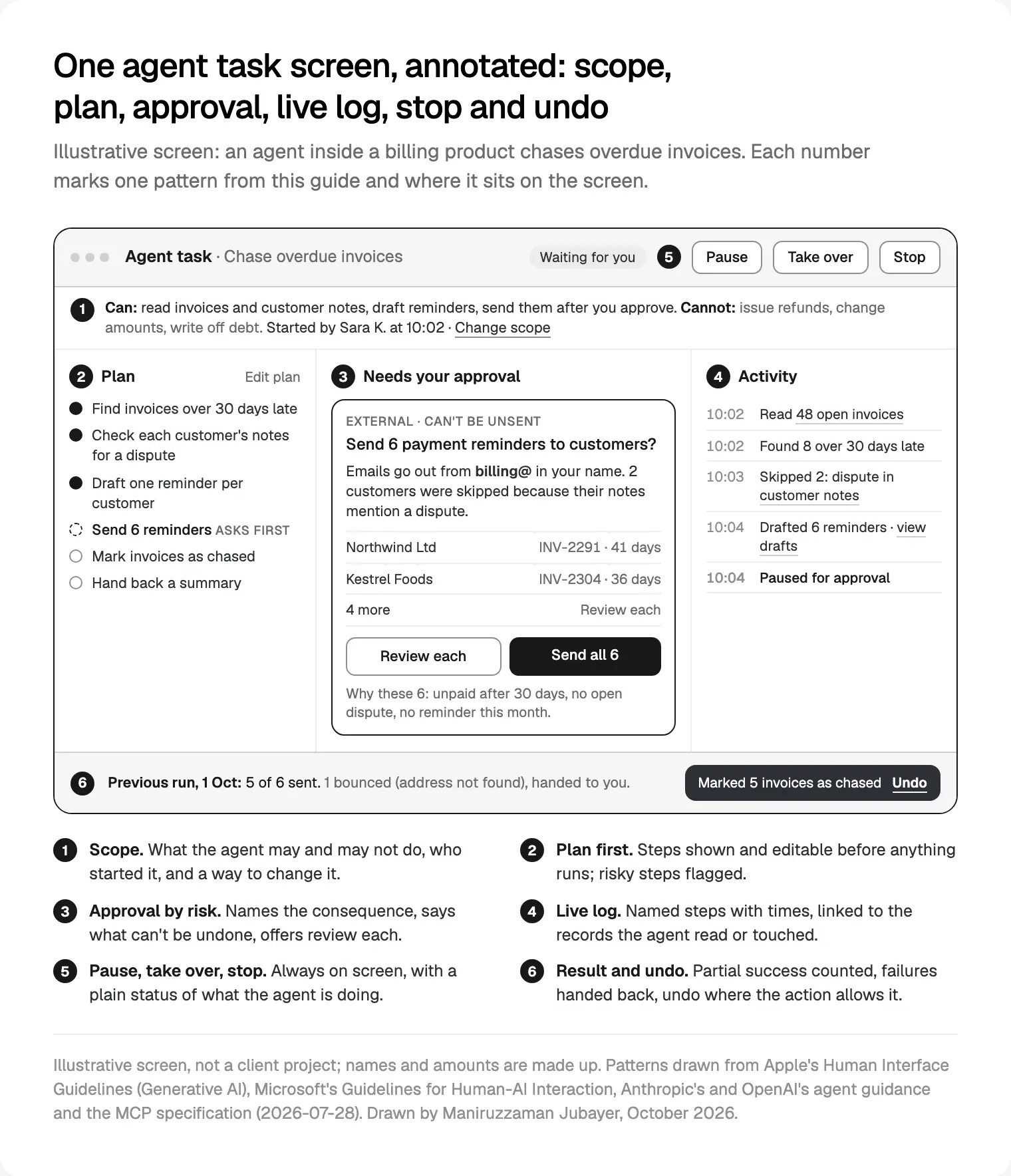
Every agent feature I design starts with a list, not a chat box. I write each action as a verb and an object ("send reminder email", "issue refund") and mark it allowed, allowed with approval, or never. That list becomes the scope line on the task screen and the permission settings behind it.
Starting narrow has support. Anthropic's framework for safe and trustworthy agents (4 August 2025) describes Claude Code as read-only by default: it reads files without asking but must ask before modifying code or systems, and people can grant persistent permissions for routine tasks.
Google's Agent Payments Protocol announcement (17 September 2025) shows delegation with money. When the person isn't present, they sign an "Intent Mandate" up front with price limits, timing and other conditions; when they are, approving the exact cart creates a second record. I borrow the idea for any delegated task: limits in plain words, and the agent stops when it hits one.
The scope line always holds three things:
- Can: the actions it will take, in the user's words.
- Cannot: the one or two actions people would worry about most.
- Started by and when: so a colleague knows whose authority it runs on.
Show the plan before the agent acts
The second of Anthropic's three principles for agents is transparency, "explicitly showing the agent's planning steps". Its August 2025 framework describes Claude Code showing planned actions as a real-time to-do checklist people can question or adjust. Microsoft Research's experimental web agent Magentic-UI (19 May 2025) calls it co-planning: people change the plan before anything runs.
On screen, I keep it concrete:
- One line per step, saying what the agent will do to which records.
- Steps that will ask for approval are marked before the run starts.
- An Edit plan control to remove, reorder or add a limit.
- A Start button. Nothing but reads happens until it's pressed.
During the run, steps tick off and a skipped step shows its reason, which meets Microsoft's G11, "Make clear why the system did what it did".
Agentic UX design for approvals: confirmation levels by risk
Ask for everything and people click Approve without reading. Ask for nothing and the first mistake ends trust. So I tier approvals.
OpenAI's guide gives the inputs: rate each tool low, medium or high risk by read or write access, reversibility, the permissions it needs and financial impact, then pause or escalate to a person on that rating. Apple's Human Interface Guidelines on generative AI (updated 8 June 2026) say to avoid automating destructive or hard-to-undo actions, like a purchase on someone's behalf. Anthropic's computer use documentation asks for human confirmation of decisions with real-world consequences, such as financial transactions.
The table I start every project with:
| Level | What the action does | Examples | What the person sees |
|---|---|---|---|
| 0 Read | Changes nothing | Search records, read notes | Runs; appears in the log |
| 1 Reversible, internal | Easy to revert, only your team sees it | Tag a ticket, change a status | Runs; undo in the toast and log |
| 2 Bulk or shared | Many records, or work colleagues rely on | Update 200 contacts | Preview; one approval per batch |
| 3 External or irreversible | Leaves the product or can't be recalled | Send an email, publish | Approval every time; says it can't be undone |
| 4 Money, access, deletion | Spends, refunds, grants access, deletes | Refund, add a user | Confirm the exact amount or item; some never delegated |
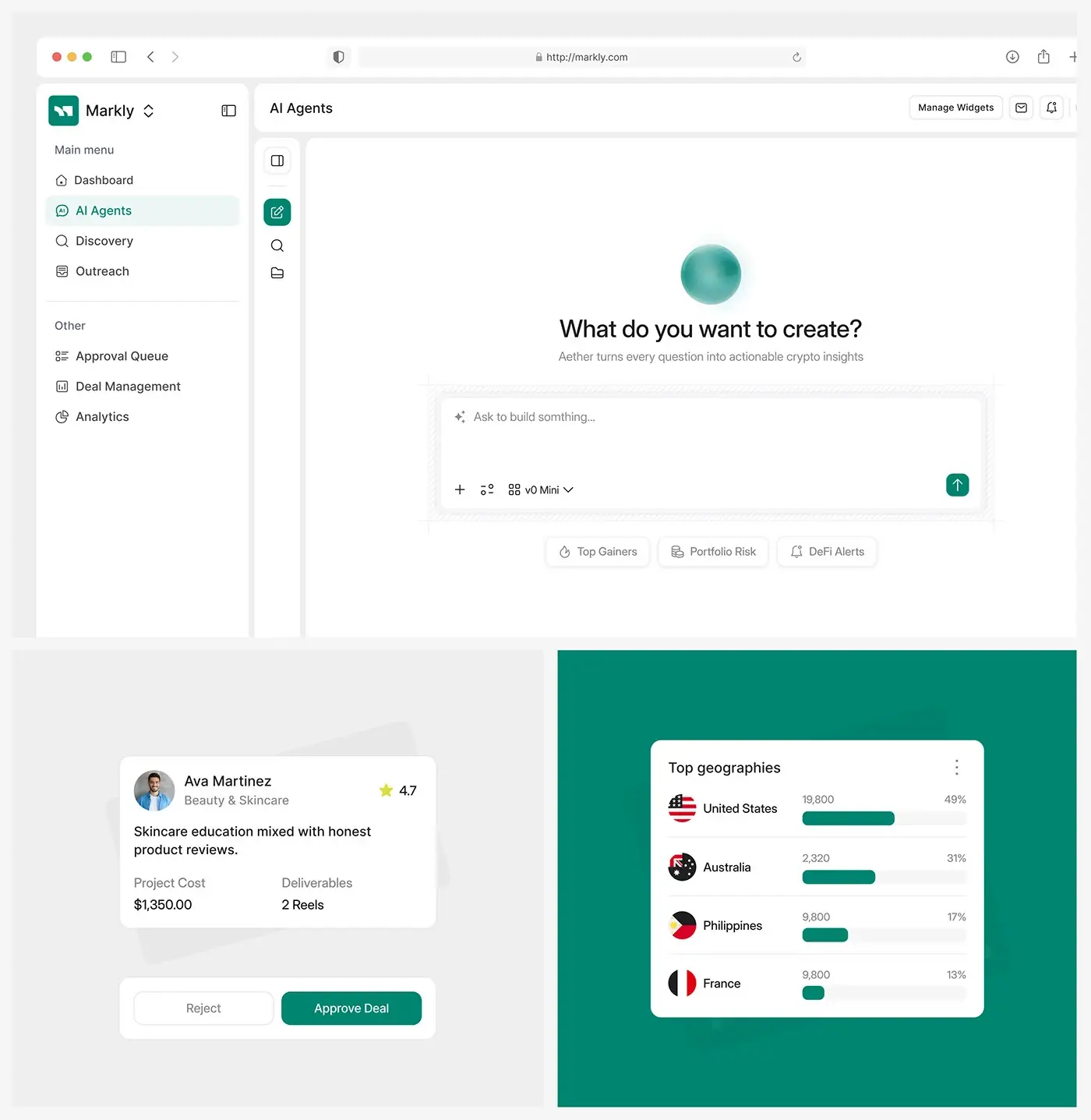
The approval card names the consequence in one sentence, says what can't be undone, shows the first few items with Review each for the rest, and says why these items. That last part is Microsoft's G16, "Convey the consequences of user actions". These levels sit at the centre of how I design agent features for SaaS teams.
If you also expose tools to outside assistants, the MCP tools specification (version 2026-07-28) defines hints such as readOnlyHint and destructiveHint, which clients must treat as untrusted unless the server is trusted. I map my levels onto them so one decision drives both surfaces.
Progress and the activity log
The MCP specification says applications should show clear indicators when tools are invoked, show tool inputs before calling them, and log tool usage for audit. Inside your product, that's one component: the activity log.
Each entry has a time, a verb, a count and a link: "10:03 Skipped 2: dispute in customer notes". The link opens the records it read or changed, so people can check its work.
What I avoid: narrated thinking instead of actions, spinners for long tasks, and logs that vanish with the session. A plain status chip ("Waiting for you", "Step 4 of 6") tells people at a glance whether they're needed.
Interruption, pause and undo
People need to stop an agent at any moment and trust that stopping leaves things in a known state. Magentic-UI calls this co-tasking: people can pause the agent, give feedback or take control of the browser. It also lets people set how often the agent asks, up to every action.
Three controls stay in the task header:
- Pause finishes the current step, then waits.
- Take over hands the remaining steps to the person, with drafts and data already gathered.
- Stop ends the run and shows what was and wasn't done.
Undo has to be real. Apple asks for ways to revert or retry actions and to acknowledge when a correction takes effect; Microsoft's G9 asks for efficient correction. But a sent email stays sent. So undo appears only where it works, and where it doesn't, the approval card said so first. For changes inside the product I store the prior value, so undo is a restore, not a second agent run guessing.
In OpenAI's Agents SDK human-in-the-loop guide, a tool that needs approval pauses the run and the saved state can wait in a database, so approvals may arrive hours later from a phone. Design for that.
Handing back, errors and partial success
Agents fail halfway, or on some items and not others. OpenAI's guide names two triggers for bringing a person in: exceeding failure thresholds, and high-risk actions, which stay under human oversight "until confidence in the agent's reliability grows".
The handback screen answers four questions: what was done ("5 of 6 reminders sent"), what wasn't and why ("1 bounced: address not found"), what you need to do (one button per failed item, with the agent's work attached), and whether anything is still running.
Google's People + AI Guidebook chapter on feedback and control asks for a way to complete the task the regular, non-automated way. For agents, every handback lands in a normal screen of your product, not a transcript.
Partial success gets its own state in the design system, with counts. Retry must be safe to press twice, so I ask engineers which actions are idempotent (the MCP schema has an idempotentHint for this).
Permissions, identity and audit
Someone will ask "who did this?" The answer is the agent and the person it acted for.
NIST's National Cybersecurity Center of Excellence published a draft concept paper in February 2026 on software and AI agent identity and authorization. It asks how to handle "on behalf of" delegation, how to bind an agent's identity to a person's for human-in-the-loop approvals, and how agents can log actions and intent in a tamper-proof way. It's a draft, not a standard, within NIST's AI Agent Standards Initiative, announced on 17 February 2026.
The NIST AI Risk Management Framework (26 January 2023) already has the governance language: GOVERN 3.2 asks for defined roles for human-AI oversight, and MANAGE 2.4 for ways to disengage or deactivate a system acting outside its intended use. NIST's AI RMF page says it is being revised.
In the product, that becomes:
| Need | What I design |
|---|---|
| Who acted | Log entries read "Agent, on behalf of Sara K." |
| What it may do | A permissions page per agent: actions, records, limits |
| Admin control | A workspace switch to turn it off (Microsoft's G17, "Provide global controls") |
| After the fact | An exportable trail: time, action, records, who approved |
| Outside content | A flag when the agent read pages or emails it didn't write |
That last row matters. Anthropic's Claude for Chrome announcement (25 August 2025) reported a 23.6% prompt injection attack success rate in browser use without its mitigations, and 11.2% with them in autonomous mode, and said Claude asks before high-risk actions like publishing, purchasing or sharing personal data. My reading: once the agent has read anything a stranger wrote, treat its next write as one level riskier.
Trust over time: widening and narrowing autonomy
Microsoft's "over time" guidelines include G14, "Update and adapt cautiously", and G18, "Notify users about changes". With OpenAI's "until confidence grows" and Anthropic's persistent permissions, the direction is clear: autonomy is earned, and can be taken back.
How I put that on screen:
- Offer, never assume. After several unedited approvals of the same action, the agent may offer "Always allow reminders under 60 days late?". The person decides.
- Keep the dial visible. A settings page shows what's automatic, what asks and what's blocked, in the levels above.
- Make narrowing one click. Every approval card has "Ask me every time".
- Announce changes to the model or tools before the agent acts on them.
On WealthWise, an AI personal finance dashboard, I placed the AI score on the dashboard beside net worth, expenses and income, not in a separate tool. Agent status belongs there too: on the screen people already open.

A checklist before an agent ships
The list I run before launch; it turns the agent screens among the interface trends I expect in 2027 into checks:
- Every action has a risk level that an owner agreed.
- The scope line names what the agent can't do.
- The plan is editable before the first write.
- Approval cards name the consequence and what can't be undone.
- The log links entries to records and survives the session.
- Pause, Take over and Stop work at every step.
- Undo appears only where it's a real restore.
- Partial success, handback and audit entries are designed, with the agent and the person it acted for.
Where I would start
Pick one task your users repeat every week that touches only your own data. Write the action list, tier it, and design the approval, log and handback before the happy path. Ship with everything above level 1 asking first, and widen from what people actually approve.
Money products deserve the strictest levels from day one. Nexfolio, an AI-powered investment dashboard I designed, is the kind of product where I'd start every agent action at level 3 or above. If you want help, book a free 30 minute intro call about my product design work for SaaS and AI products; you then get a written scope and one fixed quote for the whole project.
Frequently asked questions
What is agentic UX design?
Agentic UX design is designing products where an AI agent takes actions for the user, such as sending messages, editing records or making bookings, rather than only answering. It covers what the agent may do, showing its plan, approvals by risk, a log of each step, pausing or stopping it, undo, handing failed work back, and an audit trail of who allowed what.
How is agentic UX different from designing a chatbot?
A chatbot's mistake is a wrong answer you can ignore. An agent's mistake is an action that has already happened. So agentic UX adds a scope of allowed actions, a plan shown first, approval levels, a live activity log, undo where possible and a clear handback when the agent stops. Often the best agent interface isn't a chat at all.
When should an AI agent ask for confirmation?
Tier it by risk. Reads run without asking. Reversible changes inside your product run with undo. Bulk changes get a preview and one approval. External or irreversible actions, like sending an email, ask every time. Money, access and deletion need confirmation of the exact item, and some should never be delegated. The levels are mine; Apple, Anthropic and OpenAI all ask for confirmation before irreversible or costly actions.
How do you design undo for AI agent actions?
Store the previous value of anything the agent changes inside your product, so undo restores it exactly, and offer undo in the toast and the activity log. Be honest about actions that can't be undone, such as sent emails or payments: say so on the approval card before the action, and show no undo afterwards. A fake undo that reruns the agent is worse than none.
Should users be able to give an AI agent more autonomy over time?
Yes, if the person chooses it. After several unedited approvals of the same kind of action, the agent can offer to stop asking for it. Keep a settings page showing what's automatic, what asks and what's blocked, make going back to asking one click, and tell people before behaviour changes after a model or tool update.
What standards apply to AI agents in products?
There's no single agent UX standard yet. NIST's AI Risk Management Framework covers human oversight and switching a system off, and NIST launched an AI Agent Standards Initiative in February 2026, with a draft concept paper on agent identity and authorisation. The MCP specification sets rules for tool confirmations and audit logs, and Apple, Microsoft and Google publish design guidance.
Sources and method
I read every source on 13 October 2026 and ran no tests of my own. The task screen is illustrative, not a client project. OpenAI's Operator and ChatGPT agent pages blocked automated access, so I used its guide and SDK documentation. Independent data on which approval patterns work best is thin.
- Anthropic, Building effective agents, 19 December 2024, date read 13 October 2026: anthropic.com
- Anthropic, framework for safe and trustworthy agents, 4 August 2025, date read 13 October 2026: anthropic.com
- Anthropic, computer use tool documentation, date read 13 October 2026: platform.claude.com
- Anthropic, Claude for Chrome announcement, 25 August 2025, date read 13 October 2026: claude.com
- OpenAI, A practical guide to building agents, April 2025, date read 13 October 2026: cdn.openai.com
- OpenAI, Agents SDK human-in-the-loop guide, date read 13 October 2026: openai.github.io
- Apple, Human Interface Guidelines, Generative AI, updated 8 June 2026, date read 13 October 2026: developer.apple.com
- Microsoft, Guidelines for Human-AI Interaction and HAX Design Library, date read 13 October 2026: guidelines, library
- Microsoft Research, Magentic-UI, 19 May 2025, date read 13 October 2026: microsoft.com
- Google PAIR, People + AI Guidebook, Feedback + Control, date read 13 October 2026: pair.withgoogle.com
- Google Cloud, Agent Payments Protocol (AP2) announcement, 17 September 2025, date read 13 October 2026: cloud.google.com
- Model Context Protocol, specification 2026-07-28, Tools and Schema, date read 13 October 2026: tools, schema
- NIST, AI Risk Management Framework 1.0, 26 January 2023, and its revision note, date read 13 October 2026: framework, AI RMF page
- NIST, AI Agent Standards Initiative, 17 February 2026, date read 13 October 2026: nist.gov
- NIST NCCoE, software and AI agent identity and authorization draft concept paper, February 2026, date read 13 October 2026: nccoe.nist.gov
Tags: Agentic UX, AI agents, AI UX, Product design, SaaS