

Hospital management system software is what a hospital runs its daily operations on: patients and admissions, appointments, doctors and staff, departments and wards, beds, billing and reports, usually connected to the electronic health record, the lab and the pharmacy. Most hospitals buy the clinical record and the billing engine. What they build or redesign is the layer staff look at all day: the hospital dashboard. If your current screens make admins hunt across five modules to answer one question, that layer is where the work, and the money, should go.
I'm a design engineer: I design products and build them in production code, web apps in TypeScript, React and Next.js. I designed Mediso, a hospital management dashboard, and VitalHealth, a clinic platform with more than 50 screens, and both are walked through below. The service behind this post is my product design work.
What hospital management system software covers
The modules vary by vendor, but a buyer's list usually looks like this. The right column is where the design weight sits.
| Module | What it handles | The hard screen |
|---|---|---|
| Patient registration and admission | Demographics, admitting department, previous records | The patient profile |
| Appointments and scheduling | Bookings by doctor, department and slot | The week calendar |
| Doctors and staff | Speciality, shifts, attendance, licences | Gaps before they open |
| Departments and wards | Patients in and out, staff, revenue | Comparing departments fairly |
| Beds | Total, admitted, reserved, ready for admission | Live counts that are actually live |
| Billing | Consultations, surgery, diagnostics | Totals an admin can trust |
| Reports and export | CSV, generated reports, urgent reports | Finding the urgent one |
The clinical record itself (orders, notes, results) usually sits in a certified EHR. The management layer reads from it and writes back the admin side.
Build, buy or redesign
Buy when a standard product covers your workflows and staff can live with its screens. Configuration is cheaper than code.
Build a custom dashboard when staff juggle several systems and need one view across them. It sits on top of what you have and talks to it through interfaces, often HL7 FHIR, a standard for health care data exchange whose current published version is FHIR R5.
Redesign when the system works but nobody can find anything. A redesign keeps the back end and replaces what staff touch.
The question I ask first in an intro call: which three questions does your operations lead answer every morning, and how many screens does each one take today?
What a hospital dashboard must show, by role
A hospital dashboard fails when one screen tries to serve everyone. I start from roles:
- Hospital admin. Billing by type, patients against last month, surgeries, arrivals and urgent reports, on one screen.
- Scheduler. A week of appointments by day and hour, open slots visible, the current time marked.
- Staff manager. Attendance, shifts and leave, before a gap opens.
- Department head. Patients in and out, revenue, staff and reviews, laid out like every other department.
- Bed manager. Total, admitted, reserved and ready beds, and who is in which room.
Each role gets its own first screen, but all of them share one sidebar and one card pattern, so moving between them costs nothing.
Healthcare dashboard design: the rules I follow
These come from the two projects below and from how I work on any operational product. For the patient side of health products (booking, consent, older users), see my notes on designing healthcare apps.
- Key numbers in cards on top, the working list underneath. Admins scan, then act in the list, so the list gets the space.
- One layout everywhere. If the patient profile and the doctor profile share a queue on the left and a card on top, staff learn it once.
- Put what changes most where the eye lands first. On a patient profile, that's vitals, not the address.
- Time as a grid, not a list. Schedulers plan by day and hour, so appointments sit on a week calendar.
- Colour plus a label. A tint helps, but a code or status word carries the meaning, so the screen works for anyone who can't tell the tints apart.
- Every card ends in an action. A number that needs attention links to the list that fixes it.
For how other teams solve the first screen, my dashboard design examples sort real products by the job they do.
Common mistakes in hospital software projects
Designing the database, not the day. A module per table gives a long menu and no answer to "what needs me now?". Start from each role's questions.
Hiding time-outs and audit trails until the end. In the US, the HIPAA Security Rule's technical safeguards (45 CFR 164.312) require unique user identification and an emergency access procedure, list automatic logoff and encryption as addressable, and require audit controls that record activity in systems holding electronic health information. Each of those is a screen or a state: a sign-in per person, a warning before a session ends, an emergency access path, a history on every record. Designed late, they get bolted on.
Treating accessibility as optional for staff tools. Under HHS's 2024 Section 504 rule, recipients of HHS funding must make the web content and mobile apps they provide meet WCAG 2.1 Level A and AA. An interim final rule published on 11 May 2026 moved the compliance dates to 11 May 2027 for recipients with 15 or more employees and 10 May 2028 for smaller ones. Patient portals are the obvious case; ask your counsel about staff-only screens. Designing to AA costs little when it starts on day one. This is general information, not legal advice.
One colour for "good" and "urgent". If green marks both a button and a good trend, nothing stands out. Urgency needs its own treatment.
How I'd approach your hospital dashboard, from intro call to launch
- A free 30 minute intro call. I ask who uses the system, what they check first every morning and which systems hold the data today.
- A written scope and one fixed quote for the whole project. No retainer, nothing billed by the hour.
- Roles and questions. Before any screen, I write each role's daily questions and the data that answers them.
- Weekly design sprints in Figma, with a written update in Slack every 48 hours and a review call each week.
- A documented design system, with tokens and components named the same in Figma and in code.
- The build. A web app in TypeScript, React and Next.js, connected to your existing systems. I use AI coding tools where they save time, and a person who knows the design reviews every change.
- Launch, with sign-in, session time-outs and audit history tested alongside the screens.
My healthcare industry page covers the other kinds of health products I work on.
Case study: how I designed Mediso
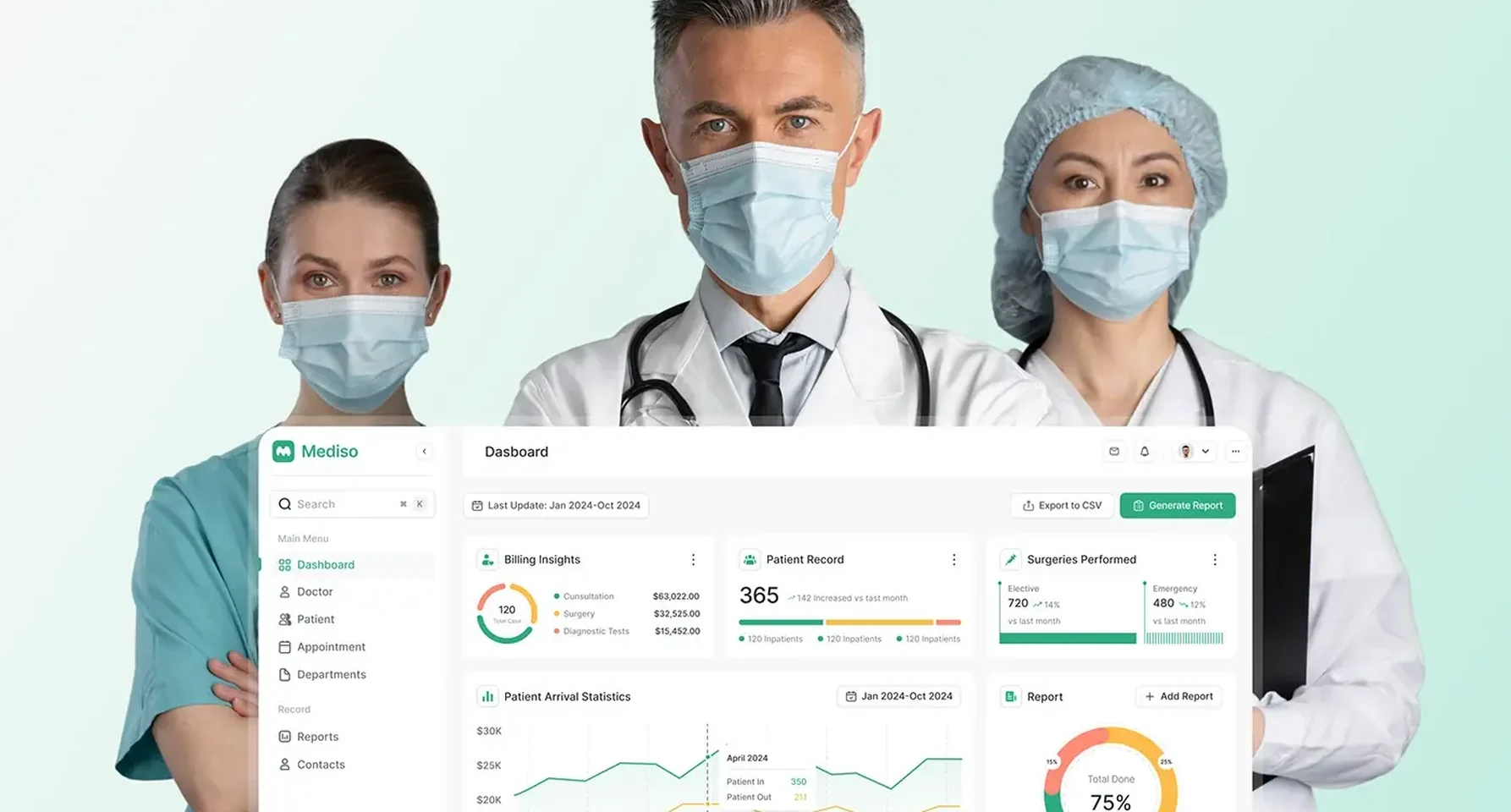
Mediso is a web platform for hospital admin teams that brings patients, doctors, appointments and departments into one place. I designed the web dashboard, from research to final UI, between 10 April and 29 May: 15 days of research, 5 of functional design, 20 of wireframing and prototyping and 10 of UI design.
The problem. Admins work under time pressure. Billing, arrivals, surgeries and urgent reports had to sit on one screen; doctor attendance and shifts had to show before a gap opened; a patient's vitals, ward, diagnosis and reports belonged on one profile; and 16 departments and a full week of appointments had to stay easy to scan.
The main dashboard. Under a date range, Export to CSV and Generate Report sit five cards: billing insights split into consultation, surgery and diagnostic tests; patient records against last month; elective and emergency surgeries; a patient arrival chart of patients in and out by month; and a report ring by urgency. The patient list underneath adds sort, filter and export.
Doctors. The doctor screen charts attendance as on time, late and on leave, and lists each doctor's speciality, status and shift. Add Doctor opens as a side panel so the list stays in view. The profile keeps a doctor queue on the left and shows the NPI number and each licence with its region and status.
Patients. Four cards split patients into child, teen, adult and older, each with its change from last month, and a radar chart plots eight conditions. On the patient profile, vitals take the top right (a blood pressure chart, pulse rate and blood oxygen), an About Patient panel lists the complaint, floor and ward, admission and expected release dates and the diagnosis, flagged when surgery is needed, and medical reports sit at the bottom as downloads.
Calendar and departments. Appointments run on a week grid with a dashed line at the current time, each booking a small card with the patient's name, the slot and a condition code such as HTN, COPD or CHF. All 16 departments get the same card, and each department page charts patients in and out and monthly revenue, with the head of department and patient reviews.
The clinic side: VitalHealth
VitalHealth is a platform for finding and booking doctors; I designed the web dashboard its clinics run on, more than 50 screens on desktop and tablet. Bed management counts beds as total, admitted, reserved, registered and ready for admission, and lists each patient's doctor, room and bed. The vitals block on each record shows the time of its last update, so nobody trusts old numbers by accident.
What decides the cost of hospital management software
I don't publish prices; after the intro call you get one fixed quote for your scope. These move it:
- Roles and modules. Each role's first screen and each module's list and profile add design and build time.
- Integrations. Reading from an EHR, lab or billing system through FHIR or a vendor's interface is often the largest single task.
- Security and audit. Per-person sign-in, time-outs, emergency access and a history on every record are part of the build, not extras.
- Accessibility. Designing to WCAG 2.1 or 2.2 AA from the start is cheap; retrofitting it is not.
- People. The US Bureau of Labor Statistics puts median pay for software developers at $135,980 a year, from May 2025 data, in its Occupational Outlook Handbook.
How to choose who builds it
- An operational dashboard they designed, with lists, profiles and forms, not only a chart screen.
- Their answer on time-outs and audit history. A good one names the screens and states.
- Who turns the design into code, and how the build is kept matching it.
- How the price is set. A written scope with one fixed price tells you what you're buying.
- Who owns the code. The repository and hosting belong in your organisation's name.
Frequently asked questions
What is hospital management system software?
The software a hospital runs its operations on: admissions, appointments, staff, departments, beds, billing and reports. It usually connects to the clinical record, lab and pharmacy rather than replacing them.
What should a hospital dashboard include?
From Mediso: billing by type, patient numbers against last month, surgeries, patient arrivals and urgent reports on the main screen, then doctor and patient lists and profiles, a week appointment calendar, department pages, and forms to add doctors and patients with their documents.
Should a hospital build custom software or buy it?
Buy the clinical record and billing engine. Build or redesign the dashboard when staff need one view across several systems, or when the data is right but hard to find.
How long does it take to design a hospital dashboard?
Mediso's design ran from 10 April to 29 May. Your timeline depends on roles, modules and integrations, and goes in the written scope after the intro call.
Does a hospital dashboard need to meet accessibility rules?
In the US, HHS's Section 504 rule requires WCAG 2.1 AA for web content and apps that funded recipients provide, from 11 May 2027 for those with 15 or more employees. I design to AA from the first screen either way.
Can you design and build the whole dashboard?
Yes. I design the product and build it as a web app in React and Next.js, with a documented design system so the code matches the design.
Sources and method
I read every source on 1 November 2026. I describe Mediso and VitalHealth only as their case studies state, with no outcome figures. I give no market size numbers, because the ones I found came from vendors' sales pages.
- HL7, FHIR R5, current published version, date read 1 November 2026: hl7.org
- US eCFR, 45 CFR 164.312, HIPAA Security Rule technical safeguards, date read 1 November 2026: ecfr.gov
- HHS, Section 504 final rule, 45 CFR 84.84 web and mobile accessibility (9 May 2024), date read 1 November 2026: federalregister.gov
- HHS, interim final rule extending the Section 504 web and app compliance dates (11 May 2026), date read 1 November 2026: govinfo.gov
- US Bureau of Labor Statistics, Occupational Outlook Handbook, Software Developers, date read 1 November 2026: bls.gov
If you're planning to build or redesign hospital management software and want the dashboard designed and built as one product, book a free 30 minute intro call. After it, you get a written scope and one fixed quote.
Tags: Hospital software, Healthcare, Dashboards, Case study, Product design