



The NYDFS MFA requirements sit in one short section, 23 NYCRR 500.12. Since 1 November 2025, a company covered by New York's cybersecurity regulation must use multi-factor authentication for any individual accessing any of its information systems. The only ways out are a CISO's written approval of reasonably equivalent or more secure controls, reviewed at least yearly, or the small-company exemption, which still requires MFA for remote access and privileged accounts.
DFS has also said which methods it trusts: SMS codes are weaker, push approvals without number matching invite fatigue attacks, and a "remember this device" cookie is not a factor at all. I design these flows as a fintech product designer in New York, working remotely, and this post turns the rule into screens people finish.
It's for founders and product leads at New York fintechs, and at companies that sell to them. Customer sign-in is in the frame too: in January 2025 DFS fined PayPal $2 million and noted it had not required customers to use MFA. I'm a designer, not a lawyer, so treat this as design guidance and let your CISO and counsel make the calls.
What Part 500 says about MFA, and when it applied
The second amendment to the DFS regulation took effect on 1 November 2023 and gave each section its own deadline. Section 500.12, with the asset inventory rule, got the longest: two years. Here's how the amended text of Part 500 lays it out.
| Date | What changed for sign-in |
|---|---|
| 1 March 2017 | Part 500 takes effect |
| 1 November 2023 | Second amendment takes effect; most new requirements apply 180 days later |
| 1 November 2025 | Section 500.12 expands to any individual accessing any information system |
| Every 15 April | Compliance certified, signed by the highest-ranking executive and the CISO |
A covered entity is anyone operating under a licence, registration, charter or similar authorisation under New York's Banking, Insurance or Financial Services Law. The limited exemption in 500.19(a) covers companies with fewer than 20 employees and contractors, or under $7.5 million in gross annual revenue in each of the last three years, or under $15 million in year-end assets. They still need MFA for remote access, remote third-party apps holding nonpublic information, and privileged accounts.
Two more sections shape my plans. Section 500.20 counts a material failure to comply for any 24-hour period as a violation, so a sign-in path left open during a migration matters. And 500.11 makes covered companies set MFA expectations for their vendors, so if you sell to a New York bank, expect questions about your admin console.
Do the rules reach customer sign-in, or only staff?
DFS's MFA requirements guidance of July 2025 says MFA applies to any individual, regardless of location or type of user. Customers come in through two doors.
The first is DFS's cybersecurity FAQ on public-facing websites and apps: MFA is generally not needed on marketing pages, but it is required where a system poses a material cybersecurity risk to the company, its customers or nonpublic information. An account showing balances, statements or tax forms is the obvious case.
The second is enforcement. In the PayPal settlement of 23 January 2025, DFS said attackers used compromised credentials to reach customers' tax forms, including Social Security numbers, and that the company "did not require customers to use multifactor authentication or use controls such as CAPTCHA or rate limiting".
My reading: if you're covered, design customer sign-in as if 500.12 applies, because the regulator has already treated its absence as a failure. Your CISO decides the scope; the product should never force a weaker choice.
Which factors count: DFS and NIST side by side
DFS doesn't mandate a method. Its FAQ asks for two different factor types (knowledge, possession, inherence) and says "something you have" should involve cryptographic proof of possession, not a device the computer merely remembers. NIST's SP 800-63B-4, final since July 2025, is written for federal systems, but security teams use it as their yardstick, and 500.20 names consistency with frameworks such as NIST as a factor in penalties.
| Method | What DFS says | What NIST 800-63B-4 says | How I use it |
|---|---|---|---|
| Password alone | Single factor, doesn't qualify | AAL2 needs a second factor | Never alone; paste and password managers always work |
| SMS code | Weaker: SIM swapping, interception | Restricted; offer an alternative, warn users | Last fallback, labelled less secure |
| Push without number matching | Open to push fatigue | Not phishing-resistant; cap pushes | I don't design it |
| Push with number matching | More secure, with retry limits | Not phishing-resistant | Fallback for staff and customers |
| Authenticator app code | A possession factor | Not phishing-resistant | Fallback in one pasteable field |
| Synced passkey | Not named in the FAQ | Phishing-resistant; AAL2, not AAL3 | Default for customers |
| Device-bound passkey or security key | Strong protection | Phishing-resistant; the kind AAL3 requires | Default for admins |
| "Remember this device" cookie | Not a factor; a signal at most | Shall not replace authentication | A convenience, never a check |
Two rows need care. NIST says a service at AAL2 "SHALL offer at least one phishing-resistant authentication option"; codes and push fail because a fake site can relay them. Synced passkeys sit in a grey zone for DFS: its FAQ warns that keys stored in software can be copied, while NIST accepts synced keys at AAL2 if the sync account itself uses MFA. Get your CISO's written position before launch; I design for both answers.
The NYDFS MFA requirements as a flow
Here is the whole thing on one page: sign-in, a second factor, the session, a step-up for a risky payment, recovery and settings. It's the flow I start from, and the core of how I design NYDFS sign-in flows for New York teams.
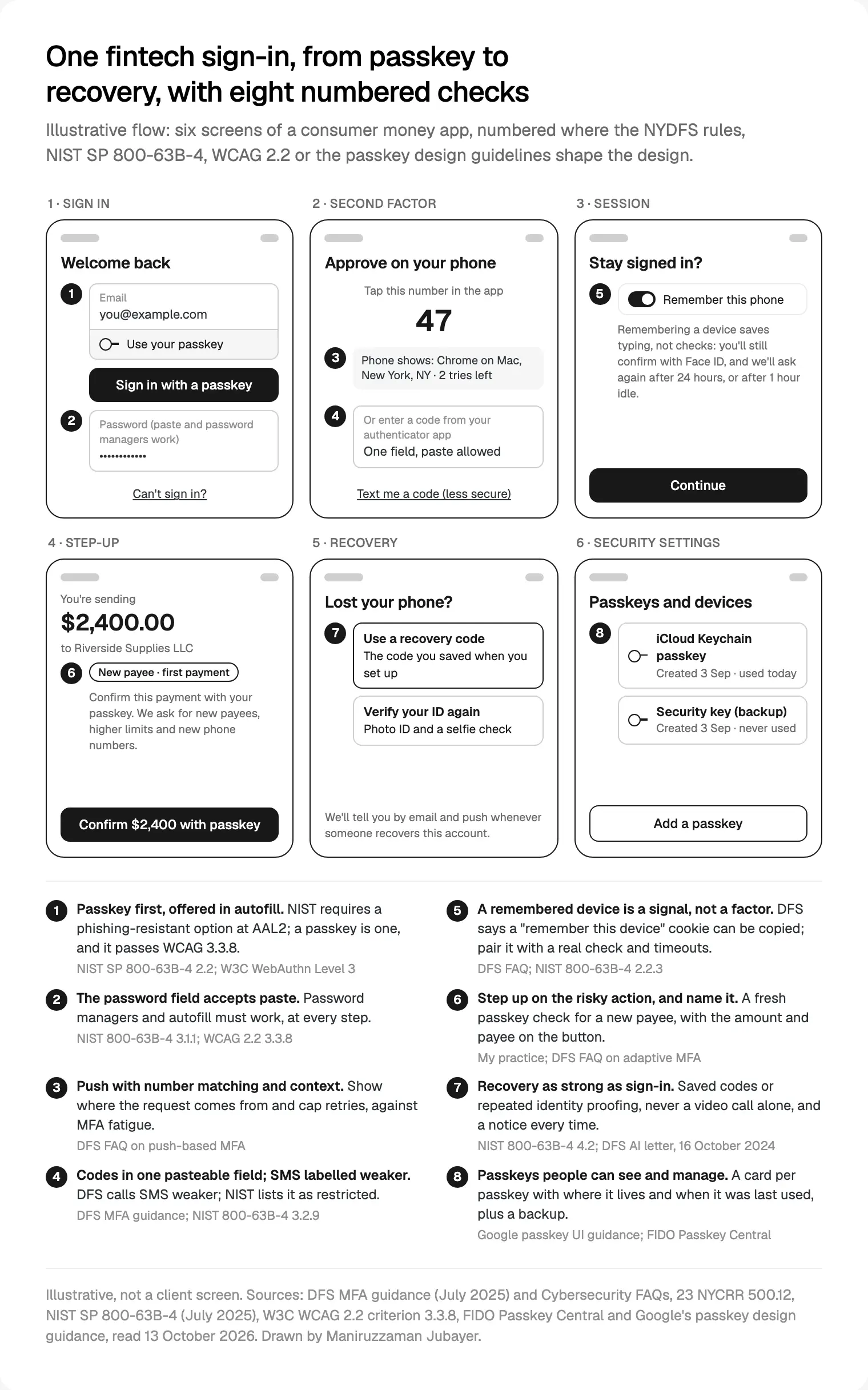
The order matters more than any screen: the strongest route first and easiest, fallbacks below it, each labelled honestly. If the passkey button is a grey link under a big password form, people keep typing passwords and phishing still works.
Passkeys first, without forcing them
A passkey is a key pair kept on a phone, laptop or hardware key. Apple's passkeys overview explains why phishing fails against it: each passkey is tied to the app or website it was made for. Web Authentication Level 3, the browser standard behind passkeys, became a W3C Recommendation on 25 August 2026. It lets a site offer passkeys in the browser's autofill menu (callout 1), and its authenticator data says whether a credential can be backed up, so the product knows a synced passkey from a device-bound one and the CISO can set rules for each.
For the screens I follow the FIDO Alliance's passkey design principles on Passkey Central:
- Offer a passkey during account tasks (sign-up, recovery, settings), not in the middle of a payment.
- Let people choose: an account with or without a passkey, and a passkey instead of a new password after a reset.
- Use the same prompt everywhere, with an icon, a headline and one plain sentence.
- Keep the explanation visible in settings, including what turning passkeys off means.
Google's passkey interface guidance adds the settings pattern in callout 8: one card per passkey, showing where it was created and when it was last used. Passkeys are invisible otherwise, and people don't trust what they can't see.
Admin consoles get device-bound passkeys or security keys, enrolled in pairs so a lost key isn't a lockout. FIDO's security key patterns cover this banking case, though not recovery policy.
Push approvals and codes that resist fatigue
Push approval is the factor most teams already have, and DFS's FAQ is specific. Push can be the possession factor, but people approve fraudulent requests by accident or to stop the notifications, and it isn't phishing-resistant. DFS asks for three safeguards:
- Number matching or challenge-response: the person reads a number on the sign-in screen and picks it in the app.
- Context on the approval: location, IP address, the application asking.
- A limit on retries, and adaptive MFA when activity looks suspicious.
NIST agrees: push verifiers should cap notifications since the last successful sign-in, and failed attempts on one authenticator stop at 100. On screen, the approval leads with context ("Chrome on Mac, New York"), and "This wasn't me" is as large as "Approve".
Codes need one field, never six boxes, with autocomplete="one-time-code" and paste allowed; the React side is in my WCAG 2.2 checklist for React components. If you still send SMS codes, keep them, but write "less secure" beside the option and put something better above it. NIST's rules on restricted authenticators ask for exactly that: notice of the risk, an alternative and a plan to migrate.
Step-up, sessions and remembered devices
Step-up means asking for a fresh check mid-session because the action is risky. NIST makes one case mandatory: adding a new authenticator needs authentication at the account's highest level, or the new authenticator's level if lower. In a fintech product I add the actions that move money or lock the owner out.
| Action | Why it gets a step-up | What the prompt names |
|---|---|---|
| Paying a new payee | It's how money leaves a taken-over account | The payee and the amount |
| Changing phone number or email | It moves recovery and alerts to the attacker | The address, and that the old one is told |
| Adding a passkey or device | NIST requires it | The device being added |
| Raising a transfer limit | It widens what a takeover can take | The old and new limit |
| Exporting statements or showing a full account number | It exposes nonpublic information | What will be shown |
Name the action in the prompt. "Confirm $2,400 to a new payee with your passkey" says why; a random "Verify your identity" teaches people to approve anything. And don't step up on every screen: people asked constantly stop reading.
For sessions at AAL2, NIST says the overall limit should be no more than 24 hours and the idle limit no more than 1 hour; at AAL3, 12 hours and 15 minutes. DFS's FAQ calls the cookie behind "remember this device" a session token that "can be easily copied". NIST lets it support re-authentication within those limits, never replace it. So callout 5 says "Remember this phone" with a line that Face ID is still checked and when we'll ask again, and the security page lists every signed-in device with "Sign out everywhere".
Recovery that doesn't undo the security
Most MFA I review is strong at the front door and soft at the side door. If an agent can reset a second factor after a friendly call, passkeys don't matter.
NIST recognises four ways back in: saved recovery codes, issued recovery codes, recovery contacts and repeated identity proofing. Every recovery must send a notification, and accounts must support at least two notification addresses. NIST also accepts that recovery may be slower than sign-in, which leaves room for a short hold before a recovered account can move money.
DFS adds the newer threat. Its industry letter on AI cybersecurity risks of 16 October 2024 warns that deepfakes imitate people over phone, text and video, and suggests avoiding authentication by SMS, voice or video in favour of methods deepfakes can't impersonate, such as digital certificates and physical security keys. So a video call can be one part of a recovery check, never all of it.
How I lay it out:
- At enrolment, offer a recovery code and a second passkey or security key, with one line on what each is for.
- On "Lost your phone?", show the saved code first, then a repeated ID check through your identity provider.
- After recovery, notify every address, sign out other sessions and hold new payees for a period your risk team sets.
- For support, give agents a tool that can start a recovery but not skip it. Their console is a privileged system under 500.12 too.
Recovery also has to be accessible. WCAG 2.2's criterion 3.3.8 bans cognitive function tests, such as remembering a password or retyping a code, at any login step unless there's an alternative, and W3C's Understanding page for 3.3.8 says every step of MFA must comply and that recovering an account is part of authentication. Recovery built only on security questions fails. My post on ADA accessibility fixes for New York fintechs covers the sign-in screens; the good news is that passkeys ask people to remember nothing.
Where I would start
Start with an inventory, not a redesign: every way in, from customer app and admin console to support tools and old API paths, marked where a password alone, a plain push or a remembered cookie still gets through.
Then fix them in this order: admin access with device-bound keys, customer sign-in with passkeys first and number-matched push behind them, step-up for new payees and contact changes, then recovery, done properly. That's how I run product design for New York fintech teams: a free 30 minute intro call in your morning, a written scope and one fixed quote, then weekly sprints in Figma, with your security team reviewing the sign-in screens before they reach code. My product design service for fintech and SaaS teams covers the rest, fintech app design best practices cover the money screens after sign-in, and there's more on how I work.
Frequently asked questions
What are the NYDFS MFA requirements?
Section 500.12 of 23 NYCRR Part 500 requires covered entities to use multi-factor authentication for any individual accessing any of their information systems. A CISO may approve in writing reasonably equivalent or more secure compensating controls, reviewed at least annually. Companies under the 500.19(a) exemption need MFA for remote access, remote third-party apps holding nonpublic information and privileged accounts.
When did NYDFS require MFA for all users?
On 1 November 2025. The second amendment to Part 500 took effect on 1 November 2023 and gave covered entities two years to meet the expanded section 500.12. Before that, MFA was required for access to internal networks from an external network, unless the CISO approved alternative controls in writing.
Does NYDFS accept SMS codes for MFA?
DFS doesn't ban them, but its July 2025 guidance calls SMS a weaker method because of SIM swapping and interception. NIST SP 800-63B-4 treats SMS as a restricted authenticator, which means offering a stronger alternative and telling users about the risk. I keep SMS as a labelled last fallback, below passkeys, number-matched push and authenticator apps.
Do NYDFS MFA rules apply to customers of a fintech app?
The text covers any individual accessing your systems, and DFS's FAQ says public-facing systems need MFA where they pose a material risk to customers or nonpublic information. In its January 2025 PayPal settlement, DFS noted the company did not require customers to use MFA. Treat customer login as in scope and have your CISO document the decision.
Do passkeys count as MFA under Part 500?
DFS's FAQ doesn't name passkeys. It wants two factor types and cryptographic proof of possession, and a passkey confirmed with Face ID or a PIN combines possession with inherence or knowledge. Device-bound passkeys and security keys fit most clearly; NIST accepts synced passkeys at AAL2. Get your CISO's written position before launch.
Is "remember this device" allowed under NYDFS rules?
You can offer it, but it can't be the second factor. DFS's FAQ says the browser cookie behind it is a session token that can be easily copied, so at most it's a supplemental signal alongside other controls. NIST says such cookies must not replace authentication. Word the option honestly and keep re-authentication timeouts.
Sources and method
I read every source on 13 October 2026. The regulation link serves DFS's unofficial consolidated text; the FAQ page shows no date. NIST SP 800-63B-4 binds federal systems, not private fintechs; I use it as a yardstick. I found no DFS statement naming passkeys, so that reading is mine.
- New York State Department of Financial Services, NY DFS Multi-Factor Authentication Requirements (July 2025), read 13 October 2026: dfs.ny.gov
- New York State Department of Financial Services, Second Amendment to 23 NYCRR 500, read 13 October 2026: dfs.ny.gov
- New York State Department of Financial Services, Cybersecurity Regulation FAQs, read 13 October 2026: dfs.ny.gov
- New York State Department of Financial Services, PayPal cybersecurity settlement (23 January 2025), read 13 October 2026: dfs.ny.gov
- New York State Department of Financial Services, industry letter on AI cybersecurity risks (16 October 2024), read 13 October 2026: dfs.ny.gov
- NIST, SP 800-63B-4 Authentication and Authenticator Management (July 2025), read 13 October 2026: pages.nist.gov
- W3C, Web Authentication Level 3, Recommendation of 25 August 2026, read 13 October 2026: w3.org
- W3C WAI, Understanding Accessible Authentication (Minimum), read 13 October 2026: w3.org
- FIDO Alliance, Passkey Central design principles, read 13 October 2026: passkeycentral.org
- FIDO Alliance, Passkey Central security key patterns, read 13 October 2026: passkeycentral.org
- Apple Developer, Passkeys overview, read 13 October 2026: developer.apple.com
- Google for Developers, Passkeys user interface design, read 13 October 2026: developers.google.com
Tags: NYDFS, MFA, Passkeys, Fintech, New York, Security